Table of Contents
Kinsta Multisite lets you run a WordPress Multisite network, many sites managed from a single WordPress installation, on Kinsta’s managed Google Cloud infrastructure. This guide explains what Kinsta Multisite is, how it works, who it suits, which plans include it, and what it costs, with one honest correction up front: Multisite is not on the entry 35 dollar plans, it starts on the 50 dollar tier.
Last updated: August 2026. Feature and pricing details were read from kinsta.com. This page carries affiliate links to Kinsta, and it is precise about which plans enable Multisite and how a network is billed.
What Is Kinsta Multisite?
Kinsta Multisite is support for running a WordPress Multisite network, a single WordPress installation that powers many subsites from one dashboard, on Kinsta’s managed platform. Kinsta handles the server-level configuration Multisite needs and provides engineers who understand network setups, so the feature works without you assembling it yourself.
Verdict: Kinsta Multisite runs a full WordPress network from one installation on managed Google Cloud infrastructure, with expert setup help and premium performance across every subsite. One honest qualifier: it is enabled on the 50 dollar per month tier and above, not on the two entry 35 dollar single-site plans, and every subsite’s traffic counts toward the plan’s visit allowance.
The clearest way to understand the feature is to see how the network actually runs on Kinsta, which the next section describes.
“WordPress is a web content management system.”
— Wikipedia, WordPress
Multisite is a native WordPress capability, and Kinsta’s role is to host that network on premium infrastructure and configure the parts that trip up ordinary hosts.
How Does Kinsta’s Multisite Work?
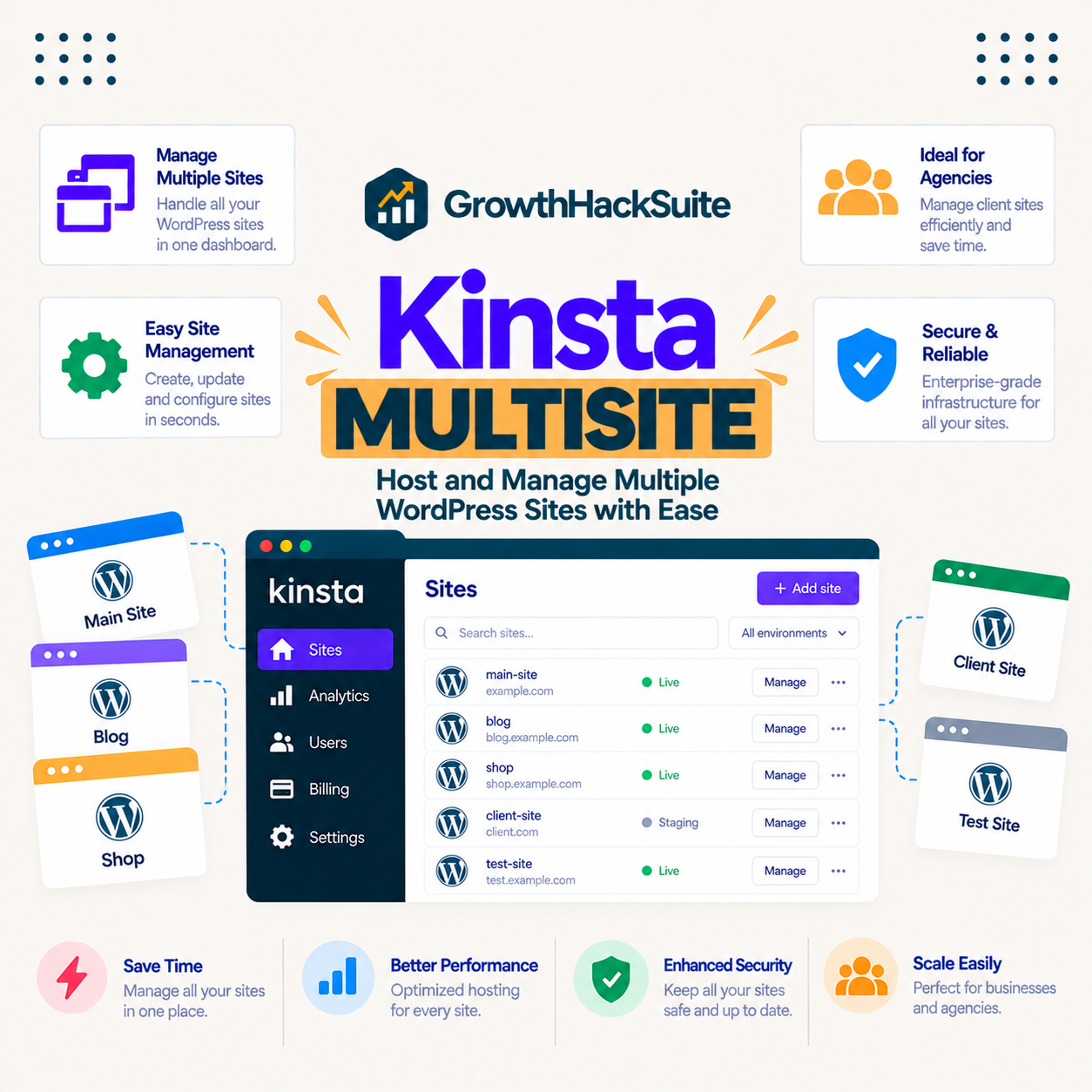
It works by enabling Multisite on your Kinsta site with the correct server configuration, so you manage subsites, domains and users from one WordPress admin. Kinsta’s premium resources and per-site isolation keep the whole network fast, and its engineers help with the setup and domain mapping that a network requires.
Once enabled, the network behaves like standard WordPress Multisite: you add subsites, assign administrators and map domains inside one installation. Kinsta manages the underlying server so the network stays fast and stable as it grows.
What Are the Benefits of Kinsta Multisite?
The benefits of Kinsta Multisite are centralised management of many sites, consistent premium performance across the network, expert help with complex configuration, and reliable resources that a network strains. It makes running a network far less painful than on hosts that barely support it.
- Central management: One dashboard runs every subsite, so themes, plugins and core updates are applied across the network from a single WordPress admin.
- Consistent performance: Every subsite sits on the same premium Google Cloud infrastructure, so the network stays fast rather than degrading as sites are added.
- Expert configuration help: Kinsta’s engineers handle the server-level Multisite setup and domain mapping that ordinary hosts leave to the customer.
- Isolated resources: Each Kinsta site runs in its own container, so the network is not sharing a strained pool with unrelated customers on the same server.
- Managed backups and staging: Backups and a staging environment apply to the installation, so the whole network can be tested and restored together.
The honest qualifier is that these gains are largest for a genuine network of related sites, since a single standalone site does not need Multisite at all.
Who Benefits Most From Multisite?
The sites that benefit most from Multisite are agencies, franchises, universities and businesses running a network of related WordPress sites that share themes and plugins. Where many similar sites are managed by one team, Multisite removes the overhead of maintaining each separately.
A single business site or a hobby blog does not benefit, because Multisite adds network complexity for no gain when there is only one site. The feature earns its place when the count of related sites is high enough that central management saves real time.
Which Kinsta Plans Include Multisite?
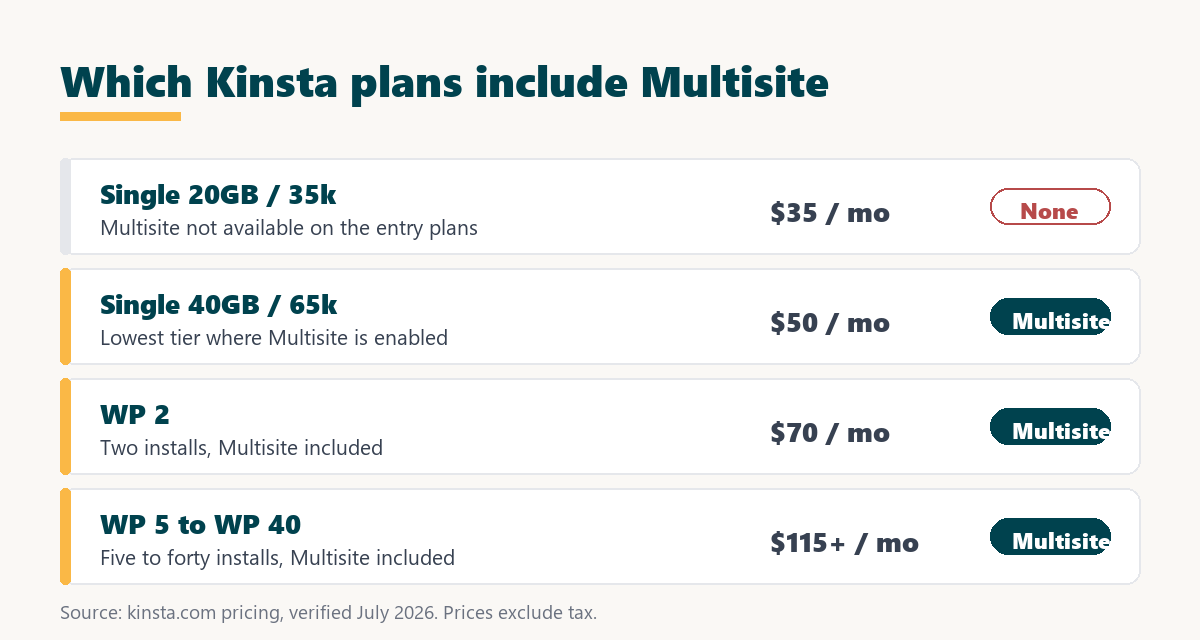
Multisite is enabled on Kinsta’s 50 dollar per month tier, the Single 40GB or 65k-visit plan, and every plan above it, including all the multi-install WP plans. It is not available on the two entry 35 dollar single-site plans, so a network cannot run on the cheapest tier.
Source: kinsta.com pricing and kinsta.com/plans, verified August 2026. Prices exclude tax; paying annually costs ten months instead of twelve. Multisite is absent on the two 35 dollar single-site plans and present from the 50 dollar tier up.
In plain terms, budget for at least the 50 dollar tier if you need a network, and step up to a WP plan when you want several independent installs alongside a Multisite network.
Compare the tiers that include Multisite
View Kinsta Pricing →Multisite starts on the 50 dollar tier and runs on every plan above it.
How Is a Multisite Network Billed on Kinsta?
A Multisite network counts as one WordPress installation on Kinsta, but every subsite’s traffic counts toward the plan’s monthly visit allowance. So you size the plan to the total traffic of the whole network, not to the number of subsites alone.
This matters because a network of small subsites can still add up to significant combined visits. The practical rule is to add the expected traffic across all subsites, then choose the tier whose visit allowance covers that total with room to spare, since visits beyond the allowance incur an overage.
How Does Kinsta Multisite Compare to a Typical Host?
Compared to a typical host, Kinsta’s Multisite runs on premium isolated infrastructure with engineer-led setup, whereas budget hosts often offer a weaker version, leave the configuration to you, or push a network onto a shared pool. The difference shows most as the network grows.
Source: kinsta.com and kinsta.com/plans, verified August 2026. No speed benchmark is quoted because none is in the verified fact sheet; the comparison is on support, resources and setup.
Read across, Kinsta trades a higher entry price for a stronger, better-supported network, which is the pattern that suits a serious multi-site operation more than a hobby one.
Does Multisite Help Your SEO and Performance?
Kinsta Multisite helps SEO and performance indirectly, because Google uses page speed and Core Web Vitals as ranking signals, and premium isolated infrastructure keeps every subsite fast. A faster, more stable network scores better and lowers bounce rates across all its sites at once.
The honest framing is that Multisite itself is a management structure, not an SEO feature, so the ranking benefit comes from the speed and reliability of Kinsta’s platform beneath it. A heavy theme or unoptimised images on a subsite still affect that subsite’s scores regardless of the network.
A managed WordPress network on premium infrastructure
See Kinsta Plans →Multisite is included from the 50 dollar tier, with a 30-day money-back guarantee.
Are There Limits to Kinsta Multisite?
Yes, and knowing them keeps expectations accurate. Kinsta Multisite is strong for a real network, and it carries the trade-offs any premium managed network does.
- Not on the cheapest plans: Multisite starts on the 50 dollar tier, so the two entry 35 dollar single-site plans cannot run a network.
- Shared visit allowance: Every subsite’s traffic counts toward one plan allowance, so a busy network needs a higher tier than the subsite count alone suggests.
- Platform-tied: A managed Multisite network is configured for Kinsta’s platform rather than being freely portable, which is a form of vendor dependence to weigh.
- Abstracted controls: Some server-level settings are managed by Kinsta for simplicity, so a team wanting deep custom control has less of it than on a self-managed server.
- Premium price: The quality comes at Kinsta’s premium pricing, which is easy to justify for a revenue network and harder for low-value sites.
“A tool is only worth its premium when the hours or revenue it protects exceed the invoice.”
— Growth Hack Suite, on tool ROI
For a network of revenue or client sites the premium pays off, while a team worried about being tied to one platform should read our note on SaaS vendor lock-in before committing a large network.
Subdomains or Subdirectories: Which Should You Use?
Kinsta supports both subdomain and subdirectory Multisite configurations, so you choose the structure that fits your project when you set the network up. The choice is made at creation and shapes how each subsite’s URL looks.
- Subdirectories: Each subsite lives under the main domain as a path, which suits a single brand splitting content into sections under one URL.
- Subdomains: Each subsite gets its own subdomain, which suits distinct areas or regions that still belong to one organisation.
- Mapped domains: With domain mapping, a subsite can use its own custom domain entirely, which suits separate brands run from one installation.
The practical guidance is to pick subdirectories or subdomains based on how separate the sites should feel, and to add domain mapping when subsites need fully independent brand domains.
Can You Migrate an Existing Multisite Network to Kinsta?
Yes, Kinsta’s migration team can move an existing WordPress Multisite network to their platform, handling the network’s files and shared database as one migration. This means you do not have to rebuild the network by hand when you switch hosts.
The reassurance for a nervous switcher is that the migration and the 30-day money-back guarantee let you test the network on Kinsta before fully committing. If the fit is wrong, the guarantee covers the plan cost within the window.
How Do You Set Up Multisite on Kinsta?
You set up Multisite on Kinsta by choosing a qualifying plan and enabling the network with Kinsta’s help, then adding subsites from one WordPress admin. The steps below outline the path from plan choice to a running network.
- Choose a qualifying plan: Select at least the 50 dollar tier or a WP plan, since Multisite is not on the entry 35 dollar single-site plans.
- Enable Multisite: Turn the network on with the correct server configuration, which Kinsta’s engineers help apply so it works from the start.
- Pick a structure: Decide on subdirectories or subdomains at creation, based on how separate the subsites should be.
- Add subsites and domains: Create subsites in the network admin and map custom domains where individual brands need their own address.
- Test on staging: Use Kinsta’s staging environment to trial network-wide theme, plugin or core updates before pushing them live.
The honest summary is that Kinsta manages the hard server-level parts, so your real work is planning the network structure and sizing the plan to the combined traffic.
Is Kinsta Worth It for Multisite?
Kinsta is worth it for Multisite when you run a network of revenue or client sites, because the premium performance, isolation and expert setup protect the speed and reliability that affect income across every subsite. For a low-value network the premium is harder to justify.
“The first five seconds of page-load time have the highest impact on conversion rates.”
— HubSpot, page load time and conversion rates
Across a network those first seconds repeat on every subsite, so the premium infrastructure that keeps them fast protects conversions network-wide. That is the case where paying from the 50 dollar tier upward returns its cost, and where a hobby network would not.
Run your WordPress network on managed Google Cloud
Try Kinsta Risk-Free →Free migration and a 30-day money-back guarantee.
Kinsta Multisite: Frequently Asked Questions
The 12 most-asked questions about Kinsta Multisite.
Does Kinsta support WordPress Multisite?
Yes, Kinsta supports WordPress Multisite, letting you run a network of sites from one WordPress installation on managed Google Cloud infrastructure, with engineer help for the setup a network needs.
Is Multisite available on every Kinsta plan?
No. Multisite is enabled on the 50 dollar per month tier and every plan above it, including the WP plans, but not on the two entry 35 dollar single-site plans, so a network needs at least the 50 dollar tier.
Does Kinsta Multisite support subdomains and subdirectories?
Yes, Kinsta supports both subdomain and subdirectory Multisite configurations, so you structure the network the way your project requires when you create it.
Can I migrate an existing Multisite network to Kinsta?
Yes, Kinsta’s migration team can move an existing WordPress Multisite network to their platform, handling the network’s files and shared database together as one migration.
How is a Multisite network billed on Kinsta?
A Multisite network counts as one WordPress installation, but every subsite’s traffic counts toward the plan’s monthly visit allowance, so you size the tier to the combined traffic of the whole network.
Do all Kinsta features work with Multisite?
Core features like backups, staging, the CDN and caching apply to a Multisite installation, though some behaviours differ across a network, which Kinsta’s support helps you configure correctly.
Is Kinsta Multisite good for agencies?
Yes, agencies managing many similar sites can run them from one installation, while Kinsta’s isolation and premium performance keep the whole network fast and reliable across every client site.
Can I map custom domains to Multisite subsites?
Yes, Kinsta supports domain mapping, so each subsite in the network can use its own custom domain, letting distinct brands run under one Multisite installation.
Should I use Multisite or separate Kinsta sites?
Multisite suits networks of related sites sharing themes and plugins, while separate Kinsta installs give stronger isolation and independent management, so the right choice depends on how connected the sites are.
Does staging work with Kinsta Multisite?
Yes, Kinsta staging works with a Multisite installation, letting you test network-wide theme, plugin or core updates in a copy before pushing them across the live network.
How do backups work for a Kinsta Multisite network?
Kinsta backs up the entire Multisite installation, its files and shared database together, so a restore returns the whole network to a consistent earlier point rather than one subsite at a time.
Who should choose Kinsta for Multisite hosting?
Businesses and agencies running a network of related WordPress sites that want managed performance, backups and staging across the whole installation from one dashboard, and can use at least the 50 dollar tier.
About this guide
Written by the Growth Hack Suite editorial team. Feature and pricing details were read from kinsta.com. This page carries affiliate links to Kinsta, so the honesty owed to a reader is stated throughout: Kinsta Multisite is a full managed WordPress network on Google Cloud infrastructure, but it is enabled only on the 50 dollar per month tier and above, not on the two entry 35 dollar single-site plans, and every subsite’s traffic counts toward one plan visit allowance. The network is configured for Kinsta’s platform rather than being freely portable, and no speed benchmark is quoted because none is in the verified fact sheet. Prices exclude tax and paying annually costs ten months rather than twelve.