Table of Contents
WordPress Multisite is a built-in feature that lets you run a network of multiple websites from a single WordPress installation, sharing the same core, themes and plugins while each site keeps its own content. It suits agencies, universities and businesses managing many similar sites, though it adds complexity. This guide explains how Multisite works, its pros and cons, and who should use it.
Last updated: August 2026. Written by the Growth Hack Suite editorial team. This guide is educational and vendor-neutral about WordPress Multisite itself, with an honest note on managed hosting where relevant; it carries affiliate links to Kinsta.
See how a WordPress network runs on managed Google Cloud
Explore Kinsta →Multisite support with backups, staging and isolation on Kinsta’s platform.
What Is WordPress Multisite?
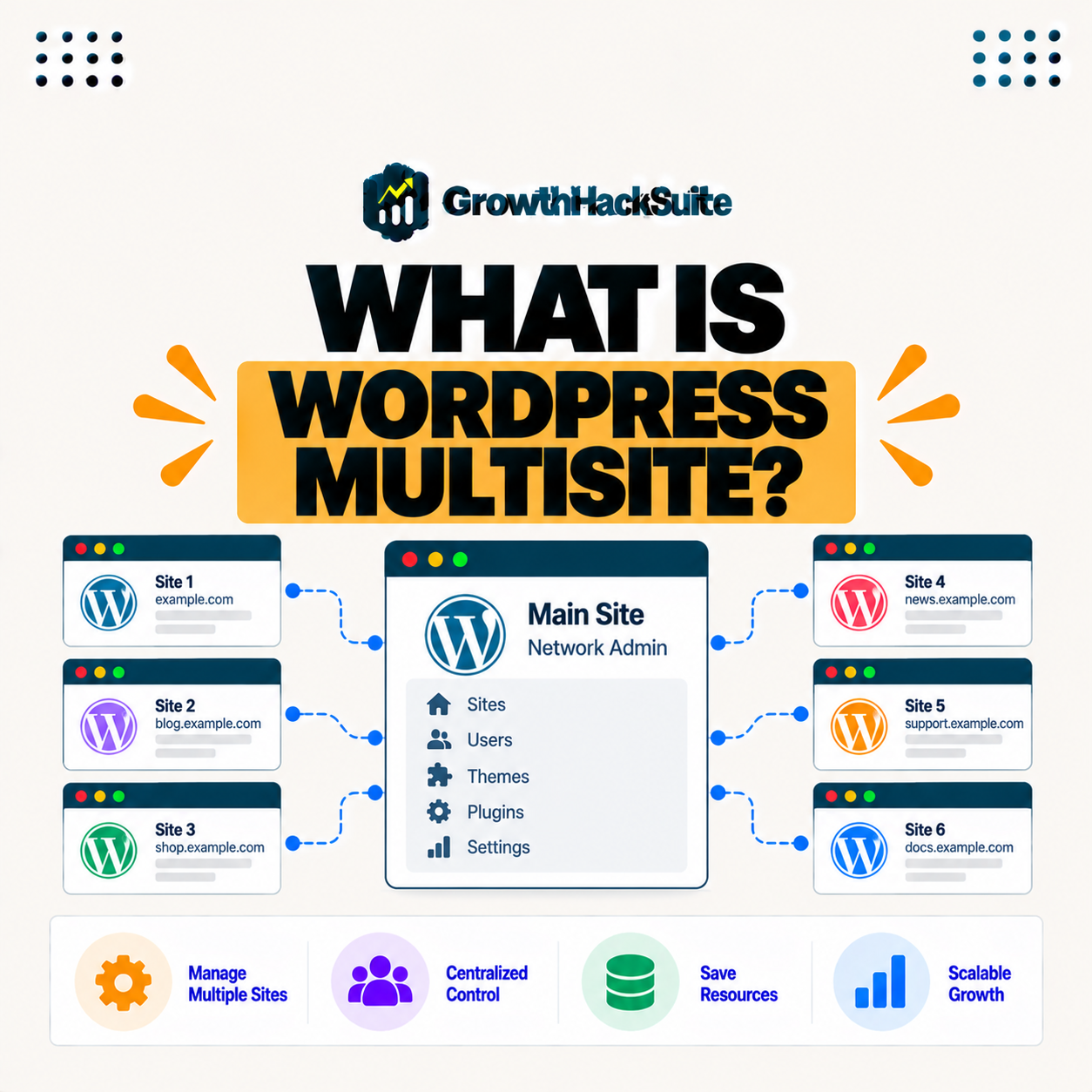
WordPress Multisite is a native WordPress feature that lets you run a network of multiple websites from a single WordPress installation, so all the sites share the same core, themes and plugins while each keeps its own content and settings. It turns one install into a manageable network rather than many separate ones.
“WordPress is a web content management system.”
— Wikipedia, WordPress
Multisite extends that content management system across many sites at once, which is why it is a network feature rather than a single-site setting.
How Does WordPress Multisite Work?
WordPress Multisite works by turning one installation into a network managed by a super admin, so you add subsites that run on the shared installation using either subdomains or subdirectories, with themes and plugins managed network-wide. The super admin controls the network while each subsite has its own administrator and content.
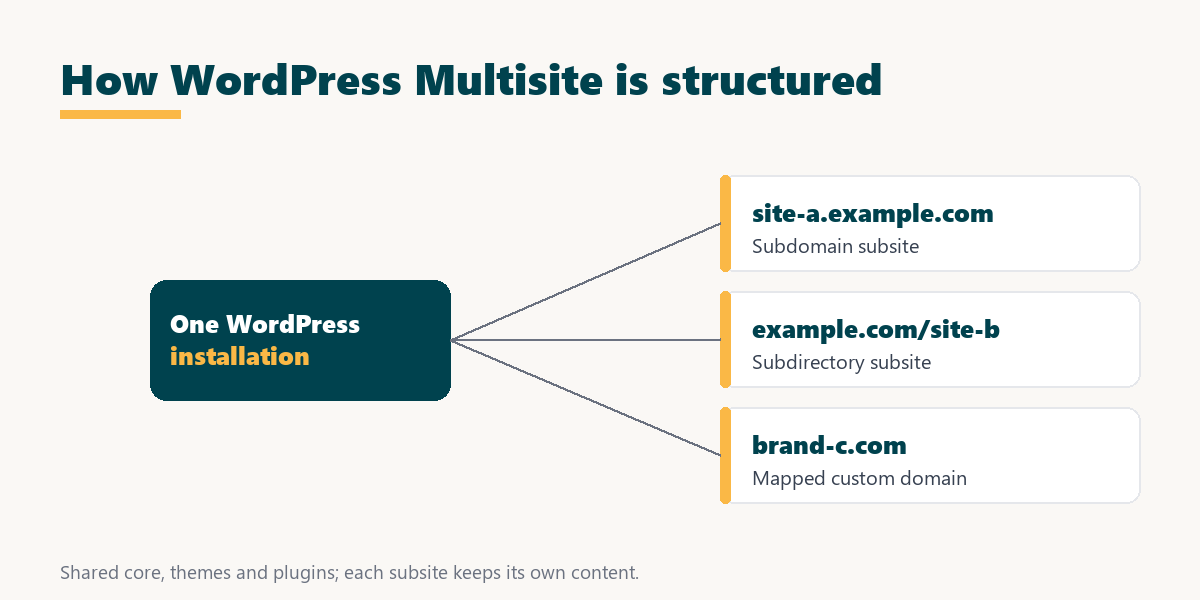
Because the network shares one codebase, a theme or plugin installed once is available to every subsite, which is the efficiency Multisite is built to provide.
Subdomains or Subdirectories in Multisite?
WordPress Multisite can structure subsites as subdomains or subdirectories, so a subdomain gives each site its own subdomain address while a subdirectory places sites in folders under the main domain. You choose the structure when enabling Multisite, and it shapes every subsite’s URL.
Source: WordPress network administration documentation, reviewed July 2026. Both structures are set when Multisite is first enabled and are hard to switch later.
In plain terms, choose subdomains when each subsite should feel independent and subdirectories when they are sections of one broader site, since the choice is difficult to reverse once the network is running.
How Is Multisite Different From Separate WordPress Installs?
WordPress Multisite manages many sites from one installation, while separate installs keep each site fully independent, so Multisite simplifies shared management and updates but links the sites, whereas separate installs give stronger isolation. The difference is central management against complete independence.
Source: WordPress Multisite documentation, reviewed July 2026. The trade-off is shared management efficiency against per-site independence.
Read across, Multisite wins on shared management and updates, while separate installs win on isolation and the ease of moving a single site, so the right pick depends on how connected the sites are.
Who Needs WordPress Multisite?
WordPress Multisite suits agencies, universities, franchises and businesses managing many similar sites that share themes and plugins, so it fits related networks rather than a collection of unrelated, highly independent websites. The need appears when one team maintains many sites that look and behave alike.
A single business site or an unrelated set of client sites does not need Multisite, because the linked network adds complexity without the shared-management payoff. The feature earns its place only when the sites are genuinely related.
What Are the Benefits of WordPress Multisite?
The benefits of WordPress Multisite are managing many sites from one dashboard, applying updates and plugins network-wide, and sharing resources, so it saves significant administration time for networks of related sites. These gains grow with the number of similar sites in the network.
- Central dashboard: One super admin manages every subsite, so adding sites, users and settings happens in a single place rather than across many logins.
- Network-wide updates: Core, theme and plugin updates apply across all subsites at once, which removes the repetitive work of updating each site separately.
- Shared themes and plugins: A theme or plugin installed once is available to every subsite, so a network keeps a consistent toolkit without duplicate installs.
- Shared resources: Subsites run on one installation and its resources, which is efficient for many small related sites compared with many separate hosting accounts.
- Consistent branding: A common theme across the network keeps a family of sites visually consistent, which suits franchises and multi-department organisations.
The honest qualifier is that these benefits only materialise for a genuine network, since a single site gains nothing from network-wide management.
What Are the Drawbacks of WordPress Multisite?
The drawbacks of WordPress Multisite are shared fate, since a problem with the installation affects all sites, added complexity, plugin compatibility issues, and harder migration of a single site out, so it is not right for every situation. These trade-offs weigh heaviest when sites need to stay independent.
- Shared fate: A problem with the single installation, a crash or a bad update, can affect every subsite at once rather than one in isolation.
- Added complexity: Network administration introduces concepts like the super admin and network settings that a standard single-site setup does not have.
- Plugin compatibility: Not every plugin is built for Multisite, so some behave unexpectedly or need network-specific configuration across the sites.
- Hard single-site exit: Moving one subsite out to its own install is more involved than migrating a standalone site, since subsites share the network database.
- Shared resource limits: Because subsites share one installation and its allowance, a busy subsite can affect the resources available to the rest.
“A tool is only worth its premium when the hours or revenue it protects exceed the invoice.”
— Growth Hack Suite, on tool ROI
The same logic applies to Multisite: it is worth the added complexity when shared management saves real time across a network, and not when a set of sites would be simpler kept apart. Teams weighing platform dependence can read our note on SaaS vendor lock-in first.
Should You Use Multisite or Separate Sites?
You should use WordPress Multisite when your sites are related and benefit from shared management, and separate installs when sites need strong isolation or independence, so the choice depends on how connected your sites really are. A quick test is whether the sites share themes, plugins and a team.
If the sites are a franchise, a set of department pages or many similar client microsites, Multisite fits. If they are unrelated businesses that each need their own security boundary and independent migration path, separate installs are the safer structure.
Can You Use Custom Domains With Multisite Subsites?
Yes, with domain mapping each subsite in a WordPress Multisite network can use its own custom domain, so distinct brands can run under one installation. Domain mapping is built into modern WordPress, so a subsite need not stay on a subdomain or subdirectory address.
This is what lets an agency run several client brands, each on its own domain, from a single Multisite network. The sites look fully separate to visitors while the team manages them from one dashboard.
Run a WordPress network on managed hosting
See Kinsta Plans →Kinsta supports Multisite on its 50 dollar tier and above, with backups, staging and isolation.
How Does Kinsta Support WordPress Multisite?
Kinsta supports WordPress Multisite with subdomain and subdirectory options, plus backups, staging and per-site isolation on Google Cloud, so agencies and organisations can run a network with managed performance and reliability. One honest detail: Multisite is enabled on Kinsta’s 50 dollar per month tier and above, not on the entry 35 dollar single-site plans.
“The first five seconds of page-load time have the highest impact on conversion rates.”
— HubSpot, page load time and conversion rates
Across a network those seconds repeat on every subsite, so running Multisite on premium infrastructure protects speed and conversions network-wide rather than on one page alone.
How Do You Run a Site Network on Managed Hosting?
You run a site network on managed hosting by enabling Multisite on a host that supports it, so the host handles the server configuration while you manage subsites, domains and users. Managed hosting adds performance, backups and staging that keep the whole network fast and safe as it grows.
The practical benefit of managed hosting for a network is that the shared-fate risk of Multisite is offset by reliable backups and a staging environment, so network-wide changes can be tested before they reach every live subsite.
How Do Backups and Updates Work in Multisite?
WordPress Multisite handles backups and updates at the network level, so a backup captures the whole installation and updates apply across sites, which is efficient but means testing on staging matters before rolling changes across the network. A restore returns the entire network to a consistent point.
The honest framing is that network-wide efficiency cuts both ways: one action covers every subsite, so a bad update or a full restore also touches every subsite, which is exactly why a staging test before a network change is worth the extra step.
Try a managed WordPress network risk-free
Start With Kinsta →Free migration and a 30-day money-back guarantee.
WordPress Multisite: Frequently Asked Questions
The 12 most-asked questions about WordPress Multisite.
What is WordPress Multisite in simple terms?
WordPress Multisite lets you run a network of multiple sites from a single WordPress installation, sharing core, themes and plugins while each site keeps its own content. It is one install managing many related sites.
How does WordPress Multisite work?
Multisite turns one installation into a network managed by a super admin, so you add subsites on the shared install using subdomains or subdirectories, with themes and plugins managed network-wide across all of them.
What is the difference between subdomains and subdirectories in Multisite?
Subdomains give each subsite its own subdomain address, while subdirectories place sites in folders under the main domain. You choose the structure when enabling Multisite, and it is hard to change later.
How is Multisite different from separate WordPress installs?
Multisite manages many sites from one installation, while separate installs keep each site independent, so Multisite simplifies shared management and network-wide updates but links the sites’ fate together.
Who needs WordPress Multisite?
Multisite suits agencies, universities, franchises and businesses managing many similar sites that share themes and plugins, rather than unrelated, highly independent websites that each need their own boundary.
What are the benefits of Multisite?
Benefits include managing many sites from one dashboard, applying updates and plugins network-wide, and sharing resources, which saves administration time for related networks that would otherwise be maintained separately.
What are the drawbacks of Multisite?
Drawbacks include shared fate, since one installation problem affects all sites, added complexity, plugin compatibility issues, and harder migration of a single site out because subsites share the network database.
Should I use Multisite or separate sites?
Use Multisite when sites are related and benefit from shared management, and separate installs when sites need strong isolation, so the right choice depends on how connected the sites really are.
Can I use custom domains with Multisite?
Yes, with domain mapping each subsite in a Multisite network can use its own custom domain, so distinct brands can run under one installation while the team manages them from one dashboard.
Is Multisite good for agencies?
Yes, Multisite suits agencies managing many similar client sites from one installation, though strong per-client isolation may favour separate sites depending on the security and independence each client requires.
Can I move one site out of a Multisite network?
Moving a single site out of Multisite is possible but more complex than migrating a standalone install, so plan carefully, since subsites share the network’s database and need careful extraction.
Does Kinsta support Multisite?
Yes, Kinsta supports WordPress Multisite with subdomain and subdirectory options plus backups, staging and isolation on Google Cloud, enabled on its 50 dollar per month tier and above, not the entry 35 dollar plans.
About this guide
Written by the Growth Hack Suite editorial team. This is an educational, vendor-neutral explanation of WordPress Multisite, a native WordPress feature that runs a network of sites from one installation. Where the guide mentions managed hosting it carries affiliate links to Kinsta, so one honest detail is stated plainly: Kinsta enables Multisite on its 50 dollar per month tier and above, not on the entry 35 dollar single-site plans. Multisite trades shared-management efficiency for shared fate and added complexity, so it fits related networks rather than unrelated or highly independent sites.