Table of Contents
Kinsta plans come in two families: single-site plans from 35 dollars a month for one WordPress install, and multi-install WP plans from 70 dollars for two to forty sites. Every tier runs on the same premium Google Cloud stack, so plans scale by sites, visits and storage rather than speed. This guide compares each Kinsta plan on price and limits so you can pick the right tier for your traffic.
Last updated: August 2026. Plan prices and limits were read from kinsta.com. This page carries affiliate links to Kinsta, and it uses the current Single and WP plan names and verified numbers rather than older marketing tier labels.
Which Kinsta Plan Should You Choose?
Choose the Kinsta plan that matches your monthly visits and number of sites: the Single 35k plan suits one site up to 35,000 visits, the WP 2 plan fits two sites, and higher WP plans handle five to forty sites with more visits and storage. Match the tier to your usage rather than overbuying.
Verdict: Kinsta plans split into single-site tiers from 35 dollars and multi-install WP tiers from 70 dollars, all on the same Google Cloud stack, so you upgrade for capacity, not speed. Two honest points: a higher plan does not make one site faster, and the entry price of 35 dollars covers 35,000 visits, not the lower figure some older summaries quote.
The clearest way to compare is to look at the two plan families separately, which the tables below set out with verified prices and limits.
“WordPress is a web content management system.”
— Wikipedia, WordPress
Whichever plan hosts that content management system, it runs on the same premium infrastructure, so the choice is about capacity for your sites and traffic rather than raw speed.
What Is Included in Every Kinsta Plan?
Every Kinsta plan includes the same core features: premium Google Cloud servers across 30 global data centers, edge and server caching, a Cloudflare CDN, daily backups, one-click staging, a firewall and 24/7 expert support. Higher tiers add sites, visits and storage, not better core technology, so even the entry plan is fast.
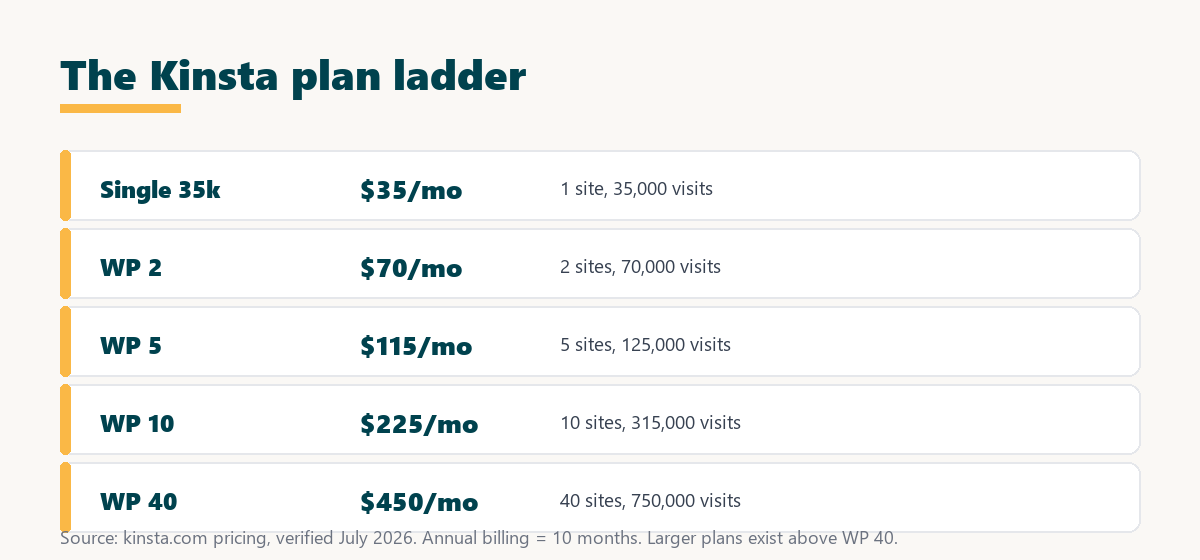
Because the core stack is identical across tiers, the practical decision is purely how many sites and visits a plan needs to cover, which the next sections quantify.
How Do Kinsta’s Single-Site Plans Compare?
Kinsta’s single-site plans host one WordPress install and scale by monthly visits, from 35 dollars for 35,000 visits up to higher tiers for hundreds of thousands. They suit a single business, portfolio or store site that does not need multiple installs.
Source: kinsta.com pricing and kinsta.com/plans, verified August 2026. Prices exclude tax; each single-site plan hosts one WordPress install and is chosen by monthly visits.
In plain terms, pick the single-site tier whose visit allowance covers your traffic with a little headroom, since all of them host one install at the same premium speed.
How Do Kinsta’s Multi-Install WP Plans Compare?
Kinsta’s multi-install WP plans host several WordPress sites under one plan, from 70 dollars for two installs up to 450 dollars for forty. They suit agencies and businesses running many sites, giving a lower per-site cost than buying separate single-site plans.
Source: kinsta.com pricing and kinsta.com/plans, verified August 2026. Prices exclude tax; Kinsta also offers larger plans above WP 40, so check kinsta.com for the current top tiers.
In plain terms, a WP plan is cheaper per site than several single-site plans once you run two or more sites, so the more sites you host, the more a WP tier saves.
How Do Kinsta Plan Limits Work?
Kinsta plans are limited by the number of WordPress installs, monthly visits and disk storage. If traffic exceeds the visit allowance, overage fees apply, so picking a tier with headroom for your traffic prevents surprise charges while keeping the base price predictable.
- WordPress installs: Single-site plans host one install, while WP plans host two to forty, which is the first thing to match to the number of sites.
- Monthly visits: Each plan has a visit allowance, from 35,000 on the entry plan upward, and this is the main driver of which tier a busy site needs.
- Disk storage: Storage rises with the tier, so a media-heavy site or a large network may need a higher plan for space rather than traffic.
- Overage on visits: Traffic beyond the allowance incurs a per-visit overage, so a little headroom avoids unexpected charges in a busy month.
- Same core features: Limits differ by tier, but the CDN, caching, backups, staging and support are identical, so a lower plan is not a weaker platform.
The honest takeaway is that the right plan is the smallest one whose install count and visit allowance comfortably cover your usage, since features do not change between tiers.
Single-Site or Multi-Install: Which Structure Fits?
The choice between a single-site plan and a multi-install WP plan comes down to how many separate WordPress sites you run. One site fits a single-site plan, while several sites are cheaper per site on a WP plan.
A freelancer or business with one main site usually starts on a single-site plan and moves up by visits as traffic grows. An agency or a company with several brands is better served by a WP plan, which bundles multiple installs at a lower cost per site than buying separate plans.
Do Higher Kinsta Plans Perform Better?
Higher Kinsta plans do not run a single site faster; they provide more capacity, more installs, visits and storage, on the same premium Google Cloud infrastructure. You upgrade to host more sites or handle more traffic, not to make an existing site quicker, since the underlying speed is the same across tiers.
“The first five seconds of page-load time have the highest impact on conversion rates.”
— HubSpot, page load time and conversion rates
Because every tier serves those first seconds from the same premium stack, a smaller plan protects conversions just as well as a larger one, so there is no speed penalty for choosing the tier that matches your traffic.
Same premium speed on every tier
See Kinsta Plans →Choose by sites and visits, with a 30-day money-back guarantee.
How Much Do Kinsta Plans Cost, and How Does Annual Billing Help?
Kinsta plans cost from 35 dollars a month for the entry single-site plan up to 450 dollars for the WP 40 plan, with larger plans available above that. Paying annually costs ten months instead of twelve, so a yearly commitment effectively gives two months free on whichever tier you choose.
The practical saving is meaningful on higher tiers: the same two-months-free discount applies across the range, so the annual price is a straightforward way to lower the effective cost once you know the plan fits.
Can You Change Kinsta Plans Later?
Yes, you can upgrade or downgrade a Kinsta plan at any time in MyKinsta as your needs change. This means you can start on a smaller plan and scale up as traffic grows, without a migration or downtime when moving between tiers.
The reassurance for a buyer unsure which tier to pick is that the decision is not permanent: choosing the plan that fits today and moving up later is simple, so there is no need to overbuy at the start.
Which Kinsta Plan Fits a WooCommerce Store?
A WooCommerce store usually needs at least a mid single-site tier for the extra resources that dynamic, uncacheable checkout traffic demands, plus optional hourly backups for order safety. Cart and checkout pages bypass caching, so a store leans harder on the origin than a static site of the same visit count.
The honest guidance is to size a store plan by real, uncacheable traffic rather than by page views alone, and to add hourly backups so recent orders can be recovered if something goes wrong.
Are There Gaps to Consider Before Choosing?
Yes, two gaps are worth planning around whichever plan you pick. Kinsta does not include email hosting on any plan, and Redis object caching is a paid add-on rather than a default, so a store or a site needing either should budget separately.
“A tool is only worth its premium when the hours or revenue it protects exceed the invoice.”
— Growth Hack Suite, on tool ROI
For a revenue site the plan premium pays back in speed, reliability and support, provided the email and Redis gaps are covered. Teams weighing platform dependence can read our note on SaaS vendor lock-in before standardising on one host.
Pick the tier that matches your traffic
View Kinsta Pricing →Single-site from 35 dollars, multi-install WP plans from 70 dollars.
How Do You Estimate the Plan You Need?
Estimating the right Kinsta plan comes down to four numbers: how many separate sites you run, your monthly visits, your storage needs and whether traffic is spiky. Getting these roughly right points to the smallest tier that fits with headroom.
- Count the sites: One site points to a single-site plan, while two or more point to a multi-install WP plan for a lower cost per site.
- Estimate monthly visits: Use analytics to find typical monthly visits, then pick a tier whose allowance sits comfortably above that figure.
- Check storage needs: A media-heavy site or a large network may need a higher tier for disk space rather than for traffic alone.
- Allow for spikes: A campaign or seasonal sale can push visits above the average, so a little headroom avoids overage in a busy month.
- Plan the extras: Budget separately for email hosting and, if needed, the Redis add-on, since neither is part of the base plan.
The honest takeaway is that a short look at analytics and site count is enough to choose confidently, and the easy plan changes mean an early estimate does not lock you in.
Is a Kinsta Plan Worth It for Your Site?
A Kinsta plan is worth it when your site earns revenue or leads and benefits from premium speed, reliability and support. For a hobby or brand-new site with little traffic, a cheaper host is fine until it grows into the value a Kinsta plan provides.
The way to decide is to match the smallest fitting tier to your sites and visits, use annual billing for the two-months-free saving, and rely on the 30-day money-back guarantee to confirm the plan fits a real site before committing.
Try the right plan risk-free for 30 days
Try Kinsta Risk-Free →Free migration and a 30-day money-back guarantee.
Kinsta Plans: Frequently Asked Questions
The 12 most-asked questions about Kinsta plans.
What plans does Kinsta offer?
Kinsta offers single-site plans that host one WordPress install, from 35 dollars a month, and multi-install WP plans that host two to forty sites, from 70 dollars, with larger plans available above the WP 40 tier.
How do Kinsta plans differ from each other?
Kinsta plans differ mainly by included WordPress installs, monthly visit allowance, disk storage and CDN bandwidth, while every tier shares the same Google Cloud infrastructure, caching, backups and support.
Which Kinsta plan is best for a single site?
The Single 35k plan suits a single WordPress site with modest traffic, since it includes one install and 35,000 monthly visits on the same premium infrastructure as larger tiers, at 35 dollars a month.
Which Kinsta plan should an agency choose?
An agency usually needs a multi-install WP plan, from WP 2 up to WP 40 or higher, so several client sites fit under one plan at a lower cost per site than separate single-site plans.
Do all Kinsta plans include the same features?
Yes, the core features, Google Cloud hosting, CDN, firewall, daily backups, staging, SSL and 24/7 support, are on every plan; higher tiers add capacity, not fundamentally different features.
Can I upgrade between Kinsta plans easily?
Yes, you can move up or down between Kinsta plans at any time in MyKinsta, so you start on a tier that fits now and scale as your sites and traffic grow, without downtime.
How many sites can each Kinsta plan host?
A single-site plan hosts one WordPress install, while multi-install WP plans host from two up to forty, so you match the plan to how many separate sites you run.
What is the difference between the WP 2 and WP 5 plans?
Moving from WP 2 at 70 dollars to WP 5 at 115 dollars increases the allowed installs from two to five and the monthly visits from 70,000 to 125,000, suiting a growing set of sites.
Which Kinsta plan fits a WooCommerce store?
A WooCommerce store usually needs at least a mid tier for the extra resources that dynamic, uncacheable checkout traffic demands, plus optional hourly backups for order safety.
Do higher Kinsta plans run faster?
No, all plans use the same premium Google Cloud stack, so higher tiers do not make a single request faster; they provide more capacity to handle more traffic and more sites at that speed.
How do I pick the right Kinsta plan?
Estimate your monthly visits and number of sites, then choose the smallest Kinsta tier that comfortably covers both, upgrading later since plan changes are simple and instant.
Can I save money with an annual Kinsta plan?
Yes, any Kinsta plan billed annually costs ten months instead of twelve, which is effectively two months free versus monthly billing, lowering the cost of whichever tier you select.
About this guide
Written by the Growth Hack Suite editorial team. Plan prices and limits were read from kinsta.com. This page carries affiliate links to Kinsta, so the honesty owed to a reader is stated plainly: Kinsta plans split into single-site tiers from 35 dollars a month, covering 35,000 visits at the entry level, and multi-install WP tiers from 70 to 450 dollars, with larger plans available above WP 40. Every tier runs on the same premium Google Cloud stack, so a higher plan adds capacity rather than speed. Kinsta does not include email hosting, and Redis is a paid add-on, so both are worth planning around. Annual billing costs ten months rather than twelve.