Table of Contents
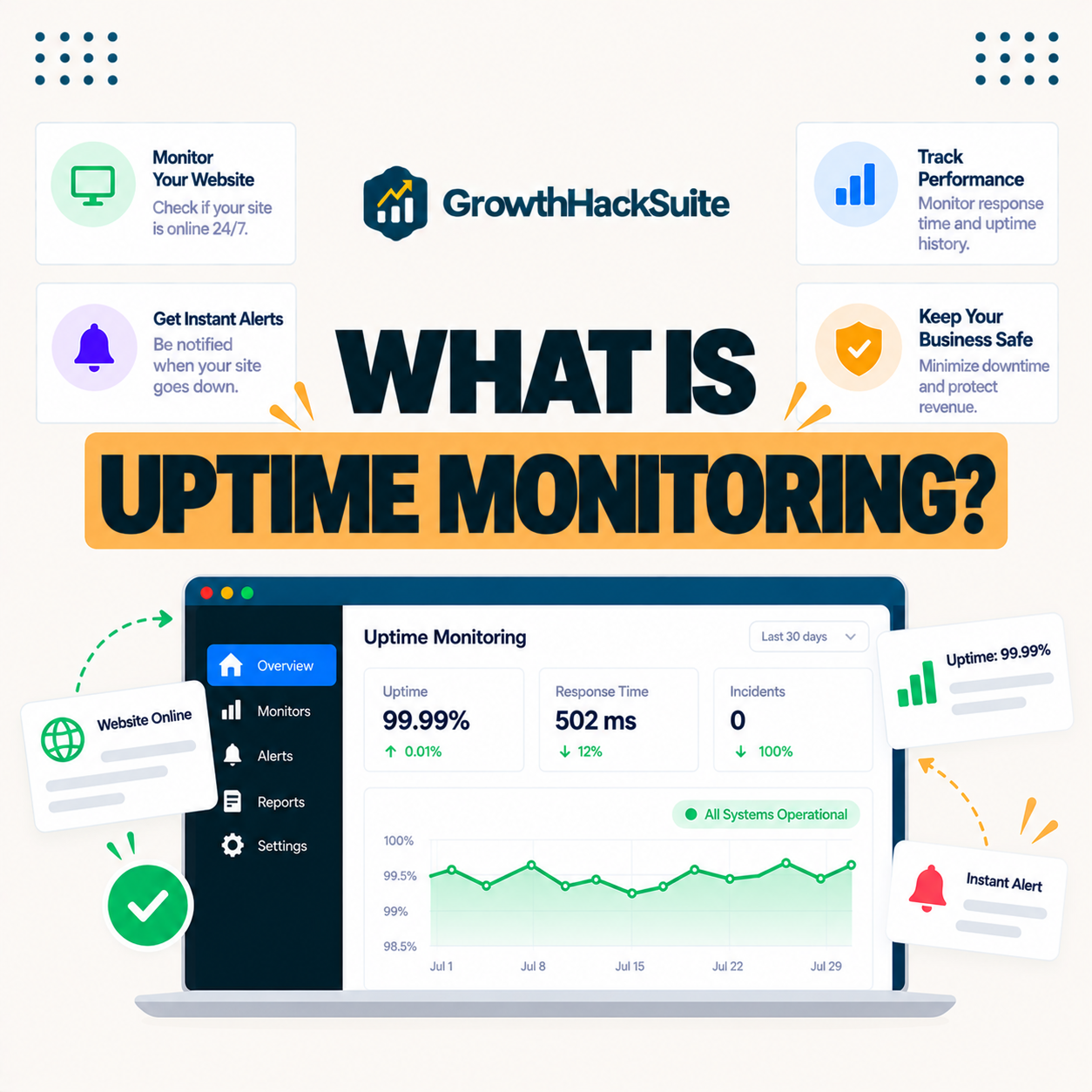
Uptime monitoring is a service that regularly checks whether your website is reachable and alerts you when it goes down. It measures availability as a percentage over time, helping owners catch outages fast, hold hosts accountable to their SLAs, and protect the revenue lost during downtime. This guide explains how it works and what uptime percentages actually mean.
Last updated: August 2026. Written by the Growth Hack Suite editorial team, with details cross-checked against provider documentation. This page carries affiliate links to Kinsta.
What Is Server Uptime Monitoring?
Server uptime monitoring is a service that repeatedly checks whether your website or server is reachable from the internet and alerts you when it becomes unavailable. It measures availability over time, so you know how reliably your site stays online rather than guessing from occasional visits.
“Uptime is a measure of system reliability, expressed as the percentage of time available.”
— Wikipedia, Uptime
Uptime monitoring turns that measure into a live signal, checking the site on a schedule so a drop in availability becomes an alert rather than a surprise reported by an unhappy visitor.
How Does Uptime Monitoring Work?
Uptime monitoring works by sending automated requests to your site at regular intervals from one or more locations, recording whether each check succeeds. When consecutive checks fail, it triggers an alert by email, SMS or app, signaling an outage so you can respond quickly.
Verdict: Uptime monitoring answers one question, is the site up, by checking it every few minutes and alerting you the moment it is not. It measures availability as a percentage: 99.9 percent still allows about nine hours of downtime a year, and 99.99 percent under an hour. The honest best practice is to pair a reliable host’s own monitoring with an independent external monitor, so you get a neutral record and an alert even if the host’s monitoring is affected.
In short, monitoring does not stop outages but detects them instantly, which is what turns a long silent failure into a short, handled incident.
What Uptime Percentages Actually Mean
Uptime percentages measure the share of time a site is available. 99.9 percent allows roughly nine hours of downtime a year and 99.99 percent under an hour, so small percentage differences translate into meaningful real-world availability that a business can feel.
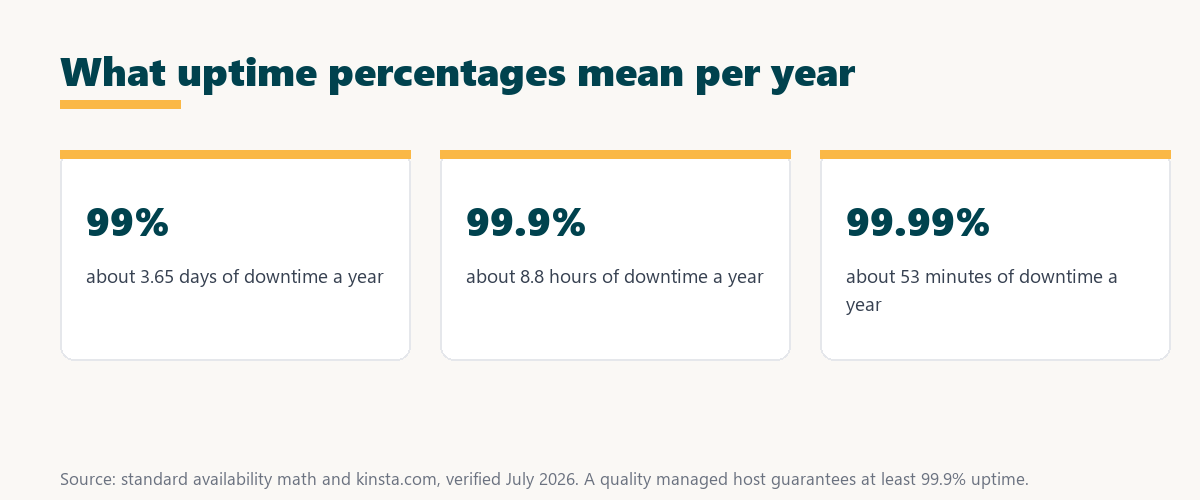
The honest point is that the gap between 99 and 99.9 percent is days versus hours of downtime a year, so the extra nines are worth far more than they look.
Uptime Monitoring vs Performance Monitoring
Uptime monitoring differs from performance monitoring by answering whether the site is up rather than how fast it is. Uptime tracks availability and outages, while performance monitoring measures load times and diagnoses what makes pages slow, so the two answer different questions about a site.
Source: standard availability math, verified August 2026. Downtime figures are approximate and rounded.
Showing 99 percent, 99.9 percent and 99.99 percent uptime with the downtime each allows makes the real difference clear: each extra nine cuts annual downtime by roughly a factor of ten.
See how Kinsta backs uptime on Google Cloud
Try Kinsta →Active monitoring and a 99.9 percent uptime SLA, with a 30-day money-back guarantee.
Types of Uptime Monitoring Checks
Types of uptime checks include simple HTTP requests that confirm a page loads, keyword checks that verify expected content appears, and port or server checks. More thorough checks catch problems that a basic ping would miss, such as a page that loads but shows an error.
- HTTP check: A request to a URL confirms the server responds with a success status rather than an error.
- Keyword check: The monitor verifies expected text appears, catching pages that load but show a broken state.
- Port check: A test on a specific port confirms a service like mail or a database is reachable.
- Ping check: A basic reachability test confirms the server is online but not that the site works.
- Multi-location check: Checks from several regions distinguish a real outage from a single network path failing.
The honest takeaway is that a keyword or multi-location check catches subtle failures a simple ping reports as healthy, so the check type matters as much as the interval.
Why Uptime Monitoring Matters for Your Business
Uptime monitoring matters because every minute of downtime can cost sales, leads and trust. Monitoring lets you detect outages immediately, respond before customers complain, and hold your host accountable to its uptime guarantee with a neutral record of what actually happened.
“The first five seconds of page-load time have the highest impact on conversion rates.”
— HubSpot, page load time and conversion rates
If slow seconds cost conversions, a full outage costs every sale during it, which is why fast detection through monitoring directly protects revenue rather than just reassuring the owner.
What Causes Website Downtime
Website downtime is caused by server overloads, traffic spikes, failed updates, expired domains or SSL, security attacks and host outages. Monitoring helps you identify when and how often these failures affect your site, turning vague reliability worries into concrete, fixable patterns.
- Server overload: Too many requests for the available resources exhaust the server and take the site offline.
- Traffic spikes: A sudden surge, such as a sale or viral post, overwhelms a plan sized for normal load.
- Failed updates: A bad theme, plugin or core update can break the site until it is rolled back.
- Expired domain or SSL: A lapsed domain registration or SSL certificate makes the site unreachable or untrusted.
- Security attacks: A DDoS attack or breach can knock a site offline or force it into maintenance.
The honest takeaway is that most downtime traces to a handful of causes, and monitoring is what reveals which one is hitting a given site.
How to Choose an Uptime Monitoring Approach
Choose an uptime monitoring approach by combining a host that guarantees and monitors availability with an independent external monitor. That way you get both proactive host-side detection and a neutral record of your site’s real-world uptime that you control.
Source: provider documentation, verified August 2026. Monitoring detects each cause quickly so the fix starts sooner.
Listing server overload, traffic spikes, failed updates, expired SSL and attacks with how monitoring catches each shows why detection speed decides how long an outage lasts. Owners weighing platform commitment can also read our note on SaaS vendor lock-in.
How Kinsta Monitors Uptime
Kinsta actively checks each site roughly every few minutes and backs availability with a 99.9 percent uptime SLA on Google Cloud infrastructure. Problems are detected quickly and compensated if the guarantee is missed, so monitoring is built into the platform rather than left to the owner alone.
Get uptime monitoring built into your hosting
Start With Kinsta →Free migration and a 30-day money-back guarantee.
How to Respond to a Downtime Alert
When a downtime alert arrives, respond by confirming the outage from a second source, checking your host’s status page and your domain and SSL expiry, then contacting support. A fast, methodical response limits how long visitors are affected and how much revenue an outage costs.
“A tool is only worth its premium when the hours or revenue it protects exceed the invoice.”
— Growth Hack Suite, on tool ROI
Applied here, monitoring and a reliable host earn their cost every time they turn a long, silent outage into a short one caught in minutes.
How Often Should Uptime Be Checked?
Uptime should be checked at short intervals, often every one to five minutes, so outages are detected quickly. Longer gaps between checks can miss brief but damaging interruptions, so the check frequency directly determines how fast an alert reaches you.
The honest qualifier is that very frequent checks can add noise from momentary blips, so most services alert only after several consecutive failures to avoid false alarms.
Protecting Your Site’s Availability
You protect your site’s availability by hosting on reliable, isolated infrastructure like Kinsta’s, keeping software updated through staging, and pairing host monitoring with an external uptime service for independent alerts. Together these reduce both how often outages happen and how long they last.
The honest summary is that availability comes from reliable hosting plus fast detection, so the strongest setup combines a solid host with an independent monitor.
Protect your site’s uptime risk-free on Kinsta
Try Kinsta Risk-Free →99.9 percent uptime SLA and free migration, with a 30-day money-back guarantee.
Uptime Monitoring: Frequently Asked Questions
The 12 most-asked questions about uptime monitoring.
What is uptime monitoring in simple terms?
Uptime monitoring is a service that regularly checks whether your website is online and alerts you when it goes down, so you learn about outages quickly instead of finding out from unhappy visitors.
How does uptime monitoring work?
Uptime monitoring works by sending automated requests to your site at set intervals, recording whether each succeeds, and alerting you by email, SMS or app when consecutive checks fail.
What does 99.9 percent uptime mean?
99.9 percent uptime means your site is available almost all the time, allowing roughly nine hours of downtime per year, while 99.99 percent reduces that to under an hour annually.
Why is uptime monitoring important?
Uptime monitoring is important because downtime costs sales, leads and trust, and monitoring lets you detect and respond to outages immediately rather than losing business while unaware.
What causes website downtime?
Website downtime is caused by server overloads, traffic spikes, failed updates, expired domains or SSL, security attacks and host outages, many of which monitoring helps you catch early.
Is uptime monitoring the same as speed monitoring?
No, uptime monitoring checks whether the site is available, while speed or performance monitoring measures how fast pages load and diagnoses what slows them down.
Do I need external uptime monitoring if my host monitors?
Pairing host monitoring with an independent external monitor is wise, because an outside service gives a neutral record of real-world availability and alerts you even if the host’s own monitoring is affected.
How often should uptime be checked?
Uptime should be checked at short intervals, often every one to five minutes, so outages are detected quickly, since longer gaps between checks can miss brief but damaging interruptions.
What uptime guarantee should I expect?
You should expect at least a 99.9 percent uptime guarantee from a quality managed host, backed by an SLA that compensates you if availability falls below the promised level.
Can uptime monitoring prevent downtime?
Uptime monitoring does not prevent downtime, but it detects it immediately so you can respond fast, and pairing it with reliable hosting reduces how often outages happen in the first place.
How does Kinsta handle uptime?
Kinsta checks each site roughly every few minutes and backs a 99.9 percent uptime SLA on Google Cloud, so outages are caught quickly and credited if the guarantee is missed.
What should I do when I get a downtime alert?
When you get a downtime alert, verify the outage, check your host’s status and your domain and SSL, and contact support, since fast diagnosis limits how long visitors are affected.
About this guide
Written by the Growth Hack Suite editorial team, drawing on hands-on experience monitoring live sites. Details were cross-checked against provider documentation. This page carries affiliate links to Kinsta, so the position is stated plainly: uptime monitoring detects outages fast but does not prevent them, 99.9 percent uptime still allows about nine hours of downtime a year, and the strongest setup pairs a reliable host with an independent external monitor. Kinsta checks each site every few minutes and backs a 99.9 percent uptime SLA on Google Cloud.