Table of Contents
Kinsta vs WordPress.com is not really a hosting comparison. It is a comparison between a host that gives every plan the full WordPress feature set and a platform that unlocks capabilities tier by tier. The closest price pairing is WordPress.com Business, which renews at 28 dollars a month, against Kinsta at 35. What separates them is what each plan is allowed to do.
Last updated: August 2026. Every figure below was read directly from kinsta.com/plans and wordpress.com/pricing in the same week. This page carries affiliate links to Kinsta, and the rows where WordPress.com offers more are stated plainly.
Kinsta vs WordPress.com: The Short Verdict
WordPress.com is cheaper at every tier, advertises unlimited visitors and includes a domain, email and a free plan. Kinsta gives every plan the same unrestricted WordPress environment. The deciding question is whether a site needs capabilities that WordPress.com reserves for its Business tier.
Verdict: Business renews at 28 dollars with 50 GB and unlimited visitors, against 35 for Kinsta with 10 GB and 35,000 metered visits. WordPress.com wins that pairing on quantity. It also gates SFTP, SSH, WP-CLI and GitHub deployments behind that same Business tier, which Kinsta includes everywhere.
Both belong to the same software family, which is exactly why the differences are commercial rather than technical.
“WordPress is a web content management system.”
: Wikipedia, WordPress
WordPress.com is a hosted service built on that system and run by Automattic. Kinsta hosts the self-installed version, which is the same software without a platform layer deciding what is switched on.
What Does WordPress.com Cost at Renewal?
Every plan is advertised at a yearly discount and renews higher, and the pricing page states both figures. Personal renews at 5 dollars a month, Premium at 9, Business at 28 and Commerce at 50, all billed every twelve months.
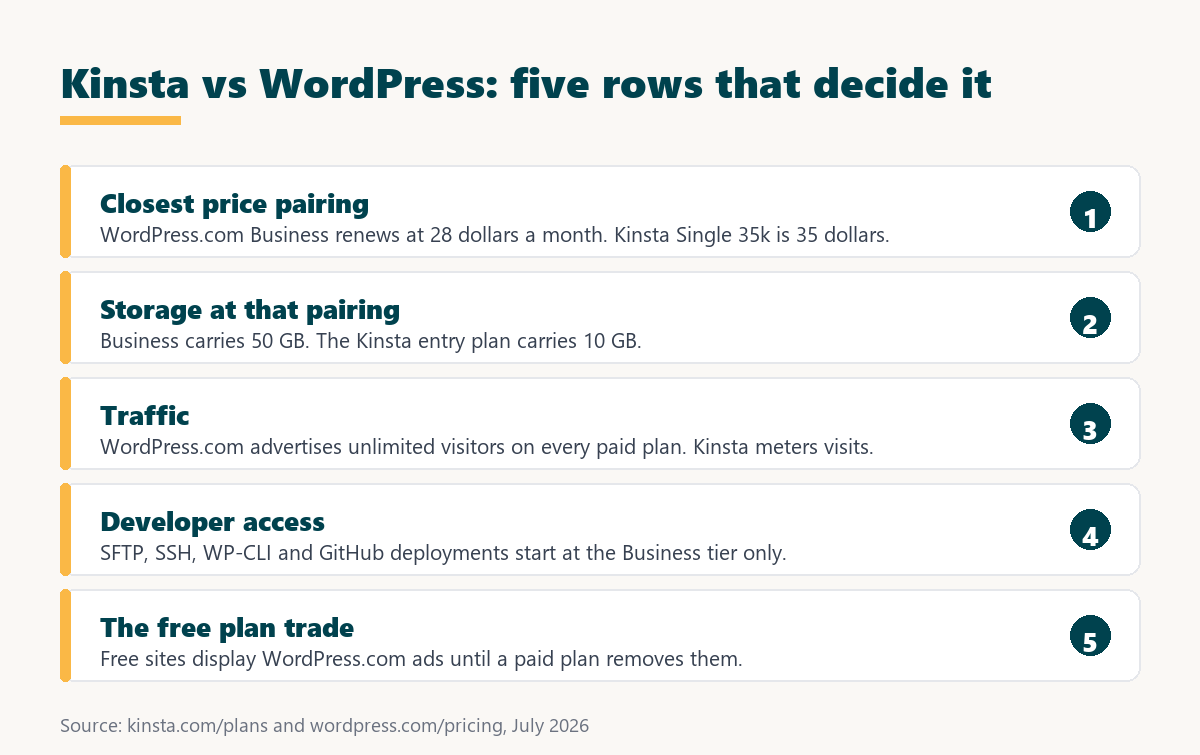
Source: wordpress.com/pricing and kinsta.com/plans, read July 2026. WordPress.com also offers monthly billing and two-year and three-year terms at deeper discounts, plus a free plan.
In plain terms, the renewal increases here are modest compared with most hosts in this category, rising by about a dollar to three dollars rather than multiplying. The pricing is honest and the ladder is clearly signposted.
Capability Is Tiered, Not Just Capacity
This is the structural difference that matters more than any price. On Kinsta, every plan runs standard WordPress with nothing withheld, and the tiers differ only in traffic, storage and install count. On WordPress.com, moving up a tier unlocks abilities as well as capacity.
- Developer access starts at Business: SFTP, SSH, WP-CLI, Git commands and GitHub deployments appear at the 28-dollar renewal tier, so anything below that is dashboard-only.
- Backups and restores at Business: Real-time backups with one-click restores are listed on the Business plan rather than across the whole range.
- Store functionality at Commerce: WooCommerce and premium store themes belong to the 50-dollar renewal tier, so an online store cannot start on a lower plan.
- Theme access widens by tier: Personal includes dozens of premium themes while Premium and above include the full premium catalogue from the marketplace.
- Priority support at Business: Free support is available on lower tiers, with 24/7 priority support arriving at Business and Commerce.
Source: wordpress.com/pricing and kinsta.com/plans, read July 2026. Renewal costs are the stated auto-renewal rates on annual billing.
Kinsta has no equivalent ladder. A 35-dollar plan and a 450-dollar plan run the same unrestricted WordPress, differing only in how much traffic and how many installs they carry.
Want full WordPress access without a capability ladder?
See Kinsta Plans →Free migration by Kinsta engineers, 30-day money-back guarantee.
What the Free Plan Actually Costs
WordPress.com offers a genuinely free plan, which nothing else in this comparison series does. The trade is stated openly on the pricing page: free sites display WordPress.com advertising to visitors, and removing those ads is the reason the Personal plan exists.
For a personal blog or a first project, that is a fair exchange and a real on-ramp. For anything representing a business, showing another company’s adverts to visitors is usually reason enough to start at Personal rather than free.
Unlimited Visitors Against a Metered Allowance
WordPress.com states unlimited pages, posts, users and visitors on every paid plan, described as no caps or restrictions. Kinsta meters visits, including 35,000 on the entry plan and charging 50 cents for each additional 1,000, alongside a 125 GB CDN bandwidth allowance.
That removes billing risk entirely on the WordPress.com side, which matters for anyone whose traffic is unpredictable. It also means capacity is managed by the platform rather than disclosed, so there is no published figure to compare against measured traffic.
What WordPress.com Bundles That Kinsta Does Not Sell
Several items included in the higher tiers are separate purchases elsewhere, and two of them are things Kinsta does not offer at any price. Counting them narrows the effective price gap further.
- Domain for the first year: A custom domain is included with every paid plan, whereas Kinsta sells no domains and leaves registration to a separate provider.
- Business email for a year: The Business plan includes a professional email account powered by Titan, and Kinsta sells no mailboxes at any tier.
- Email marketing included: Business bundles a MailPoet plan covering 500 subscribers, replacing a separate newsletter subscription for small lists.
- Advertising credits: Two hundred dollars of Blaze advertising credit ships with the Business plan, which is a marketing budget rather than a hosting feature.
- Video hosting: VideoPress with 250 GB of dedicated storage is included at Business, well beyond what a general storage allowance would cover.
Read together, the Business plan is closer to a bundled small-business package than to a hosting plan, which is the fairest way to describe what 28 dollars buys.
Check the Plugin Rules Before Committing
The pricing page currently lists plugin installation from over 60,000 marketplace options, including direct upload, alongside the Personal and Premium tiers as well as Business. That differs from how WordPress.com plans have historically been described, where plugin installation was a Business-tier capability.
Because this is the single feature most likely to decide the platform for a WordPress user, confirm it at checkout rather than trusting any comparison page, including this one. Older reviews describing plugins as Business-only may simply be out of date, or the entitlement may vary in ways the summary does not capture.
Which Is Better for Speed?
Neither publishes enough to declare a winner. WordPress.com runs on Automattic’s WP Cloud platform, described on the pricing page as scalable, highly available and fast. Kinsta publishes compute-optimised Google Cloud machines with a private container per site and a bundled CDN.
Google’s guidance on Largest Contentful Paint puts the target at 2.5 seconds or less, which both platforms can reach on a well-built site.
“a B2B site that loads in 1 second has a conversion rate 3x higher than a site that loads in 5 seconds”
: HubSpot, page load time and conversion rates
Testing is complicated here by the tiering. A fair speed comparison has to run on a WordPress.com plan that actually permits the same plugins and configuration as the Kinsta site being measured.
Portability Is the Long-Term Question
A site hosted on Kinsta is standard self-installed WordPress, so moving it to another host is a normal migration. A WordPress.com site can also be exported, but anything built on platform-specific features has to be rebuilt rather than moved.
That distinction rarely matters in year one and matters a great deal in year five. Anyone expecting to change providers eventually should weigh it alongside the monthly price.
Kinsta vs WordPress.com for WooCommerce Stores
WordPress.com places WooCommerce on its Commerce plan, which renews at 50 dollars a month with 50 GB of storage and priority support. Kinsta runs WooCommerce on any plan and marks its multi-site tiers as recommended for ecommerce and membership sites.
At 50 dollars against 35, the store comparison inverts the usual pattern in this series: the platform is the more expensive option once a shop is involved, because store functionality sits behind its own tier.
“Tool spend is only defensible when the outcome it protects is measured, not assumed.”
: Growth Hack Suite, ROI on sales tools
For a store, the measurement worth running is checkout response under load, since that is the page neither platform can serve from cache.
When Is WordPress.com the Better Pick?
WordPress.com is the better pick for most sites that do not need developer access, which is a very large share of WordPress. The lower tiers in particular have no equivalent anywhere in this comparison series.
- Small sites on small budgets: Five dollars a month at renewal with a domain, no adverts and unlimited visitors is a price point managed WordPress hosting does not attempt to reach.
- Starting from nothing: A genuinely free tier lets a project prove itself before any money is committed, which no other platform in this group offers.
- Bundled business tooling: A domain, business email, email marketing and advertising credits arriving together suit a small business that would otherwise buy four subscriptions.
- Unpredictable traffic: Unlimited visitors on every paid plan removes any possibility of an overage charge after a post performs unexpectedly well.
- No maintenance appetite: The platform decides what runs, which removes an entire category of configuration decisions for someone who only wants to publish.
Anyone in those categories who reads this page and chooses WordPress.com has read it correctly.
When Is Kinsta the Better Pick?
Kinsta earns the difference wherever the site needs to do something a tier might not permit, or wherever more than one site is involved.
- Unrestricted WordPress on every plan: Plugins, themes, code and server access are available at the entry tier rather than unlocked by moving up a ladder.
- Developer workflow from the start: Staging, deployment tooling and command-line access do not require reaching a specific price point before they appear.
- Portfolios on one subscription: Plans running to forty installs consolidate many sites, whereas WordPress.com prices each site as its own plan.
- Published infrastructure: Compute-optimised Google Cloud machines with a private container per site describe where the site runs rather than abstracting it away.
- Straightforward portability: A standard self-installed site moves to any other host as a normal migration, without rebuilding platform-specific features.
Below the Business tier the price argument favours WordPress.com decisively, and this page says so rather than steering toward the higher commission.
Need SSH, staging and plugins on the entry plan?
See Kinsta Plans →Engineers handle the migration, and the 30-day guarantee covers the test.
How Do You Compare the Two Properly?
The comparison only works once both sides are allowed to run the same site. That is the step most people skip, and it is the one that decides whether the cheaper plan is genuinely cheaper.
- List the required capabilities first. Write down which plugins, themes, code access and integrations the site actually needs before looking at any price.
- Find the tier that permits them. Match that list against the WordPress.com plan that includes it, since a lower plan is only cheaper if it can run the site.
- Compare renewal against renewal. Use 5, 9, 28 or 50 dollars against 35, rather than the advertised first-year rate.
- Add the bundled extras. Subtract the value of a domain, business email and email marketing if those would otherwise be bought separately.
- Test the same content on both. Kinsta includes engineer-handled migrations, so an identical copy can run on each and be measured properly.
- Decide inside the guarantee window. Kinsta refunds within 30 days, so treat that as the deadline for the whole exercise.
Step two is the one that changes answers. A plan that cannot install the plugin a site depends on is not a cheaper option, it is a different product.
Ready to run the same site on both and measure?
Start With Kinsta →Unlimited free migrations, staging included, 30-day money-back guarantee.
Kinsta vs WordPress.com: Frequently Asked Questions
The 12 most-asked questions about choosing between Kinsta and WordPress.com.
Is Kinsta better than WordPress.com?
Not on price. WordPress.com is cheaper at every tier and advertises unlimited visitors. Kinsta gives every plan the full unrestricted WordPress environment, while WordPress.com unlocks capabilities as the tier rises.
What does WordPress.com cost at renewal?
Personal renews at 5 dollars a month, Premium at 9, Business at 28 and Commerce at 50, billed every twelve months. The advertised yearly rates are 4, 8, 25 and 45 respectively.
Is the WordPress.com free plan really free?
Yes, with a stated trade: free sites display WordPress.com advertising to visitors. Removing those adverts is the stated reason to upgrade to the Personal plan.
Which plan unlocks SSH and SFTP?
The Business plan, which renews at 28 dollars a month and adds SFTP, SSH, WP-CLI, Git commands and GitHub deployments. Kinsta provides developer access on every plan.
Can I install plugins on WordPress.com?
The pricing page currently lists plugin installation from over 60,000 options, including direct upload, alongside Personal and Premium as well as Business. That differs from how the plans have historically been described.
Does WordPress.com meter traffic?
No. Every paid plan states unlimited pages, posts, users and visitors with no caps or restrictions. Kinsta meters visits, with 35,000 on the entry plan and 50 cents per additional 1,000.
Which includes a domain and email?
WordPress.com includes a domain for the first year on every paid plan and a business email account for a year on Business. Kinsta sells neither domains nor mailboxes at any tier.
Which plan do I need for WooCommerce?
Commerce on WordPress.com, which renews at 50 dollars a month. Kinsta runs WooCommerce on any plan, so a store costs 35 dollars there rather than 50.
Which is faster?
Neither publishes enough to decide. WordPress.com runs on Automattic’s WP Cloud platform; Kinsta publishes compute-optimised Google Cloud machines with a container per site and a bundled CDN.
Can I move a WordPress.com site to another host?
Content can be exported, but anything built on platform-specific features has to be rebuilt rather than migrated. A Kinsta site is standard self-installed WordPress and moves as a normal migration.
Who owns WordPress.com?
Automattic, which also owns Pressable and contributes heavily to WordPress core. WordPress.com is a hosted service built on the same software Kinsta hosts in its self-installed form.
Should I move from WordPress.com to Kinsta?
Only where the tier restrictions have become a problem, more than one site is involved, or portability matters. Below the Business tier, WordPress.com is substantially cheaper and perfectly capable.
About this comparison
Written by the Growth Hack Suite editorial team. Advertised prices, renewal rates and tier entitlements were read directly from kinsta.com/plans and wordpress.com/pricing in August 2026 and are reported as published. Where an entitlement appeared to differ from how these plans have historically been described, this page says so and recommends confirming at checkout. This page contains affiliate links to Kinsta, which pay a commission at no extra cost to the reader.