Table of Contents
Web hosting is a service that stores your website’s files on a server connected to the internet, so anyone can load your site by entering its domain. Hosting types range from shared to managed and cloud, differing in performance, control and price to match different needs. This guide explains how web hosting works and how to choose the right host.
Last updated: August 2026. Written by the Growth Hack Suite editorial team, with details cross-checked against provider documentation. This page carries affiliate links to Kinsta.
What Is Web Hosting?
Web hosting is a service that stores your website’s files on a server connected to the internet. When someone enters your domain, the server delivers your pages to their browser and your site appears online, which is why every live website needs a host somewhere behind it.
“A web hosting service is a type of Internet hosting service that hosts websites.”
— Wikipedia, Web hosting service
In practical terms, the host is the always-on computer that keeps your site available, so choosing one is really choosing how fast, reliable and scalable that computer is.
How Does Web Hosting Work?
Web hosting works by keeping your site’s files on an always-on server. When a visitor’s browser requests your domain, the domain’s DNS points to that server, which sends back the pages so the browser can display your website, usually in a fraction of a second.
Verdict: Web hosting is the server space that keeps your website online, and the type you pick decides its speed, reliability and cost. Shared hosting is cheapest but slowest, VPS and dedicated add control, cloud adds scalability, and managed hosting hands the technical work to the provider. The honest rule is to match the host to the site: a hobby page can use shared hosting, while a revenue site benefits from managed hosting built for performance.
In short, the mechanics are simple, but the hosting type quietly determines whether the site is fast and dependable or slow and fragile.
Why You Need Web Hosting for a Website
You need web hosting because a website’s files must live on a server that is always online for people to reach it. Without hosting, your site exists only on your own computer and cannot be visited over the internet, no matter how well it is built.
The honest point is that hosting is not optional for a public site, so the only real question is which type and provider fit the site’s needs.
Main Types of Web Hosting Explained
The main types of web hosting are shared, VPS, dedicated, cloud and managed hosting. They differ in how resources are allocated, how much control you get, and how they balance performance against price for different site sizes, from a first blog to a busy store.
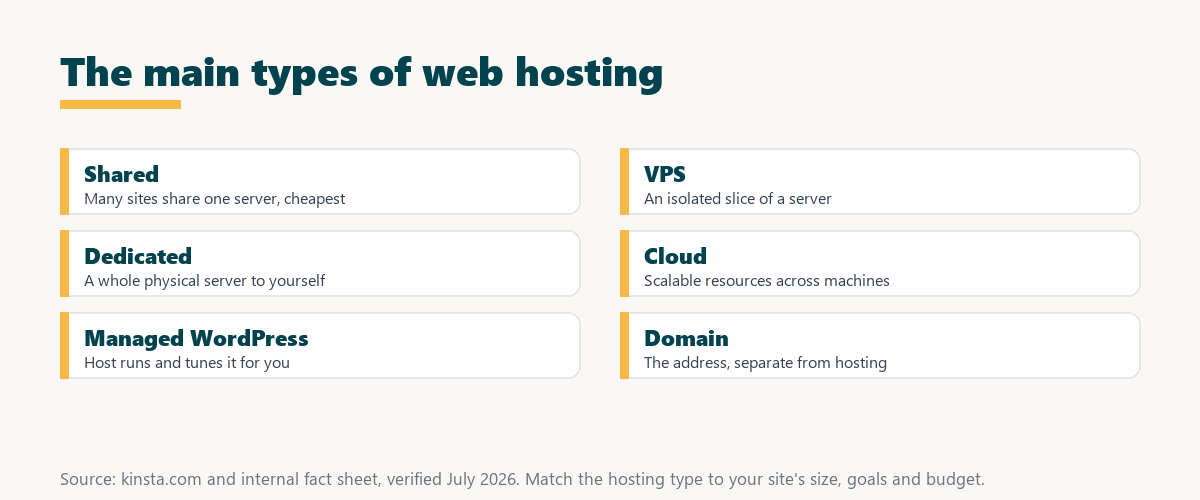
Source: provider documentation and kinsta.com/plans, verified August 2026. Each type trades price against performance and control differently.
Comparing shared, VPS, dedicated, cloud and managed hosting on performance, control, price and best use case shows there is no single best type, only the best fit for a given site.
See managed web hosting on Google Cloud
Try Kinsta →Managed WordPress on Google Cloud, with a 30-day money-back guarantee.
Web Hosting vs Domain Name
Web hosting and a domain name are different but related. Hosting is the server space that stores your site, while the domain is the address people type to find it. A working website needs both together, with the domain pointing to the host through DNS.
The honest point is that hosting and a domain are bought separately, so a new site owner needs both, even though many providers sell them in one bundle.
What to Look for in a Web Host
When choosing a web host, look for reliable uptime, fast performance, security features, backups, responsive support and room to grow. These factors determine how well your site loads, stays online and scales over time, and they matter far more than a low headline price.
- Reliable uptime: A strong uptime guarantee keeps the site reachable, since downtime costs both sales and trust.
- Fast performance: Server speed and caching decide how quickly pages load for every visitor.
- Security features: Firewalls, SSL and malware protection defend the site from common attacks.
- Automatic backups: Regular backups make recovery easy after a mistake or a failed update.
- Room to grow: Scalable plans let the site handle rising traffic without a painful migration.
“The first five seconds of page-load time have the highest impact on conversion rates.”
— HubSpot, page load time and conversion rates
Because those first seconds shape conversions, a host’s speed is not a technical detail but a direct influence on how a site performs commercially.
Common Web Hosting Mistakes to Avoid
Common web hosting mistakes include picking the cheapest plan without checking performance, ignoring uptime and support quality, and choosing a host you will quickly outgrow. All of these can lead to a slow, unreliable site that costs more to fix than to avoid.
- Chasing the lowest price: The cheapest plan often means shared, slow resources that hurt a growing site.
- Ignoring uptime: Skipping the uptime guarantee risks frequent outages that quietly cost sales.
- Overlooking support: Weak or slow support turns a small issue into extended downtime.
- Outgrowing the plan: Picking a host with no room to scale forces an early, disruptive migration.
- Skipping backups: Choosing a host without backups leaves no safety net when something breaks.
The honest takeaway is that most hosting regret comes from optimizing for price alone, so weighing reliability and support first avoids the common traps.
How to Choose the Right Web Host
Choose the right web host by matching hosting type to your site’s size and goals, comparing performance, uptime, support and price. Favor a host you can grow into rather than one you will outgrow within months, since migrating later is more disruptive than choosing well now.
Source: provider documentation, verified August 2026. Weigh these factors together rather than price alone.
Listing uptime, speed, security, backups, support and scalability as factors to evaluate gives a simple checklist that keeps the choice grounded in reliability. Owners weighing platform commitment can also read our note on SaaS vendor lock-in.
Where Managed Hosting Like Kinsta Fits
Managed hosting like Kinsta fits sites that want strong performance without server management, running WordPress on Google Cloud Platform with caching, backups and support handled for you. It is ideal once a site earns revenue and reliability matters more than the lowest price.
Get web hosting handled on Kinsta
Start With Kinsta →Free migration and a 30-day money-back guarantee.
How Much Does Web Hosting Cost?
Web hosting cost ranges from a few dollars a month for shared plans to tens of dollars for premium managed hosting, which starts around 35 dollars a month. The price reflects performance, isolation and support, so matching spend to a site’s importance matters more than picking the cheapest option.
“A tool is only worth its premium when the hours or revenue it protects exceed the invoice.”
— Growth Hack Suite, on tool ROI
Applied to hosting, paying more for a reliable, fast host is justified whenever the sales and time it protects exceed the difference over a cheap shared plan.
Which Web Hosting Is Best for Beginners?
The best web hosting for beginners depends on the goal: shared hosting is the cheapest starting point, but managed WordPress hosting is often better for those who want a fast, secure site without learning server administration. It handles the technical work while the owner focuses on content.
The honest qualifier is that a zero-budget hobby site can start on shared hosting, while a beginner building something that matters is usually better served by managed hosting from the start.
Getting Started With the Right Host
You get started with the right host by choosing a plan that matches your current needs and growth. Quality managed hosts like Kinsta offer free migration, so you can move an existing site over without downtime, and a money-back guarantee lets you test performance first.
The honest summary is that the right first move is matching the host to the site’s real needs, since a good fit now avoids a disruptive migration later.
Start your site on reliable hosting risk-free
Try Kinsta Risk-Free →Free migration and a 30-day money-back guarantee.
Web Hosting: Frequently Asked Questions
The 12 most-asked questions about web hosting.
What is web hosting in simple terms?
Web hosting is a service that stores your website’s files on an always-on server, so when someone types your domain, the server delivers your pages and your site loads in their browser.
How does web hosting work?
Web hosting works by keeping your site on a server; when a visitor requests your domain, DNS points to that server, which sends your pages back so the browser can display them.
Do I need web hosting for a website?
Yes, you need web hosting because your site’s files must live on a server that is always online for people to reach it, otherwise the site exists only on your own computer.
What are the main types of web hosting?
The main types are shared, VPS, dedicated, cloud and managed hosting, which differ in how server resources are allocated and how they balance performance, control and price.
What is the difference between web hosting and a domain?
Web hosting is the server space that stores your website, while a domain is the address people type to find it; a working site needs both a host and a domain together.
How much does web hosting cost?
Web hosting ranges from a few dollars a month for shared plans to premium managed hosting in the tens of dollars, with price reflecting performance, isolation and included support.
Which type of web hosting is best for beginners?
Shared hosting is the cheapest starting point, but managed WordPress hosting is often best for beginners who want a fast, secure site without learning server administration.
What should I look for in a web host?
Look for reliable uptime, fast performance, security, backups, responsive support and room to grow, since these determine how well your site loads, stays online and scales.
Can I change web hosts later?
Yes, you can change web hosts later, and many quality hosts offer free migration, so you can move your site to better hosting without losing content or facing downtime.
Is cheap web hosting worth it?
Cheap web hosting can work for a small hobby site, but it often means slower speeds and weaker support, so a site that earns money usually benefits from more reliable hosting.
What is managed web hosting?
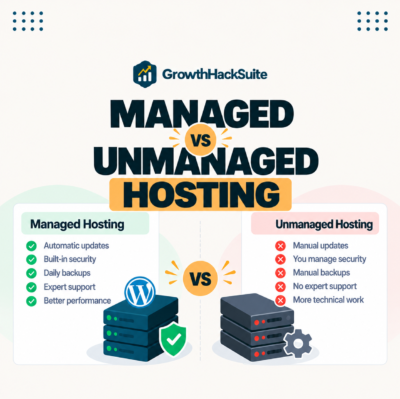
Managed web hosting is hosting where the provider handles server maintenance, security, updates and backups for you, so you get better performance and less technical work than on basic shared hosting.
How do I know which web host to choose?
Choose a web host by matching the hosting type to your site’s size and goals and comparing uptime, speed, support and price, favoring one you can grow into over time.
About this guide
Written by the Growth Hack Suite editorial team, drawing on hands-on experience choosing and testing web hosting. Details were cross-checked against provider documentation. This page carries affiliate links to Kinsta, so the position is stated plainly: web hosting is the server space that keeps a site online, the type you pick decides its speed, reliability and cost, and price should match the site’s importance rather than default to the cheapest plan. Managed hosting like Kinsta, on Google Cloud Platform, suits revenue sites that want performance without server management.