Table of Contents
The best LinkedIn automation tools split into three groups: cloud platforms that give each account its own IP, cloud tools that run sequences without publishing that layer, and desktop apps or browser extensions that send from the operator’s machine. This ranking puts account safety first, then billing model, then sequence depth, across eleven tools with prices quoted from each vendor’s page.
Last checked: October 2026. Every tool on this list was checked against its own pricing and feature pages, and the ranking uses only what each vendor publishes. Prices change on different schedules, so confirm the current figure before buying.
Prefer the safety-first option? Expandi runs each account on a dedicated country-based IP with automatic warm-up. Start the seven-day trial.
Start Your 7-Day Expandi Trial →Dedicated country-based IP · unlimited campaigns · cancel anytime
What Are the Best LinkedIn Automation Tools?
The best LinkedIn automation tools are cloud platforms that isolate each account behind its own IP and warm the profile before sending at volume. Expandi leads that group on published safety infrastructure, HeyReach and Closely follow with dedicated proxies for each account, and PhantomBuster covers data extraction rather than pure outreach.
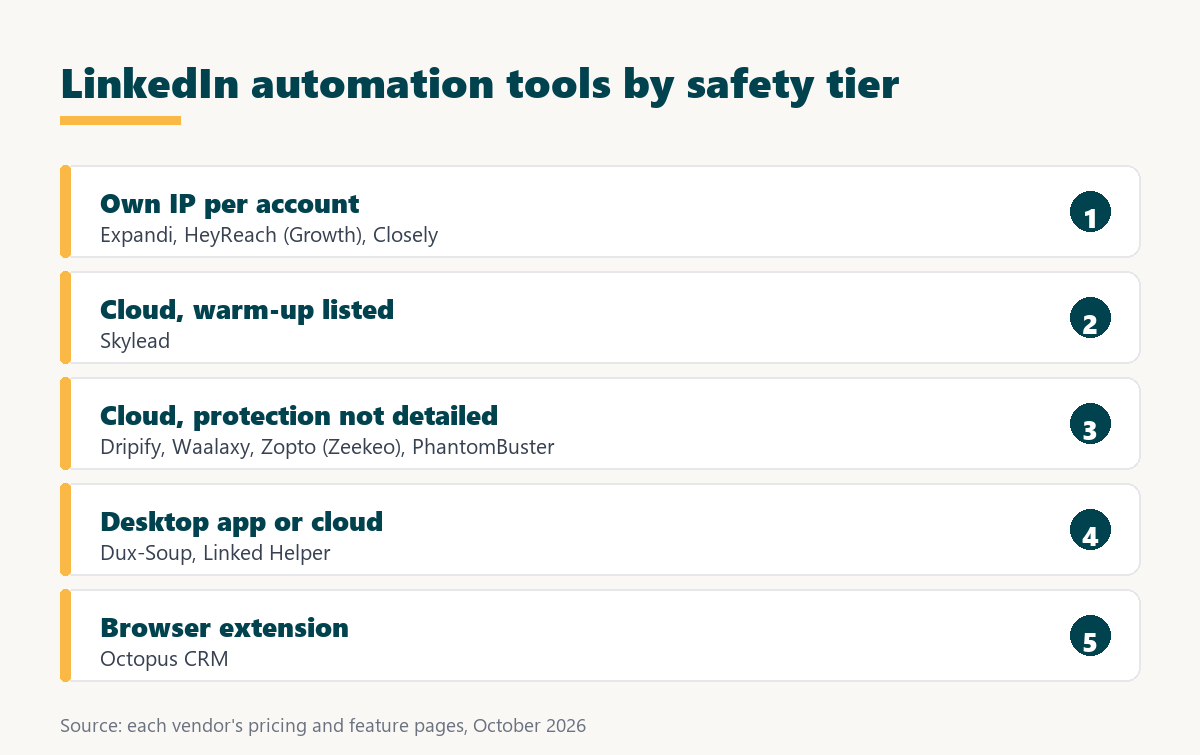
Safety comes first in this ranking for a practical reason. LinkedIn’s help center states that members who use automation tools “risk having their accounts restricted or shut down,” so every tool here carries some risk. The useful question is which vendors publish concrete measures to reduce it, and which leave the operator to manage it alone.
The ranking below follows account safety first, because a restricted profile costs more than any subscription in this category and no feature list compensates for losing the account.
How Should a LinkedIn Automation Tool Be Ranked?
Five criteria separate LinkedIn automation tools: where the session runs, whether each account gets its own IP, whether the profile is warmed automatically, what the fee is attached to, and how deep the sequence logic goes. Feature counts matter far less than any of these five, because they decide both risk and cost.
- Session location: cloud platforms keep sending after the laptop closes, while desktop apps and browser extensions stop whenever the operator’s machine sleeps or the browser closes.
- Dedicated IP for each account: a fixed address for each LinkedIn profile keeps one account’s activity separate from other customers and from other profiles in the same workspace.
- Automatic profile warm-up: a gradual ramp in daily actions protects new or idle profiles, and vendors that publish the schedule make the protection easier to verify.
- Billing unit: fees attach to a LinkedIn account, a user, a seat, a license, or a workspace, and the unit decides what a second profile adds to the invoice.
- Sequence depth: conditions, multichannel steps, and reply detection decide how much manual follow-up remains after launch, which matters most at agency scale.
The safety criteria all come back to one engineering idea. Wikipedia describes rate limiting this way:
“rate limiting is used to control the rate of requests sent or received”
Wikipedia, Rate limiting
Applying the same five criteria to every tool is what keeps a list like this honest, because each vendor markets whichever criterion it happens to win.
How Do the 11 Tools Compare Side by Side?
The table sets all eleven tools against the same criteria, so differences in billing unit and published account protection are visible before reading any individual entry. Prices are entry list prices on monthly billing where the vendor publishes one, and Waalaxy is described without a figure because its page changes price with the currency view.
Source: each vendor’s own pricing page (expandi.io, heyreach.io, closelyhq.com, skylead.io, dripify.com, dux-soup.com, waalaxy.com, zeekeo.com, phantombuster.com, linkedhelper.com, octopuscrm.io), checked between August and October 2026. Monthly list prices before tax; most tools are cheaper on annual billing.
Read the billing-unit column before the price column: a per-user tool and a per-account tool produce very different invoices once a second LinkedIn profile joins the workflow.
The table settles the shortlist for most readers, and the sections below explain why each tool sits where it does on the safety axis.
1. Expandi: Is Cloud Safety Worth Per-Account Pricing?
Expandi is a cloud platform that bills $99 a month for each connected LinkedIn account, or $79 a month when billed annually, and gives every account a dedicated country-based IP plus automatic profile warm-up. It tops this list because both protections ship on its only self-serve plan and the warm-up schedule is documented.
- Best for agencies: operators running several LinkedIn accounts that each carry client revenue get one dedicated IP per profile and billing that follows each account.
- Best for revenue-critical profiles: founders whose own profile is the main sales asset get a gradual warm-up from 5 to 21 actions a day before full volume.
- Campaign depth: the plan includes unlimited campaigns and templates, email steps, campaign prioritization, and recovery, without a higher self-serve tier to unlock.
- Watch-out on trial terms: Expandi offers a seven-day trial on the first subscription and no permanently free tier, and checkout asks for card details.
- Watch-out on refunds: the Terms state that subscription fees are nonrefundable unless required by law, so monthly billing is the safer first purchase.
Expandi’s FAQ states the price in one line:
“Expandi costs 99 USD per account per month.”
Expandi FAQ
Expandi earns first place on published safety infrastructure, and it loses points for having no permanently free tier and for fees that the published terms make nonrefundable once paid.
2. HeyReach: Is It Built for Multi-Account Agency Work?
HeyReach is a cloud platform built for agencies running many LinkedIn accounts, billed for each sender rather than for each user. Its Growth tier costs $79 a month for each sender and includes a dedicated residential proxy for every sender, while its Agency bundle covers 25 senders for $999 a month with customers supplying their own proxies.
HeyReach’s FAQ is explicit: “HeyReach charges only per LinkedIn senders, not per users,” so teammates, assistants, and clients add no cost. The trial runs fourteen days with up to 3 LinkedIn accounts and no card, and the Terms state that fees are non-refundable. The proxy arrangement is the main detail to check, because the dedicated proxy sits on Growth while the bundles ask agencies to bring their own.
HeyReach belongs on any agency shortlist next to Expandi, and the choice between them turns on how each one prices additional accounts and supplies the proxy layer.
3. Closely: Does Inbox-Led Outreach Suit Small Teams?
Closely is a cloud LinkedIn and email outreach tool priced in tiers by the number of LinkedIn accounts, from $65 a month for one account to $259 a month for five. Each tier lists a dedicated residential IP for every LinkedIn account and an account warm-up, which places it high on the safety axis.
The product centers on reply handling. Its pricing FAQ says that “All your replies from LinkedIn and email are synced into a single inbox,” and each sender counts as one LinkedIn account plus one email inbox. Annual billing lowers the entry tier to $39 a month, a white-label option costs $1,499 a month at a fixed price, and the warm-up appears as a feature without a published schedule.
Closely fits small teams whose bottleneck is reply handling across two channels, and its published IP layer puts it ahead of tools that leave protection undocumented.
4. Skylead: How Do Conditional Sequences Work Across Channels?
Skylead is a cloud LinkedIn and email outreach tool built around conditional sequences that branch on prospect behavior, priced at $100 a month for each seat on its All-in-one plan. Each seat includes one LinkedIn account and unlimited email accounts, and LinkedIn warm-up appears in its feature list without a published schedule.
Skylead’s Smart Sequences page describes the builder: “Use 8 actions and 7 if/else conditions to create your own sequence.” Image and GIF personalization is included at no extra charge. The trial runs seven days and, under the Terms, applies only to the first account added to a subscription, while the Agency offer is a first-year promotion of $999 a month for 25 seats.
Skylead attracts operators who want branch-heavy sequences across LinkedIn and email, and it competes with the multichannel side of Expandi more than with its documented safety layer.
5. Dripify: How Fast Is Setup on Per-User Billing?
Dripify is a cloud tool billed for each user, at $59 a month on Basic or $39 a month when billed annually, with built-in LinkedIn protection on its paid tiers and advanced protection on Advanced. It suits a single operator who wants a campaign live quickly more than an agency juggling many client profiles.
- Best for a single operator: one person running one profile gets cloud LinkedIn and email sequences at a lower entry price than the per-account platforms above.
- Best for small per-user teams: billing that follows each user suits teams where several people share outreach but each one works a separate profile.
- Watch-out on displayed prices: the pricing page shows annual-billing figures by default, so the monthly price is higher than the first number a visitor sees.
- Watch-out on entry limits: the Basic tier lists one drip campaign and limited daily quotas, and unlimited drip campaigns start on the Pro tier.
- Trial terms: Dripify advertises a seven-day trial with no credit card required and no permanently free tier after the trial ends.
Dripify sits fifth because the entry price is lower and setup is simple, while the published protection story is less specific than a dedicated IP for each account.
6. Dux-Soup: Is It the Right Fit for Solo Sending?
Dux-Soup is a LinkedIn automation tool that began as a Chrome extension and now sells STACKED as a Local desktop app at $55 a month for each seat or a Cloud version at $99 a month for each seat. The Local version runs on the operator’s machine, while Cloud runs continuously on Dux-Soup’s infrastructure.
The home page lists five built-in safety controls, including natural activity patterns, daily limits, speed throttling, an auto-snooze safeguard, and a daily planner, and adds that “The specifics stay confidential, by design.” No dedicated IP or proxy for each account is documented on the pages reviewed. Yearly billing saves 25%, and a trial of fourteen days is offered.
Dux-Soup is the low-commitment entry point among the cloud-capable tools, and undocumented IP handling is the reason it ranks below the platforms that publish one.
Seen enough of the lighter options? Expandi puts each account on its own dedicated IP from day one. Seven-day trial.
Start Your 7-Day Expandi Trial →No charge until the seven days are up · first subscription only
7. Waalaxy: Does Quota-Based Sending Suit Solo Users?
Waalaxy is a cloud tool billed for each user that meters activity through monthly invitation quotas, 300 on Pro and 800 on Advanced and Business, with a trial of fourteen days on every tier. It fits occasional senders whose volume changes month to month rather than teams sending at a steady pace.
- Best for occasional senders: a per-user tier with a monthly invitation quota keeps cost proportional to activity during the months when outreach pauses.
- Best for cautious first-timers: a hard monthly ceiling on invitations limits how far a new user can push volume, which works as a built-in brake.
- Email on the top tier: cold email sequences and 500 email finder credits a month sit on the Business tier, while lower tiers include 25 credits.
- Watch-out on price display: the pricing page shows different figures by currency view, so the rate has to be confirmed on the page itself on the day of purchase.
- Watch-out on the IP layer: the pricing page does not publish a dedicated IP for each account, so protection rests on quotas rather than on network isolation.
Waalaxy is the quota option on this list, and its price display changes by currency, so the rate should be confirmed on the day of purchase.
8. Zopto: Is Cloud Sending Aimed at Teams the Right Fit?
Zopto is a LinkedIn and email outreach platform whose zopto.com domain now redirects to Zeekeo, which sells a do-it-yourself platform at $149 a month for each seat and a done-for-you managed service from $600 a month. It targets teams and agencies that want help running outbound, not only software.
The pricing FAQ describes the self-serve product plainly: “Zeekeo Launchpad is built for social and email outreach.” It lists CRM integrations, Zapier and API access, and image and GIF personalization, but no free trial and no description of a dedicated IP or proxy for each account, which places it in the middle of this ranking.
Zopto competes with Expandi at the agency end of the market, and the comparison usually comes down to cost for each account and how much of the work the managed service takes over.
9. PhantomBuster: Is It Data Extraction More Than Outreach?
PhantomBuster is a cloud automation platform priced by execution time, automation slots, and credits rather than by user, starting at $69 a month on Start or $56 a month billed annually, with unlimited users. It is the extraction and enrichment option on this list, with outreach as one workflow among many.
The Start tier includes 5 automation slots and 20 execution hours a month, and the FAQ warns that “Your automations will pause until your execution time resets or you upgrade your plan.” The pricing page does not publish warm-up or a dedicated IP for each LinkedIn account, which is why it ranks low on this list despite strong data features.
PhantomBuster wins for teams whose bottleneck is building and enriching the list, and it asks for noticeably more technical setup than a platform built only for outreach sequences.
10. Linked Helper: What Does a Desktop App With Local Control Offer?
Linked Helper is desktop software that runs on the operator’s own computer or on a VPS the operator controls, priced from $15 a month for a Standard license with local storage. It keeps campaigns under local control and ties every sending window to that machine staying on with the app running.
The pricing FAQ is direct: “Proxies are purchased separately by the user,” and one license works on one LinkedIn account at a time. Smart daily limits run on a rolling 24-hour window, and the Pro license removes Linked Helper’s own action caps while noting that LinkedIn may still impose limits. The trial runs fourteen days with no credit card and no automatic renewal.
Linked Helper appeals to operators who want local control and their own proxy choice, and who accept that sending pauses whenever the computer sleeps or goes offline.
11. Octopus CRM: How Much Pipeline Tracking Comes With Outreach?
Octopus CRM is a Chrome extension that pairs LinkedIn automation with a lightweight personal CRM, priced from $9.99 a month on its entry tier to $39.99 on Unlimited. It suits solo sellers who want outreach and basic deal tracking in one place, and it is the least protected option on this list.
The FAQ advises users to “Make sure your performance on LinkedIn is not excessive and the activity growth is gradual,” and Activity Control is reserved for the Unlimited tier. Because it runs inside the browser, no dedicated IP is described. All tiers come with a seven-day trial that gives full access to the Unlimited tier, without a credit card.
Octopus CRM suits a seller who wants basic tracking without a full CRM, and it is not built for multi-account agency work or for profiles that carry client revenue.
How Do You Pick the Right Tool for Your Situation?
The right LinkedIn automation tool follows the number of accounts and the sending pace: one profile sending occasionally suits a quota or extension tool, one profile sending weekly suits a per-user cloud tool, and several client profiles suit a per-account platform that gives each profile its own IP.
Source: categories derived from the five ranking criteria in this guide; prices and protection details for each tool appear in the comparison table above and come from each vendor’s pricing page, checked August to October 2026.
The situation column decides the shortlist faster than any feature list, because billing model and account isolation are what change once a second profile joins the workflow.
- Agency or lead-gen freelancer: a per-account platform with dedicated IPs keeps client profiles isolated and maps the platform fee onto each client retainer.
- B2B founder sending weekly: a cloud tool with automatic warm-up protects a founder’s profile, which is usually the company’s most valuable sales asset on LinkedIn.
- Occasional sender: a quota tool or extension keeps cost low in quiet months, provided the profile’s value does not justify a dedicated IP.
- Data-first team: an automation platform priced by usage handles list building and enrichment, often alongside a dedicated outreach tool rather than replacing it.
- SDR team on a fixed process: a cloud tool with unlimited campaigns and email steps supports the same sequence every week across several reps.
Whichever tool wins, the role behind most LinkedIn outreach stays the same. Growth Hack Suite describes it this way:
“An SDR owns the top of the revenue funnel: prospecting, qualifying, and booking meetings so Account Executives can focus entirely on closing.”
Growth Hack Suite, What Is an SDR?
HubSpot’s guide to social selling adds the principle that no tool replaces:
“Social selling is relationship-based and thrives on authentic engagement.”
HubSpot, LinkedIn for Social Selling
Teams adding email to LinkedIn should also read the guide to multichannel outreach, and the method for measuring ROI on sales tools before committing to annual billing.
Picking on billing model and account isolation rather than on feature count is what stops a shortlist from turning into a spreadsheet nobody finishes reading.
Best LinkedIn Automation Tools: Frequently Asked Questions
The 12 most-asked questions about LinkedIn automation tools.
What is the best LinkedIn automation tool?
On account safety, Expandi ranks first because every account gets a dedicated country-based IP and documented warm-up on its single plan. Other tools win on price, setup, or data features.
Which LinkedIn automation tool is safest for the account?
The safest tools publish a dedicated IP or proxy for each account plus warm-up. Expandi, HeyReach on its Growth tier, and Closely all publish this layer.
Are LinkedIn automation tools allowed by LinkedIn?
No. LinkedIn’s User Agreement prohibits third-party automation software, and its help center warns that accounts using such tools risk restriction.
What does a dedicated IP change?
A dedicated IP gives each LinkedIn account a fixed address of its own, so its activity is not mixed with other customers’ accounts on a shared address.
Is a cloud tool better than a Chrome extension?
For safety and reliability, usually yes. Cloud tools keep sending when the laptop closes and can isolate accounts, while extensions depend on the browser staying open.
How much do LinkedIn automation tools cost?
Entry prices on monthly billing range from $9.99 for Octopus CRM to $149 for Zeekeo, with Expandi at $99 for each LinkedIn account and Dripify at $59 for each user.
Which LinkedIn automation tool is cheapest?
Octopus CRM has the lowest entry price at $9.99 a month, followed by Linked Helper at $15 for a local Standard license, but both run on the operator’s own machine or browser.
Which tool suits agencies?
Expandi, HeyReach, and Closely suit agencies best, because each prices by LinkedIn account and publishes an IP or proxy layer for each client profile.
Which tool suits one person?
Dripify suits one person sending weekly, while Waalaxy or Octopus CRM suit one person sending occasionally on a smaller budget.
Do any of these tools have a permanently free tier?
None publishes a permanently free tier for full outreach. Most offer trials instead, and PhantomBuster lists a Trial tier without stating its duration.
Can campaigns be moved between tools?
Lead lists can usually move as CSV files, but sequences, conditions, and message steps have to be rebuilt by hand in the new tool.
How many connection requests can be sent per week?
No tool sets the real ceiling; LinkedIn does. Expandi’s help center recommends staying within 100 actions per week because of LinkedIn’s weekly cap on connection requests.
Want the safety-first pick from this list? Start the seven-day Expandi trial and run one account on a dedicated IP.
Start Your 7-Day Expandi Trial →Seven-day trial on the first subscription · cancel anytime · paid fees are nonrefundable
Growth Hack Suite Editorial, Outbound Sales Team
How we ranked these tools: each tool was scored against the five criteria in this guide, with account protection weighted first, using only what each vendor publishes on its own pricing, feature, FAQ, and Terms pages. Expandi is an affiliate partner; its first place rests on the published dedicated IP and warm-up schedule, and the entries say where other tools win.
Last checked: October 2026. When a vendor changes its pricing page, this ranking is updated.
Affiliate disclosure: this page contains affiliate links to Expandi only. If a subscription is purchased through them, Growth Hack Suite may earn a commission at no extra cost to the buyer. It does not change the assessment.