Table of Contents
Kinsta for bloggers is worth the premium once a blog earns real income and usually overkill before it does, which is the honest answer most guides avoid. The deciding question is not whether Kinsta is fast, it is whether a blog makes enough from ads or affiliates that faster pages and reliable uptime protect money worth protecting.
Last updated: August 2026. Features, plans and limits were read from kinsta.com. This page carries affiliate links to Kinsta, and it says plainly when a cheaper host is the better call for a blogger.
Is Kinsta Good for Bloggers?
Yes for a monetised or high-traffic blog, because slow pages and downtime directly cost ad and affiliate income, and Kinsta’s speed and reliability protect it. No for a hobby or new blog with little traffic, where the premium is more than the blog earns and a cheaper host is the sensible start.
Verdict: The test is income, not speed. If a blog earns from ads or affiliates and traffic is real, Kinsta’s speed protects money and the premium is justified. If it is a hobby or a new blog still finding readers, a budget host does the job and Kinsta is overkill until the income arrives.
That single test settles the decision for most bloggers, which is why the ranking of features below is read against whether the blog earns rather than against a benchmark.
“WordPress is a web content management system.”
: Wikipedia, WordPress
WordPress began as blogging software, so it runs a blog well on almost any host, which is exactly why the hosting decision comes down to money at stake rather than raw capability.
When Does a Blog Earn Enough to Justify Kinsta?
When lost speed or uptime would cost more than the plan does, which is a calculation rather than a feeling. A blog earning steadily from ads or affiliates crosses that line; one earning little or nothing does not.
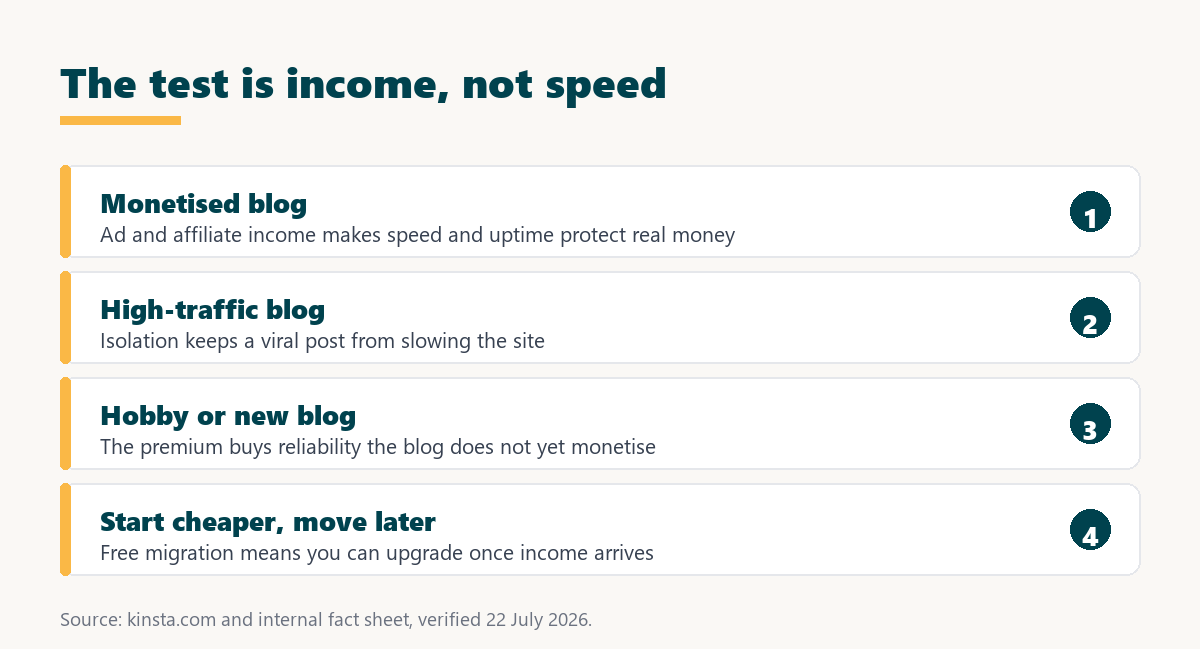
- Ad revenue at scale: A blog earning meaningfully from display ads loses income directly when pages slow or the site goes down during peak reading hours.
- Affiliate income: A blog where affiliate clicks drive revenue depends on readers reaching and trusting fast pages, so speed protects conversions.
- A growing audience: A blog with rising traffic benefits from isolation that a shared plan cannot guarantee as visits climb.
- A professional brand: A blog that is a business rather than a hobby treats reliability as a cost of doing business, like any other tool.
- Below those thresholds: A hobby, personal or brand-new blog rarely earns enough for the premium to pay back, and a cheaper host is the honest choice.
The practical rule is to compare the plan cost against what an hour of downtime or a slow month would actually cost the blog, and to upgrade only when that maths favours it.
What Does Kinsta Offer Bloggers?
Fast, reliable hosting with the maintenance handled, which for a monetised blogger means less time on the site and more on writing. Most of it is included on every plan, which keeps a blogger out of the add-on weeds.
- Isolated resources: Each blog runs in its own container on Google Cloud, so a traffic surge from a viral post does not fight a neighbour for capacity.
- A bundled content delivery network: Cloudflare Enterprise and a network of more than 300 edge locations serve images and pages quickly to a global readership.
- Free SSL and security: A wildcard SSL certificate and a managed firewall come included, which a blog handling reader data and logins needs.
- Automatic backups: Scheduled backups protect against a bad plugin update or a mistake, with retention that varies by plan tier.
- Managed maintenance: Updates, caching and server upkeep are handled, so a blogger spends time writing rather than administering a server.
The honest summary is that Kinsta removes hosting as a worry, which is valuable to a blogger whose time is better spent on content than on server maintenance, provided the blog earns enough to justify the cost.
Does Kinsta Help a Blog’s SEO?
Indirectly, because Google uses page speed and Core Web Vitals as ranking signals, and faster hosting improves the server-side part of those scores. Honestly, though, hosting is one input among several, and a theme, images and plugins affect Core Web Vitals as much as the host does.
“a B2B site that loads in 1 second has a conversion rate 3x higher than a site that loads in 5 seconds”
: HubSpot, page load time and conversion rates
For a blogger the takeaway is that fast hosting removes one obstacle to good Core Web Vitals, but it does not fix a heavy theme or unoptimised images. Kinsta helps the part of speed that hosting controls, and the rest is still the blogger’s job.
Speed that protects a monetised blog’s income
See Kinsta Plans →Isolated resources and a bundled CDN, with free migrations if you are moving an existing blog.
How Does Kinsta Compare to a Budget Host for a Blog?
Kinsta costs several times more and gives isolated resources, managed maintenance and stronger support, while a budget host costs a few dollars and shares resources across many sites. For a blog that earns, the isolation is worth the difference; for one that does not, the budget host is the rational choice.
The honest way to read the gap is that a budget host runs a blog perfectly well until traffic or income makes reliability matter. Kinsta is not a better blog platform in the abstract, it is a better fit for a blog with money on the line, which is the only comparison that decides it.
Premium reliability for a blog with income to protect
View Kinsta Pricing →Isolated resources and managed upkeep, with a 30-day money-back guarantee.
Does a Blogger Need to Be Technical to Use Kinsta?
No, because the platform is managed, so a blogger uses the MyKinsta dashboard for the everyday tasks and leaves the server to Kinsta. Publishing, media and plugins work through WordPress as usual, with no server administration required.
The developer tools like SSH and Git are there for those who want them, but a non-technical blogger never has to touch them. That combination, a simple dashboard over a powerful platform, is part of what a monetised blogger pays for when time on writing matters more than time on infrastructure.
How Does Kinsta Handle a Content-Heavy Blog?
Well for the pages themselves, because a content blog is highly cacheable, so articles serve quickly from cache and the content delivery network. The considerations for a large blog are storage for years of images and the visit allowance as an archive draws steady traffic.
- Cacheable articles: A standard post is served from cache, so a content-heavy blog stays fast without the object caching a dynamic site needs.
- Content delivery network: Images from years of posts load quickly worldwide through the bundled network rather than from a single origin.
- Storage to watch: A large media library uses storage, so a long-running blog should check the plan’s allowance as its archive grows.
- Visits across the archive: An established blog draws traffic to old posts as well as new, so the visit allowance reflects the whole archive, not just recent articles.
- Backups of a large site: Scheduled backups cover the whole blog, and a large media library makes restore planning worth understanding in advance.
For a content blog the platform suits the workload well, and the two numbers to track over time are storage and total visits rather than any dynamic-page concern.
Which Kinsta Features Matter Most for Bloggers?
Speed, uptime and simple management, because a blogger cares about readers reaching a fast page, the site staying up, and not becoming a part-time system administrator. The table maps each to why it matters for a blog.
Source: kinsta.com, verified August 2026. Every feature listed is included on all plans; object caching for a dynamic blog is the exception, sold as a Redis add-on.
In plain terms, the features a blogger uses most are bundled, and the platform’s job is to make hosting invisible so the blogger can focus on the writing that earns.
What Are Kinsta’s Limits for Bloggers?
The premium price above all, plus a few practical gaps that matter more to a blogger than to a business. Naming them lets a blogger judge the fit honestly rather than on the marketing.
- Premium price: At 35 dollars and up, Kinsta costs several times a budget host, which is hard to justify for a blog that earns little or nothing.
- No email hosting: Kinsta does not host email, so a blogger wanting a branded mailbox needs a separate provider, which a budget host often bundles.
- Metered traffic: Each tier is sold either as a visits plan or as a server bandwidth plan at the same price, with overage at 50 cents per thousand visits or per extra gigabyte, so a sudden viral post can add a small overage bill.
- Object caching is extra: A blog running membership or store features benefits from Redis, a 100-dollar per site add-on, though a standard content blog rarely needs it.
- No free plan or trial: There is a 30-day money-back guarantee rather than a free tier, and new customers can get the first month free on Single 20GB, Single 35k or WP 2, but testing Kinsta still means starting a paid plan.
The pattern is that Kinsta suits a blog that earns enough to absorb the premium, and a hobby blog is better served by a cheaper host until the income changes that maths.
What Does Kinsta Cost for Bloggers?
From 35 dollars a month for a single blog, scaling by visits, which is the figure to weigh against what the blog earns. The table uses Kinsta’s real plan structure so a blogger can match a plan to traffic.
Source: kinsta.com/plans, verified August 2026. Each tier is also sold as a bandwidth-based plan at the same price, such as Single 20GB, Single 40GB and Single 65GB, and annual billing lowers the effective monthly cost.
Put simply, a blogger picks a single-site plan by expected visits, and the honest comparison is the plan cost against the blog’s monthly earnings rather than against a budget host’s headline.
When Is Kinsta Overkill for a Blogger?
When the blog is a hobby, a new project, or earns little, because the premium buys reliability the blog does not yet monetise. In those cases a budget or mid-tier host does the job, and the money is better spent on the blog itself.
- A brand-new blog: Before traffic and income arrive, a cheaper host covers the same content perfectly well, and the savings fund tools or promotion.
- A personal or hobby blog: A blog written for enjoyment rather than income rarely needs premium reliability, and a budget host is the sensible fit.
- A very low-traffic blog: With modest visits, the isolation Kinsta charges for is capacity the blog is not using, so the value is not there yet.
- A tight content budget: When money is limited, spending it on writing, images or promotion usually returns more than premium hosting does.
- Wanting bundled email: A blogger who wants hosting and a branded mailbox in one plan is better served by a host that includes email.
Naming these keeps the advice honest: Kinsta is a strong choice once a blog earns, and a premature one before it does, which is where most bloggers actually sit.
Worth it once your blog earns from ads or affiliates
Compare Kinsta Tiers →A 30-day money-back guarantee lets you test the fit on a real blog.
Can a Blogger Move to Kinsta Later Without Losing Anything?
Yes, which is exactly why starting on a cheaper host is a safe plan. A blog can begin on a budget host and move to Kinsta once it earns, using free migration that copies posts, images and settings into a tested staging copy before switching.
Because the move is low-risk and reversible within the money-back window, there is no penalty for waiting until the income justifies the upgrade. That makes the honest sequence simple: start cheap, grow the blog, and switch to Kinsta when reliability starts protecting real money rather than potential.
How Do You Get Started With Kinsta as a Blogger?
Pick a single-site plan sized to your visits, use free migration to move an existing blog, and manage it from MyKinsta. The migration is low-risk because Kinsta copies the blog into a tested staging copy before switching, so no content is rebuilt.
A 30-day money-back guarantee lets a blogger test real performance before committing. The sensible approach is to move once the blog earns enough that the reliability protects income, and to stay on a cheaper host until then.
“Tool spend is only defensible when the outcome it protects is measured, not assumed.”
: Growth Hack Suite, ROI on sales tools
For a blogger the outcome is income protected by speed and uptime, which is measurable against the plan cost. Where a blog earns enough that the maths favours it, Kinsta is worth the premium, and where it does not, a cheaper host is the honest answer until it does.
Kinsta for Bloggers: Frequently Asked Questions
The 12 most-asked questions about using Kinsta for a blog.
Is Kinsta good for bloggers?
Yes for a monetised or high-traffic blog, where speed and uptime protect ad and affiliate income. No for a hobby or new blog with little traffic, where the premium is more than it earns and a cheaper host is the sensible start.
Is Kinsta worth it for a small blog?
Usually not. For a small or hobby blog earning little, the premium buys reliability the blog does not yet monetise, and a budget host covers the same content. The money is better spent on writing, images or promotion.
When should a blogger upgrade to Kinsta?
When lost speed or downtime would cost more than the plan does, which happens once a blog earns steadily from ads or affiliates. That is a calculation against monthly earnings rather than a feeling about speed.
Does Kinsta improve blog SEO?
Indirectly. Google uses page speed and Core Web Vitals as ranking signals, and faster hosting improves the server-side part. But a theme, images and plugins affect those scores as much as the host, so Kinsta helps one part rather than all of it.
How much does Kinsta cost for a blog?
From 35 dollars a month for a single blog up to 35,000 visits, scaling to 50 dollars at 65,000 and 90 at 125,000. The honest comparison is that figure against what the blog earns, not against a budget host’s headline.
Does Kinsta include email for a blog?
No. Kinsta does not host email, so a blogger wanting a branded mailbox needs a separate email provider. A budget host often bundles email, which is a point in its favour for a blogger who wants everything in one place.
Will my blog be faster on Kinsta?
Under load, yes, because isolated resources hold up where a crowded shared server slows down. On a quiet blog the difference is small, since most quality hosts cache a content page well. The gain shows when traffic arrives.
What happens if a post goes viral?
Isolated resources absorb the surge better than a shared plan, so the blog stays up while it earns from the traffic. Traffic is metered, so a very large spike can add a small overage at 50 cents per thousand visits, or per extra gigabyte on a bandwidth-based plan.
Can Kinsta migrate my blog for free?
Yes, with free migrations that copy the blog into a tested staging copy before switching, so no content is rebuilt. That makes trying Kinsta low-effort, and a blogger can verify the migrated blog on staging first.
Is there a free plan or trial?
No free plan and no free trial. New customers can get the first month free on Single 20GB, Single 35k or WP 2, and every plan carries a 30-day money-back guarantee, which lets a blogger test a real plan and get a refund if it does not fit. It is a paid test rather than a free tier, so a hobby blogger may prefer a free-friendly host.
What is a good cheaper host for a new blog?
A budget managed host with bundled features suits a new blog until it earns, and this site compares those options separately. The point here is that a new blogger does not need Kinsta’s premium yet, not that Kinsta is a poor host.
Does a blog need object caching on Kinsta?
A standard content blog rarely does, so the Redis add-on at 100 dollars per site is usually unnecessary. A blog running membership, forum or store features benefits from it, but a typical article blog runs well on the plan alone.
About this guide
Written by the Growth Hack Suite editorial team. Kinsta’s features, plans and limits were read from kinsta.com. This page carries affiliate links to Kinsta, so the honesty owed to a blogger is stated throughout: Kinsta is worth the premium once a blog earns real income from ads or affiliates, and overkill for a hobby, new or low-traffic blog, where a cheaper host is the sensible choice.
It does not host email, meters traffic by visits or by server bandwidth with overage either way, and has no free plan and no free trial, only a first month free on the three entry tiers for new customers plus a 30-day money-back guarantee, while its SEO help is limited to the server-side of page speed rather than a full Core Web Vitals fix. No speed benchmark is used, because the honest test for a blogger is income against cost rather than a lab figure, and the plan-tier table corrects an earlier draft that used inaccurate tier names and a 25,000-visit entry.