Table of Contents
Kinsta hidden costs are limited but real: Kinsta uses transparent flat pricing, yet a few extras are worth understanding, a visit overage of 0.50 dollars per 1,000 extra visits, disk and CDN overages, paid add-ons like Redis, and separate email hosting since Kinsta does not include it. This guide lists every potential extra cost with verified rates, so you can pick the right plan and avoid surprises.
Last updated: August 2026. Overage and add-on rates were read from kinsta.com billing docs. This page carries affiliate links to Kinsta, and it lists the extras plainly rather than pretending the flat price covers everything.
Does Kinsta Have Hidden Costs?
Kinsta does not hide costs, but there are extras to know: exceeding a plan’s monthly visit limit triggers an overage of 0.50 dollars per 1,000 visits, extra disk or CDN usage can cost more, and email is not included, so a separate provider is needed. Choosing the right plan avoids most of these.
Verdict: Kinsta’s pricing is genuinely transparent, with every overage and add-on rate published, but the flat plan price is not the whole story. Two honest points: the main avoidable cost is the visit overage at 0.50 dollars per 1,000 visits, and email is a guaranteed separate cost, since Kinsta hosts no mailboxes.
The clearest way to plan a budget is to see the actual overage and add-on rates, which the tables below list with figures verified from Kinsta’s billing docs.
“WordPress is a web content management system.”
— Wikipedia, WordPress
Hosting that content management system on Kinsta costs the plan price for most sites, and the extras below only apply in specific, avoidable cases.
How Do Kinsta Visit Overage Fees Work?
Kinsta visit overage fees apply when a site exceeds its plan’s included monthly visits, charged at 0.50 dollars per 1,000 extra visits. For example, going 65,000 visits over an allowance adds 32.50 dollars, applied to the next invoice, which is why choosing a plan with headroom keeps the bill predictable.
Kinsta counts unique monthly visits rather than raw hits and sends alerts at 80 and 100 percent of the allowance, so a site owner sees a limit approaching before an overage lands on the invoice.
What Are Kinsta’s Overage Rates?
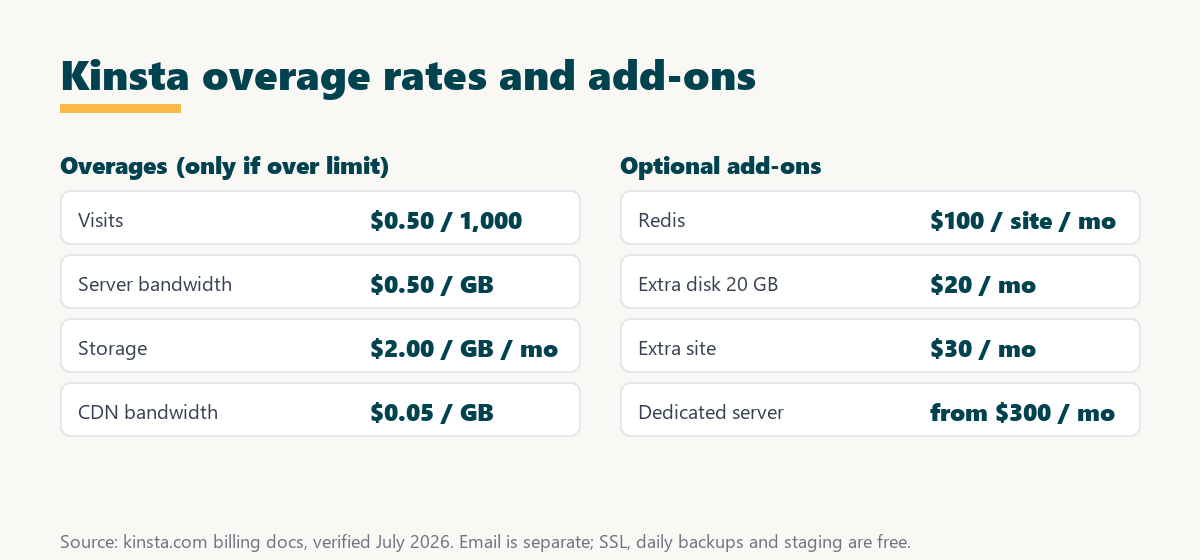
Kinsta publishes a clear rate for each type of overage: visits, server bandwidth, storage and CDN bandwidth. Only usage above a plan’s included allowance is charged, so a right-sized plan avoids all of them.
Source: kinsta.com billing docs (overages), verified August 2026. Overages are billed on the next invoice, and alerts fire before a limit is reached.
In plain terms, the visit overage is the one most sites could meet, and at 0.50 dollars per 1,000 visits it is modest, while the CDN overage of 0.05 dollars per GB is the cheapest of the four.
What Add-Ons Cost Extra on Kinsta?
Kinsta’s optional add-ons are the other source of extra cost, and each is only billed if enabled: Redis object caching, extra disk space, an additional WordPress site and a dedicated server. None is required for a standard site to run well.
Source: kinsta.com add-ons docs and kinsta.com/plans, verified August 2026. Hourly and external backups and premium staging are also optional paid add-ons, priced when enabled.
The honest point is that Redis at 100 dollars per site is the add-on most worth flagging, since a busy store may want it, while most sites never enable any of these.
Do You Need to Pay for Email Separately?
Yes, Kinsta does not host email on any plan, so a site needs a separate email provider such as Google Workspace, which starts at a few dollars a mailbox a month. This is the one guaranteed extra cost, since it applies to every site rather than only in overage cases.
The honest framing is that this is a deliberate design choice: Kinsta focuses on WordPress hosting and leaves email to specialists, so budgeting a small monthly email cost from the start avoids treating it as a surprise.
How Do You Avoid Surprise Charges on Kinsta?
Avoiding surprise charges comes down to choosing a plan with headroom, monitoring usage and only enabling add-ons that are needed. Because every rate is published and alerts fire before limits, the extras are predictable rather than hidden.
- Size the plan with headroom: Pick a tier whose visit allowance sits comfortably above typical monthly traffic, so a busy month does not trigger the visit overage.
- Watch the usage chart: The MyKinsta dashboard shows visits, storage and CDN usage against limits, so a rising trend is visible before it costs anything.
- Heed the alerts: Kinsta emails at 80 and 100 percent of a limit, so acting on those warnings prevents an overage from landing unnoticed.
- Set up email from the start: Arrange a separate email provider at launch, so the guaranteed email cost is planned rather than a surprise.
- Enable add-ons deliberately: Turn on Redis or extra disk only when a site genuinely needs it, since each add-on bills until it is removed.
The honest takeaway is that a short look at analytics before choosing a tier prevents the one common extra, the visit overage, and keeps the effective cost equal to the plan price plus email.
How Transparent Is Kinsta Pricing Overall?
Kinsta pricing is transparent overall, because plan prices, visit limits, storage, overage rates and add-on prices are all published, unlike budget hosts that hide steep renewal jumps. The extras are clearly defined, so with the right plan the cost is stable month to month.
“The first five seconds of page-load time have the highest impact on conversion rates.”
— HubSpot, page load time and conversion rates
Compared with a cheap host whose renewal price can double, Kinsta’s published rates mean the value of its speed is not undercut by a surprise bill later, which matters most for a revenue site where downtime and slow loads cost real money.
Transparent, published pricing with no renewal jumps
See Kinsta Plans →Every overage and add-on rate is published, with a 30-day money-back guarantee.
What Is the Real Total Cost of Kinsta?
The real total cost of Kinsta is the plan price plus separate email of a few dollars a month, and any overage only if a plan’s limits are exceeded. For most sites that pick the right tier, the total is simply the plan price plus email, with annual billing giving two months free.
Source: kinsta.com pricing and billing docs, verified August 2026. For a right-sized plan with no add-ons, the total is the plan price plus a small email cost.
Put simply, for a right-sized plan the total is the plan price plus a few dollars for email, with annual billing lowering the effective monthly cost.
Can You Monitor Usage to Control Costs?
Yes, MyKinsta shows visits, storage and CDN usage against a plan’s limits in near real time, so a site owner can watch trends and upgrade before hitting a limit. This visibility turns cost control into a proactive step rather than a surprise on the invoice.
The practical benefit is that the same dashboard that shows performance also shows the numbers that drive the bill, so a rising visit count is spotted and handled before it becomes an overage.
What Is Not an Extra Cost on Kinsta?
Plenty of what other hosts charge for is included free on Kinsta, and being clear about that matters as much as the extras. Free SSL, daily backups, standard staging, the CDN and expert migrations all come with the plan price rather than as add-ons.
- Free SSL: A wildcard SSL certificate is included, so serving a site over HTTPS costs nothing extra.
- Daily backups: Automatic daily backups come with every plan, with only hourly or external backups as paid add-ons.
- Standard staging: A one-click staging environment is free, and only premium staging with dedicated resources is optional.
- The CDN: A Cloudflare CDN is included, with only bandwidth beyond the allowance billed at 0.05 dollars per GB.
- Free migrations: Standard expert migrations are free, so moving a site onto Kinsta usually costs nothing.
The honest balance is that Kinsta bundles the essentials most budget hosts upsell, so the extras that do exist are the exception rather than the rule.
Do Kinsta’s Costs Rise as Your Traffic Grows?
Yes, growing traffic can raise the cost, either by pushing a site into a higher plan tier or by triggering the visit overage on the current one. The rise is predictable, though, because the visit overage rate is published at 0.50 dollars per 1,000 and the dashboard shows the trend before it lands.
The honest framing is that cost scaling with success is normal for managed hosting, and the practical choice is whether to absorb small overages in busy months or upgrade to a tier whose allowance covers the new baseline.
Is Kinsta Good Value Despite the Extras?
Kinsta is good value despite the potential extras, because its plan price already bundles a CDN, backups, security and support that other hosts charge for, and the extras are avoidable with the right plan. For a revenue site, the predictable premium cost is well justified.
“A tool is only worth its premium when the hours or revenue it protects exceed the invoice.”
— Growth Hack Suite, on tool ROI
Applied to the extras, a predictable bill that bundles the essentials protects more time and revenue than a cheap host with hidden renewal jumps. Teams weighing platform dependence can read our note on SaaS vendor lock-in before committing.
A predictable bill for a right-sized plan
View Kinsta Pricing →Essentials bundled; overages and add-ons are avoidable and published.
How Do You Pick a Plan That Avoids Extras?
You pick a plan that avoids extras by checking current visits and storage in analytics, choosing the tier that covers them with headroom, and planning email separately. The steps below keep the effective cost equal to the plan price plus email.
- Check current visits: Read monthly visits from existing analytics to find the real traffic a plan needs to cover.
- Add headroom: Choose a tier whose visit allowance sits above that figure, so a busy month does not trigger the overage.
- Check storage needs: Confirm the plan’s disk allowance covers the site, since a media-heavy site may need a higher tier or the disk add-on.
- Budget for email: Add a separate email provider’s cost to the plan, since Kinsta does not host mailboxes.
- Skip unneeded add-ons: Leave Redis and other add-ons off unless the site genuinely needs them, since each bills until removed.
The honest summary is that a right-sized plan plus a small email cost is the whole bill for most sites, and the published rates make any exception easy to anticipate.
Pick the right tier and try it risk-free
Try Kinsta Risk-Free →Free migration and a 30-day money-back guarantee.
Kinsta Hidden Costs: Frequently Asked Questions
The 12 most-asked questions about Kinsta’s hidden costs.
Does Kinsta have hidden costs?
Kinsta’s pricing is transparent with no surprise fees baked into the plan, but a few extra charges can appear if a site exceeds included visits or enables optional add-ons, all at published rates.
What causes overage charges on Kinsta?
Overage charges apply when a site exceeds its plan’s included monthly visits, billed at 0.50 dollars per 1,000 extra visits, which is why choosing a tier that fits the traffic matters.
Do CDN or bandwidth overages add to my Kinsta bill?
Each plan includes a CDN bandwidth allowance, and only if a site exceeds it does Kinsta bill extra bandwidth at 0.05 dollars per GB, so normal usage stays within the plan price.
Are backups an extra cost on Kinsta?
Daily backups are included free, but hourly backups and external backups to your own cloud storage are optional paid add-ons for sites that need more frequent or off-site protection.
Is premium staging an added cost?
Standard staging is free on every plan, while premium staging environments with dedicated resources are an optional add-on billed only if enabled.
Does Kinsta charge for migrations?
No, standard expert migrations are free, though very complex sites may use premium migration handling, so most site moves onto Kinsta cost nothing extra.
Does Kinsta charge for Redis?
Yes, Redis object caching is a paid add-on at 100 dollars per site a month, so it is enabled only for heavy dynamic or store sites that benefit from it, not by default.
Are SSL certificates an extra cost on Kinsta?
No, free SSL certificates are included on every Kinsta plan, so securing a site with HTTPS does not add to the bill.
Do I have to pay for email with Kinsta?
Kinsta does not host email, so a separate provider such as Google Workspace is needed, at a few dollars a mailbox a month. It is the one guaranteed extra cost alongside the plan.
How can I avoid unexpected Kinsta charges?
Pick a plan with headroom above current visits, monitor usage in MyKinsta, heed the 80 and 100 percent alerts, and only enable add-ons that are needed, so the bill stays close to the base plan price.
Do add-ons renew automatically on Kinsta?
Optional add-ons you enable continue to bill until removed, so reviewing active add-ons in MyKinsta periodically ensures you only pay for what a site still uses.
Is Kinsta’s pricing more honest than cheap hosts?
Kinsta avoids the renewal-price jumps and paywalled essentials common at budget hosts, bundling the CDN, backups, SSL and support into a clear price rather than upselling them later.
About this guide
Written by the Growth Hack Suite editorial team. Overage and add-on rates were read from kinsta.com billing docs.
This page carries affiliate links to Kinsta, so the honesty owed to a reader is stated plainly: Kinsta’s pricing is transparent, with visit overage at 0.50 dollars per 1,000 visits, server bandwidth at 0.50 dollars per GB, storage at 2 dollars per GB a month and CDN bandwidth at 0.05 dollars per GB, plus paid add-ons such as Redis at 100 dollars per site, extra disk at 20 dollars per 20 GB, an extra site at 30 dollars and a dedicated server from 300 dollars a month. Email is a guaranteed separate cost, while SSL, daily backups, standard staging, the CDN and migrations are free.