Table of Contents
Real-time vs bulk email verification is a workflow choice, not an accuracy one. Bulk verification cleans an existing list in one CSV pass, returning a status per address; real-time verification checks a single address on the spot via API, usually at signup. Both run the same checks, so the difference is timing, not accuracy. Most senders need bulk for cleaning and real-time for live forms.
Try both free — bulk-verify a list or check one address live with Hunter.
Try Hunter Verifier Free →Free plan included · No credit card · Bulk CSV and real-time API
What’s the Difference Between Real-Time and Bulk Email Verification?
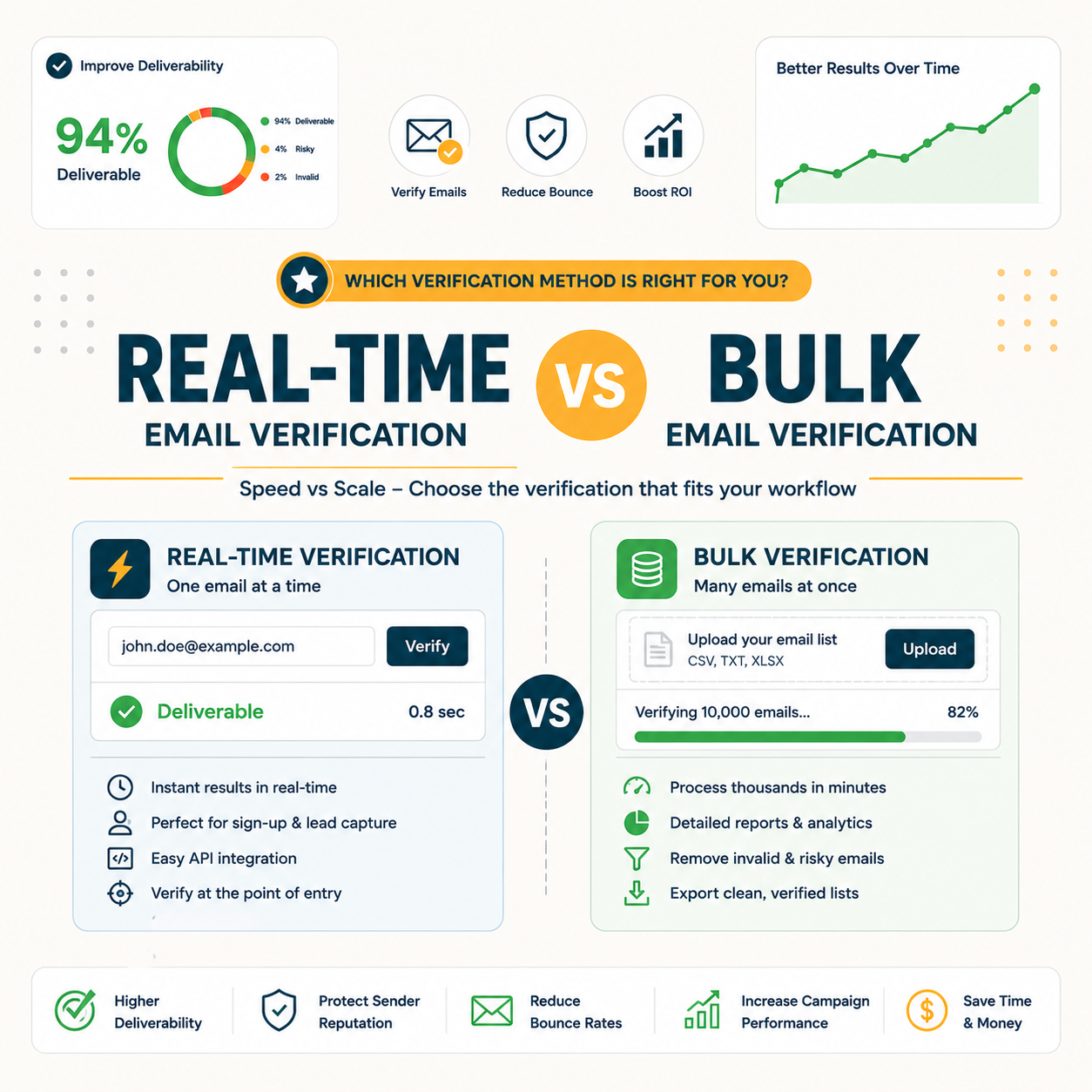
Bulk verification processes a whole list at once, usually uploaded as a CSV, and returns each address with a status. Real-time verification checks one address instantly via API, typically the moment it is entered into a form. The checks are identical and the accuracy is the same; only the timing and the integration point differ between the two methods.
- Bulk verification: Takes an entire list as a CSV or API batch, processes every address in one pass, and returns a clean file with a deliverability status for each. It suits any moment when many addresses need checking together rather than one at a time.
- Real-time verification: Validates a single address the instant it arrives, returning a status in milliseconds through an API call. It sits inside live forms and apps, blocking bad data at the point of entry instead of cleaning it later.
- Shared checks: Both methods run the same validation stack — syntax parsing, MX-record lookup, SMTP probe, and risk flags for disposable or role addresses — so the verdict on any single address is identical no matter which path triggered the check.
- Integration point: Bulk plugs into a dashboard upload or a batch endpoint run on a schedule, while real-time plugs into a live form through an inline API call, marking the clearest structural difference between the two approaches.
- Output shape: Bulk returns a full file of statuses for review and segmentation, whereas real-time returns one verdict to act on immediately, so the result feeds a cleaning workflow in one case and a gatekeeping decision in the other.
The choice is about when verification happens, not how accurate it is, since both methods run the same underlying checks.
What Is Bulk Email Verification Best For?
Bulk verification is best for cleaning an existing list before a campaign sends: a purchased list, an aging database, or a newsletter file collected over months. The flow is simple — upload, process, export the clean version. It is the right tool whenever many addresses need checking at once rather than individually as they arrive.
- Pre-campaign clean: Running a full list through bulk verification before a send removes hard bounces in advance, protecting sender reputation and inbox placement. It converts a risky blast into a clean one in a single batch pass.
- Purchased or aging lists: Lists bought from a vendor or collected long ago decay steadily as people change jobs. A bulk pass flags dead and risky addresses before any message reaches them, cutting wasted credits and complaints.
- Periodic hygiene: Scheduled monthly or quarterly bulk runs keep a database healthy over time, catching decay that accumulates between campaigns. Routine cleaning maintains low bounce rates without touching the live data-capture flow.
- Re-engagement prep: Before mailing a dormant segment, a bulk pass strips out addresses that have gone dead during the silence, so the win-back campaign reaches only inboxes that can still receive and respond to it.
- Migration cleanup: Moving contacts between platforms or merging databases tends to surface stale and duplicate addresses, and a single bulk verification on the combined file removes them before the new system inherits the existing data problems.
Bulk is the list-cleaning workhorse; anytime a batch of addresses needs checking, bulk is the answer.
What Is Real-Time (API) Verification Best For?
Real-time verification is best at the point of capture: signup forms, checkout fields, and CRM entry. It blocks fake and mistyped addresses before they enter the database, keeping data clean at the source instead of cleaning it later in bulk. The check runs in the background and returns fast enough to validate inline without slowing the user.
- Signup forms: A real-time check on a signup field rejects typos and disposable addresses before an account is created, keeping the user database clean from the first record rather than accumulating dead contacts.
- Checkout fields: Validating an email at checkout ensures order confirmations and receipts actually reach the buyer, reducing support tickets caused by mistyped addresses that silently fail to deliver.
- CRM entry: An API check at the moment a sales rep or form adds a contact stops bad records entering the pipeline, preserving data quality where decisions and outreach later depend on it.
- Lead capture pages: Gated content and webinar forms attract throwaway addresses, so an inline check at submission filters those out instantly, leaving a lead list that sales can act on without a separate cleaning step later.
- Account recovery flows: Password-reset and verification emails must reach a real inbox to work, so confirming the address in real time during account setup prevents lockouts that an after-the-fact bulk clean cannot undo.
Real-time stops bad data at entry — prevention that saves the bulk clean later.
Real-Time vs Bulk at a Glance
The table compares both methods on input, timing, integration, best use, and typical cost. Bulk fits batch cleaning; real-time fits point-of-entry capture. Neither replaces the other, because they cover different moments in the data lifecycle: one cleans what already exists, the other guards what is arriving now.
Source: hunter.io/api-documentation/v2 and hunter.io/pricing, verified 2026-06-27. Both methods draw from the same verification credit pool; only the spend pattern differs.
At a glance the two are complements, not competitors, and most mature setups run both side by side.
How Do Speed and Workflow Differ?
Bulk runs as a background job — upload, wait, download — fitting a periodic cleaning routine that does not need to be instant. Real-time returns in milliseconds inside a live form, fitting an always-on workflow where any delay would block the user. The speed each method needs is dictated by where it sits in the process.
- Bulk workflow: An operator uploads a file, the service processes it as a queued job, and a clean export returns minutes later. Speed barely matters here because nothing waits on the result; the routine runs ahead of a scheduled campaign send.
- Real-time workflow: A form submission triggers an instant API call that returns a verdict before the page advances. Latency is critical because a person is waiting, so the check must complete in milliseconds to avoid friction at signup or checkout.
Workflow placement, not raw speed, is what separates the two methods in practice.
Is One More Accurate Than the Other?
No. Real-time and bulk run identical checks — syntax, MX records, SMTP response, and risk flags — so accuracy is the same per address. The only practical difference is that real-time verifies fresh data at the moment of entry, while bulk may verify data that has aged since it was first collected and could have decayed.
Hunter’s verification API applies the same syntax, MX, and SMTP checks whether one address or many.
— Hunter API documentation
Accuracy is identical; freshness is the subtle edge real-time has by checking data the moment it arrives. For the deeper test, see the Hunter Email Verifier accuracy benchmark.
How Do Costs Compare for Bulk vs Real-Time?
Both methods usually draw from the same credit pool, so the cost per verification is similar regardless of how the check is triggered. The difference is the pattern: bulk spends credits in big periodic batches, while real-time spends them steadily as signups arrive. Budget by volume pattern, not by method, to avoid running out mid-month.
Source: hunter.io/pricing, verified 2026-06-27. Hunter’s free plan includes 50 credits per month (~100 verifications at 0.5 credit each); paid verification runs roughly $7.45 per 1,000 on the Growth plan when credits go to verifying.
Cost per check is the same; the spend pattern differs, so plan credits around signup flow plus clean cadence.
Can You Use Real-Time and Bulk Together?
Yes, and most mature setups do. Real-time guards the signup form so new data enters clean, while periodic bulk runs catch decay in the existing list over time. Used together they cover both the entry point and the back catalog of a database, closing the two main paths through which bad addresses accumulate.
Two Moments, One Credit Pool
Real-time plus bulk is the complete setup: prevent bad data at entry, remove decay from the catalog.
Set up both free — verify at signup and clean in bulk from one account.
Try Hunter Verifier Free →Free plan · No credit card · One credit pool for both
Which Should You Choose by Use Case?
Choose bulk to clean a list before sending, real-time to protect a signup form, and both for an always-on product collecting addresses continuously. The use case, not a feature preference, decides which method to switch on. Mapping the method to where addresses come from removes most of the guesswork from the decision.
Source: hunter.io/api-documentation/v2 and hunter.io/pricing, verified 2026-06-27. Method shown reflects the timing each use case requires, not an accuracy difference.
Pick by use case: cleaning means bulk, capturing means real-time, scaling means both.
When Is Bulk Verification Enough on Its Own?
Bulk alone is enough when addresses are collected in batches rather than a live stream — imported lists, event sign-ups, or occasional newsletter subscriptions verified before each send. If there is no high-traffic form feeding the database continuously, real-time adds little, and a scheduled bulk pass covers the whole job at lower complexity.
- Batch collection: When new addresses arrive in occasional groups — a trade-show export, a one-off purchased file — a single bulk pass before the next send catches every bad record, and no live integration is required to stay clean.
- No live form: Sites without a high-volume signup or checkout flow gain nothing measurable from an inline API check, so adding real-time would be unused capacity that complicates the stack without lowering bounce rates further.
No high-traffic form means bulk alone covers the job, and real-time would sit as unused capacity.
When Do You Really Need Real-Time Verification?
Real-time is necessary when addresses arrive continuously through forms, checkouts, or apps, and bad data must be blocked before it enters the system. High-volume signup products and lead forms gain the most, since cleaning that constant flow in bulk later is slower, costlier, and leaves a window where dead addresses already sit in the database.
- Continuous form traffic: Products taking signups around the clock accumulate bad addresses faster than periodic cleaning can keep up, so an inline check at submission is the only way to hold data quality steady at scale.
- Block at entry: Rejecting a fake or mistyped address before account creation prevents the record from ever existing, which is cheaper and cleaner than detecting and removing it during a later bulk pass.
- App and checkout flows: Transactional emails such as receipts and password resets must reach real inboxes, making an instant check at the entry field essential for products where a failed delivery breaks the user experience.
- Freemium signups: Free-tier products draw a high share of disposable addresses from users avoiding commitment, so a real-time check at registration keeps the active-user count honest and the onboarding emails landing where they should.
- Compliance-sensitive data: Regulated industries that must contact verified individuals benefit from confirming an address at the point of collection, since a clean record from the start reduces the risk of undeliverable notices later in the relationship.
Verifying a list before the first send is the cheapest way to protect a sending domain.
— Growth Hack Suite, pre-send verification workflow
Live form traffic is the trigger for real-time, preventing the mess bulk would otherwise clean up.
Verdict: Real-Time, Bulk, or Both?
For most senders the answer is both, sequenced by need: bulk to clean existing and imported lists, real-time to protect live signup forms. If only one is possible, start with bulk for cleaning and add real-time once form traffic justifies it. Same accuracy, same credits, different moment in the data lifecycle — the methods complete each other.
Verdict: Bulk for cleaning existing lists, real-time for capturing new signups, both for always-on products at scale. Accuracy is identical and credits come from one pool, so the choice is purely about when each check fires. Start with bulk, add real-time when form traffic grows.
Email verification confirms an address exists and can receive messages.
— Wikipedia, Email verification
Try bulk and real-time verification free — one account, both methods.
Try Hunter Verifier Free →Free plan · No credit card · CSV bulk and real-time API
Related Tools in the Hunter Stack
Whether the choice is bulk, real-time, or both, Hunter supports each from one account alongside email finding. The verifier basics cover what each check does, and the finder review covers building the lists worth verifying in the first place on the same credit pool.
- Hunter Email Verifier: The validation layer that runs both bulk and real-time checks — start with what the Hunter Email Verifier is.
- Email verification basics: The shared definition behind both methods — read what email verification is for the fundamentals.
- Hunter Email Finder: The other half of the bundle on one credit pool — read the Hunter.io email finder review for list building.
Real-Time vs Bulk Email Verification: Frequently Asked Questions
The 12 most-asked questions about real-time vs bulk email verification.
What’s the difference between real-time and bulk email verification?
Bulk verification processes a whole list at once, usually as a CSV upload, and returns a status for each address. Real-time verification checks a single address instantly via API, typically at the moment it is entered. Both run the same checks, so the difference is timing and integration point, not accuracy.
Which is more accurate, real-time or bulk?
Neither is more accurate. Real-time and bulk run identical checks — syntax, MX, SMTP, and risk flags — so the result per address is the same. The only edge real-time has is freshness, since it verifies data the moment it arrives rather than after it has aged.
When should I use bulk email verification?
Use bulk to clean an existing list before a campaign: a purchased list, an aging database, or a newsletter file. Upload, process, and export the clean version in one pass. Bulk is the right choice whenever many addresses need checking together rather than one at a time as they arrive.
When do I need real-time (API) verification?
Real-time is needed when addresses arrive continuously through forms, checkouts, or apps, and bad data must be blocked before it enters. High-volume signup products and lead forms gain the most, because cleaning that constant flow in bulk later is slower and leaves dead addresses sitting in the database meanwhile.
Can I use both real-time and bulk together?
Yes, and most mature setups do. Real-time guards the signup form so new data enters clean, while periodic bulk runs catch decay in the existing list. Together they cover both the entry point and the back catalog, closing the two main paths through which bad addresses accumulate in a database.
Is real-time verification more expensive?
Not per check. Both methods usually draw from the same credit pool, so cost per verification is the same. The difference is the spend pattern: real-time spends credits steadily as signups arrive, while bulk spends them in large periodic batches before each send.
Does real-time verification slow down my signup form?
A well-built API check returns in milliseconds, fast enough to validate inline without a noticeable delay. The verdict comes back before the form advances, so users rarely feel it. Latency only becomes an issue if the integration waits synchronously without a sensible timeout or fallback path.
Is bulk verification enough on its own?
Bulk alone is enough when addresses arrive in batches rather than a live stream — imported lists, events, or occasional newsletter sign-ups verified before each send. Without a high-traffic form feeding the database, real-time adds little, and a scheduled bulk pass covers the whole job at lower complexity.
Which is better for cleaning a purchased list?
Bulk is better for a purchased list. A bought file arrives as a single batch and is often stale, so one bulk pass flags every dead and risky address before any message sends. Real-time has no role here because the addresses are not arriving live through a form.
Which is better for a signup form?
Real-time is better for a signup form. An inline API check rejects typos and disposable addresses before an account is created, keeping the database clean from the first record. Bulk would only catch those bad entries later, after they have already entered and possibly triggered failed sends.
Do both use the same credits?
On most platforms, yes. Bulk and real-time verification draw from one shared credit pool, with each verification costing the same regardless of how it was triggered. On Hunter, verification costs 0.5 credit per address whether the check comes from a CSV batch or a live API call.
Real-time vs bulk — which should I choose?
Choose bulk to clean a list before sending, real-time to protect a live signup form, and both for an always-on product collecting addresses continuously. If only one is possible, start with bulk for cleaning and add real-time once form traffic justifies it. The use case decides, not a feature preference.