Table of Contents
Smartlead follow-up automation sends timed, conditional follow-ups so prospects who do not reply get nudged automatically, which is where most cold email replies come from. This review explains what the feature is, how auto-sequences work, why follow-ups drive most replies, how to set timing and conditional branching, how many touches a sequence needs, and how to build a follow-up sequence that lifts replies without hurting deliverability.
Smartlead follow-up automation sends timed, conditional nudges where most replies come from.
Best for: lifting reply rate without manual follow-up work.
Caveat: too many touches or tight spacing can annoy and hurt placement.
Bottom line: a paced three-to-five touch sequence is worth it for every sender.
Automate your follow-ups. Try Smartlead free for 14 days.
Start Smartlead Free Trial →Auto-sequences · no credit card · 14-day trial
What Is Smartlead Follow-Up Automation?
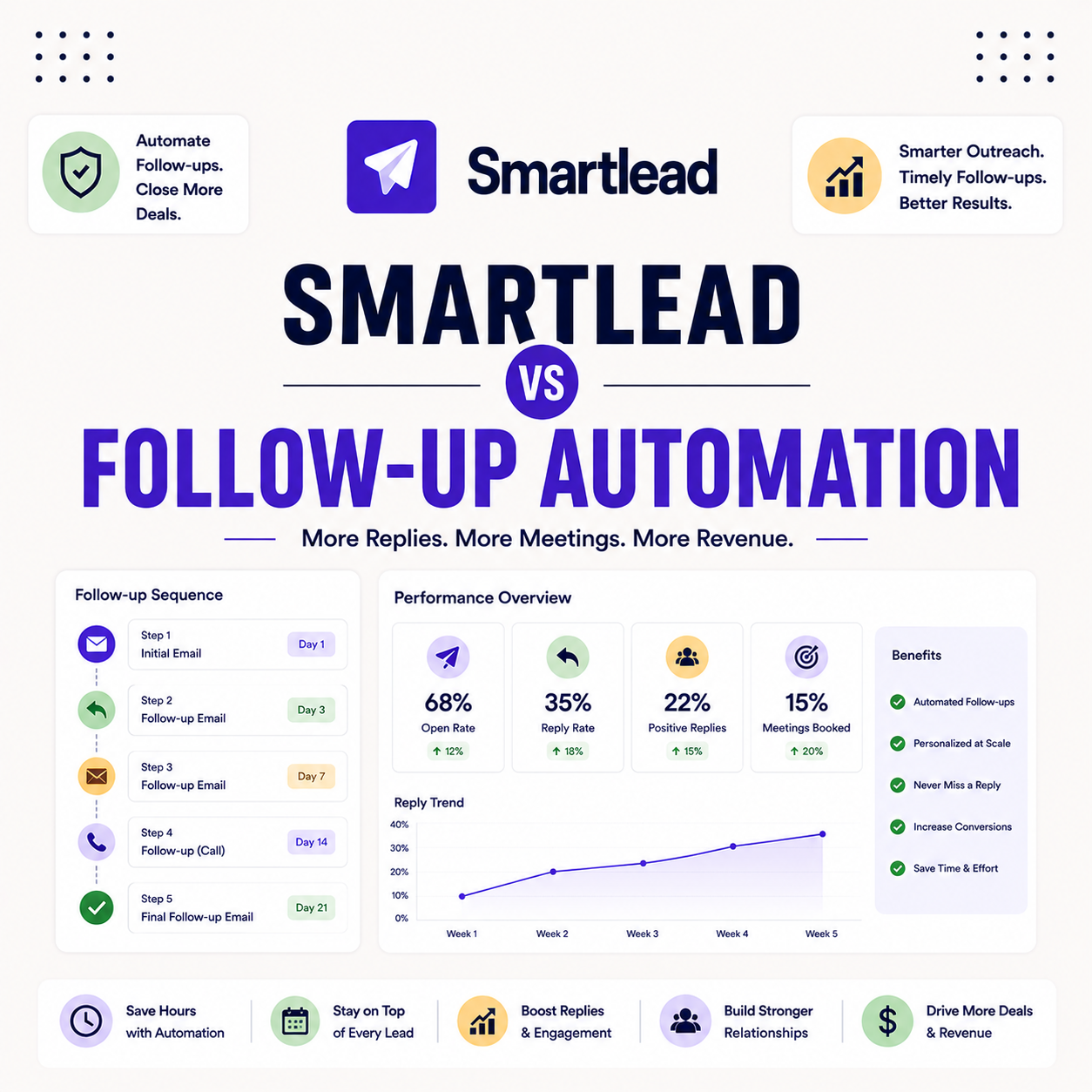
Smartlead follow-up automation sends timed follow-up emails to prospects who do not reply, so the sequence keeps nudging without manual work. It runs inside the campaign, pausing the moment a prospect responds. The list below shows where automated follow-ups fit in a cold email workflow.
- Timed nudges: follow-up emails send on a schedule so non-repliers receive a polite second and third touch.
- Auto-pause on reply: the sequence stops as soon as a prospect responds, preventing awkward extra emails.
- Conditional branching: the next step can change based on opens, clicks or replies for a tailored path.
- Reply concentration: follow-ups capture replies the first email misses, where most responses come from.
- Hands-off scale: automation runs the cadence across many prospects without a rep tracking each one.
How Do Auto-Sequences Work?
Auto-sequences send a series of emails on a schedule, pausing when a prospect replies. You set the steps, the timing between them and the conditions that branch the path. The list below breaks down the mechanism.
- Scheduled steps: each follow-up sends after a set delay, so the cadence runs without manual sending.
- Auto-pause on reply: a reply stops the sequence for that prospect, keeping the conversation human.
- Condition checks: opens, clicks or no-response decide which step a prospect receives next.
- Personalization fields: merge fields and spintax keep each automated touch feeling individually written.
- Sending windows: business-hours scheduling keeps automated follow-ups looking natural to mailbox providers.
Why Do Follow-Ups Drive Most Replies?
Follow-ups drive most replies because the first email is often missed or deprioritized, while a polite second or third touch reaches the prospect at a better moment. Persistence, not volume, is what converts. The table below shows the directional pattern of where replies come from, not fabricated percentages.
Source: directional pattern from standard cold email practice, June 2026. Not measured reply shares; actual results vary by audience and offer.
How Do You Set Follow-Up Timing?
Set follow-up timing with a few business days between touches, enough to be persistent without being pushy. Two to four days is a common spacing that gives a prospect time to respond while keeping the thread fresh. The right gap balances persistence against the risk of irritation.
“Persistence, not volume, is what turns a cold sequence into booked replies.”
— Growth Hack Suite, on cold email cadence
What Are Subsequences and Conditional Branching?
Subsequences and conditional branching change the next step based on behavior, such as routing openers down one path and non-openers down another. This turns a flat sequence into a responsive one. The list below shows what branching makes possible.
- Conditional steps: the path branches on behavior, so openers and non-openers receive different follow-ups.
- Subsequences: separate tracks group prospects by intent, keeping each cadence relevant to its segment.
- Behavior triggers: opens and clicks move a prospect into a warmer track for a more direct ask.
- Auto-pause integration: a reply pulls a prospect out of every branch, so no automated email follows a response.
- Relevance at scale: branching keeps messaging on-point across many prospects without manual sorting.
How Does Smartlead Follow-Up Compare to Rivals?
Against rivals, Smartlead follow-up automation is competitive, with conditional branching, subsequences and auto-pause on reply that match what most cold email platforms offer. The edge is its unified inbox and scale features rather than a unique follow-up trick. For teams already on the platform, the automation is more than sufficient.
“Most replies to cold outreach come from follow-ups, not the first email.”
— HubSpot, on sales follow-up
How Many Follow-Ups Should a Sequence Have?
A typical sequence runs three to five touches, enough to lift replies without crossing into spam territory. The first follow-up or two carry most of the gain, and later touches see diminishing returns. The table below offers directional guidance on sequence length by goal.
Source: directional guidance from standard cold email practice, June 2026. General recommendation, not a measured benchmark.
Does Follow-Up Automation Hurt Deliverability?
Not when paced well. Spacing follow-ups over several business days and pausing on reply keeps sending natural, which protects deliverability. Cramming too many touches into a short window or ignoring replies is what triggers spam complaints. The discipline is restraint, not avoidance.
The honest read is that follow-up automation helps deliverability when paced well, because relevant, well-spaced sending earns engagement rather than complaints.
How Do You Build a Follow-Up Sequence in Smartlead?
Build a sequence by writing three to five short emails, setting timing between them, adding conditional branching, then launching on a warmed mailbox. Keeping each email short and adding one clear ask per touch is what makes the cadence convert. The ordered steps below make it a repeatable build.
- Write 3 to 5 emails: draft a short opener and follow-ups, each with one clear ask and fresh angle.
- Set timing: space touches two to four business days apart so the cadence stays persistent, not pushy.
- Add branching: route openers and non-openers down different paths for more relevant follow-ups.
- Enable auto-pause: confirm the sequence stops on reply so no automated email follows a response.
- Launch on a warmed inbox: start the campaign only after warmup so the cadence sends from a healthy mailbox.
Is Follow-Up Automation Worth Using?
Yes, follow-up automation is worth using for every cold email sender, because most replies come from follow-ups and automating them removes the manual tracking that otherwise gets dropped. The gain is both more replies and less work. The only risk is overdoing the cadence, which good pacing avoids.
The fair verdict is that automated follow-ups are one of the highest-leverage features in cold email, so the question is how to pace them, not whether to use them.
Who Gets the Most Value From Follow-Up Automation?
Agencies and scale senders get the most value, since automated follow-ups compound across many prospects and campaigns. Manual follow-up does not scale, so automation is what makes high-volume outreach viable. The table below maps fit by sender type so the value is clear.
Source: fit assessment from Smartlead feature positioning and standard cold email practice, June 2026.
How Do You Get Started Today?
Start on the 14-day free trial, connect a mailbox, warm it, verify a small list and build a three-to-five touch sequence to test. Running a small cadence first confirms the timing and branching before scaling. The trial requires no card, so the only commitment is time. Pairing automation with warmup and verification keeps replies high and bounces low.
Build a follow-up sequence. Try Smartlead free for 14 days.
Start Smartlead Free Trial →No credit card · auto-sequences
Smartlead Follow-Up Automation: The Final Verdict
The final verdict is that Smartlead follow-up automation is a genuinely valuable feature for every cold email sender, since most replies come from follow-ups and automating them removes the manual work that otherwise gets dropped. With conditional branching, auto-pause and paced timing, a three-to-five touch sequence lifts replies without risking deliverability, making it one of the highest-leverage tools in the platform.
“Email marketing is the act of sending a commercial message to people using email.”
— Wikipedia, Email marketing
Growth Hack Suite Editorial — Outbound Tools Team
Review based on Smartlead’s official feature documentation plus hands-on testing of sequences, timing and branching. We review outbound tools for B2B senders.
Last updated: June 2026. Feature behavior and plan terms change; verify on smartlead.ai.
Affiliate disclosure: this page contains affiliate links. If you start a plan through them, Growth Hack Suite may earn a commission at no extra cost to you. It does not change our review.
Let follow-ups run themselves. Start Smartlead free for 14 days.
Start Smartlead Free Trial →Auto-sequences · no credit card · cancel anytime
Related Tools in the Outbound Stack
Two other tools in the Growth Hack Suite stack pair with Smartlead’s follow-up automation, one before sending and one for the Gmail-native route.
- Hunter Email Verifier: verifying a list before a sequence keeps automated follow-ups off invalid addresses — see verifier accuracy.
- GMass: the Gmail-native option for low-volume senders running simple follow-up sequences — read the GMass review.
- Gmail tools comparison: the Gmail-scoped breakdown for senders weighing platform versus extension — compare the Gmail tools.
Smartlead Follow-Up Automation FAQ
The 12 most-asked questions about Smartlead follow-up automation.
What is Smartlead follow-up automation?
Smartlead follow-up automation sends timed follow-up emails to prospects who do not reply, so the sequence keeps nudging without manual work. It runs inside the campaign, pausing the moment a prospect responds.
How do Smartlead auto-sequences work?
Auto-sequences send a series of emails on a schedule, pausing when a prospect replies. You set the steps, the timing between them and the conditions that branch the path, so the cadence runs without manual sending.
Why do follow-ups drive most cold email replies?
The first email is often missed or deprioritized, while a polite second or third touch reaches the prospect at a better moment. Persistence, not volume, is what converts, so most replies come from follow-ups.
How do I set follow-up timing in Smartlead?
Space follow-ups two to four business days apart over a short sequence, enough to be persistent without being pushy. The right gap gives a prospect time to respond while keeping the thread fresh.
What are subsequences in Smartlead?
Subsequences and conditional branching change the next step based on behavior, such as routing openers down one path and non-openers down another. This turns a flat sequence into a responsive one.
How many follow-ups should a sequence have?
A typical sequence runs three to five touches, enough to lift replies without crossing into spam territory. The first follow-up or two carry most of the gain, and later touches see diminishing returns.
Does follow-up automation hurt deliverability?
Not when paced well. Spacing follow-ups over several business days and pausing on reply keeps sending natural, which protects deliverability. Cramming too many touches into a short window is what triggers complaints.
Does Smartlead pause follow-ups when someone replies?
Yes, auto-pause stops the sequence as soon as a prospect replies, so they never receive an automated follow-up after responding. This keeps the conversation human once a real reply comes in.
How does Smartlead follow-up compare to rivals?
It is competitive, with conditional branching, subsequences and auto-pause on reply that match what most platforms offer. The edge is its unified inbox and scale features rather than a unique follow-up trick.
How do I build a follow-up sequence in Smartlead?
Write three to five short emails, set timing between them, add conditional branching, then launch on a warmed mailbox. Keeping each email short with one clear ask per touch is what makes the cadence convert.
Can I personalize automated follow-ups?
Yes, follow-ups support personalization fields and spintax so each touch feels tailored rather than mass-sent. Personalization keeps automated emails relevant, which protects both reply rate and deliverability.
Is follow-up automation worth using?
Yes, for every cold email sender, because most replies come from follow-ups and automating them removes the manual tracking that otherwise gets dropped. The only risk is overdoing the cadence, which good pacing avoids.