Table of Contents
The Smartlead master inbox, also called the unibox, consolidates replies from every campaign and client into one centralized inbox, with AI categorization and bulk actions. This guide explains what it is, how it works, how AI sorts replies by intent, why it matters at scale, how agencies use it, whether it syncs with a CRM, and how to set it up.
The Smartlead master inbox centralizes every reply with AI categorization and bulk actions.
Best for: teams running many campaigns or clients across mailboxes.
Caveat: the value is smaller for a solo sender with one mailbox.
Bottom line: one inbox for every reply is a real reason to choose it.
Manage every reply in one place. Try Smartlead free for 14 days.
Start Smartlead Free Trial →Unified inbox · no credit card · 14-day trial
What Is the Smartlead Master Inbox?
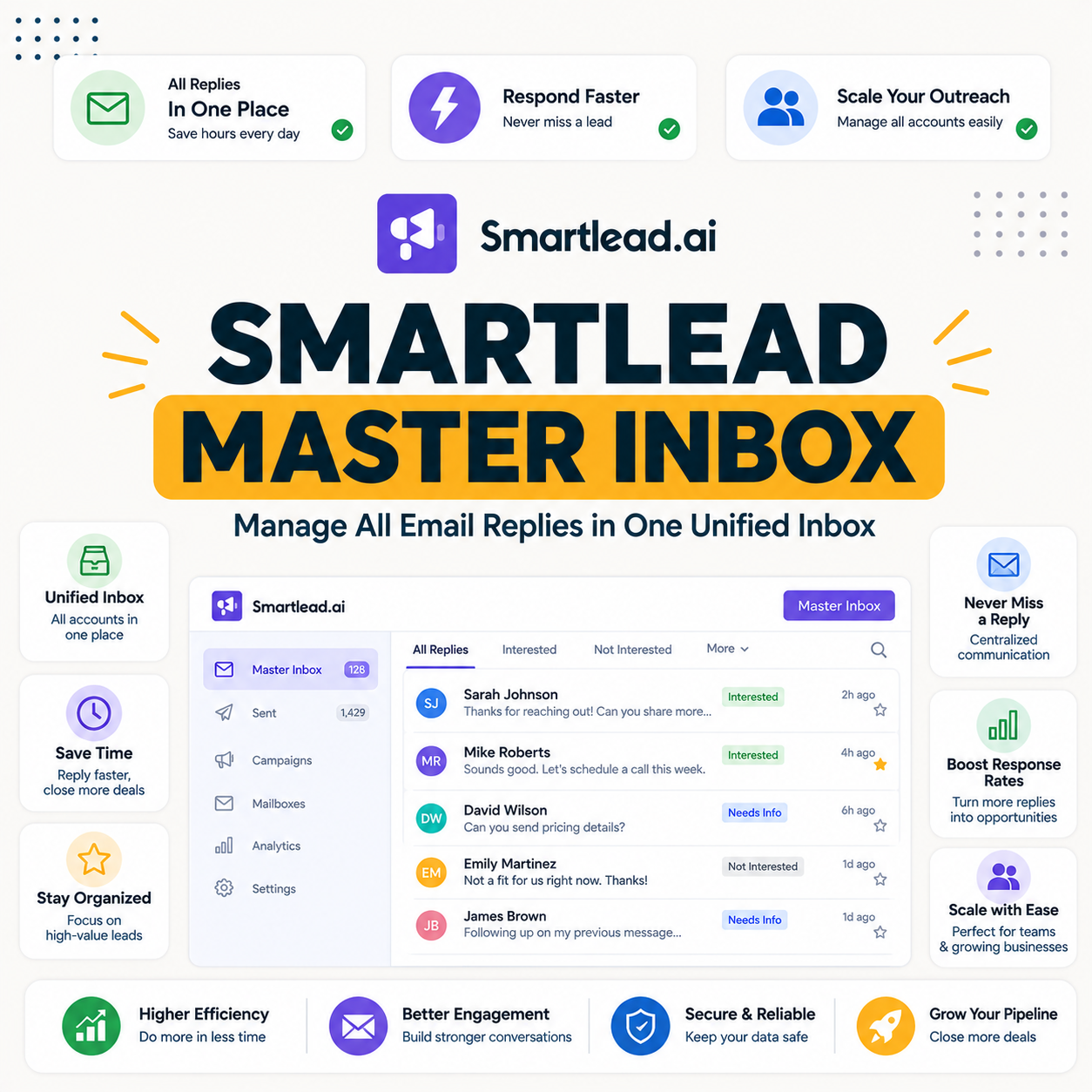
The Smartlead master inbox, or unibox, is a single view that consolidates replies from all campaigns and connected mailboxes into one feed. Instead of checking many accounts, a team works from one place. The list below shows what the master inbox provides.
- One centralized view: replies from every campaign and mailbox land in a single feed to work from.
- AI categorization: each reply is tagged by intent, so hot leads surface ahead of auto-replies.
- Bulk actions: a team acts on many replies at once instead of handling each one separately.
- Multi-client ready: agencies manage every client’s replies without logging into separate accounts.
- Reply from one place: a rep reads and responds in the inbox, keeping the whole conversation in view.
How Does the Master Inbox Work?
The master inbox pulls replies from every connected mailbox into one feed, tags each by intent, and lets a team act on them with notes, assignment and bulk actions. It works automatically once campaigns are running. The list below breaks down the mechanism.
- Centralized feed: every reply across mailboxes flows into one view rather than scattered inboxes.
- Intent tagging: AI sorts each reply by type, so positive replies stand out from out-of-office notes.
- Assignment and notes: replies route to the right team member with context attached for handoff.
- Bulk handling: repetitive replies like auto-responders are cleared in batches to save time.
- Automatic operation: the inbox populates as campaigns run, with no separate setup step required.
How Does AI Categorize Replies?
AI reads each reply and tags it by intent, such as interested, not now, or out of office, so hot leads surface first. That sorting turns a flood of replies into a prioritized queue. For a busy team, intent tagging is what makes a high reply volume manageable. The deciding benefit is that the best leads are never buried.
The honest read is that AI categorization is not perfect, but it reliably pushes the replies worth answering to the top of the feed.
Why Does the Master Inbox Matter at Scale?
At scale, replies arrive across many mailboxes and clients, and missing one means a lost deal. The master inbox removes the risk of a reply sitting unseen in an account no one checks. The more mailboxes a team runs, the more the single feed matters. The deciding factor is that no positive reply slips through the cracks.
The practical effect is that reply management scales with the number of mailboxes instead of multiplying the daily checking work.
How Do Agencies Use the Master Inbox?
Agencies use the master inbox to manage replies across all client campaigns without logging into separate accounts, routing each to the right person. One feed covers every client, which is what makes multi-client management practical. The list below shows the agency workflow.
- All clients in one place: replies from every client campaign appear in a single feed to triage.
- Assignment: each reply routes to the right team member, so ownership is clear across clients.
- Notes and context: internal notes keep the team aligned on how to handle a client’s lead.
- Per-client reporting: reply outcomes roll up by client, which supports clean client updates.
- No account switching: the team never logs into separate inboxes, which removes a major time sink.
“A reply that no one sees is a deal that quietly dies in an unchecked inbox.”
— Growth Hack Suite, on reply management
How Does It Compare to Other Inboxes?
Compared to rivals, the Smartlead master inbox stands out for AI categorization and bulk actions across unlimited mailboxes, where many tools offer only a basic combined view. The difference shows most for teams handling a high reply volume. The table below compares the core capabilities qualitatively.
Source: Smartlead feature documentation and standard tool comparison, June 2026. Qualitative capability view; confirm specific features on each vendor’s page.
“Responding to a lead within the first hour dramatically improves the odds of conversion.”
— HubSpot, on lead response time
Can You Manage the Master Inbox From a Mobile App?
Yes, Smartlead offers mobile apps so you can read and reply from the master inbox on the go, which matters when a hot lead replies outside working hours. Fast response is often the difference between booking a meeting and losing it. The honest read is that mobile access turns the inbox into a real-time tool rather than a desk-only one.
The practical benefit is that a rep can answer a positive reply within minutes, even away from a laptop, protecting the conversion.
Does the Master Inbox Sync With a CRM?
Yes, replies and outcomes can sync to a CRM through integrations and the API, so deals move forward without manual copying. A positive reply in the inbox can update a CRM record automatically. For a RevOps team, that sync keeps the pipeline accurate. The deciding benefit is that reply management and pipeline stay connected.
The fair read is that the master inbox is most powerful when wired to a CRM, so replies become tracked pipeline rather than inbox notes.
Can You Schedule Follow-Ups From the Inbox?
Yes, you can schedule follow-ups and trigger next steps directly from the master inbox, so a reply leads straight into the next action without switching tools. Handling the reply and the follow-up in one place keeps the workflow tight. The practical benefit is fewer dropped threads, since the next step is set the moment a reply is read.
The honest read is that scheduling from the inbox removes the gap where follow-ups usually get forgotten between tools.
How Does the Master Inbox Help Reply Rate?
By surfacing replies fast and sorting by intent, the master inbox helps teams respond to hot leads quickly, which lifts conversion from the replies already earned. It does not generate replies, but it makes sure the ones received are answered in time. The list below shows how it protects reply value.
- Fast surfacing: replies appear immediately in one feed, so a team can respond before a lead cools.
- Intent first: hot leads are tagged and prioritized, so the best replies are answered first.
- No missed replies: a single feed means no positive reply sits unseen in an unchecked mailbox.
- Quick handoff: assignment routes replies to the right rep, so response does not wait on the wrong person.
- Mobile response: answering from a phone keeps response time low even outside working hours.
Drowning in scattered replies? Try Smartlead free for 14 days.
Start Smartlead Free Trial →No credit card · unified master inbox
How Do You Set Up the Master Inbox?
The master inbox works automatically once mailboxes are connected, pulling in replies as campaigns run, so setup is mostly about connecting accounts and tuning categorization. The ordered steps below cover the small amount of setup involved.
- Connect mailboxes: add the sending accounts so their replies flow into the master inbox.
- Run campaigns: launch sends so replies start populating the centralized feed automatically.
- Set categorization: review the AI intent tags and adjust how replies are sorted if needed.
- Assign owners: route replies to the right team members so handling is clear from the start.
- Connect a CRM: sync replies and outcomes so the inbox feeds tracked pipeline, not just notes.
Is the Master Inbox Good for Solo Operators?
Yes, even solo operators benefit, because one inbox beats checking many accounts, though the gain is smaller than for a team. A solo sender running several mailboxes still saves time and avoids missed replies. The honest read is that the value scales with mailbox count, so a single-mailbox sender gains the least.
The fair verdict is that the master inbox helps anyone running more than one mailbox, with the benefit growing as accounts and clients add up.
Is the Master Inbox a Reason to Choose Smartlead?
For teams running many campaigns or clients, the master inbox is a real reason to choose Smartlead, since reply management at scale is where outbound deals are won or lost. The table below maps fit by team type so the value is clear.
Source: fit assessment from Smartlead feature positioning and standard outbound practice, June 2026.
How Do You Get Started Today?
Start on the 14-day free trial, connect a mailbox, warm it, run a small campaign and watch replies flow into the master inbox. Seeing the unified feed on a live campaign is the fastest way to judge its value. The trial requires no card, so the only commitment is time. Connecting a CRM early turns those replies into tracked pipeline.
See every reply in one feed. Try Smartlead free for 14 days.
Start Smartlead Free Trial →No credit card · unified master inbox
Smartlead Master Inbox: The Final Verdict
The final verdict is that the Smartlead master inbox is a genuinely valuable feature for teams and agencies running many campaigns, since AI categorization, bulk actions and CRM sync turn a flood of replies into a managed pipeline. It is less essential for a single-mailbox solo sender, but for anyone at scale, one inbox for every reply is a real reason to choose the platform.
“Email marketing is the act of sending a commercial message to people using email.”
— Wikipedia, Email marketing
Growth Hack Suite Editorial — Outbound Tools Team
Review based on Smartlead’s official documentation plus hands-on testing of the unibox, AI categorization and reply workflows. We review outbound tools for B2B senders.
Last updated: June 2026. Feature behavior and plan terms change; verify on smartlead.ai.
Affiliate disclosure: this page contains affiliate links. If you start a plan through them, Growth Hack Suite may earn a commission at no extra cost to you. It does not change our review.
Catch every reply in one inbox. Start Smartlead free for 14 days.
Start Smartlead Free Trial →Unified inbox · no credit card · cancel anytime
Related Tools in the Outbound Stack
Two other tools in the Growth Hack Suite stack pair with Smartlead’s master inbox, one before sending and one for the Gmail-native route.
- Hunter Email Verifier: verifying lists before sending keeps the replies in the inbox from real prospects — see verifier accuracy.
- GMass: the Gmail-native option for low-volume senders managing replies in Gmail itself — read the GMass review.
- Gmail tools comparison: the Gmail-scoped breakdown for senders weighing platform versus extension — compare the Gmail tools.
Smartlead Master Inbox FAQ
The 12 most-asked questions about the Smartlead master inbox.
What is the Smartlead master inbox?
The Smartlead master inbox, or unibox, is a single view that consolidates replies from all campaigns and connected mailboxes into one feed. Instead of checking many accounts, a team works from one place with AI categorization and bulk actions.
How does the Smartlead master inbox work?
It pulls replies from every connected mailbox into one feed, tags each by intent, and lets a team act on them with notes, assignment and bulk actions. It works automatically once campaigns are running.
Does the master inbox categorize replies with AI?
Yes, AI reads each reply and tags it by intent, such as interested, not now, or out of office, so hot leads surface first. That sorting turns a flood of replies into a prioritized queue.
Why does the master inbox matter at scale?
At scale, replies arrive across many mailboxes and clients, and missing one means a lost deal. The master inbox removes the risk of a reply sitting unseen in an account no one checks.
How do agencies use the Smartlead master inbox?
Agencies manage replies across all client campaigns from one place, using notes, assignment and per-client reporting. One feed covers every client, which is what makes multi-client management practical.
Is there a Smartlead mobile app for the inbox?
Yes, Smartlead offers mobile apps so you can read and reply from the master inbox on the go. Fast response to a hot lead outside working hours is often the difference between booking and losing a meeting.
Does the master inbox sync with a CRM?
Yes, replies and outcomes can sync to a CRM through integrations and the API, so deals move forward without manual copying. A positive reply can update a CRM record automatically.
Can I schedule follow-ups from the master inbox?
Yes, you can schedule follow-ups and trigger next steps directly from the inbox, so a reply leads straight into the next action without switching tools. That keeps the workflow tight and reduces dropped threads.
How does the master inbox help reply rate?
By surfacing replies fast and sorting by intent, it helps teams respond to hot leads quickly, which lifts conversion from the replies already earned. It does not generate replies, but it ensures the ones received are answered in time.
How do I set up the Smartlead master inbox?
It works automatically once mailboxes are connected, pulling in replies as campaigns run. Setup is mostly connecting accounts, tuning categorization, assigning owners and connecting a CRM for pipeline sync.
What is the difference between the unibox and master inbox?
They are the same feature. Smartlead uses unibox and master inbox interchangeably for the unified view that consolidates replies from every campaign and mailbox into one feed.
Is the master inbox a reason to choose Smartlead?
For teams running many campaigns or clients, yes, since reply management at scale is where outbound deals are won or lost. For a single-mailbox solo sender the benefit is smaller, so it scales with mailbox count.