Table of Contents
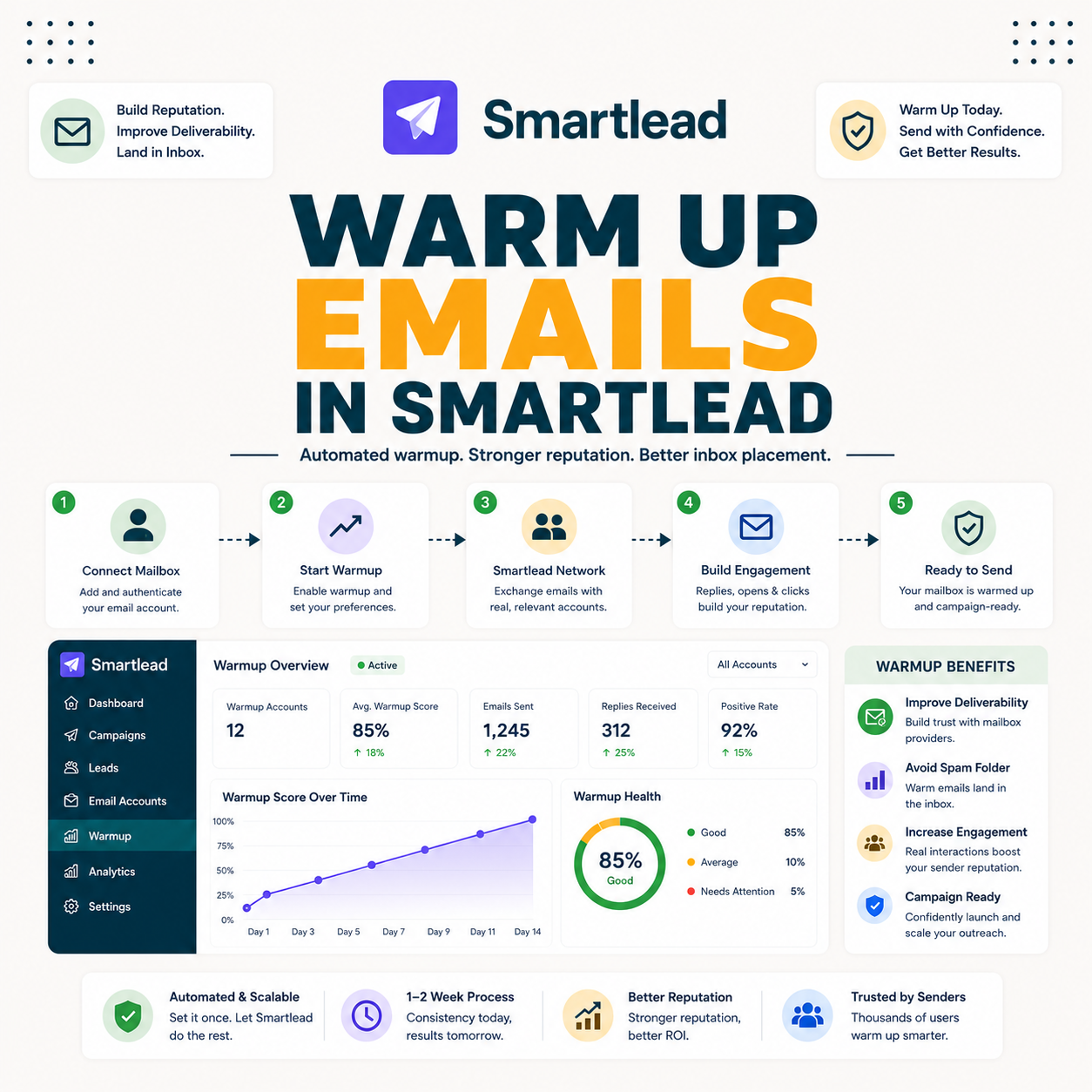
Knowing how to warm up emails in Smartlead is the difference between landing in the inbox and the spam folder, because a new mailbox has no sending history and providers treat it with suspicion. This guide covers enabling warmup per mailbox, how long to run it, what good warmup looks like, when a mailbox is ready to send, and what hurts the process.
Warm up by enabling it on every mailbox and running one to two weeks before sending.
Best for: any new mailbox or domain before its first real send.
Caveat: warmup is included on higher tiers, an add-on on lower ones.
Bottom line: skipping warmup almost guarantees spam placement.
Warm every mailbox before sending. Try Smartlead free for 14 days.
Start Smartlead Free Trial →Unlimited mailboxes · no credit card · 14-day trial
Why Do You Need to Warm Up Emails in Smartlead?
You need to warm up emails in Smartlead because a new mailbox has no sending history, so providers treat it as risky and filter its mail. Warmup builds the reputation that earns inbox placement before any real campaign. The deciding factor is that reputation has to be built first, not assumed. The list below covers why warmup matters.
- No history looks risky: a brand-new mailbox has nothing to prove it is a legitimate sender.
- Builds trust gradually: warmup adds positive sending history that providers learn to trust.
- Protects placement: a warmed mailbox reaches the inbox where a cold one lands in spam.
- Required for new domains: fresh sending domains especially need warmup before real volume.
- Foundation for scale: reputation built in warmup is what lets volume grow safely later.
How Do You Enable Warmup on a Mailbox?
Enable warmup on each mailbox right after connecting it, turning the feature on in the mailbox settings. Switching it on immediately means reputation starts building while everything else is set up. The deciding factor is that warmup should start the moment a mailbox connects. The list below covers enabling it.
- Connect first: add and authenticate the mailbox before turning warmup on.
- Turn warmup on: enable the warmup feature in the mailbox settings right after connecting.
- Start immediately: beginning warmup at connection means reputation builds while setup continues.
- Leave it running: warmup needs continuous days, so it should not be paused once started.
- Repeat per mailbox: enable warmup individually on every account, since reputation is per mailbox.
How Long Should You Warm Up Before Sending?
When you warm up emails in Smartlead, run it for at least one to two weeks before real sends, longer for stricter providers or fresh domains. The window gives the mailbox time to build a believable sending history. The honest read is that rushing the window is the most common cause of first-campaign spam placement. The table below shows a typical warmup timeline.
Source: typical warmup timeline from standard cold email practice, mid-2026. Windows are directional and vary by provider and domain age.
What Does Good Warmup Look Like?
Good results when you warm up emails in Smartlead show steadily rising positive interactions: messages opened, replied to and moved out of spam, with a low spam rate throughout. Those signals tell providers the mailbox behaves like a real sender. The deciding factor is the trend, not any single day. The list below covers the markers of healthy warmup.
- Rising interactions: opens and replies on warmup mail grow steadily over the window.
- Low spam rate: warmup mail mostly lands in the inbox rather than the spam folder.
- Stable trend: the signals hold steady or improve rather than swinging up and down.
- Spam recovery: warmup mail that lands in spam gets moved back, training the filter.
- Consistent volume: warmup sends continue daily rather than stopping and starting.
“Watch the warmup trend over days, because a steady rise matters more than any single number.”
— Growth Hack Suite, on reading warmup
How Do You Know a Mailbox Is Ready to Send?
A mailbox is ready when warmup has run one to two weeks with strong, stable interaction rates and a low spam rate. Readiness is about consistent signals, not a fixed calendar date. The honest read is that a mailbox showing weak or unstable signals needs more time, not a launch. The practical test is whether the warmup trend has held steady for several days.
The deciding factor is that readiness comes from the signals, so a mailbox that still looks shaky after two weeks should keep warming before any real send.
Should You Keep Warmup Running After Sending?
Yes, keep it running alongside campaigns to maintain reputation, especially on mailboxes sending real volume you should always warm up emails in Smartlead continuously, not just once. Ongoing warmup offsets the wear that real sending puts on a mailbox’s standing. The deciding factor is that reputation needs maintenance, not just a one-time build. The honest read is that turning warmup off after launch slowly erodes the gains it created.
The practical guidance is to leave warmup on permanently, so every mailbox keeps a steady base of positive interactions while it runs campaigns.
Building mailbox reputation? Test Smartlead free for 14 days.
Start Smartlead Free Trial →No credit card · unlimited mailboxes
What Hurts Warmup?
Efforts to warm up emails in Smartlead are hurt by sending real volume too early, sending to bad lists during the window, or turning warmup off prematurely. Each undoes the reputation the process is building. The table below maps the common warmup mistakes to what to do instead.
Source: common warmup mistakes from standard cold email deliverability practice, mid-2026.
“Ramp sending gradually, because sudden volume from a new mailbox triggers spam filters.”
— HubSpot, on warmup
How Do You Warm Up Many Mailboxes at Once?
Warm many mailboxes at once by enabling warmup across all connected accounts, since the platform runs warmup on every mailbox in parallel. Group warmup means a large pool builds reputation together rather than one at a time. The deciding factor is that warmup scales with the account, so adding mailboxes does not add manual work. The honest read is that this parallel warmup is what makes large mailbox pools practical.
The practical point is to enable warmup on each new mailbox as it connects, so the whole pool stays warmed and ready as it grows.
Can You Skip Warmup if You Are in a Hurry?
No, if you skip the step to warm up emails in Smartlead, you almost guarantee spam placement on new mailboxes, wasting the campaign and the list. The time saved by skipping is lost many times over when the first send lands in spam. The deciding factor is that warmup is the cheapest insurance against a failed launch. The honest read is that there is no safe shortcut around the warmup window.
The practical guidance is to plan the warmup window into the timeline from the start, so there is never pressure to skip it later.
Who Gets the Most Value From Warmup?
Agencies and scale senders get the most value when they warm up emails in Smartlead, since the effort compounds across many mailboxes and clients. A low-volume sender still needs it for any new mailbox, but the payoff grows with the size of the pool. The deciding factor is how many mailboxes the warmup keeps healthy. The honest read is that the more mailboxes a sender runs, the more parallel warmup pays back.
The practical point is that warmup is essential at any size, but the operational saving from automated parallel warmup is largest for agencies.
How Do You Get Started Today?
Start on the 14-day free trial, connect a mailbox, enable warmup and let it run while you verify a small list. Beginning warmup on day one means the mailbox is closer to ready by the time the trial ends. The trial needs no card, so the only cost is the warmup time. By the end of the window, the mailbox is ready for a careful first send.
Is Smartlead Warmup Free?
Warmup is included free on Smartlead’s higher Unlimited tiers and available as a paid add-on on the lower Base and Pro plans, so whether it is free depends on the plan. Always confirm the current terms on the pricing page. The deciding factor is that warmup on unlimited mailboxes is a major saving on the tiers that include it. The honest read is that the cost of warmup should be weighed into the plan choice.
“Email deliverability is the ability to deliver emails to subscribers’ inboxes.”
— Wikipedia, Email deliverability
Warming Up Emails in Smartlead: Final Verdict
The final verdict is that warming up emails in Smartlead is non-negotiable: enable warmup on every mailbox, run it one to two weeks before sending, watch for strong stable signals, and keep it running afterward. The process is simple, but the discipline of waiting the window is what protects deliverability. Do the warmup work, and the first campaign reaches the inbox.
Growth Hack Suite Editorial — Outbound Tools Team
This guide to how you warm up emails in Smartlead is based on official documentation plus hands-on testing of the warmup feature. Warmup is included on the higher Unlimited tiers and is a paid add-on on lower plans; warmup timing varies by provider and domain. Verify current plan terms on smartlead.ai. We review outbound tools for B2B senders.
Last updated: June 2026. Confirm current warmup behavior and plan inclusion on smartlead.ai.
Affiliate disclosure: this page contains affiliate links. If you start a plan through them, Growth Hack Suite may earn a commission at no extra cost to you. It does not change our guidance.
Warm every mailbox before you send. Start Smartlead free for 14 days.
Start Smartlead Free Trial →Unlimited mailboxes · no credit card · cancel anytime
Related Tools in the Outbound Stack
Two other tools in the Growth Hack Suite stack pair with Smartlead warmup before sending.
- Hunter Email Verifier: verifying lists protects the reputation warmup builds from bounce damage — see verifier accuracy.
- GMass: the Gmail-native option for a sender warming a single Gmail mailbox — read the GMass review.
- Gmail tools comparison: the Gmail-scoped breakdown for senders weighing platform versus extension — compare the Gmail tools.
Smartlead Warmup FAQ
The 12 most-asked questions about warming up emails in Smartlead.
How do I warm up emails in Smartlead?
To warm up emails in Smartlead, enable warmup on each mailbox right after connecting it, then let it run one to two weeks before real sending. Warmup builds the sender reputation that decides whether your emails reach the inbox.
Why do I need to warm up emails?
A new mailbox has no sending history, so providers treat it with suspicion and filter its mail. Warmup builds the reputation that earns inbox placement before any real campaign begins.
How long should I warm up before sending?
At least one to two weeks, longer for stricter providers or fresh domains. The window gives the mailbox time to build a believable sending history before any real send.
How do I know a mailbox is ready to send?
When warmup has run one to two weeks with strong, stable interaction rates and a low spam rate. Readiness is about consistent signals, not a fixed calendar date, so weak signals mean more time.
What does good warmup look like?
Steadily rising positive interactions: warmup emails opened, replied to and moved out of spam, with a low spam rate throughout. The trend matters more than any single day’s number.
Should I keep warmup running after I start sending?
Yes, keep it running alongside campaigns to maintain reputation, especially on mailboxes sending real volume. Ongoing warmup offsets the wear that real sending puts on a mailbox’s standing.
Can I skip warmup if I am in a hurry?
No, skipping warmup almost guarantees spam placement on new mailboxes, wasting the campaign and the list. The time saved is lost many times over when the first send lands in spam.
What hurts warmup?
Sending real volume too early, sending to bad lists during warmup, or turning warmup off prematurely. Each undoes the reputation the process is building, so avoid all three.
How do I warm up many mailboxes at once?
Enable warmup across all connected accounts, since Smartlead runs warmup on every mailbox in parallel. Group warmup lets a large pool build reputation together rather than one mailbox at a time.
Is Smartlead warmup free?
Warmup is included free on the higher Unlimited tiers and is a paid add-on on the lower Base and Pro plans, so it depends on the plan. Confirm the current terms on the pricing page before choosing.
Does warmup guarantee inbox placement?
No, warmup builds reputation but you still need authentication, a verified list and sensible volume. It is necessary for placement but not sufficient on its own; the other steps still matter.
How much should I send right after warmup?
Start with small real volumes and ramp gradually across warmed mailboxes. A sudden jump to high volume right after warmup can undo the reputation the process just built.