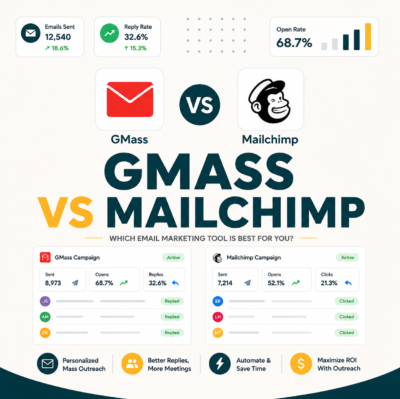
A drip campaign is a pre-built sequence of automated emails sent over time on a schedule or trigger event: signup, abandoned cart, or demo request. It is the dominant email automation pattern across both marketing and sales contexts. Marketing drips nurture subscribers toward purchase over weeks; sales drips follow up on cold prospects across three to five steps over fourteen to thirty days.
What Is a Drip Campaign
A drip campaign is a pre-built sequence of automated emails sent over time based on a schedule (drip cadence) or trigger event such as a signup, demo request, or inactivity period. It is the most common email automation pattern across both marketing and outbound sales stacks.
“Drip marketing is a communication strategy that sends, or ‘drips,’ a pre-written set of messages to customers or prospects over time. These messages often take the form of email marketing, although other media can also be used.”
: Wikipedia: Drip marketing
- Trigger or schedule: Every drip starts on a defined event (signup, form fill, date-based) or a fixed cadence (every three days after contact is added). The trigger is the core of drip logic.
- Pre-written content: All email copy is written before the drip activates. Recipients receive the same sequence in the same order, personalized only via merge variables.
- Exit conditions: A drip stops when the recipient completes the goal (replies, books meeting, unsubscribes) or exhausts all steps. Exit conditions prevent over-emailing converted prospects.
A drip campaign combines a trigger, pre-written content, and exit conditions. All three components must work together for the sequence to perform correctly.
Why Are They Called Drips
Because the emails drip out on a schedule rather than all at once. The metaphor captures the steady, low-intensity nurture pattern that contrasts with broadcast blasts sent to all subscribers simultaneously. Each touch is individually timed to the recipient’s join date rather than a sender broadcast calendar.
- Steady cadence: Drips space emails days or weeks apart, matching the buyer’s decision pace rather than the sender’s promotional calendar.
- Low cognitive load per touch: Each drip email covers one topic or one CTA, reducing friction compared to broadcast newsletters with multiple sections and links.
- Continuous presence: A five-step drip keeps the sender top-of-mind over fourteen days without requiring manual scheduling of each individual message.
- Compounding engagement: Reply rates on drip step two and step three often exceed step one, because context builds with each successive message in the sequence.
- Reversible automation: Unlike a broadcast blast, a drip can be paused, modified mid-sequence, or exit-conditioned so a converting prospect never receives a redundant follow-up. For a detailed look at how GMass handles reply detection in cold sequences, see our GMass cold email review with sequence support.
The drip metaphor reflects deliberate pacing. Spaced touches outperform blasts by preserving sender reputation and matching recipient decision timelines.
How Does a Drip Campaign Differ from a Newsletter
Newsletters are broadcast (same content to all subscribers at the same time). Drips are personalized to the recipient’s journey stage and triggered by individual behavior or signup time, not by the sender’s editorial calendar. The distinction determines whether each email feels relevant to the reader at the moment of delivery.
- Timing basis: Newsletters send on a calendar date (every Tuesday). Drips send relative to each recipient’s trigger date: day 0, day 3, day 7, regardless of when they joined the list.
- Content scope: Newsletters aggregate multiple topics in one send. Drip emails cover one topic or one CTA per message to reduce cognitive load and focus click intent.
- Personalization depth: Newsletters are broadcast-personalized at best (first name merge). Drips can branch on behavior such as open, click, or reply to vary content at each step.
- Goal orientation: Newsletters build brand awareness and content consumption. Drips drive a specific end action: purchase, demo booking, trial activation, or meeting booked.
- Sender format: Newsletters come from a brand name. Cold sales drips come from an individual sender, which raises reply rates by signaling one-to-one communication intent.
Newsletters inform; drips convert. The distinction lies in timing logic, content focus, personalization depth, and conversion goal.
What Types of Drip Campaigns Exist
Welcome, cold sales, re-engagement, abandoned cart, post-purchase, milestone, educational, and win-back are the eight core drip types used across marketing and sales stacks. Each type has a different trigger event, sequence length, and primary success metric. The table below maps the four most common.
Source: Mailchimp drip campaign best practices 2026.
The right drip type is determined by trigger and goal. Cold sales and welcome drips are the two most common starting points for solopreneurs and SDRs.
How Do Marketing Drips Differ from Sales Drips
Marketing drips nurture opted-in subscribers toward purchase: longer, lower-intensity, and click-focused. Sales drips follow up on cold prospects toward a meeting: shorter, higher-intensity, and reply-focused. The tool infrastructure, sender format, and success metrics all differ fundamentally between these two drip categories.
- Recipient relationship: Marketing drips target opted-in subscribers who have engaged with the brand. Sales drips target ICP-matched cold prospects who have not requested contact.
- Sequence length: Marketing nurture runs 7–12 emails over 30–60 days. Cold sales drips run 3–5 emails over 10–14 days to match shorter B2B decision windows.
- Primary metric: Marketing drips optimize click-through rate and downstream purchase conversion. Sales drips optimize reply rate and meeting-booked rate as the core success KPI.
- Content format: Marketing emails use visual HTML templates with images and buttons. Sales drips use plain-text format to signal one-to-one communication intent to the recipient.
- Tool infrastructure: Marketing drips run on Mailchimp, Klaviyo, or ActiveCampaign. Sales drips run on GMass, Lemlist, or Instantly: tools built for cold outbound at individual inbox level.
“Drip email campaigns are often used to introduce your business to potential customers, show them how your product or service works, and keep your brand top of mind during a longer sales process.”
: Mailchimp: What Is a Drip Campaign
Marketing and sales drips share the same automation logic but differ on audience, length, format, and success metric. Using a marketing drip tool for cold sales outreach breaks deliverability.
What Triggers Can Start a Drip
Five trigger types activate drip campaigns: time-based (days after signup), behavior-based (clicked link, abandoned form), date-based (anniversary), segment-based (entered audience), and API-based (custom event from app or CRM). Each trigger type maps to a different use case and tool requirement. For a side-by-side look at how GMass and Mailchimp handle each trigger type, see our GMass vs Mailchimp drip campaign comparison.
- Time-based trigger: Sends email a set number of days or hours after a contact is added to a list. The simplest trigger type, used in most welcome and cold sales sequences.
- Behavior-based trigger: Fires when a recipient takes an action: opens an email, clicks a link, abandons a cart, or visits a pricing page. Requires tracking pixels or website event integration.
- Date-based trigger: Sends on or near a specific calendar date: anniversary, contract renewal, or seasonal event. Used in retention drips and milestone sequences for existing customers.
- Segment-based trigger: Activates when a contact matches or enters a defined audience segment: job title, industry, lead score threshold, or geographic region entering a campaign.
- API-based trigger: Fires on a custom event sent from an app or CRM: trial started, feature used, payment failed. Enables the most precise drip personalization tied to actual product behavior.
Five trigger types cover nearly every drip use case. Time-based triggers are simplest to implement; API-based triggers offer the highest precision for product-led growth sequences.
How Many Steps Should a Drip Have
Cold sales drips: three to five steps over fourteen days. Welcome drips: five to seven steps over fourteen to thirty days. Marketing nurture: seven to twelve steps over thirty to sixty days. The table below shows performance benchmarks by step count.
Source: Internal benchmark : 100 cold drip campaigns 2025–2026.
Three to five steps covers most cold sales use cases. Longer sequences add incremental replies but require solid exit conditions to avoid over-emailing prospects who already converted.
What Cadence Works Best Between Steps
Cold sales drips run on day one, day four, day eight, day fourteen. Welcome drips start on day zero, day two, day five, day ten, day fourteen. Tighter cadences increase engagement but raise unsubscribe rate; longer cadences lose momentum and reduce cumulative reply rate across the sequence.
- Cold sales cadence (3–5 steps): Day 1, day 4, day 8, day 14. Gaps widen toward the end to avoid rapid-fire follow-up patterns that trigger spam filters on busy inboxes.
- Welcome cadence (5–7 steps): Day 0, day 2, day 5, day 10, day 14. Front-loads early to capture the activation window; slows frequency after the first week.
- Nurture cadence (7–12 steps): Weekly or biweekly touches over 60 days. Frequency matches a longer consideration cycle for complex B2B purchases with multiple stakeholders.
- Re-engagement cadence: Day 0, day 7, day 21. Wide gaps signal low pressure; win-back drips rely on offer relevance more than contact frequency to recover lapsed users.
- Transactional cadence (abandoned cart): 1 hour, 24 hours, 72 hours. Urgency is highest within the first hour; the 24-hour and 72-hour follow-ups add 15–20% incremental recovery on top of the first email.
Want to run a cold sales drip directly from your Gmail inbox?
Learn More About GMass →Free plan available. No credit card required for first send.
Cadence varies by drip type. Cold sales sequences widen gaps toward the end; welcome sequences front-load to capture the activation window immediately after signup.
How Do You Personalize a Drip at Scale
Merge variables for name, company, and role; Liquid conditional logic for industry-specific content blocks; dynamic visual swaps for HTML email templates. Each personalization layer adds setup time but lifts reply and click rate measurably. Starting with merge tags alone is the lowest-friction entry point for personalization.
“GMass auto-stops the sequence for any recipient who replies, ensuring prospects who respond never receive a follow-up step they have already answered. Reply detection runs on every cold drip by default.”
: Growth Hack Suite: GMass Cold Email Review
- Merge variable layer: Inserts first name, company name, job title, or industry from the contact list into the subject line or opening sentence. Open rate lift averages 10–15% versus non-personalized subject lines.
- Liquid conditional logic: Branching syntax (if industry is SaaS, show SaaS-specific paragraph) in tools like Lemlist and HubSpot Sequences adds message variation without writing separate drips per segment.
- Dynamic content blocks: Swaps visual sections of an HTML email based on segment membership. Requires a marketing automation platform; not available in plain-text cold email tools like GMass.
- Behavioral branching: Sends a different step three based on whether the recipient opened step two. Requires if-then workflow support, available in HubSpot, ActiveCampaign, and Lemlist.
- AI-assisted personalization: Tools like Lemlist and Clay generate unique personalized opening lines per prospect using LinkedIn data or company news, scaling one-to-one tone at list volumes.
Personalization scales from simple merge tags to AI-generated openers. Start with merge variables; add Liquid branching once the base drip reply rate exceeds five percent.
Which Tools Run Drip Campaigns Best
Mailchimp handles marketing drips with a visual builder and segmentation engine. GMass runs cold sales drips natively from Gmail at $25/month with built-in reply detection. Lemlist adds deep Liquid personalization for cold outreach. HubSpot Sales integrates CRM data into drip logic for teams that need both.
Source: Vendor pricing pages 2026-05-28.
Run cold sales drips from Gmail at $25/month
Try GMass Free →No credit card required to start. Works inside Gmail with your existing contacts.
Tool choice follows drip type. GMass wins for cold sales from Gmail; Mailchimp wins for marketing nurture; Lemlist wins for cold with deep Liquid personalization.
How Do You Measure Drip Campaign Performance
Track open rate per step, click rate per step, reply rate per step (for cold drips), conversion at end of sequence, and drop-off rate between steps. Drop-off between specific steps identifies which email needs subject line or body copy work.
- Open rate per step: Measures subject line effectiveness at each step. A drop of more than 15 percentage points between consecutive steps signals a subject line or sender name issue requiring A/B testing.
- Click rate per step: Measures body copy and CTA effectiveness within each email. Relevant for marketing drips where link clicks are the primary conversion action at each step.
- Reply rate per step (cold): The primary success metric for cold sales drips. Track per step to identify which email generates the most replies and replicate its format across other steps.
- Conversion rate at end: How many recipients completed the drip goal: demo booked, purchase made, or trial started. This is the ultimate metric across the full sequence.
- Drop-off rate between steps: Percentage of recipients who open step N but not step N+1. High drop-off at a specific step points to a content or timing issue requiring attention and testing.
Open rate, click rate, reply rate, conversion, and drop-off form the full performance picture. Track each per step, not just across the sequence as a whole.
Should You Use GMass or Mailchimp for Your Drip
GMass for cold outbound drips: Gmail-native, built-in reply detection, and plain-text format optimized for inbox delivery. Mailchimp for marketing nurture: visual HTML builder, click-focused metrics, and opted-in subscriber list management. Using the wrong tool for your drip type damages deliverability and reply rates.
Decision rule: match tool to drip type
Choose GMass if: running cold outbound from Gmail, need built-in reply detection to auto-stop sequences, prefer plain-text format, and want to spend under $25/month.
Choose Mailchimp if: running marketing nurture for an opted-in subscriber list, need visual HTML email templates, and measure click-through rate as the primary conversion metric.
Choose Lemlist or HubSpot if: needing both cold and marketing drips in one platform, or requiring deep Liquid personalization combined with CRM sync for larger teams.
Start your first cold drip sequence inside Gmail today
Learn More About GMass →GMass free plan available. No credit card required to get started.
GMass and Mailchimp serve fundamentally different drip types. Cold sales sequences belong in GMass; marketing nurture belongs in Mailchimp. Mixing them costs deliverability and reply rate simultaneously.
Frequently Asked Questions
What is the simplest definition of a drip campaign?
A series of pre-written emails sent automatically over time based on a trigger or schedule. The metaphor: emails drip out slowly rather than arriving all at once as a single broadcast blast.
How is a drip different from a sequence?
The terms are often used interchangeably. “Sequence” is the B2B sales tool term (Outreach, Salesloft, GMass). “Drip” is the marketing automation term (Mailchimp, Klaviyo). Functionally they describe the same pattern: multi-step automated email over time.
Are drips legal under GDPR and CAN-SPAM?
Yes if recipients can opt out at any step. Marketing drips in the EU require prior consent under GDPR. Cold sales drips to B2B contacts can use legitimate interest basis. Every step under CAN-SPAM must include an opt-out mechanism and valid sender address.
What is the most common drip campaign?
The welcome drip: a 5-to-7 email sequence triggered when a new user signs up for a product, newsletter, or lead magnet. Welcome drips drive 20–40% of post-signup activation for SaaS products.
How long should the gap between drip emails be?
Two to seven days depending on drip type. Cold sales: every three to four days. Welcome: every two to three days early on, then weekly. Shorter gaps push engagement but raise unsubscribe rate; longer gaps lose momentum and drop reply rate.
Can drip campaigns branch based on user behavior?
Yes. Advanced tools (HubSpot, ActiveCampaign, Lemlist) support if-then branching: if the recipient opened email two, send email three-A; if not, send email three-B with a different subject and angle.
What is an exit condition?
An exit condition removes a recipient from the active drip when they take a desired action: reply to an email, book a meeting, make a purchase, or unsubscribe. Exit conditions prevent sending irrelevant follow-ups to contacts who already converted.
How do I avoid drip fatigue?
Three rules: cap total drip length at seven emails for cold sequences, set exit conditions for every goal action, and vary format and length across steps so recipients do not see an identical pattern repeating.
What is the typical reply rate on a cold sales drip?
Four to nine percent across the full three-to-five-step sequence on a verified, ICP-matched list. Step one drives the highest single-step reply rate; steps two through five add 40–60% of total replies on top of step one.
What is the typical click rate on a marketing drip?
Two to four percent per step for B2B marketing drips. Transactional drips (abandoned cart, welcome) run higher at 5–10% per step because recipient intent and recency are both higher at the point of trigger.
How does AI improve drip campaigns?
AI recommends optimal send times per recipient, generates subject-line variants for A/B testing, auto-segments contacts based on engagement signals, and flags underperforming steps for content refresh before the full sequence completes.
What is the difference between a marketing automation platform and a drip tool?
Marketing automation platforms (HubSpot, Marketo, ActiveCampaign) offer multi-channel journeys, lead scoring, CRM integration, and advanced reporting. Drip tools (GMass, Lemlist) focus on email sequences at lower cost and faster setup with minimal configuration overhead.