Table of Contents
An SMTP check is the core test an email verifier runs to confirm a mailbox is real. It opens a conversation with the recipient mail server and asks whether the address exists, without sending an actual message. The server reply reveals whether the mailbox is deliverable. This is how verifiers confirm an address before you ever email it, protecting your sender reputation from the start.
See SMTP checks in action — verify an email free.
Verify an Email Free →Free plan included · No credit card · Real mailbox status
What Is an SMTP Check?
An SMTP check is a verification test that connects to the recipient mail server over SMTP and asks whether a specific address exists, reading the reply to judge deliverability without sending an actual email. It is the most decisive step in email verification, because it queries the destination server directly rather than inferring an answer from formatting or domain records alone.
- Server conversation: The check opens a live dialogue with the mailbox provider, issuing the same opening commands a real sending server uses. That direct exchange makes it the strongest deliverability signal available short of an actual send.
- No real message: The verifier stops before transmitting any content, so the recipient never receives an email or notification. Only the server response matters, which keeps the test silent and non-intrusive for the mailbox owner.
- Deliverability signal: The reply code tells the verifier whether the address accepts mail, rejects it, or defers the answer. That single signal drives the valid, invalid or unknown status returned to the user.
- Existence proof: Unlike a format or domain test, the check confirms the exact mailbox is present on the live server. That existence proof is the difference between a guess and a verified address ready for a campaign.
- Reputation guard: Catching invalid addresses before a send keeps bounce rates low, which protects the sending domain reputation that inbox placement depends on. The check is the first line of defence against deliverability damage.
The SMTP check is the verifier strongest signal, because it asks the destination server directly instead of guessing from syntax or domain data.
How Does an SMTP Check Work Step by Step?
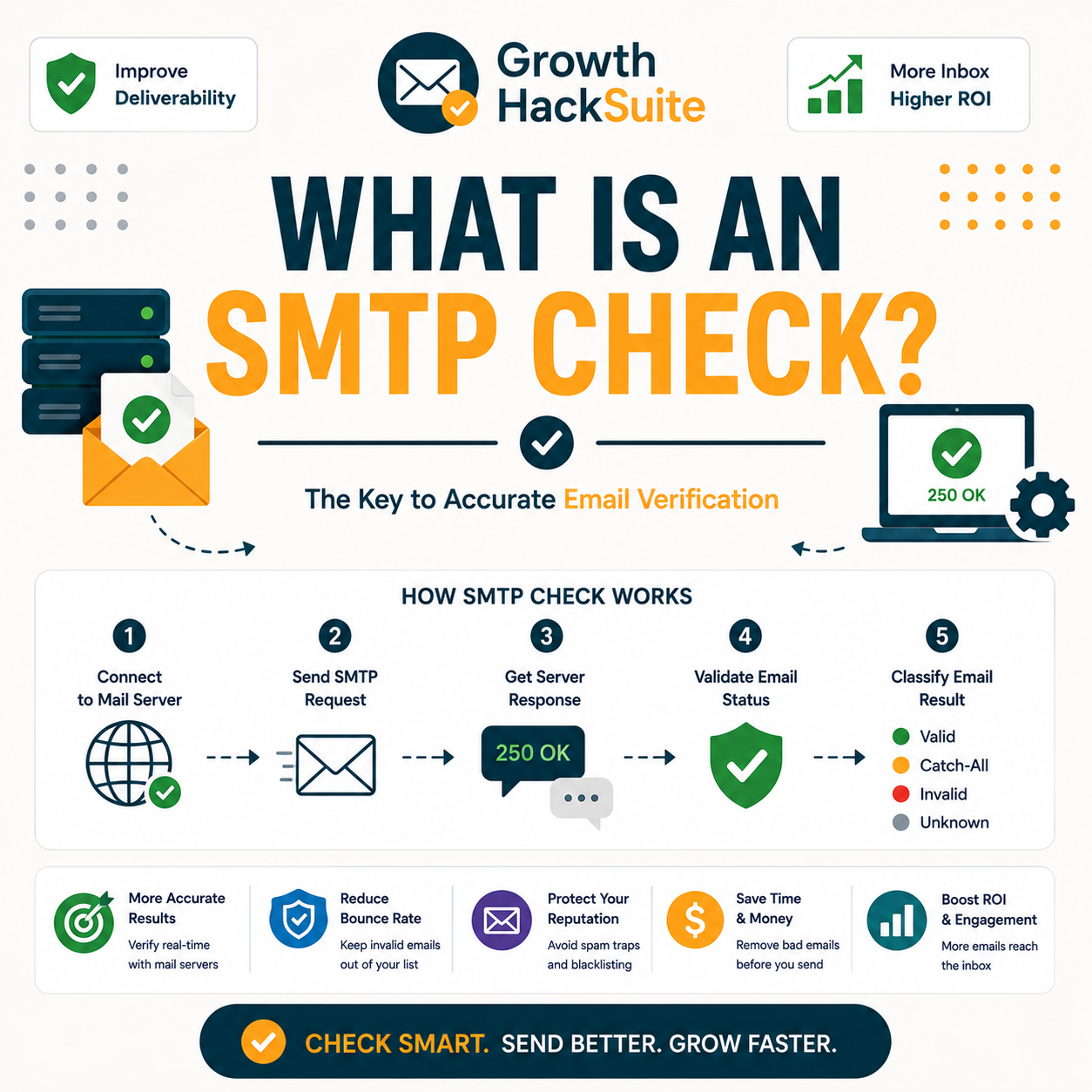
The verifier resolves the domain mail server, opens an SMTP connection, and issues the commands that simulate the start of a delivery. It introduces itself, declares a sender, then names the recipient and stops before sending content. It reads the accept-or-reject response for that address, and the reply determines the status returned.
- Resolve the mail server: The verifier looks up the domain mail-exchange records to find the server responsible for receiving mail. Without a reachable server, the address cannot be verified and the check returns an early failure.
- Open the SMTP connection: A TCP connection opens to that server, then the verifier greets it with a HELO or EHLO command and declares a sender address using MAIL FROM. This mirrors how a sending server begins every delivery.
- Name the recipient: The verifier issues RCPT TO with the target address, which is the command that forces the server to reveal whether the mailbox exists. This single command does the decisive work of the entire check.
- Read the response code: The server returns a numeric reply, and the verifier records it without sending any message body. That accept-or-reject code becomes the verdict translated into a valid, invalid or unknown status.
- Close the connection: The verifier disconnects politely after reading the reply, leaving no message in the queue. Closing cleanly avoids tripping anti-abuse limits and keeps the probe within courteous server-contact norms.
The check mimics the opening of a delivery, then stops and listens. The server numeric response is the answer that decides the final status.
The SMTP Handshake, Step by Step
What Does an SMTP Check Confirm?
An SMTP check confirms whether the mailbox accepts mail at that address. A positive reply means the address is deliverable; a hard rejection means it is invalid. It verifies existence at the server level, which is far more reliable than syntax or domain checks alone, since those only test format and the presence of a mail server.
- Mailbox exists: A success reply confirms the named recipient is accepted by the server, marking the address valid and safe to email. This is the result most senders want before adding an address to an active campaign list.
- Hard rejection: A permanent rejection confirms no such mailbox exists at the domain, marking the address invalid. Removing these addresses before sending prevents the bounces that erode a sending domain reputation over time.
An SMTP check answers the question that matters most for deliverability: will mail sent to this address actually be accepted by the server?
What Do SMTP Response Codes Mean?
Mail servers reply with numeric SMTP codes that the verifier reads. A 250 code means the recipient is accepted; a 550 means no such mailbox; and 4xx codes signal a temporary issue such as greylisting. Verifiers translate these raw replies into valid, invalid or unknown statuses. The table below maps the common codes a check encounters.
Source: SMTP reply-code semantics per RFC 5321 (datatracker.ietf.org/doc/html/rfc5321), verified 2026-06-27. 2xx = success, 4xx = transient failure (retry), 5xx = permanent failure. Verifier-status mapping reflects standard verifier behaviour.
SMTP specifies the exact command sequence two servers use to exchange mail.
— Hunter, Email Verifier API documentation
SMTP codes are the raw signal of the check; the verifier turns 250, 550 and the 4xx range into one clear, human-readable status.
Why Does an SMTP Check Sometimes Return Unknown?
Some servers neither confirm nor deny an address during the check. Catch-all domains accept every recipient regardless of whether the mailbox exists, and greylisting temporarily defers connections from unfamiliar senders. When the server hides the truth this way, an honest verifier returns unknown rather than guessing the address valid or invalid.
- Catch-all domains: An accept-all server replies positively to any recipient, so the SMTP check cannot distinguish a real mailbox from a non-existent one. The verifier flags the address as accept-all rather than confirming it valid.
- Greylisting: Anti-spam systems defer the first connection from an unknown sender with a temporary 4xx code, expecting a retry. During that deferral the check cannot read a definitive answer, so the result stays unknown until a later attempt.
Unknown is an honest verdict, not a failure of the tool. The server refused to reveal the address status, so the verifier reports that uncertainty plainly.
SMTP Check vs Syntax Check: What Is the Difference?
A syntax check only confirms formatting, while an SMTP check confirms the address actually exists on a live server. Syntax filtering catches obvious typos cheaply and instantly, but the SMTP check does the real verification by querying the mailbox. Good verifiers run a syntax check first to discard malformed input, then run SMTP on what remains.
- Syntax check: A format test confirms an address follows valid email structure, catching missing symbols or malformed domains before any network call. It is fast and free of server contact, but it cannot prove the mailbox is real.
- SMTP check: A live server query confirms the mailbox actually accepts mail, providing the existence proof syntax cannot. It costs a connection and a moment of time, yet it delivers the deliverability answer that protects sender reputation.
Syntax weeds out malformed addresses cheaply; the SMTP check then proves the valid-looking ones are real. For the related concept, see what email validation means.
How Does Hunter Use SMTP Checks?
Hunter runs an SMTP check inside a multi-layer process, combining it with syntax, domain and risk signals to return a status plus a confidence score. The SMTP result is the backbone of the verdict; the score reflects how certain the server reply was. This layered approach is why a Hunter result carries both a status and a confidence percentage.
Hunter’s own verifier review found accuracy holds strong on standard domains, with valid-status addresses bouncing under 2% across a 2,000-email benchmark, proof the SMTP layer behind that status can be trusted.
In Hunter, the SMTP check anchors the result while the confidence score captures how clear the server reply was for that address.
What Are the Limitations of an SMTP Check?
SMTP checks cannot defeat catch-all domains, can be slowed by greylisting, and a few servers block verification probes entirely. They confirm that a mailbox exists, not whether the owner is engaged or the address is high quality. Honest verifiers report these limits with an unknown status rather than inventing a false positive to look more complete.
- Catch-all blind spot: Accept-all servers reply positively to every recipient, so the check cannot separate real mailboxes from fake ones on those domains. The result becomes accept-all, never a confirmed valid verdict.
- Greylisting delay: Temporary deferral codes force a retry later, slowing bulk verification and occasionally leaving an address marked unknown. A single pass cannot always resolve servers that defer first contact by design.
- Blocked probes: A small number of servers reject verification connections outright as an anti-abuse measure, returning no usable answer. Those addresses fall into the unknown bucket regardless of whether the mailbox actually exists.
- Existence only: A passing check proves the mailbox accepts mail, not that the recipient reads it, wants it, or will engage. Quality and consent require list hygiene and permission practices the SMTP check does not measure.
- No quality score: The check cannot judge whether an address is a role inbox, a spam trap or an inactive account on its own. Layered risk signals beyond the raw SMTP reply are needed to flag those quality concerns.
An SMTP check proves a mailbox exists, not that it is engaged or safe to email. Naming those honest limits is what keeps a verifier trustworthy.
How Do You Run an SMTP Check?
Most people run an SMTP check through a verifier rather than by hand: enter a single address or upload a list, and the tool performs the check and returns the status. Doing it manually requires issuing technical SMTP commands from a terminal, which is slow and error-prone, so a verifier automates the entire exchange.
- Use a verifier: A verification tool handles the connection, commands and reply parsing automatically, turning the technical exchange into a single click. This removes the need to understand SMTP syntax or manage server connections by hand.
- Enter the address: A single email goes into the search box for an instant check, returning one status in seconds. This quick path suits spot-checking a prospect before a one-off outreach message.
- Upload a list: A full CSV can be uploaded for bulk verification, where the tool runs the same SMTP exchange against every row. Batch mode is the practical choice for cleaning an entire mailing list at once.
- Read the status: Results return as valid, invalid, accept-all or unknown, often with a confidence score. Acting on those statuses, by removing invalids before sending, is what protects deliverability and sender reputation.
- Export the clean list: A verifier exports the filtered results so only deliverable addresses move into the sending tool. Keeping the unknown and invalid rows out of the campaign is the final step that guards inbox placement.
Run an SMTP check free on any address.
Verify an Email Free →Free plan · No credit card · Single or bulk verification
A verifier runs the SMTP exchange for you, with no manual commands required. You enter an address and read back a clear, actionable status.
What Tools Perform SMTP Verification?
Any reputable email verifier performs SMTP checks under the hood; the tools differ in catch-all handling, speed and free allowance. Hunter offers SMTP-based verification with a recurring free tier, while pure-play verifiers compete mainly on bulk price per thousand. The table below compares the common options on the points that matter to most senders.
Source: hunter.io/pricing, verified 2026-06-27 (free plan 50 credits/mo = ~100 verifications at 0.5 credit each). Other rows describe common verifier categories; confirm each provider’s current features before buying.
Every real verifier uses SMTP checks under the hood. They differ mainly in how honestly they handle catch-alls and how generous the free tier is.
Verdict: Why the SMTP Check Matters
The SMTP check is the heart of email verification: it asks the destination server whether an address is real, giving the most reliable signal short of actually sending. It cannot solve catch-all domains or beat greylisting, but as the decisive existence test, it is what makes a verifier status trustworthy enough to act on before a campaign.
Verdict: The SMTP check is the core of verification. A 250 reply means valid, a 550 means invalid, and 4xx codes return unknown. Its blind spot is catch-all domains, yet it remains the most reliable existence signal short of sending a real message.
SMTP is an Internet standard protocol for electronic mail transmission.
— Wikipedia, Simple Mail Transfer Protocol
Verify an email free with a real SMTP check.
Verify an Email Free →Free plan · No credit card · Real mailbox status returned
Related Tools in the Hunter Stack
The SMTP check is one layer of verification, not the whole picture. The Hunter verifier review covers the full validation process and every check it runs, while the finder review covers building the lists worth verifying in the same connected stack on one credit pool.
- Hunter Email Verifier: The validation layer that wraps the SMTP check in syntax, domain and risk signals — start with what the Hunter Email Verifier is.
- Hunter Email Finder: The list-building half of the bundle that shares the same credit pool — read the Hunter.io email finder review for sourcing costs.
SMTP Check: Frequently Asked Questions
The 12 most-asked questions about SMTP checks.
What is an SMTP check?
An SMTP check is the verification test that connects to a recipient mail server and asks whether a specific address exists, reading the reply to judge deliverability without sending an actual message. It is the most decisive step in email verification, querying the destination server directly rather than inferring an answer from format or domain data.
How does an SMTP check work?
The verifier resolves the domain mail server, opens an SMTP connection, greets it with HELO, declares a sender with MAIL FROM, then names the recipient with RCPT TO. It stops before sending content and reads the numeric response. That accept-or-reject code becomes the address status.
What does an SMTP check confirm?
An SMTP check confirms whether the mailbox accepts mail at that address. A positive reply marks it deliverable; a hard rejection marks it invalid. It proves existence at the server level, which is far more reliable than syntax or domain checks alone because those only test format and the presence of a mail server.
What do SMTP response codes mean?
Mail servers reply with numeric codes. A 250 means the recipient is accepted and the mailbox exists; a 550 means no such mailbox; and 4xx codes such as 421, 450 and 451 signal a temporary issue like greylisting. Verifiers map these to valid, invalid and unknown statuses respectively.
Why does an SMTP check return unknown?
An unknown result appears when the server neither confirms nor denies the address. Catch-all domains accept every recipient regardless of whether the mailbox exists, and greylisting defers the first connection with a temporary code. When the server hides the truth, an honest verifier reports unknown rather than guessing.
SMTP check vs syntax check — what is the difference?
A syntax check only confirms the address is correctly formatted, catching typos cheaply before any network call. An SMTP check goes further, querying the live server to confirm the mailbox actually exists. Good verifiers run syntax first to discard malformed input, then run SMTP on the remaining addresses.
Does an SMTP check send a real email?
No. The verifier issues the opening SMTP commands and stops at RCPT TO, before any message content is transmitted. The recipient never receives an email or notification, so the check stays silent and non-intrusive. Only the server response code is read to determine the address status.
Can people tell I ran an SMTP check?
The mailbox owner sees nothing, because no message reaches the inbox. The receiving server may log the connection attempt, as it logs any SMTP contact, but the recipient is not notified. Reputable verifiers limit probe frequency to stay polite and avoid triggering server defences during the check.
What are the limits of SMTP checks?
SMTP checks cannot confirm addresses on catch-all domains, can be slowed by greylisting, and a few servers block probes entirely. They prove a mailbox exists, not that the owner is engaged or the address is high quality. Honest verifiers report these limits as unknown rather than a false positive.
How do I run an SMTP check?
The easiest way is through a verifier: enter a single address or upload a list by CSV, and the tool runs the SMTP exchange and returns the status. Running it manually requires issuing SMTP commands from a terminal, which is slow and technical, so most people let a verifier automate it.
What tools do SMTP verification?
Every reputable email verifier performs SMTP checks under the hood, including bundled platforms like Hunter and dedicated pure-play verifiers. They differ in catch-all handling, bulk speed and free allowance rather than in the underlying check itself. Hunter pairs SMTP verification with a recurring free tier of about 100 verifications a month.
Is an SMTP check reliable?
An SMTP check is the most reliable verification signal short of sending a real message, because it queries the destination server directly. Its reliability drops on catch-all domains and greylisting servers, where it honestly returns unknown. For standard domains, a clear 250 or 550 reply is a dependable verdict.