Table of Contents
A role-based email is an address tied to a function or team rather than a named person, such as info@, sales@ or support@. Several people may read it, or no one may. Verifiers flag role-based emails because they engage poorly and raise complaint risk. This guide explains what they are, why they exist, and whether to send to them.
Flag role-based emails free — verify your list.
Verify Your List Free →Free plan included · No credit card · Role status flagged
What Is a Role-Based Email Address?
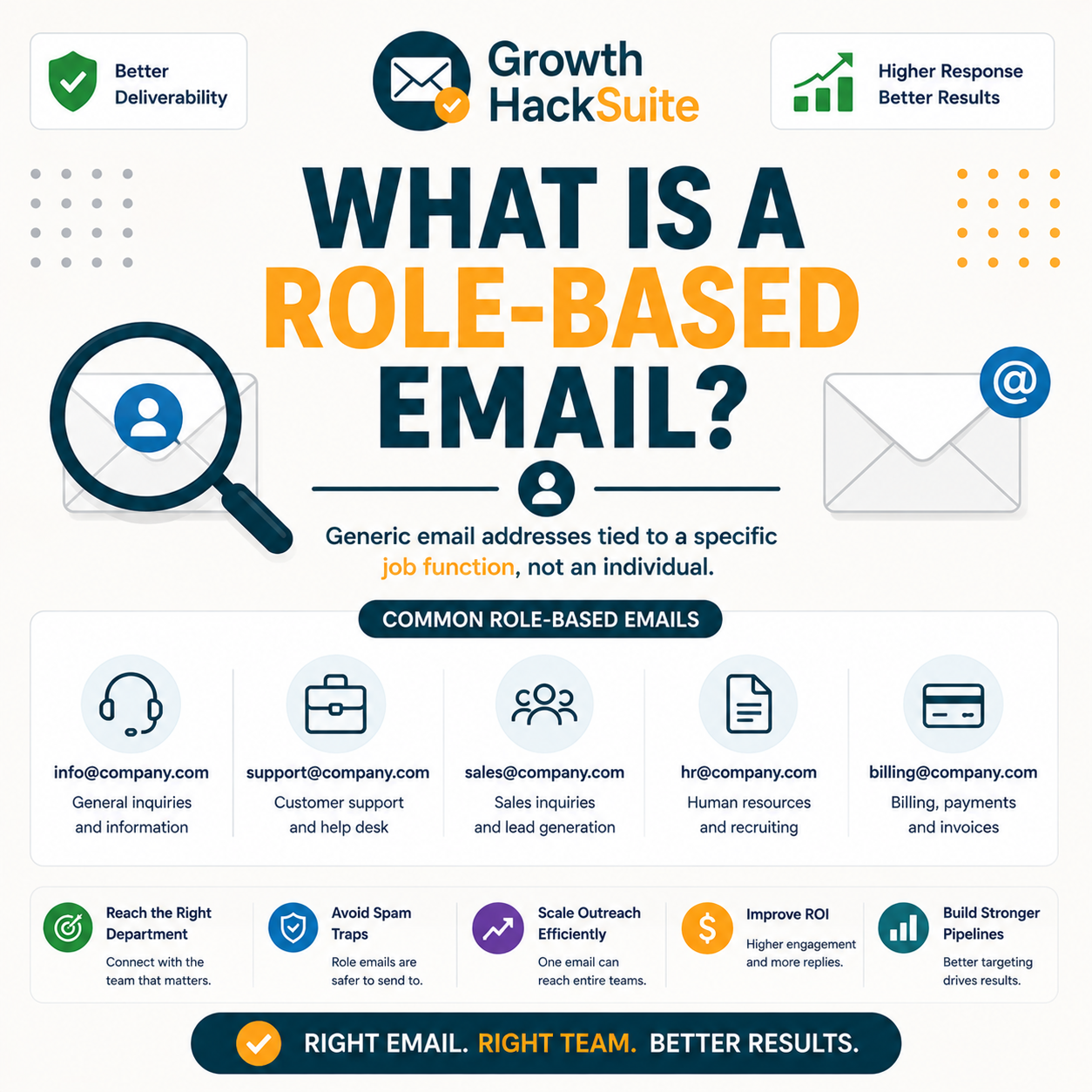
A role-based email is an address built around a job, team or function instead of an individual, like info@, sales@, support@ or admin@. It may be monitored by several people or by none at all. Because no single person owns the inbox, a role-based email behaves differently from a personal mailbox and reacts differently to outreach.
- Function, not person: A role address names a job or department rather than a human, so the recipient is a workflow rather than an individual. That distinction changes everything about how the address responds to marketing or cold outreach.
- Shared or unmonitored: A role inbox may sit in front of several staff, rotate between shifts, or go unread for weeks. The ambiguity means a message can reach a team, a stranger, or nobody at all.
- Common prefixes: Recognisable local parts such as info, sales, support, admin, contact, hello and billing mark an address as role-based. Verifiers maintain lists of these prefixes to flag the pattern automatically during a check.
- No single owner: Because accountability is spread across a team, nobody feels personally addressed when a marketing message lands. The absence of a clear owner explains the weak open and reply behaviour these addresses show.
- Published openly: A role address usually appears on a public contact page or footer, so it spreads into directories and scraped lists. That visibility is why generic inboxes dominate B2B data sourced from the open web.
A role-based email points to a function, not a person, which is exactly why it behaves unpredictably for any sender.
Role-Based vs Personal at a Glance
Why Do Companies Use Role-Based Emails?
Companies use role addresses so inquiries reach a team regardless of staff changes: info@ for general contact, sales@ for leads, and support@ for help. The address stays stable even when individuals join or leave, which makes it convenient for the business but a poor target for outreach, since no individual is accountable for replying.
- Continuity: A role address survives employee turnover, so a customer contacting sales@ still reaches the sales function after the original rep leaves. Stability for the company is the whole point of publishing a generic inbox.
- Routing: A shared inbox lets a help desk distribute messages to whichever agent is free, splitting load across a team. The address becomes a queue rather than a single person, which suits support but not personalised outreach.
Role addresses exist for the company’s convenience and continuity, not for one-to-one outreach with a named individual.
Why Are Role-Based Emails Risky to Send To?
Role addresses engage poorly and attract complaints. Mail to info@ is often ignored or marked as spam, and some role addresses double as spam traps. High volumes of role-based sends signal weak list hygiene to mailbox providers, which can quietly erode sender reputation and pull a whole campaign toward the spam folder.
- Low engagement: A generic inbox rarely opens or clicks marketing mail, because no individual feels personally addressed. Sustained low engagement on these addresses drags down list-wide open rates that mailbox providers watch closely.
- Complaint risk: Whoever monitors a shared inbox marks unwanted mail as spam more readily than a personal recipient might. Each complaint counts against the sending domain and raises the odds of future filtering.
- Possible traps: Some abandoned role addresses are repurposed as spam traps that catch senders mailing unverified lists. Hitting a trap damages reputation instantly, even when the rest of the list is clean.
- Reputation drag: A heavy block of role addresses pulls average engagement down across the whole sending domain, training filters to treat the sender with suspicion. The damage outlasts any single campaign and slows future inbox placement.
- Wasted spend: Outreach budget spent mailing inboxes that nobody reads returns almost nothing in replies or revenue. The cost of sending to role addresses lands without the engagement that would justify it.
Role accounts engage poorly and raise complaint risk for senders.
— Hunter, Email Verifier API documentation
Role addresses combine low engagement with high complaint risk, a poor trade for any sender chasing inbox placement.
How Do Email Verifiers Detect Role-Based Emails?
Verifiers flag role addresses by matching the local part against a list of known role prefixes such as info, sales, support and admin. The address is marked valid but role-based, which lets a sender decide whether to keep, segment or drop it rather than emailing blindly. Detection is a label, not a rejection of the address.
- Prefix matching: The verifier compares the part before the @ symbol against a maintained set of role prefixes, returning a role-based flag on a match. This pattern check runs alongside the standard syntax, domain and SMTP layers.
- Flag plus status: A verifier reports the address as valid and simultaneously tags it role-based, separating deliverability from suitability. That dual signal hands the keep-or-suppress decision to the sender rather than making it automatically.
Hunter’s own verifier review found accuracy holds strong on standard domains, with valid-status addresses bouncing under 2% across a 2,000-email benchmark, the same engine that flags role-based addresses for safe segmentation.
Verifiers do not reject role addresses; they flag them so a sender can decide consciously what to do with each one.
What Do Role-Based Emails Do to Deliverability?
Sending heavily to role addresses lowers open and click rates and raises complaints, both of which drag down sender reputation. Even when role addresses are technically valid and deliverable, their poor engagement pulls list-wide metrics down toward the spam folder, where mailbox providers begin filtering the sender more aggressively over time.
- Metric drag: A large block of unengaged role addresses depresses the average open and click rates that algorithms read as quality signals. The dilution penalises engaged subscribers who share the same sending domain.
- Reputation effect: Repeated complaints and low engagement from role inboxes train filters to treat the sender with suspicion. That accumulated reputation damage outlasts any single campaign and slows future inbox placement.
Valid but unengaged, role addresses quietly erode the engagement metrics that decide inbox placement for the entire list.
Role-Based vs Personal Email: What’s the Difference?
A personal email belongs to one named individual who reads and replies; a role address routes to a function with no single owner. Personal addresses are the natural target for outreach and nurture, while role addresses suit support or transactional contact. Matching the message to the address type avoids wasted sends and protects engagement.
Source: describes common verifier categories and standard deliverability practice; confirm each provider’s current features before relying on a specific behaviour.
Personal addresses are for outreach and role addresses are for support, so matching the use to the type avoids wasted effort.
How Should You Handle Role-Based Emails in a List?
Segment role addresses out of cold outreach and nurture, keep them only where appropriate such as existing support contacts, and verify new signups to flag them at entry. Suppression rather than a blanket blast protects engagement metrics without deleting potentially useful contacts. The goal is conscious management, not reflexive deletion of every role address.
- Verify the list: A verification pass tags every role address across the file so the segment becomes visible before any send. Flagging is the prerequisite step that makes deliberate handling possible at all.
- Segment out of outreach: A separate role-based segment keeps generic inboxes away from cold and nurture campaigns that depend on personal engagement. Suppressing the segment protects the metrics those campaigns rely on for inbox placement.
- Keep where appropriate: A consented support or account contact at info@ stays useful for transactional and service mail, so blanket deletion wastes a legitimate channel. Context decides whether a role address earns a place in the list.
- Flag at signup: Verification at the point of entry catches role addresses before they ever enter the main list. Early flagging turns an ongoing cleanup problem into a one-time gate at the form.
- Review periodically: A recurring check catches role addresses that slip in through new imports or list growth over time. Scheduled hygiene keeps the suppressed segment accurate rather than letting it drift.
Verify your list free to flag role addresses.
Verify Your List Free →Free plan · No credit card · Role and invalid flags included
Segment rather than delete, because role addresses have a place; they simply do not belong in cold outreach campaigns.
Should You Ever Send to Role-Based Emails?
Sometimes. Existing customers who chose a role address for support, or B2B contacts where info@ is the only published route, can be emailed cautiously and with consent. For cold outreach and bulk marketing, avoid role addresses entirely. The honest answer depends on consent and context rather than a blanket ban on every generic inbox.
- Acceptable contact: A consented support thread, an account notification, or a B2B reply where info@ is the only route can justify a careful send. Permission and relevance make the difference between a legitimate message and spam.
- Transactional mail: A receipt, ticket update or service notice sent to a role address the recipient chose stays expected and welcome. Operational messages tied to an existing relationship carry little complaint risk regardless of inbox type.
- Existing relationship: A contact who already corresponds from sales@ has effectively opted into that channel, so a relevant reply continues the thread. Prior engagement reframes the role address as a known, consenting correspondent.
- Avoid for cold: Cold outreach and bulk marketing to role addresses risk complaints, traps and reputation damage with little payoff. The low engagement of generic inboxes rarely rewards the deliverability cost they impose.
- Avoid for nurture: Automated nurture sequences assume a single human reading over time, an assumption a shared inbox breaks. Pushing drip campaigns at role addresses wastes sends and dilutes the engagement signals the sequence depends on.
Context decides the answer: a consented support contact is fine, while cold blasting role addresses is never worth the risk.
What Tools Flag Role-Based Emails?
Any quality verifier flags role addresses as part of its result; the tools differ in how the flag is surfaced and exported. Hunter marks role-based status alongside its verification result with a recurring free tier, while pure-play verifiers vary in their export filters. The table compares how common tools handle role detection for senders.
Source: hunter.io/pricing, verified 2026-06-28 (free plan 50 credits/mo = ~100 verifications at 0.5 credit each). Other rows describe common verifier categories; confirm each provider’s current features before buying.
Pick a verifier that both surfaces and exports the role flag, because that is what makes practical segmentation possible at scale.
How Common Are Role-Based Emails in B2B Lists?
Role addresses make up a meaningful share of B2B lists, especially those built from web scraping and general contact forms. Their prevalence is exactly why verifiers flag them by default. At scale, unflagged role addresses become a large, low-engagement segment that drags down results and masks the true health of a sending list.
- Common in scraped data: Lists assembled from public web pages and directories collect whatever address a company publishes, which is frequently info@ or contact@. Scraping therefore concentrates role addresses far more than opt-in signups do.
- Higher in B2B: Business contact pages favour generic departmental inboxes over named staff, so B2B lists carry a heavier role-based share than consumer lists. The pattern makes flagging essential before any B2B campaign launches.
Role addresses cluster in scraped B2B data, common enough that flagging and segmenting them is essential at any real scale.
Verdict: What to Do About Role-Based Emails
Role-based emails are valid but low-value for outreach: they engage poorly, raise complaints, and can mask spam traps. Flag them with a verifier, segment them out of cold and nurture sends, and email them only with clear consent and context. The right posture is to manage role addresses deliberately, not to blast them blindly.
Verdict: A role-based email points to a function, not a person, so it engages poorly and raises complaint risk. Flag it with a verifier, segment it out of cold outreach, and send only with clear consent. Valid does not mean worth emailing.
An email address identifies a mailbox that receives electronic mail.
— Wikipedia, Email address
Verify your list free and flag every role address.
Verify Your List Free →Free plan · No credit card · Role status flagged on export
Related Tools in the Hunter Stack
Role detection is one verifier check, not the whole product. The Hunter Email Verifier wraps role flagging in syntax, domain and SMTP signals, while the finder review covers building the lists worth verifying in the same connected stack on one shared credit pool.
- Hunter Email Verifier: The validation layer that flags role-based addresses alongside invalids and catch-alls — start with what the Hunter Email Verifier is.
- Hunter Email Finder: The list-building half of the bundle that shares the same credit pool — read the Hunter.io email finder review for sourcing costs.
Role-Based Email: Frequently Asked Questions
The 12 most-asked questions about role-based emails.
What is a role-based email address?
A role-based email is an address built around a job, team or function instead of a named person, such as info@, sales@, support@ or admin@. It may be read by several staff or by no one. Because no single individual owns the inbox, it behaves differently from a personal mailbox.
Why do companies use role-based emails?
Companies publish role addresses so inquiries reach a team regardless of staff changes: info@ for general contact, sales@ for leads, support@ for help. The address stays stable as people join and leave, and a shared inbox lets several agents handle the queue. It is convenient for the business but poor for outreach.
Why are role-based emails risky?
Role addresses engage poorly and attract complaints. Mail to info@ is often ignored or marked as spam, and some abandoned role addresses double as spam traps. High volumes of role-based sends signal weak list hygiene to mailbox providers, which can erode sender reputation and pull a campaign toward the spam folder.
How do verifiers detect role-based emails?
A verifier matches the local part before the @ symbol against a maintained list of known role prefixes such as info, sales, support and admin. On a match it tags the address role-based while still reporting it as valid. The flag runs alongside the syntax, domain and SMTP layers of the check.
Do role-based emails hurt deliverability?
Yes, indirectly. Role addresses engage poorly and complain more readily, which lowers list-wide open and click rates and raises complaint counts. Mailbox providers read those signals as quality indicators, so a heavy role-based segment drags the whole sending domain toward the spam folder even when each address is valid.
Role-based vs personal email?
A personal email belongs to one named individual who reads and replies, making it the right target for outreach and nurture. A role address routes to a function with no single owner and suits support or transactional contact. Matching the message type to the address type avoids wasted sends and protects engagement.
Should I send to info@ or sales@?
For cold outreach and bulk marketing, avoid them. These generic inboxes engage poorly and raise complaint and trap risk. They are acceptable only with clear consent and relevant context, such as a B2B reply where info@ is the only published route or an existing support thread the contact chose.
How do I handle role addresses in my list?
Verify the list to flag role addresses, then segment them out of cold and nurture campaigns rather than deleting them outright. Keep consented support or transactional contacts where they make sense, and verify new signups at the form so role addresses are caught at entry instead of during a later cleanup.
Are role-based emails spam traps?
Not all of them, but some are. Abandoned role addresses are sometimes repurposed by mailbox providers as spam traps that catch senders mailing unverified lists. Hitting a trap damages reputation immediately, which is one more reason to flag and segment role addresses before any campaign rather than emailing them blindly.
What tools flag role-based emails?
Any quality email verifier flags role addresses as part of its result, including bundled platforms like Hunter and dedicated pure-play verifiers. They differ mainly in how the flag is surfaced and whether it can be exported as a filter. Hunter marks role-based status with a recurring free tier of about 100 verifications a month.
Can I email role addresses with consent?
Yes, cautiously. A contact who consented at a role address for support, account notices or a B2B exchange can be emailed with relevant, expected content. Consent and context make the send legitimate. The caution that applies to cold outreach does not extend to a recipient who actively asked to hear from the sender.
Are role-based emails valid?
Usually yes. A role address like info@ or sales@ is typically a real, deliverable mailbox, so a verifier reports it as valid. Valid, however, is not the same as worth emailing: the verifier adds a separate role-based flag precisely because deliverability and suitability for outreach are two different questions.