Table of Contents
What is a disposable email? It is a temporary address from a throwaway-mail service, used to sign up for something and then abandoned within minutes. People reach for one to grab a freebie or dodge spam, not to read messages. On a marketing list these signups inflate counts, never engage, and can hide spam traps. This guide covers what they are, why they are risky, and how verifiers block them.
Block disposable emails free — verify your list before the next send.
Verify Your List Free →Free plan included · No credit card · Flags disposable and risky addresses
What Is a Disposable Email Address?
A disposable email is a temporary, throwaway address from a service that generates inboxes lasting minutes or hours. People use a disposable email to sign up for something without exposing a real address, then let it expire. On a marketing list, this kind of address is dead weight that never opens, clicks, or replies to a single message.
- Temporary inbox: A disposable address is a real, working inbox that receives mail only for a short window, often a few minutes or hours, before the throwaway-mail service recycles or deletes it entirely.
- Expires fast: Most disposable inboxes vanish soon after the signup confirmation arrives, so any follow-up newsletter or promotion sent days later lands in an address that no longer exists or accepts mail.
- Throwaway by design: The service exists purely to absorb one verification message and then disappear, which means the address was never intended to build an ongoing relationship with any brand behind it.
- No account required: A disposable inbox opens instantly with no password or signup of its own, lowering the effort to almost nothing, which is exactly why casual visitors reach for one so readily.
- Random or public address: Many services hand out a randomly generated or shared public address, so the same inbox may be reused by strangers, making it useless for any private or lasting communication.
A disposable email is built to vanish, useful to the user and useless and risky to a sender’s list.
How Do Disposable Emails Work?
A throwaway-mail service issues an address on demand, receives any confirmation message, then discards the inbox after a short window. The user grabs whatever they signed up for and the address goes dead, so future mail bounces or is simply never read. The whole cycle is designed to leave no lasting trace behind it.
- Generated on demand: The service hands out a random address instantly, with no account creation or password, so a visitor can have a working inbox open in seconds purely to receive one incoming message.
- Receives one message: The temporary inbox catches the signup confirmation or verification link, displays it on screen, and lets the user click through, completing whatever access the throwaway address was created to unlock.
- Holds mail briefly: The inbox keeps incoming messages visible for a short countdown, sometimes ten minutes, sometimes a few hours, giving just enough time to read a code before the window closes for good.
- Requires no recovery: Because nothing of value lives in the inbox, the service offers no password reset or recovery, treating each address as expendable the moment its single purpose is served.
- Discarded after use: Once the short lifespan ends, the service recycles or deletes the inbox, leaving the address non-functional, so later marketing mail has nowhere to land and quietly fails.
Disposable services hand out an inbox for one message, then discard it, so later mail goes nowhere.
Why Do People Use Disposable Emails?
People use disposables to claim a lead magnet, bypass a signup wall, or avoid giving a real address to a brand they do not yet trust. The motive is convenience or privacy, not engagement, so a disposable signup almost never becomes a real subscriber who reads, clicks, or buys anything later.
- Grab a freebie: A visitor wanting a gated PDF, coupon, or trial drops in a disposable address to clear the form, collects the reward, and never intends to receive a single follow-up message afterward.
- Avoid spam and tracking: Privacy-minded users hand over a throwaway address to keep their real inbox clean, sidestep future promotions, and avoid being tracked or sold on by a brand they barely know.
Disposable signups want the freebie, not the emails, so they rarely convert into real subscribers.
Why Are Disposable Emails Risky on a List?
Disposables inflate list size, drag down engagement metrics, and waste send budget on inboxes no one reads. Some disposable domains also overlap with abuse and spam-trap activity. Together they distort analytics and quietly lower deliverability, because mailbox providers read low engagement and dead addresses as signs of a careless sender.
- Inflated list size: Disposable signups pad subscriber counts with addresses that will never engage, making a list look healthier than it is and skewing growth reports that drive marketing decisions.
- Zero engagement: Because the inbox is abandoned moments after signup, these addresses produce no opens, clicks, or replies, dragging average engagement down and signalling poor list quality to mailbox providers.
- Wasted send budget: Every disposable address still counts against send volume and platform pricing, so a sender pays to deliver mail into inboxes that expired before the first campaign ever reached them.
- Higher bounce rates: Expired disposable inboxes return hard bounces once they stop accepting mail, and a rising bounce rate is one of the clearest negative signals a mailbox provider tracks against a sending domain.
- Hidden trap overlap: Some abandoned disposable domains drift into spam-trap territory over time, so a list seeded with them risks hitting traps that silently damage sender reputation without any obvious warning.
Hunter automatically skips disposable addresses during verification and charges no credit for them.
— Hunter.io API documentation
Disposables pad the list and kill engagement metrics, a quiet drag on deliverability and analytics alike.
How Do Verifiers Detect Disposable Emails?
Verifiers match the address domain against a maintained database of known throwaway-mail services and flag it as disposable. Because new disposable domains appear constantly, the freshness and quality of that database decide how many a verifier actually catches. A stale list misses the newest throwaway domains and lets them slip through onto your list.
- Domain matching: The verifier compares the part after the @ symbol against a curated list of throwaway-mail providers, returning a disposable flag the moment the domain appears on that maintained reference list.
- Database freshness: New disposable services launch all the time, so a provider that updates its domain database frequently catches recent throwaway domains that an outdated, rarely refreshed list would silently let pass.
- Separate from validity: A disposable flag is distinct from a syntax or mailbox check, since the address can be technically valid yet still disposable, which is why verifiers report disposable status as its own result.
Verifying a list before the first send is the cheapest way to protect a sending domain.
— Growth Hack Suite, pre-send verification workflow
Verifiers flag disposables by matching known throwaway domains, and database freshness decides the catch rate.
How Common Are Disposable Signups?
Disposable signups cluster on free offers, gated content, and high-value promotions, where users resist sharing a real address. The stronger the incentive to sign up without commitment, the higher the disposable share tends to be, which is exactly why verification at the signup form matters most on those high-conversion pages.
- Spike on free offers: Lead magnets, coupons, and free trials draw disposable addresses, because the visitor wants only the reward and sees no reason to expose a real inbox to claim it.
- Gated content forms: Walls that demand an email before showing a guide or webinar push privacy-conscious and casual visitors alike toward a throwaway address that clears the gate without ongoing commitment.
Disposables cluster on free offers and gated content, exactly where signup verification pays off most.
Disposable vs Role vs Invalid: How Do They Compare?
A disposable is a real but temporary address; a role address is a real but shared function inbox; an invalid does not exist at all. Each is flagged differently and handled differently. The table below contrasts the three address types so you can treat each one correctly instead of lumping them together.
Source: address-type definitions per Hunter.io email-verifier documentation and standard verifier result categories, hunter.io/email-verifier, verified 2026-06-27.
Disposable, role, and invalid are three different problems, and flagging each one lets you act correctly.
Should You Always Block Disposable Emails?
Usually, but not always. Blocking them at signup keeps marketing lists clean, yet some products legitimately allow disposables for low-friction trials. The honest call depends on your goal: block for nurture lists where engagement matters, and allow them cautiously only where frictionless access matters more than long-term reachability.
- Block for nurture lists: Any list built to send ongoing newsletters or sequences should reject disposables, since these addresses expire fast and would only inflate counts while dragging engagement and deliverability down.
- Allow for frictionless trials: A product that wants the lowest possible barrier to a free trial may accept disposables knowingly, trading reachability for sign-up volume, provided it tracks how few of those accounts ever activate.
Block disposables on nurture lists, and allow them only where frictionless access truly beats reachability.
How Do You Block Disposable Emails?
Block them by verifying at signup with real-time detection, rejecting or flagging known disposable domains, and bulk-verifying existing lists to remove ones already collected. Real-time blocking at the form is the most effective approach, stopping disposable addresses before they ever enter the list and distort future campaigns.
- Verify at signup: Wire a real-time verification check into the signup form so each address is screened the instant it is submitted, catching disposable domains at the door before they ever reach the list.
- Reject disposable domains: Configure the form to refuse or quarantine any address whose domain matches a known throwaway service, prompting genuine subscribers to enter a real, lasting inbox instead.
- Use a fresh database: Rely on a verifier that updates its disposable-domain list frequently, since new throwaway services appear constantly and an outdated reference list will silently let the newest ones slip through.
- Bulk-clean existing lists: Run current subscriber lists through a bulk verifier to flag and remove disposables already collected, restoring accurate engagement metrics and trimming wasted send volume across campaigns.
- Monitor over time: Re-verify periodically and watch for fresh disposable signups on high-converting forms, because a one-off clean fades as new throwaway addresses enter through offers that attract them most.
Verify your list free to block disposable signups.
Verify Your List Free →Free plan · No credit card · Disposable addresses skipped automatically
Real-time blocking at the form stops disposables best, and bulk cleaning removes the ones already inside.
What Tools Detect Disposable Emails?
Any verifier with a maintained disposable database flags them, though depth and freshness vary between tools. Hunter detects disposable domains and skips them automatically without charging a credit, on a free tier. The table below compares disposable detection across common verifier types so you can match a tool to your need.
Source: Hunter free-tier and disposable handling per hunter.io/email-verifier and hunter.io/pricing, verified 2026-06-27. Other rows describe general verifier categories, not a single named vendor; confirm each provider’s current terms before buying.
Pick a verifier with a fresh disposable database, because that freshness is what catches new throwaway domains.
Disposable Detection at a Glance
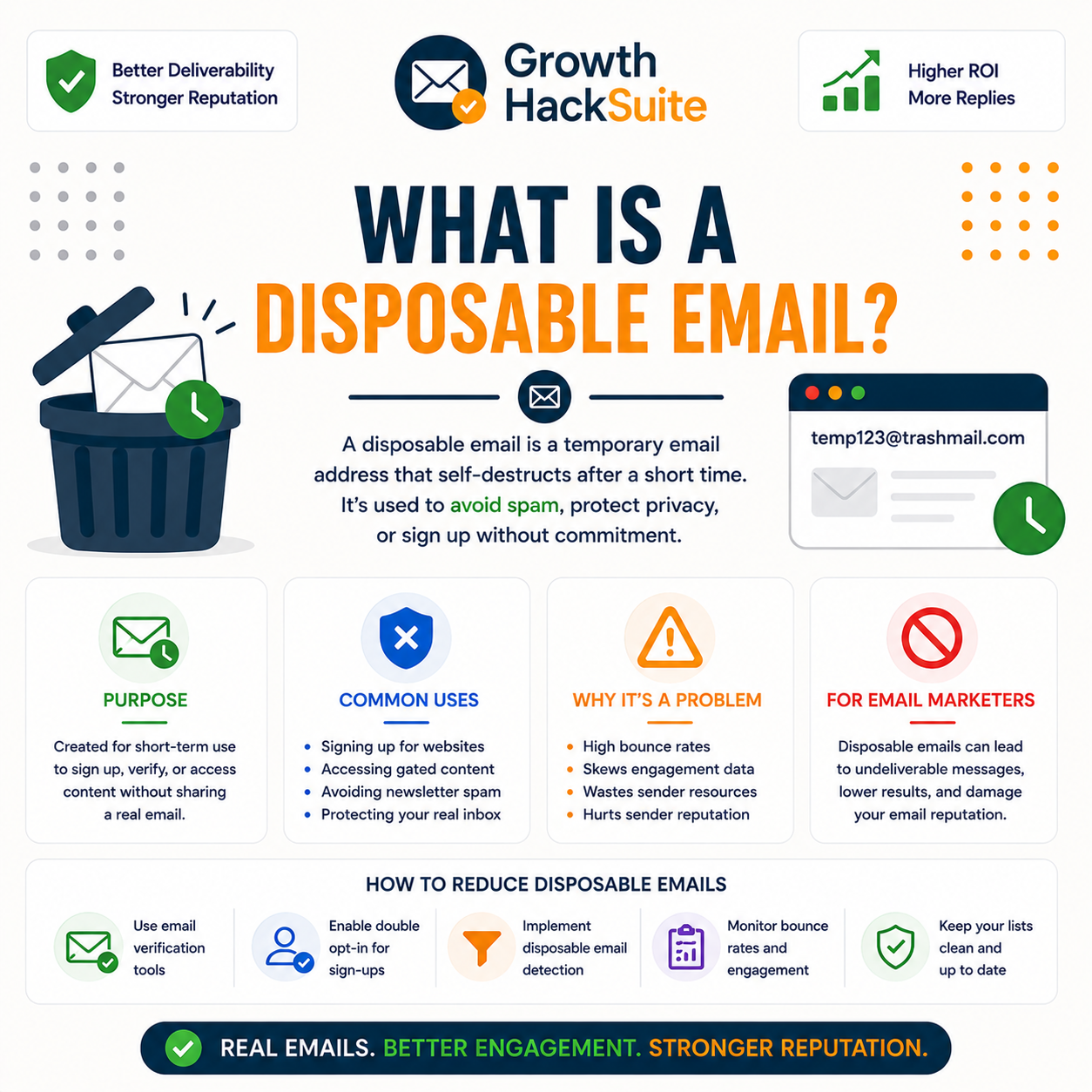
Detection comes down to three moving parts: a fresh domain database, a real-time check at the form, and a bulk pass over existing lists. The infographic below shows how those pieces fit so disposable addresses are caught both before entry and after collection, keeping list quality high over time.
Three Layers That Catch Disposable Emails
One fresh database powers both the form check and the bulk clean, catching disposables coming and going.
Verdict: What to Do About Disposable Emails
A disposable email is a temporary address that never engages and can hide abuse. Flag and block disposable signups at the form with real-time verification, and bulk-clean lists already collected. Block them for nurture lists by default, allowing them only where low-friction access genuinely outweighs reachability for a specific product goal.
Verdict: A disposable email is temporary, never engages, and can hide spam traps. Block it at signup with real-time verification, bulk-clean lists already built, and keep nurture lists disposable-free by default.
A disposable email address is a temporary address valid for a short time.
— Wikipedia, Disposable email address
Verify your list free and block disposable emails today.
Verify Your List Free →Free plan · No credit card · Disposable and risky addresses flagged
Related Reading on Email Verification
Disposable addresses are one piece of the wider list-quality picture, which also covers what verification means and how it cuts bounces. These guides on the Hunter verifier explain detection and the workflow that keeps a sending domain healthy over the long run.
- Email verification basics: For the underlying concept behind disposable detection, start with what email verification is and how each check works.
- The Hunter verifier in depth: To see how detection plays out in one tool, read what the Hunter Email Verifier is and what it flags.
- Cutting bounces with clean lists: For the deliverability payoff, see the workflow to reduce your email bounce rate before the next send.
Disposable Email Addresses: Frequently Asked Questions
The 12 most-asked questions about disposable email addresses.
What is a disposable email address?
A disposable email address is a temporary, throwaway inbox from a service that issues addresses on demand and discards them after minutes or hours. People use one to claim a freebie or sign up without exposing a real address, then let it expire unread.
How do disposable emails work?
A throwaway-mail service generates an address instantly with no account, receives one confirmation message, lets the user click through, then recycles or deletes the inbox. The address goes dead quickly, so any later marketing mail bounces or is simply never read.
Why do people use disposable emails?
People use disposables to grab a lead magnet, bypass a signup wall, or avoid handing a real address to a brand they do not trust. The motive is convenience or privacy, not engagement, so the signup almost never turns into a real subscriber.
Why are disposable emails risky?
Disposables inflate list size, drag engagement metrics down, and waste send budget on inboxes nobody reads. Some disposable domains also overlap with abuse and spam-trap activity. Together they distort analytics and quietly lower deliverability with mailbox providers over time.
How do verifiers detect disposable emails?
Verifiers match the address domain against a maintained database of known throwaway-mail services and return a disposable flag when it matches. Because new disposable domains launch constantly, the freshness of that database decides how many a given verifier actually catches.
How common are disposable signups?
Disposable signups cluster on free offers, gated content, and high-value promotions, where visitors resist sharing a real address. The stronger the incentive to sign up without commitment, the higher the disposable share tends to be on that particular form.
Disposable vs role vs invalid — what’s the difference?
A disposable is a real but temporary address; a role address is a real but shared function inbox like info@; an invalid does not exist at all. Each gets a separate flag, so a verifier reports them distinctly and you can act on each correctly.
Should I always block disposable emails?
Usually, but not always. Blocking them keeps nurture lists clean and engaged, yet some products allow disposables for low-friction trials. The honest call depends on whether ongoing reachability or the lowest possible signup barrier matters more for a given goal.
How do I block disposable emails?
Verify at signup with a real-time check, reject or flag addresses on known disposable domains, and bulk-verify existing lists to remove ones already collected. Real-time blocking at the form is the most effective layer, stopping disposables before they ever enter.
What tools detect disposable emails?
Any verifier with a maintained disposable database flags them, with depth and freshness varying by tool. Hunter detects disposable domains and skips them automatically without charging a credit, on a free tier, making it a practical option for cleaning lists.
Are disposable emails spam traps?
Not all disposable addresses are spam traps, but some disposable and abandoned domains overlap with trap activity, so the categories blur. Either way, disposables never engage and can quietly hide trap risk, which is why blocking them at signup protects sender reputation.
Can I verify disposable emails?
A verifier identifies a disposable address by domain rather than confirming a live mailbox, since the inbox may already have expired. Hunter, for example, flags disposable addresses and skips them automatically without charging a credit, so they are detected rather than fully verified.