Table of Contents
Email syntax validation checks whether an address is written correctly: a valid local part, an @ sign, and a properly formed domain. It is the fast first step of verification, catching typos and malformed addresses instantly before any server is contacted. But passing the syntax check does not prove the mailbox exists. This guide explains what email syntax validation does, what it catches, and exactly where it stops.
Go past syntax — verify emails free with a full mailbox check.
Verify Emails Free →Free plan included · No credit card · Syntax, MX and SMTP checked
What Is Email Syntax Validation?
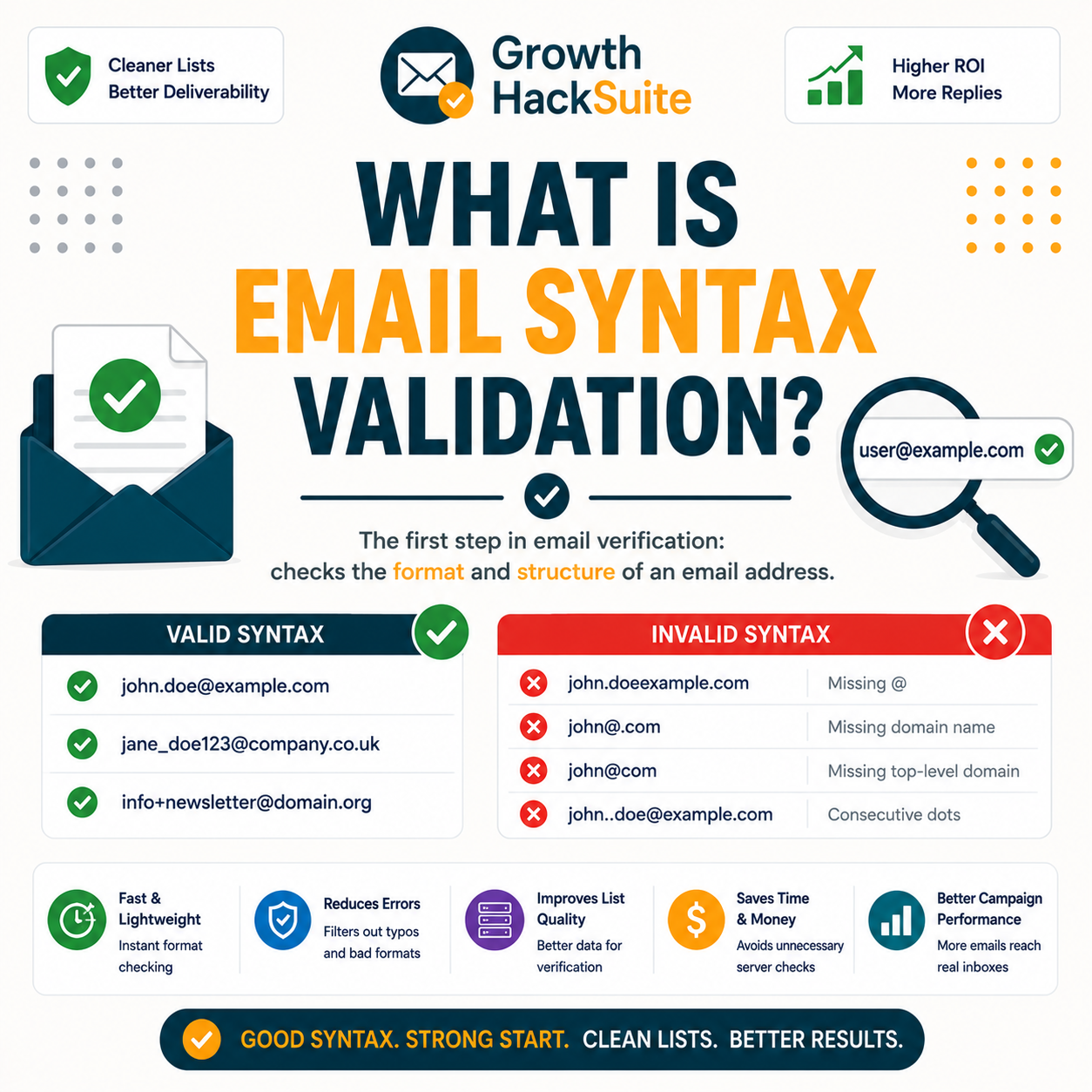
Email syntax validation is the check that confirms an address is written in a valid format: a local part before the @, the @ symbol itself, and a correctly structured domain after it. It follows the email format standard defined in the relevant specifications and serves as the first, fastest filter in any verification process. No network connection is required to run it.
- Local part: The local part is everything before the @ symbol, such as the name or handle that identifies an individual mailbox. Syntax validation confirms it uses permitted characters and avoids illegal ones like spaces or stray quotes that would break the address structure.
- The @ symbol: Exactly one @ symbol must separate the local part from the domain, since it marks the boundary the email standard depends on. An address with no @ or with two of them fails syntax validation instantly, because the parser cannot identify where the mailbox name ends.
- Domain part: The domain part follows the @ and must form a valid hostname with proper labels and a recognised top-level domain. Syntax validation checks its shape only, confirming the structure is legal without yet asking whether that domain can actually receive mail.
- Permitted characters: The standard defines exactly which characters are legal in each half of an address, allowing letters, digits and a small symbol set while rejecting most punctuation. Syntax validation tests every character against that set, failing any address that includes an illegal one.
- Structural form, not identity: Syntax validation judges only the shape of the address, never whether it belongs to a real person or active inbox. The check answers whether the address could exist as written, leaving the deeper question of existence to later MX and SMTP layers.
Syntax validation confirms an address is shaped like a real email, with a local part, an @, and a structured domain. It is the first gate before any deeper check runs.
The Verification Layers, In Order
What Rules Does Syntax Validation Apply?
Syntax validation enforces the email format standard: allowed characters in the local part, exactly one @ separating the two halves, and a domain with a valid structure and label rules. Addresses with spaces, double dots, a missing @ or illegal characters fail instantly at this stage. The check is purely structural, judging form rather than whether the address belongs to a real person.
- Character rules: The local part permits letters, digits and a defined set of symbols, while spaces and most punctuation are rejected outside quoted forms. Syntax validation scans each character against the standard, so an address containing an illegal symbol fails before any lookup begins.
- Single @ separator: A valid address contains precisely one @ symbol dividing the local part from the domain. Zero or multiple @ symbols leave the parser unable to locate the boundary, so syntax validation rejects the address as structurally impossible to deliver.
- Valid domain shape: The domain must consist of correctly formed labels separated by dots, ending in a recognised top-level domain. Syntax validation checks for consecutive dots, leading or trailing dots, and missing labels, all of which violate the format and cause an immediate fail.
- Length boundaries: The standard caps both the local part and the full address at defined character limits, so an address exceeding them is invalid regardless of its characters. Syntax validation measures length against these ceilings and rejects oversized entries before any costlier lookup begins.
- No surrounding whitespace: A valid address carries no leading, trailing or embedded spaces outside quoted local parts, since whitespace breaks the structural form. Syntax validation trims and inspects the string, flagging stray spaces that commonly slip in through copy-paste or spreadsheet imports.
The rules come from the email format standard. Break the format with a stray character, a missing @ or a malformed domain, and the address fails before any network lookup.
Why Is Syntax Validation the First Step?
Syntax validation runs first because it is instant and free: there is no point querying DNS or a mail server for an address that is not even formatted correctly. Filtering malformed addresses up front saves the cost of deeper checks on data that can never be valid. Ordering verification this way keeps the whole process fast, cheap and efficient.
- Instant and free: Syntax validation runs in code without contacting any server, so it returns a verdict in microseconds at no cost. That speed makes it the natural opening filter, screening an entire list before a single network request is spent.
- Saves deeper checks: Removing malformed addresses early means the slower MX and SMTP layers only run on plausible candidates. Each skipped lookup conserves a verification credit and shortens total processing time, which matters most on large lists riddled with typos.
Syntax goes first because it is free and instant. There is no reason to probe a server for an address that is not even shaped like an email.
What Does Syntax Validation Catch?
Syntax validation catches missing @ signs, illegal characters, spaces, double dots and malformed domains. These are the obvious data-entry errors plus many automated junk entries. Anything that is not even shaped like an email is removed here, before it wastes a verification credit on a deeper check. The result is a cleaner list entering the MX and SMTP stages.
- Missing @ or spaces: Addresses typed without an @ symbol, or containing spaces where none belong, violate the basic structure and fail immediately. These slips are common in manually entered lists and webform data, and syntax validation strips them out before any lookup runs.
- Illegal characters: Characters outside the permitted set, such as stray commas, brackets or control codes, render the local part or domain invalid. Syntax validation rejects these entries on sight, removing copy-paste corruption and encoding errors that would otherwise reach the verifier.
- Malformed domains: Domains with consecutive dots, a missing top-level domain or a trailing dot fail the structural check. Catching these malformed domains at the syntax stage removes guaranteed dead ends long before the MX lookup would have confirmed the same result more slowly.
- Double or missing @: Addresses with two @ symbols or none at all break the boundary the email standard depends on. Syntax validation rejects them on sight, since the parser cannot tell where the local part ends and the domain begins.
- Encoding corruption: Control codes, invisible characters and mojibake introduced by faulty exports render an address structurally invalid. Syntax validation flags this corruption immediately, stripping entries that look like text but cannot function as a deliverable email address.
The verifier first checks an address is correctly formatted before deeper checks run.
— Hunter, Email Verifier API documentation
Syntax validation sweeps out the obviously broken addresses, the typos, spaces and junk formatting, so the deeper layers never waste effort on data that could never deliver.
What Does Syntax Validation Miss?
A perfectly formatted address can still be fake. Syntax validation cannot tell whether the domain receives mail or whether the mailbox exists, so it passes well-formed addresses that point to non-existent inboxes. That gap is exactly why deeper verification must follow. This limit also separates simple format validation from full email verification, which confirms the mailbox is real.
- Domain reachability: A correctly structured domain may still have no mail server behind it, so it cannot receive any message. Syntax validation never queries DNS, leaving the MX lookup to confirm whether the domain is actually configured to accept mail at all.
- Mailbox existence: A flawless format proves nothing about whether the specific inbox is real and active. Only an SMTP existence check probes the mail server to confirm the individual mailbox, which is the step syntax validation cannot reach on its own.
- Catch-all behaviour: A domain may accept every address regardless of whether the mailbox exists, and syntax validation has no way to detect this. Identifying a catch-all needs an SMTP probe and risk signals layered well beyond a structural format check.
- Disposable providers: Throwaway and temporary-mail services publish addresses that are perfectly formatted yet worthless for outreach. Syntax validation cannot flag them, because the address is structurally legal even though the inbox will vanish within hours.
- Sender reputation: A well-formed address reveals nothing about whether the domain is a spam trap or a trusted recipient. Those quality judgements depend on signals outside the format, which is why verification combines syntax with deeper reputation checks.
A valid format is not a valid mailbox. Syntax validation passes well-formed fakes that only deeper MX and SMTP checks can finally catch.
How Does Hunter Use Syntax Validation?
Hunter runs syntax validation as the first layer of its verifier, instantly rejecting malformed addresses before it spends resources on MX and SMTP checks. The clean addresses then move to the deeper steps that confirm real deliverability. Treating syntax as layer one is what keeps the whole verification fast, since junk never reaches the slower, connection-based stages.
Syntax validation is the first layer; clearing it is what lets the deeper checks run only on plausible addresses.
— Growth Hack Suite, pre-send verification workflow
In Hunter, syntax validation is layer one. It clears the junk so the deeper MX and SMTP checks run only on addresses that are at least plausible.
Syntax Validation vs SMTP Check: What’s the Difference?
Syntax validation checks how an address is written; the SMTP check confirms it actually exists on a live server. Syntax is instant and structural, judging format alone, while SMTP is slower and definitive, probing the real mailbox. They are sequential layers, not alternatives, with syntax always running first to remove malformed addresses before the costlier existence check.
Source: email format standard per IETF RFC 5322 and SMTP per RFC 5321, verified 2026-06-29. Syntax validation is a structural check requiring no network; the MX and SMTP layers query DNS and the mail server in turn.
Syntax checks the writing; SMTP checks the reality. They are two layers that run in order, not a choice between one and the other.
Can Syntax Validation Reject a Valid Address?
Rarely, but yes. Overly strict validators can flag unusual but legal addresses, such as those using plus signs or newer top-level domains. Good validators follow the standard closely to avoid false rejections. The honest caveat is that format rules are nuanced, so strictness has to be calibrated carefully or a small share of legitimate addresses gets wrongly removed.
- Edge-case addresses: Legal addresses with plus-tagging, long new top-level domains or quoted local parts can trip naive validators built on outdated patterns. A standards-aware validator accepts these forms, while a crude one rejects valid mail and quietly shrinks a reachable list.
- Calibrated strictness: A quality validator balances catching junk against preserving rare but legal formats by tracking the current standard. Setting the rules too tight removes good contacts, so the safest validators err toward the specification rather than an aggressive custom pattern.
Over-strict syntax rules can reject legal addresses. Quality validators follow the email standard closely to keep edge-case but valid formats from being thrown away.
How Do You Run Syntax Validation?
Syntax validation is built into every verifier and many form libraries, so you rarely run it alone. For a list, a verifier validates syntax and then verifies existence in one pass. For a webform, a lightweight check can validate format live as a user types. In practice, syntax validation is bundled with the broader email validation workflow rather than handled separately.
- Use a verifier: An email verifier runs syntax validation silently as the first step of every check, then continues to the MX and SMTP layers. This route turns a structural format test into a single action and bundles it with the deliverability answer that actually matters.
- Or a form-side check: A client-side validation library checks format the instant a user types an address into a signup form, blocking typos at the source. This stops malformed addresses entering a list in the first place, reducing the cleanup a verifier handles later.
Verify emails free — the syntax check is built in.
Verify Emails Free →Free plan · No credit card · Syntax plus mailbox check
You rarely run syntax validation alone. A verifier bundles it with the existence check in one pass, while a form-side library catches typos as they are typed.
What Tools Do Syntax Validation?
Form libraries and basic validators do syntax-only checks; full verifiers add MX and SMTP on top. Hunter includes syntax validation as the first layer of full verification on a recurring free tier. The table below contrasts syntax-only tools with full verifiers on the points that decide which one fits a given job. Syntax validation also underpins broader email list cleaning.
Source: hunter.io/pricing, verified 2026-06-29 (free plan 50 credits/mo = ~100 verifications at 0.5 credit each). Other rows describe common tool categories; confirm each provider’s current features before buying.
Syntax-only tools confirm the format and stop there. A full verifier uses that same check as step one of confirming the mailbox actually exists.
Verdict: The Role of Syntax Validation
Syntax validation is verification’s essential first step: instant, free, and effective at removing malformed addresses. It cannot confirm a mailbox exists, so it must be paired with MX and SMTP checks to reach a deliverability verdict. As the opening filter, it makes the whole process faster and cheaper, which is why every serious verifier runs it before anything else.
Verdict: Syntax validation is verification’s first layer. It catches malformed addresses instantly and free, but misses mailbox existence entirely. A valid format confirms the shape only, never the inbox, so an MX and SMTP check must always follow to confirm the address is real.
An email address has a local part and a domain, separated by @.
— Wikipedia, Email address
Verify emails free — go past syntax to real existence.
Verify Emails Free →Free plan · No credit card · Real mailbox status returned
Related Tools in the Hunter Stack
Syntax validation is the first verifier layer, not the whole process. The Hunter Email Verifier review covers the full validation flow and every check it runs, including syntax, while the finder review covers building the lists worth verifying in the same connected stack on one shared credit pool.
- Hunter Email Verifier: The validation layer that wraps syntax in MX, SMTP and risk signals — start with what the Hunter Email Verifier is.
- Hunter Email Finder: The list-building half of the bundle that shares the same credit pool — read the Hunter.io email finder review for sourcing costs.
Email Syntax Validation: Frequently Asked Questions
The 12 most-asked questions about email syntax validation.
What is email syntax validation?
Email syntax validation is the check that confirms an address is written in a valid format: a local part before the @, the @ symbol, and a correctly structured domain after it. It follows the email format standard and runs instantly in code, without contacting any server, as the first step of verification.
What rules does it apply?
Syntax validation enforces the email format standard: allowed characters in the local part, exactly one @ separating the two halves, and a domain with valid labels and a recognised top-level domain. Spaces, double dots, a missing @ or illegal characters all cause an instant fail at this structural stage.
Why is syntax validation the first step?
Syntax validation runs first because it is instant and free: there is no point querying DNS or a mail server for an address that is not even formatted correctly. Filtering malformed addresses up front saves the cost of deeper checks on data that can never be valid, keeping the whole process efficient.
What does syntax validation catch?
It catches missing @ signs, illegal characters, spaces, double dots and malformed domains. These are the obvious data-entry errors plus many automated junk entries. Anything that is not even shaped like an email is removed at this stage, before it wastes a verification credit on a slower MX or SMTP check.
What does it miss?
A perfectly formatted address can still be fake. Syntax validation cannot tell whether the domain receives mail or whether the mailbox exists, so it passes well-formed addresses that point to non-existent inboxes. That gap is exactly why MX and SMTP checks must follow to confirm real deliverability.
Syntax validation vs SMTP check?
Syntax validation checks how an address is written; the SMTP check confirms it actually exists on a live server. Syntax is instant and structural, while SMTP is slower and definitive. They are sequential layers, not alternatives, with syntax always running first to remove malformed addresses before the costlier existence check.
Can it reject a valid address?
Rarely, but yes. Overly strict validators can flag unusual but legal addresses, such as those using plus signs or newer top-level domains. Good validators follow the standard closely to avoid false rejections. Format rules are nuanced, so strictness must be calibrated or a few legitimate addresses get wrongly removed.
Is a valid format a valid mailbox?
No. A valid format proves only that an address is written correctly, not that the inbox exists or receives mail. Passing syntax validation is a necessary precondition, never the final verdict. An SMTP existence check must probe the mail server to confirm the specific mailbox is real and able to accept messages.
How do I run syntax validation?
Syntax validation is built into every verifier and many form libraries, so it rarely runs alone. For a list, a verifier validates syntax and then verifies existence in one pass. For a webform, a lightweight client-side library can validate format live as a user types, blocking typos at the point of entry.
What tools do syntax validation?
Form libraries and basic validators do syntax-only checks, while full verifiers add MX and SMTP on top. Hunter includes syntax validation as the first layer of full verification on a recurring free tier of about 100 verifications a month. Standalone format checks confirm the writing but never test a mailbox.
Does a verifier include syntax validation?
Yes. Every full email verifier runs syntax validation as its first layer, rejecting malformed addresses before spending resources on MX and SMTP checks. In Hunter, syntax is layer one of the verifier, so the clean addresses that pass move on to the deeper steps that confirm real deliverability.
Is syntax validation enough?
No. Syntax validation confirms an address is formatted correctly, but it cannot tell whether the domain receives mail or whether the mailbox exists. Full verification follows the syntax check with MX and SMTP layers that probe the real server. Syntax is the gate; the deeper checks are the proof of the mailbox.