Table of Contents
An invalid email is an address that cannot receive mail, so anything sent to it bounces. It may be malformed, sit on a dead domain, or point to a mailbox that never existed or was deleted. Invalid addresses drive hard bounces and damage sender reputation. This guide answers what is an invalid email, what causes one, and how verification finds and removes them.
Remove invalid emails free — verify your list before the next send.
Verify Your List Free →Free plan included · No credit card · Full status and scoring
What Is an Invalid Email Address?
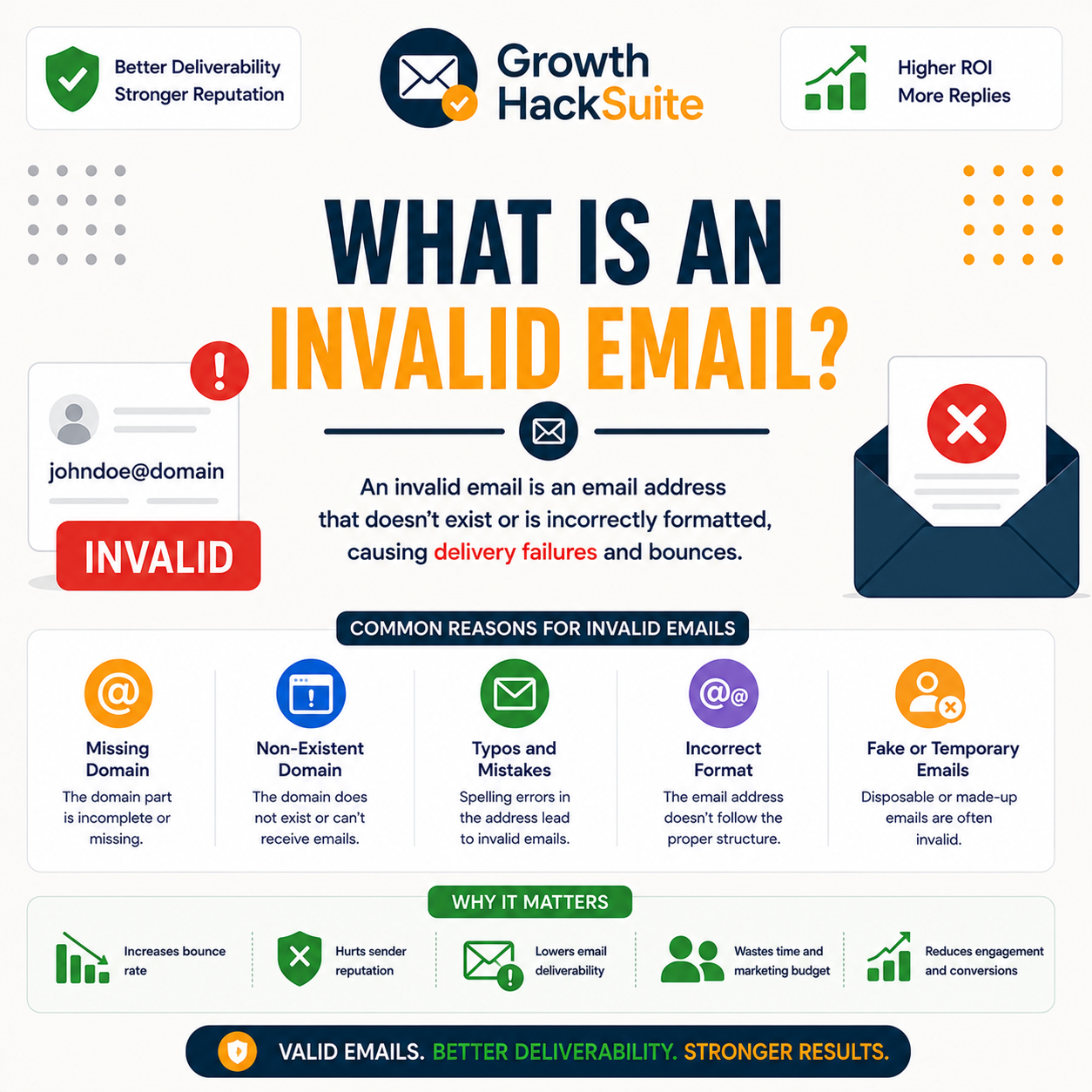
An invalid email is an address that cannot receive mail, so any message sent to it bounces. It is the opposite of a valid, deliverable address. Invalid addresses are the main source of hard bounces, the permanent delivery failures that signal poor list hygiene, which is why removing them is the first goal of email verification.
- Cannot receive mail: An invalid address has no working mailbox behind it, so the receiving server has nowhere to deliver a message. The format may look correct, yet nothing on the other side can accept the email at all.
- Always bounces: Every send to an invalid address returns a permanent failure rather than reaching an inbox. Unlike a temporary soft bounce, this hard bounce never resolves on its own and repeats on each attempt.
- Source of hard bounces: Invalid addresses generate the bulk of hard bounces in a campaign, and a high hard-bounce rate tells mailbox providers a list is poorly maintained, dragging sender reputation down across the whole sending domain.
- Opposite of valid: A valid address passes every deliverability check, while an invalid one fails at least one and is confirmed undeliverable. The two statuses are mutually exclusive outcomes a verifier assigns to each entry on a list.
- Looks correct but is dead: Many invalid addresses pass a casual eye test because the format is fine. Only a domain and mailbox check reveals that no inbox exists behind the address, making manual review unreliable for spotting them.
An invalid email is undeliverable by definition — the main source of the hard bounces verification removes before a campaign ever sends.
How Is an Invalid Email Detected?
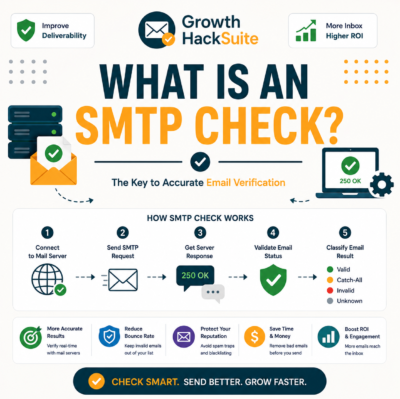
A verifier confirms an address is invalid through syntax, domain and SMTP checks. A malformed format, a domain with no mail server, or a server that rejects the recipient each mark it invalid. The SMTP rejection is the definitive signal, because the receiving server itself confirms the mailbox cannot accept mail without a message being delivered.
- Syntax check: The verifier first tests whether the address follows valid formatting rules, catching missing symbols, illegal characters and broken structure. A failed syntax check marks the address invalid before any network lookup runs.
- No mail server: A domain lookup checks for MX records that route mail. A domain with no mail server, or one that no longer exists, cannot receive messages, so every address on it is flagged invalid.
- SMTP rejection: The verifier opens a mailbox-level handshake with the receiving server. A permanent rejection at this step confirms the recipient does not exist, the strongest and most definitive evidence an address is invalid.
- Disposable detection: Many verifiers cross-check the domain against known throwaway providers. Disposable addresses self-destruct after a short window, so flagging them prevents wasted sends to mailboxes designed to expire within hours of creation.
- Role and trap filtering: The check also identifies role accounts and likely spam traps that should never receive cold mail. Catching these alongside hard invalids keeps a list clean and reduces the risk of a deliverability complaint.
Invalid is confirmed by syntax, domain or SMTP failure — the server rejection is the definitive proof. For the full process, see what email verification is.
What Causes an Email to Be Invalid?
Common causes are typos at entry, a domain that expired or never existed, a mailbox that was deleted or never created, and formatting errors. Most invalid addresses enter through unverified signups and aging data, which is why verifying at the point of capture and re-verifying old lists both matter for keeping a list deliverable.
- Typos: Manual entry introduces misspelled domains and dropped characters, turning a real person’s address into one that bounces. A single wrong letter in the domain sends every message to a mailbox that does not exist.
- Dead domain: Domains expire, get abandoned, or were never registered. When a domain has no active mail server, every address built on it becomes permanently undeliverable regardless of how the local part is written.
- Deleted mailbox: Employees leave and accounts close, removing a once-valid mailbox. The address still looks correct but now has no inbox to receive mail, so it returns a hard bounce on every send.
- Data decay: Contact lists lose accuracy over time as people change jobs and providers retire addresses. The longer a list sits unverified, the larger its share of newly invalid addresses grows before the next campaign.
- Unverified signups: Forms without a real-time check accept whatever a visitor types, including fake or mistyped addresses. These flow straight onto a list and become hard bounces the moment the first message goes out to them.
A hard bounce means the address does not exist or the domain has permanently rejected it.
— hunter.io API documentation
Invalids come from typos, dead domains and deleted mailboxes — mostly entering through unverified data that ages without a check.
Invalid vs Valid: What Is the Difference?
A valid address is confirmed deliverable; an invalid one is confirmed undeliverable and will bounce. Verification sorts a list into these two outcomes, plus the uncertain accept-all and unknown buckets. Valid addresses are safe to send to, while invalid addresses must be removed before any campaign goes out to protect deliverability.
- Valid is deliverable: A valid address passes syntax, domain and mailbox checks, confirming a working inbox can accept mail. Sending to valid addresses keeps bounce rates low and protects the reputation of the sending domain.
- Invalid bounces: An invalid address fails one of those checks and returns a permanent hard bounce on every send. Keeping invalid addresses on a list inflates bounce rates and pushes valid mail toward the spam folder.
Valid delivers, invalid bounces — sorting the two is the core job of a verifier before any list goes out.
What Do Invalid Emails Do to Your Sending?
Invalid addresses bounce on send, and a high hard-bounce rate signals poor list hygiene to mailbox providers, lowering reputation and pushing valid mail toward spam. They also waste send budget on messages no one receives. Removing invalid addresses is the most direct way to protect deliverability before a campaign ever leaves the queue.
Source: Industry deliverability benchmarks (Suped, Mailforge, SMTP2GO), verified 2026-06. A healthy hard-bounce rate sits under 2%; rates above 5% degrade domain reputation and inbox placement.
Verifying a list before the first send is the cheapest way to protect a sending domain.
— Growth Hack Suite, pre-send verification workflow
Invalids bounce, bounces lower reputation — removing them is the most direct deliverability fix available. The full method sits in the guide to reducing email bounce rate with Hunter.
How Common Are Invalid Addresses?
Unverified and aging lists commonly carry double-digit invalid shares, since data decays and signups go unchecked. The older or less consensual the list, the higher the share of dead addresses it holds. Verified lists keep the invalid share near zero, which is the entire point of verifying before every send.
- High in aging data: Lists that sit unverified for months accumulate dead domains and closed mailboxes as contacts change roles and providers. Purchased or scraped lists carry the highest invalid shares because they were never confirmed at the source.
- Near zero when verified: Running a list through a verifier and removing every flagged invalid drops the invalid share close to zero. Re-verifying before each send keeps it there as fresh decay creeps back into the data.
Aging lists carry double-digit invalid shares; verification drives that share back toward zero before the next campaign.
Why an Email Is Marked Invalid
Invalid vs Unknown: What Is the Difference?
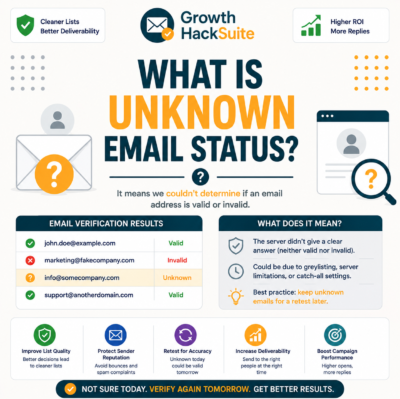
Invalid means confirmed undeliverable; unknown means the verifier could not determine the result, usually because of a catch-all domain or greylisting. Invalid addresses should be removed, while unknown addresses should be segmented by confidence rather than deleted outright. The table below contrasts the two statuses and the right action for each.
Source: Public email-verifier status definitions (Hunter, NeverBounce documentation), verified 2026-06. Invalid is a confirmed permanent failure; unknown reflects an inconclusive check, not a confirmed bad address.
Invalid means remove; unknown means investigate — confusing the two either bounces mail or wastes contacts that may still be reachable.
Can an Invalid Email Be Fixed?
Sometimes the underlying contact can be recovered, even though the invalid address cannot. A typo invalid can be corrected if the right address is inferable, and a finder may locate a current address for someone whose mailbox changed. But the invalid address itself cannot be made deliverable; it must be replaced or removed from the list.
- Fix typos: An address invalid because of a misspelled domain or dropped character can be corrected when the intended address is obvious. Correcting the entry recovers a real contact that a blind deletion would have lost entirely.
- Re-find a current address: When a mailbox was deleted because someone changed jobs, an email finder can locate their new address at the new domain. The old invalid entry is replaced rather than repaired, restoring a reachable contact.
The contact behind an invalid email can sometimes be recovered, but the invalid address itself must be replaced or removed.
How Do You Remove Invalid Emails?
Remove invalid addresses by bulk-verifying the list and deleting everything flagged invalid, correcting obvious typos before deletion, and verifying at signup to stop new ones entering. Re-verify aging lists on a schedule so invalid addresses from natural decay are caught before the next send rather than discovered as bounces afterward.
- Bulk verify and delete: Run the full list through a verifier and remove every address returned as invalid. This single pass clears the bulk of hard bounces before a campaign and is the fastest way to lift deliverability.
- Correct typos first: Review obvious misspellings before deleting, since a corrected domain often recovers a real contact. Fixing the entry preserves a reachable person that a straight deletion would discard along with the dead addresses.
- Verify at signup: Add a real-time check at the point of capture so invalid addresses never enter the list. Stopping bad data at the source reduces the cleanup burden and keeps future bounce rates low automatically.
- Re-verify aging segments: Schedule a recurring re-verification of older list segments, since data decays continuously. Catching newly invalid addresses on a cycle stops them from accumulating into a bounce spike on the next big send.
- Suppress, do not resend: Move confirmed invalids to a suppression list rather than deleting blindly, so the same dead addresses are never re-imported. A permanent suppression record keeps cleaned lists from quietly refilling with old bounces.
Verify your list free and remove every invalid email before you send.
Verify Your List Free →Free plan · No credit card · Flags invalid, accept-all and unknown
Bulk verify, fix typos, delete the rest, and verify at signup — that loop keeps invalid addresses out of every send.
What Tools Remove Invalid Emails?
A verifier is the core tool: it flags invalid addresses for removal across an entire list. Hunter does this with a recurring free tier and bundles email finding on the same account; pure-play verifiers compete mainly on bulk price. The table compares common options for finding and removing invalid addresses before a send.
Source: hunter.io/pricing, neverbounce.com and zerobounce.net product pages, verified 2026-06-27. Free-tier sizes change; confirm current allowances on each provider’s site before choosing.
A verifier flags every invalid address for removal — the core tool for keeping a list deliverable. Compare two in the Hunter vs ZeroBounce comparison for email marketers.
Verdict: What to Do About Invalid Emails
An invalid email cannot receive mail and bounces, driving the hard bounces that damage sender reputation. Remove invalid addresses by verifying before every send, correcting typos where possible, and verifying at signup. The invalid address itself cannot be fixed, only replaced or removed, so verification is the standing defense against bounces.
Verdict: An invalid email is confirmed undeliverable and always bounces. It drives the hard bounces that push reputation past the 5% danger line. Remove invalids by verifying before every send, fix typos where the contact is recoverable, and verify at signup. The address itself is unfixable; replace or remove it.
An email address identifies a mailbox to which messages are delivered.
— Wikipedia, Email address
Clear out invalid emails free — verify your list before the next campaign.
Verify Your List Free →Free plan · No credit card · Find and verify in one account
Related Tools in the Hunter Stack
Invalid addresses tie directly to verification and to the email finding that replaces dead contacts. The Hunter verifier review covers how detection and flagging work, and the finder review covers sourcing fresh addresses to replace the invalid ones removed from a list.
- Hunter Email Verifier: The validation layer that flags invalid, accept-all and unknown addresses — start with what the Hunter Email Verifier is and its accuracy benchmark.
- Hunter Email Finder: The finding half of the bundle that locates a current address when a mailbox dies — read the Hunter.io email finder review for sourcing replacements.
Invalid Email Addresses: Frequently Asked Questions
The 12 most-asked questions about invalid email addresses.
What is an invalid email address?
An invalid email address is one that cannot receive mail, so any message sent to it bounces. It may be malformed, sit on a domain with no mail server, or point to a mailbox that never existed or was deleted. It is the opposite of a valid, deliverable address.
How is an invalid email detected?
A verifier runs three checks: syntax, domain and SMTP. A malformed format, a domain with no mail server, or a server that permanently rejects the recipient each mark the address invalid. The SMTP rejection is the definitive signal because the receiving server itself confirms the mailbox cannot accept mail.
What causes an email to be invalid?
The common causes are typos at entry, a domain that expired or never existed, a mailbox that was deleted or never created, and formatting errors. Most invalid addresses enter through unverified signups and aging data, which is why verifying at capture and re-verifying old lists both matter.
What is the difference between an invalid and a valid email?
A valid email is confirmed deliverable and safe to send to; an invalid email is confirmed undeliverable and will bounce. Verification sorts a list into these two outcomes plus the uncertain accept-all and unknown buckets. Valid addresses stay; invalid addresses must be removed before any send.
Why is my email invalid?
An email shows as invalid when a verifier confirms it cannot receive mail. The most likely reasons are a typo in the domain, a domain that no longer has a mail server, or a mailbox that was closed. The address may look correct yet still have no working inbox behind it.
What do invalid emails do to sender reputation?
Invalid addresses bounce on send, and a high hard-bounce rate signals poor list hygiene to mailbox providers. A healthy hard-bounce rate sits under 2%; rates above 5% degrade domain reputation and route mail toward spam. Removing invalids is the most direct way to protect deliverability.
What is the difference between invalid and unknown?
Invalid means confirmed undeliverable; unknown means the verifier could not determine a result, usually because of a catch-all domain or greylisting. Invalid addresses should be removed, while unknown addresses should be segmented by confidence rather than deleted, since some may still be reachable.
Can an invalid email be fixed?
The address itself cannot be made deliverable, but the contact behind it can sometimes be recovered. A typo invalid can be corrected if the right address is obvious, and a finder may locate a current address for someone whose mailbox changed. The invalid entry is replaced rather than repaired.
How do you remove invalid emails from a list?
Bulk-verify the list and delete every address flagged invalid, correct obvious typos before deleting, and add a real-time check at signup to stop new ones entering. Re-verify aging lists on a schedule so invalids from decay are caught before the next send rather than as bounces afterward.
What tools remove invalid emails?
A dedicated email verifier is the core tool, flagging every invalid address for removal. Hunter does this with a recurring free tier and bundles email finding on the same account, while pure-play verifiers like NeverBounce and ZeroBounce compete mainly on bulk price per thousand.
How common are invalid addresses on a list?
Unverified and aging lists commonly carry double-digit invalid shares, since data decays as contacts change roles and providers retire addresses. Purchased or scraped lists carry the highest shares. Verified lists keep the invalid share near zero, which is the entire point of verifying before each send.
Is an invalid email the same as a bounced email?
They are closely related but not identical. An invalid email is the cause; a bounce is the result. Sending to an invalid address produces a hard bounce, a permanent failure. A soft bounce is temporary and may come from a full mailbox or a server issue rather than an invalid address.