Table of Contents
A unified inbox is a single view that consolidates email replies from many mailboxes and campaigns into one place, so every conversation is managed without switching accounts. This guide explains what it is, how it works, why it matters at scale, how intent sorting helps, how teams use it, and how it differs from a normal inbox.
This consolidated view brings replies from many mailboxes into one intent-sorted queue, so one operator answers hot leads fast.
Best for: agencies and scale senders running many mailboxes at once.
Caveat: a single-mailbox sender gains little from consolidation.
Bottom line: one queue means no reply, and no deal, slips through.
Put this into practice. Try Smartlead free for 14 days.
Start Smartlead Free Trial →Unlimited mailboxes · no credit card · 14-day trial
What Is a Unified Inbox?
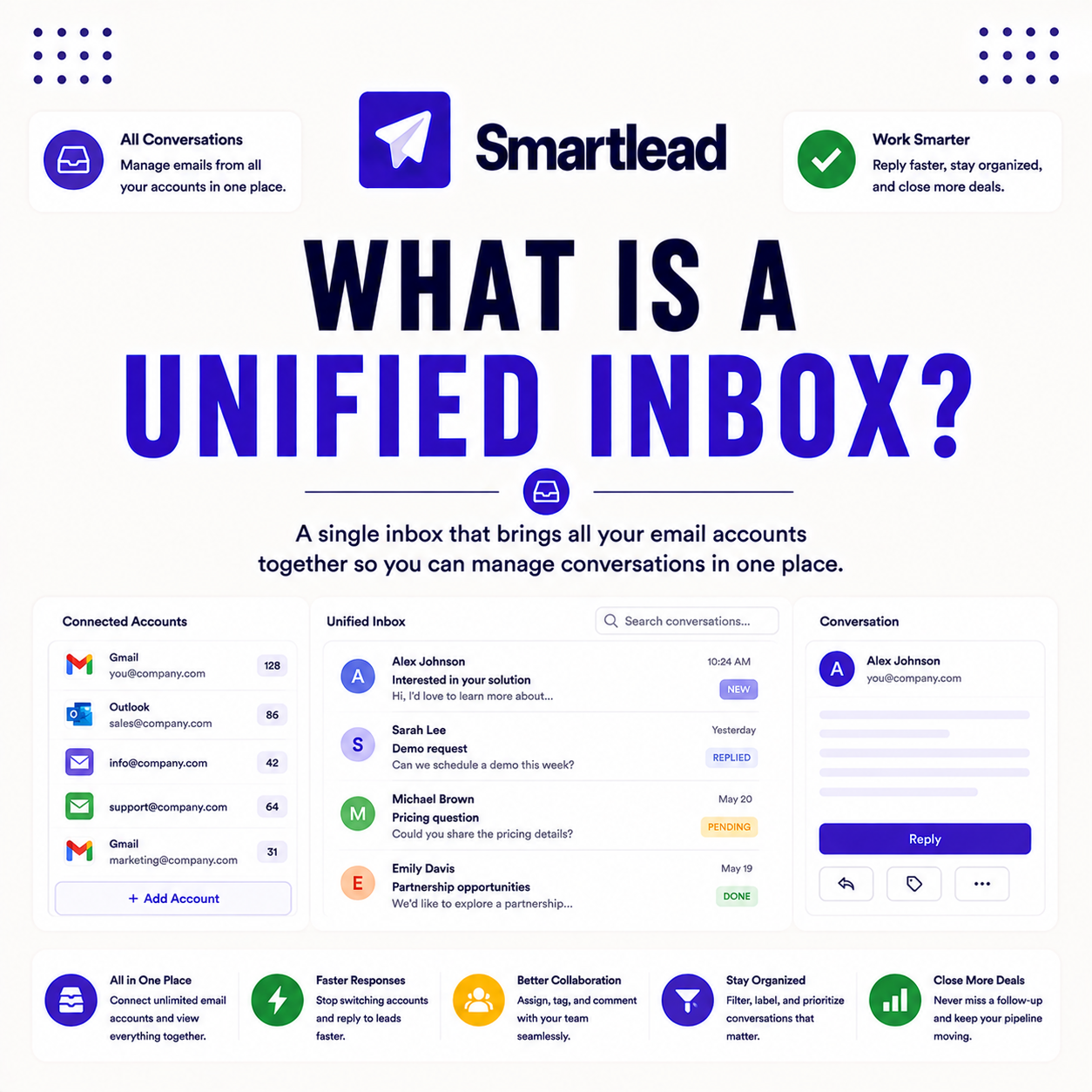
It is a single view that pulls replies from all connected mailboxes and campaigns into one place. Instead of checking many accounts, an operator handles every conversation from one queue. The deciding factor is that consolidation removes the account-switching that loses replies. The list below covers the parts.
- One view: replies from all mailboxes and campaigns land in a single feed.
- Intent sorting: hot leads surface first, ahead of low-priority replies.
- Quick actions: replies are answered, tagged or assigned without switching accounts.
- No account hopping: one queue replaces logging into each mailbox separately.
- Also known by other names: some platforms use different terms for this same feature.
“Consolidating replies into one view is what lets a single operator run high-volume outreach.”
— Growth Hack Suite, on cold email tools
How Does a Unified Inbox Work?
It aggregates replies from every connected mailbox into one feed, tagging each by intent and letting operators respond without switching accounts. The platform handles consolidation, so all conversations sit in a single queue. The deciding factor is that aggregation and tagging are automatic. The list below covers the flow.
- Connect mailboxes: every sending account is linked into the one inbox.
- Aggregate replies: incoming responses flow into a single shared feed.
- Tag by intent: each reply is categorized as interested, not now or auto-reply.
- Respond in place: replies are answered from the feed without opening accounts.
- Pairs with basics: the inbox sits on top of warmup and list verification.
“Response speed to inbound interest is one of the strongest predictors of conversion.”
— HubSpot, on response time
Why Does a Unified Inbox Matter at Scale?
It matters because high-volume cold email spreads replies across many mailboxes, and missing one means a lost deal.This consolidated queue surfaces every reply in one queue, so nothing slips through the cracks. The deciding factor is that scattered replies are the failure mode at scale. The list below covers why.
- Scattered replies: high volume spreads responses across many mailboxes.
- Missed deals: a reply left unseen in one account is a lost opportunity.
- One queue: consolidation surfaces every reply so none is overlooked.
- Best for scale: the benefit grows with the number of mailboxes in use.
- Caveat: a single-mailbox sender sees little gain from consolidation.
How Does Intent Sorting Help?
Intent sorting tags replies as interested, not now, or out of office, so operators act on hot leads first. This focuses time on the responses that convert rather than reading every message in order. The deciding factor is that prioritized replies protect the highest-value conversations. The list below covers how it helps.
- Interested: positive replies are prioritized at the top of the queue.
- Not now: soft passes are tagged for a scheduled later follow-up.
- Out of office: auto-replies are filtered so they do not clutter the feed.
- Focus on conversion: time goes to the replies most likely to become deals.
- Less noise: low-value responses drop down, keeping the hot list clear.
How Do Teams Use a Unified Inbox?
Teams use this shared queue to assign replies to the right person, add notes for context, and apply bulk actions, so a small team handles many campaigns or clients. Clear ownership prevents duplicate replies. The ordered steps below show how teams work in it.
- Assign replies: each conversation is routed to the right team member.
- Add notes: context is attached so the next person understands the thread.
- Apply bulk actions: similar replies are tagged or cleared together.
- Avoid duplicates: clear ownership stops two people answering one lead.
- Cover more clients: a small team runs many campaigns from one queue.
Managing many mailboxes? Test Smartlead free for 14 days.
Start Smartlead Free Trial →No credit card · unlimited mailboxes
Is a Unified Inbox the Same as a Master Inbox?
Yes, they’re simply different labels different platforms use for the same underlying capability: one consolidated view of replies across mailboxes. Platforms use the terms interchangeably. The deciding factor is that the function, not the label, defines the feature. The honest read is that any of the three names points to the same consolidated queue.
The practical point is not to be thrown by the naming, since all of these labels do exactly the same job.
Does a Unified Inbox Sync With a CRM?
Often yes, replies and outcomes can sync to a CRM through integrations, so deals move forward without manual entry. This keeps the inbox and pipeline aligned for tracking. The deciding factor is that integration removes double data entry. The table below positions the feature against a typical rival.
Source: vendor sites plus internal review, mid-2026. Verify current features on smartlead.ai.
Does Smartlead Have a Unified Inbox?
Yes, Smartlead consolidates replies across unlimited mailboxes with AI categorization and bulk actions. It makes managing high-volume outreach from one screen practical. The deciding factor is that unlimited mailboxes plus one queue is what scale senders need. The honest read is that this consolidation is central to running many mailboxes without a bloated team.
The practical point is that the master inbox lets one operator cover dozens of mailboxes. Verify current features on smartlead.ai.
Who Gets the Most Value From a Unified Inbox?
Agencies and scale senders get the most value, since this consolidation compounds across many mailboxes and clients. Low-volume single-account senders see a smaller benefit, so weigh it against how many mailboxes are in play. The deciding factor is the number of accounts a single operator must cover. The honest read is that the more mailboxes there are, the more it pays back.
The practical point is that a multi-mailbox operation gains most, while a single-inbox sender can manage without consolidation.
How Do You Get Started Today?
Start on the 14-day free trial, connect a few mailboxes, warm them, verify a small list and watch replies land in one inbox. Confirming the workflow on your own accounts before committing is the lowest-risk way to begin. The trial needs no card, so the only cost is setup time. By launch, every reply sits in one intent-sorted queue.
Can One Person Manage Many Mailboxes With a Unified Inbox?
Yes, that is the main benefit: one operator handles replies from dozens of mailboxes without logging into each. This is what makes high-volume, multi-account outreach manageable for a small team. The deciding factor is that one queue replaces dozens of separate logins. The honest read is that without this consolidation, multi-mailbox outreach becomes unmanageable fast.
The practical point is that consolidation is what lets a lean team run the mailbox count that high-volume outreach requires.
What Is the Difference Between a Unibox and a Normal Inbox?
A normal inbox shows one account’s mail, while a unibox consolidates many mailboxes into one view with intent sorting. It’s built for managing outreach at scale. The deciding factor is one account versus many. The table below draws the distinction.
Source: standard inbox terminology, mid-2026. Directional, not a measured benchmark.
“An email client is a program used to access and manage a user’s email.”
— Wikipedia, Email client
Unified Inbox: The Final Verdict
The final verdict is that this consolidated queue, built from many mailboxes, brings every reply into one intent-sorted place so no lead slips through. It matters most at scale, where replies otherwise scatter across accounts. For a multi-mailbox operation it is essential, letting one operator answer hot leads fast; a single-inbox sender needs it less.
Growth Hack Suite Editorial — Outbound Tools Team
This guide explains the concept based on standard cold email practice plus hands-on testing of Smartlead. Behavior varies; verify current features on smartlead.ai. We review outbound tools for B2B senders.
Last updated: June 2026. Confirm current inbox features on smartlead.ai.
Affiliate disclosure: this page contains affiliate links. If you start a plan through them, Growth Hack Suite may earn a commission at no extra cost to you. It does not change our guidance.
Answer every hot lead from one inbox. Start Smartlead free for 14 days.
Start Smartlead Free Trial →Unlimited mailboxes · no credit card · cancel anytime
Related Tools in the Outbound Stack
Two other tools in the Growth Hack Suite stack pair with this consolidated inbox.
- Hunter Email Verifier: verifying the list means fewer bounces and cleaner replies in the inbox — see verifier accuracy.
- GMass: the Gmail-native option for a sender managing replies inside Gmail — read the GMass review.
- Gmail tools comparison: the Gmail-scoped breakdown for senders weighing platform versus extension — compare the Gmail tools.
Unified Inbox FAQ
The 12 most-asked questions about this feature.
What is a unified inbox?
A unified inbox, or unibox, is a single view that pulls replies from all mailboxes and campaigns into one place. Instead of checking many accounts, an operator handles every conversation from one queue.
How does a unified inbox work?
It aggregates replies from every connected mailbox into one feed, tagging each by intent and letting operators respond without switching accounts. The platform handles consolidation, so all conversations sit in a single queue.
Why does a unified inbox matter at scale?
High-volume cold email spreads replies across many mailboxes, and missing one means a lost deal. This queue surfaces every reply in one place, so nothing slips through the cracks.
How does intent sorting help in a unified inbox?
It tags replies as interested, not now, or out of office, so operators act on hot leads first. This focuses time on the responses that convert, rather than reading every message in order.
Is a unified inbox the same as a master inbox?
Yes, they’re simply different labels different platforms use for the same underlying capability: one consolidated view of replies across mailboxes.
How do teams use a unified inbox?
Teams assign replies to the right person, add notes for context, and apply bulk actions, so a small team handles many campaigns or clients. This coordination prevents duplicate replies.
Does a unified inbox sync with a CRM?
Often yes, replies and outcomes can sync through integrations, so deals move forward without manual entry. This keeps replies and the pipeline aligned for tracking.
Does Smartlead have a unified inbox?
Yes, Smartlead’s master inbox consolidates replies across unlimited mailboxes with AI categorization and bulk actions. It makes managing high-volume outreach from one screen practical.
Can one person manage many mailboxes with a unified inbox?
Yes, that is the main benefit: one operator handles replies from dozens of mailboxes without logging into each. This is what makes high-volume, multi-account outreach manageable for a small team.
Does a unified inbox work on mobile?
Many platforms, including Smartlead, offer mobile access to this feature, so hot leads can be answered on the go. Mobile access means fast responses are not tied to a desk.
What is the difference between a unibox and a normal inbox?
A normal inbox shows one account’s mail, while a unibox consolidates many mailboxes into one view with intent sorting. It’s built for managing outreach at scale.
Does a unified inbox improve reply handling speed?
Yes, by surfacing all replies in one intent-sorted queue, it lets operators answer hot leads faster than checking accounts separately. Speed of response often makes the difference in closing.