
Table of Contents
Server response time is how long a server takes to process a request and begin sending a response, closely related to time to first byte. It reflects hosting power, caching and database efficiency, and reducing it is one of the most effective ways to speed up a website and improve Core Web Vitals. This guide explains what a good response time is and how to lower it.
Last updated: August 2026. Written by the Growth Hack Suite editorial team, with details cross-checked against provider documentation. This page carries affiliate links to Kinsta.
What Is Server Response Time?
Server response time is how long a server takes to process an incoming request and begin sending back a response, closely tied to time to first byte. It reflects how quickly your hosting and application can produce a page before any of it reaches the browser.
“Response time is the total time it takes to respond to a request.”
— Wikipedia, Response time
For a website, that request is a page load, so server response time is the delay before the server even starts to deliver the page a visitor asked for.
How Is Response Time Measured?
Server response time is measured as the delay between a request reaching the server and the first byte returning. It is reported by tools like PageSpeed Insights as server response time or TTFB, and by browser dev tools during a page load, so both lab and live data are available.
Verdict: Server response time is how fast a server starts replying, and a good figure is under 200 milliseconds, with under 100 excellent and over 600 poor. The honest rule is that hosting power and caching dominate: a cached page skips PHP and the database and returns almost instantly, so a fast host with strong caching and modern PHP is the most reliable way to keep response time low.
In short, server response time is a server-side metric, so the largest gains come from infrastructure and caching rather than front-end changes.
What Is a Good Server Response Time?
A good server response time is generally under 200 milliseconds, since Google associates that range with strong performance. A fast response leaves more of the load budget for downloading and rendering the rest of the page, so it benefits every metric that follows.
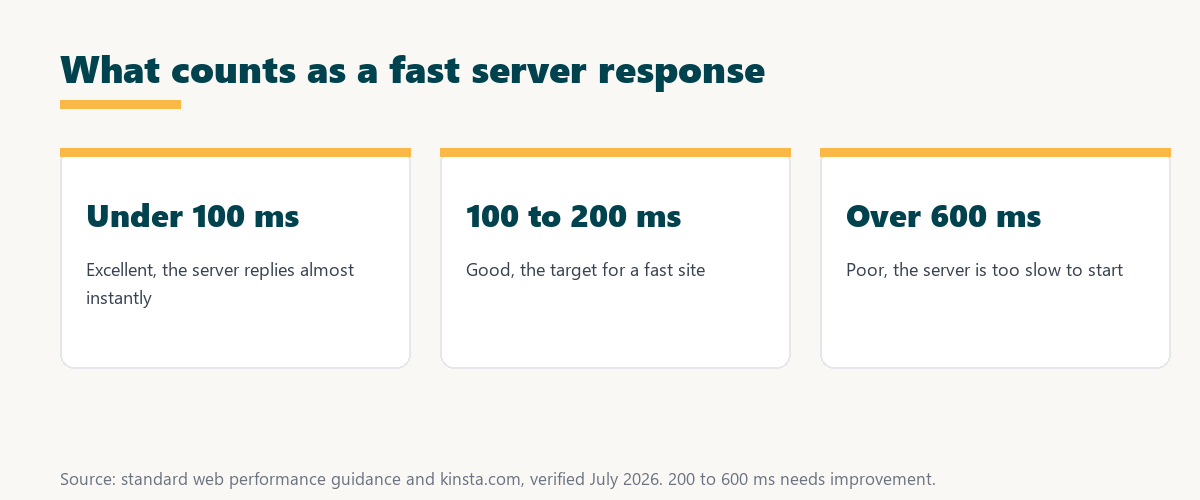
Source: standard web performance guidance, verified August 2026. Bands are approximate and rounded.
Showing excellent, good and poor response time ranges in milliseconds lets a site owner grade a server at a glance against the 200-millisecond target.
Response Time vs TTFB
Server response time and TTFB overlap closely, but TTFB also includes network travel time. Server response time focuses on the processing on the server itself, while TTFB is what the browser actually experiences end to end, including the round trip across the network.
See how Kinsta keeps server response fast
Try Kinsta →Compute-optimized servers and caching, with a 30-day money-back guarantee.
What Slows Down a Server’s Response?
Server response time is slowed by underpowered hosting, no caching, slow database queries, heavy or poorly coded plugins, and an outdated PHP version. Each of these adds processing time before the server can start responding, so they compound into a sluggish first byte.
- Underpowered hosting: Slow or shared hardware takes longer to process each request before replying.
- No caching: Building each page with PHP and the database adds time versus serving a cached copy.
- Slow database queries: Inefficient or heavy queries delay how quickly the server can assemble a page.
- Heavy plugins: Poorly coded plugins that run on every request add processing before the response begins.
- Outdated PHP: An old PHP version executes code more slowly than a current release.
The honest takeaway is that most slow responses trace to hosting, caching or the database, so those are the first places to look.
Why Response Time Matters
Server response time matters because it sets the starting point for every page load. A slow response delays rendering, worsens Core Web Vitals like LCP, and frustrates visitors, so reducing it improves both speed metrics and the experience that keeps people on the page.
“The first five seconds of page-load time have the highest impact on conversion rates.”
— HubSpot, page load time and conversion rates
Because a slow response eats into those decisive early seconds before anything even renders, cutting it protects both engagement and the conversions that follow.
How to Reduce Server Response Time
You reduce server response time with faster hosting, full-page and object caching, an updated PHP version, optimized database queries and fewer heavy plugins. Each step helps the server produce and return pages more quickly, so the first byte arrives sooner.
- Faster hosting: Compute-optimized servers process requests in a fraction of the time slow hardware takes.
- Full-page and object caching: Serving cached pages and query results skips the slowest processing steps.
- Update PHP: A newer PHP version runs the same code noticeably faster than an old one.
- Optimize the database: Trimming and indexing slow queries speeds up how fast a page is assembled.
- Trim heavy plugins: Removing or replacing slow plugins cuts the processing added to every request.
The honest takeaway is that hosting and caching deliver the biggest, fastest reductions, so start there before optimizing individual queries.
How Caching Cuts Response Time
Caching cuts server response time by serving a stored page without running PHP or querying the database. Server-level and edge caching are among the most effective ways to make the server respond almost instantly to most requests, since the hard work is already done.
Source: provider documentation, verified August 2026. Caching and hosting cut response time the most.
Listing slow hosting, no caching, heavy queries and old PHP with the fix for each turns a slow first byte into a short checklist. Owners weighing platform commitment can also read our note on SaaS vendor lock-in.
How to Choose Hosting for Fast Response
Choose hosting for fast response by favoring compute-optimized servers, built-in caching, modern PHP and isolated resources. These infrastructure choices influence server response time far more than front-end tweaks, so they deserve the most weight when comparing hosts on speed.
Get fast server response handled on Kinsta
Start With Kinsta →Free migration and a 30-day money-back guarantee.
How Kinsta Keeps Server Response Fast
Kinsta keeps server response fast with Google Cloud compute-optimized machines, server-level and object caching, current PHP versions and isolated resources. Each site therefore processes requests quickly without noisy neighbors competing for the same hardware, which keeps response times consistent.
“A tool is only worth its premium when the hours or revenue it protects exceed the invoice.”
— Growth Hack Suite, on tool ROI
Applied to response time, a fast platform earns its premium when the quicker first byte it delivers protects conversions worth more than the plan.
Does PHP Version Affect Response Time?
Yes, a newer PHP version runs code faster, so keeping WordPress on a current PHP release can noticeably reduce how long the server takes to generate a page. Upgrading PHP is one of the simplest, lowest-risk ways to lower server response time on an otherwise unchanged site.
The honest qualifier is that a plugin must be compatible with the newer PHP version, so test on staging before switching a live site.
Reducing Response Time on WordPress
You reduce server response time on WordPress with fast managed hosting, caching, updated PHP, and by diagnosing slow queries and plugins using a tool like Kinsta APM. Together these help the server return pages as quickly as possible for every visitor.
The honest summary is that WordPress response time is mostly a hosting-and-caching story, with query and plugin tuning handling the rest.
Lower your server response time risk-free
Try Kinsta Risk-Free →Compute-optimized hosting, APM and free migration, with a 30-day money-back guarantee.
Response Time: Frequently Asked Questions
The 12 most-asked questions about server response time.
What is server response time in simple terms?
Server response time is how long your server takes to process a request and start sending a reply, closely tied to time to first byte and reflecting hosting speed and caching.
What is a good server response time?
A good server response time is generally under 200 milliseconds, since that range supports fast page loads and strong Core Web Vitals like Largest Contentful Paint.
What is the difference between server response time and TTFB?
Server response time focuses on the processing on the server itself, while TTFB also includes network travel time, so TTFB is the end-to-end delay the browser experiences.
What causes slow server response time?
Slow server response time is caused by underpowered hosting, no caching, slow database queries, heavy plugins, and an outdated PHP version, all of which add processing delay.
How can I reduce server response time?
You reduce server response time with faster hosting, full-page and object caching, updated PHP, optimized database queries, and fewer heavy plugins.
Does caching reduce server response time?
Yes, caching reduces server response time by serving a stored page without running PHP or querying the database, making the server respond almost instantly to most requests.
Does server response time affect SEO?
Yes, server response time affects SEO indirectly, because a slow response delays rendering and worsens Core Web Vitals like LCP, which contribute to page experience signals.
How do I measure server response time?
You measure server response time with PageSpeed Insights, which reports it directly, or with browser dev tools that show the delay before the first byte during a page load.
Does PHP version affect server response time?
Yes, a newer PHP version runs code faster, so keeping WordPress on a current PHP release can noticeably reduce how long the server takes to generate a page.
Does hosting affect server response time?
Yes, hosting strongly affects server response time, since server power, caching and modern PHP determine how quickly the server can process and return a page.
Is 500 ms a slow server response?
A 500-millisecond response is slower than ideal, since good performance is under about 200 milliseconds, so a half-second response suggests room to improve hosting or caching.
How does Kinsta keep server response fast?
Kinsta keeps server response fast with Google Cloud compute-optimized machines, server-level and object caching, current PHP, and isolated resources for each site.
About this guide
Written by the Growth Hack Suite editorial team, drawing on hands-on experience measuring and tuning server performance. Details were cross-checked against provider documentation. This page carries affiliate links to Kinsta, so the position is stated plainly: server response time is how fast a server starts replying, a good figure is under 200 milliseconds, and hosting power, caching and modern PHP move it far more than any front-end change. Kinsta keeps response time low with Google Cloud compute-optimized machines, caching, current PHP and isolated resources.