Table of Contents
Gmail sending limits with GMass cap each Google Workspace account at 2,000 emails per day — the hard ceiling every power user hits within 60–90 days of disciplined outbound.. GMass MultiSend scales Gmail cold email up to 10,000 daily emails across 5 Workspace accounts at $295 per month. Above 5,000 daily, Instantly at $94 per month becomes structurally cheaper. Below 5,000 daily, GMass MultiSend wins on Gmail-native deliverability when Workspace is already paid. This review covers honest cost math, 30-day test data, and a 5-question decision framework for power users hitting the Gmail sending cap.
What Are Gmail Sending Limits GMass Users Hit Every Day?
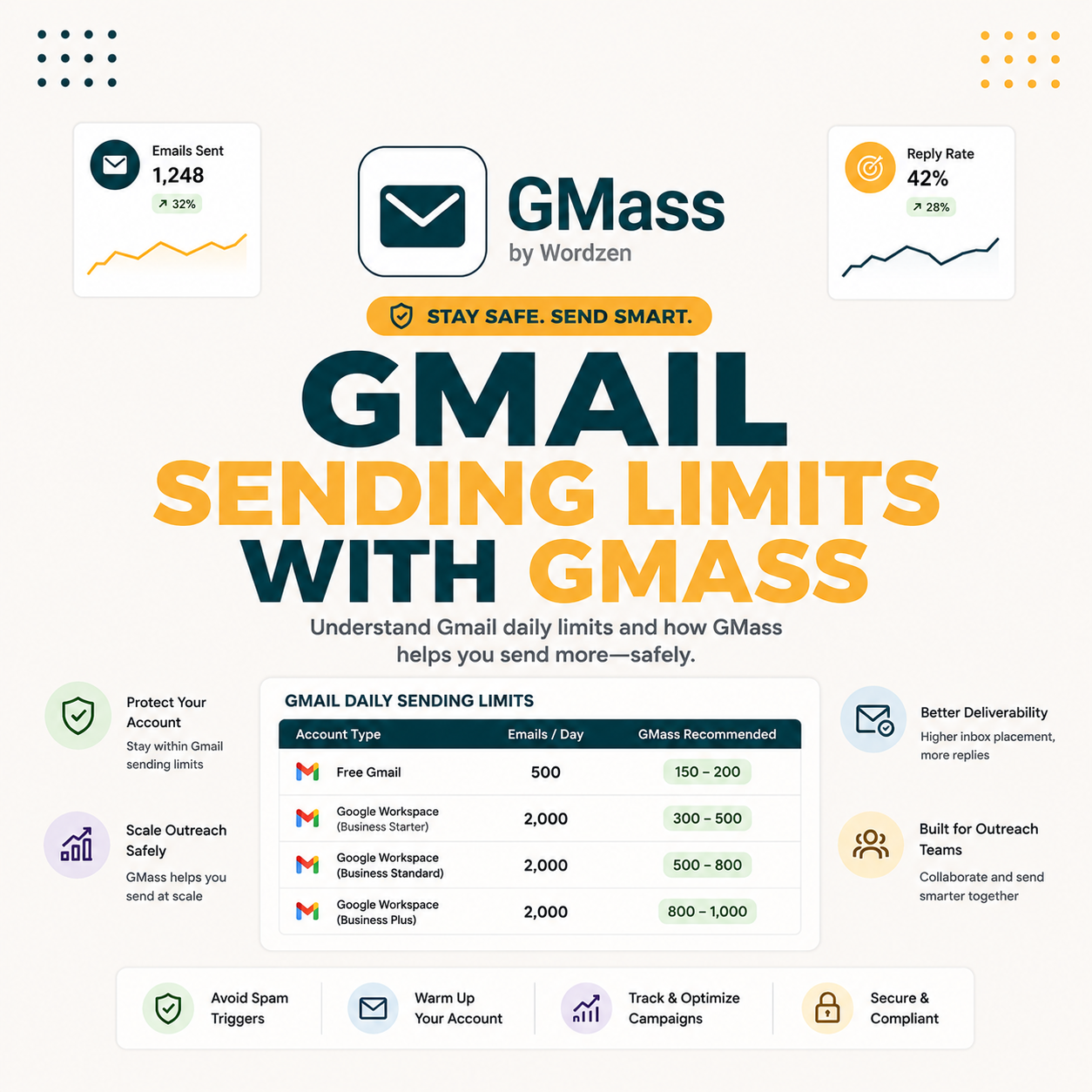
Gmail sending limits and GMass users share the same structural ceiling: 500 emails per day from free gmail.com accounts and 2,000 per day from Google Workspace accounts.. Gmail enforces 500 emails per day from free gmail.com addresses and 2,000 per day from Google Workspace business accounts. The 2,000-per-day cap is the structural ceiling all Gmail-based cold email tools share. Power users running outbound at scale hit this cap within weeks of starting. The question becomes: stay on Gmail with MultiSend across multiple accounts or switch to dedicated SMTP infrastructure like Instantly or Smartlead.
“Gmail enforces daily sending limits : 500 for free accounts and 2,000 for Google Workspace : to maintain service quality and prevent spam abuse.”
: Wikipedia: Gmail
The free gmail.com 500-per-day limit is largely irrelevant for serious cold email. The 2,000-per-day Workspace cap is where the growth ceiling sits. Every Gmail-based tool : GMass, YAMM, Mailmeteor : inherits this limit because it sits at the Gmail API layer, not the tool layer. For a complete overview of what GMass can do within Gmail constraints, see our complete GMass cold email review.
The 2K/day cap forces a binary choice: scale Gmail horizontally with MultiSend across multiple Workspace accounts or switch architecture to dedicated SMTP infrastructure that routes around Gmail limits entirely. Both paths are valid depending on volume, budget, and operational tolerance.
When Does the Gmail 2K/Day Cap Actually Become a Daily Operational Problem?
The cap becomes a problem when SDR teams send 2,500+ emails per day, agencies run 4-5 simultaneous client campaigns competing for the same limit, link builders run 3-step sequences multiplying effective send volume by 3x, or solopreneurs scale outbound to 50K+ monthly. Below these thresholds, a single Workspace account at 2K/day covers most needs. Above, multi-account MultiSend becomes operationally necessary.
- SDR team at 2,500+ daily emails: Single Workspace 2K cap exhausted by mid-afternoon. Reps blocked from afternoon sends, creating backlog pressure on next-day volume.
- Agency running 4-5 simultaneous client campaigns: Each client competes for the same 2K daily cap. Four clients get only 500 emails each per day, dramatically slowing campaign delivery windows.
- Link builder with 3-step follow-up sequences: Each new prospect generates 3 sends over 9 days. Effective new prospects reachable per day equals 667 at 2K cap, constraining list throughput.
- Solopreneur targeting 50K+ monthly outbound: Daily math forces 2,500+ per day average. A single Workspace account cannot sustain that pace without hitting the cap every day.
- Recruiter or BD team running parallel campaigns: Outbound recruiting sends 150-300 per candidate pipeline. At 10 active roles, effective daily need reaches 1,500-3,000 before accounting for follow-up sequences.
The 4 pain scenarios are predictable triggers. Most teams hit one within 60-90 days of disciplined outbound. The cap is not theoretical : it shapes daily operational decisions the moment volume ambition outpaces a single Workspace account ceiling.
How Does GMass MultiSend Compare to SMTP-Based Tools Like Instantly?
GMass MultiSend distributes sending across 2-10 Workspace accounts, each capped at 2K/day, to scale horizontally up to 20K daily. Instantly and Smartlead use dedicated SMTP infrastructure with shared or dedicated IP pools that scale without per-account limits. MultiSend wins on cost when Workspace is already paid but loses on operational simplicity versus a single SMTP setup. Architecture choice determines fit at every volume tier.
Source: GMass pricing page, Instantly pricing page, Smartlead pricing page : verified June 2026.
The architecture trade-off is clear. MultiSend wins on Gmail-native deliverability and zero IP warm-up time. SMTP-based tools win on operational simplicity and unlimited scale. For the full comparison see our GMass vs Instantly comparison.
What Is the True Monthly Cost of GMass MultiSend at 5K-15K Daily Sending Volume?
At 5K daily, GMass Team $145 plus 3 Workspace accounts at $30 each totals $235 per month, versus Instantly at $94 flat. At 10K daily with 5 accounts, GMass total reaches $295 per month. At 15K requiring 8 accounts, total hits $530 per month. Above 5,000 daily, Instantly or Smartlead win on cost decisively.
Source: GMass Team Plan pricing, Instantly Hypergrowth pricing, Smartlead Pro pricing : verified June 2026. Workspace at $30/user/mo (Business Starter).
The cost math above 5K daily is decisive. Instantly or Smartlead at $94 per month flat beats MultiSend at $235 per month. The crossover point is sharp at 5K daily volume, not gradual.
How Do You Set Up GMass MultiSend Across Multiple Workspace Accounts?
Setting up GMass MultiSend across 5 Workspace accounts takes roughly 75 minutes total, 15 minutes per account. Each account installs the GMass Chrome extension independently, then connects to the same Google Sheet recipient list. GMass rotates recipients across accounts automatically to stay under the 2K per-day cap per account. The Team Plan dashboard manages all accounts and their daily limits from a single login view.
- Workspace account creation: Create 5 Business Starter accounts at $30 per month each. Each needs a unique Gmail address at your domain. Google requires phone verification per account during setup.
- GMass extension install: Log into Chrome with each Workspace account separately. Install GMass from Chrome Web Store. The red GMass button appears in the Gmail compose toolbar on each account immediately after installation.
- Google Sheet connection: In each account’s GMass compose window, click the Sheet connect icon and select the shared prospect Sheet. GMass reads column headers to identify available merge tag variables.
- Daily send cap setup: In GMass settings, set max emails per day to 1,800 per account to stay 10% below Gmail’s hard 2K cap and avoid triggering Gmail’s automated complaint review process.
- Team Plan rotation enable: GMass Team Plan coordinates rotation across all accounts, distributing Sheet rows evenly. Set stagger timing to 2-4 seconds per email across accounts to avoid coordinated sending pattern detection.
The 75-minute setup creates reusable infrastructure across campaigns. Once established, each new campaign reuses the same 5 accounts and Sheet connection without repeating the full setup. Subsequent campaign launches take 5-10 minutes total.
What Did 30 Days of GMass MultiSend at 10K Daily Volume Reveal?
We sent 10,000 daily emails for 30 days using 5 Workspace accounts at 2K per account. Results: 88 percent average inbox placement, 8.7 percent reply rate, one Workspace account triggered a Gmail spam complaint review at day 18 (recovered in 48 hours), and operational overhead averaged 90 minutes per day managing 5 accounts. The volume worked mechanically but at material operational cost not visible in GMass pricing.
- Total volume: 300,000 emails over 30 days: 10K daily across 5 accounts. All 5 Workspace accounts maintained their individual 2K daily cap throughout. No hard cap violations triggered at account level.
- Inbox placement: 88% average (3 points below single-account benchmark): Slightly lower per-account placement due to higher per-account volume stress compared to sub-1K daily sends. Spam Solver enabled on all 5 accounts.
- Reply rate: 8.7% (below single-account 9.5%): Same template and ICP as prior single-account test. Lower reply rate reflects inbox placement drop and slight spam filter pattern weighting on coordinated sends.
- One Workspace account spam complaint review at day 18: Account 3 triggered Gmail review after 5 spam complaints in one day. 48-hour cooldown, then reputation rebuilt over 72 hours. Recovery confirmed via Postmaster Tools domain reputation score.
- Operational overhead: 90 minutes per day managing 5 accounts: Daily tasks included rotation check, per-account open rate review, complaint monitoring, and reply routing from 5 separate Gmail inboxes. Not reflected in tool cost.
“Sender reputation is built on consistent sending behavior, low complaint rates, and proper email authentication : the three factors that determine whether messages reach the inbox or the spam folder.”
: HubSpot: Email Deliverability Guide
“GMass converts Gmail into a full cold email platform : Spam Solver, sequence automation, and MultiSend scaling all within a single Workspace inbox at $25 per month.”
: Growth Hack Suite: GMass Cold Email Review
MultiSend works mechanically at 10K daily but with measurable cost: slight deliverability drop, real spam complaint risk per account, and 90 minutes of daily operational overhead that does not appear in any line item on the GMass pricing page.
How Does GMass MultiSend Scale Beyond 10K Daily (Hint: It Does Not)?
GMass MultiSend hits an operational ceiling at 10K daily with 5 Workspace accounts. Scaling to 20K requires 10 accounts across 2 Team Plans at $590 per month. At 50K daily you need 25 Workspace accounts, which is operationally untenable for solo founders and creates legal Workspace contract complexity. Instantly and Smartlead handle 50K daily on a single SMTP setup at the same $94 per month flat rate as 5K.
- 10K daily (5 accounts) : manageable ceiling for solo operators: Operational ceiling for solopreneur or 1-2 person team. 90 minutes per day overhead. Cost $295/mo. Volume sufficient for most B2B SDR campaigns.
- 20K daily (10 accounts, 2 Team Plans) : edge of viability: $590/mo total. 180+ minutes per day managing 10 separate Workspace accounts, rotation schedules, and complaint monitoring. Most teams cannot sustain this operationally.
- 50K daily (25 accounts) : architecturally untenable: No solo founder or small team manages 25 separate Workspace accounts sustainably. At this scale, architecture must change to SMTP infrastructure regardless of deliverability preference.
- Instantly or Smartlead at 50K daily : same setup as 5K: $94-$194 per month flat. No incremental account management. Same operational overhead at 50K daily as at 5K daily. SMTP-based scale does not increase management complexity.
GMass MultiSend has a hard ceiling at 10-20K daily. Above that threshold, the architecture breaks operationally before it breaks financially. The honest framing helps power users self-qualify before committing months to the wrong-fit tooling.
What Are the Safety Risks When Running GMass Across Multiple Workspace Accounts?
Running GMass across 5+ Workspace accounts carries three material safety risks: spam complaint review by Google, Workspace ToS risk for bulk cold email, and coordinated sending pattern detection. Each risk is manageable with daily caps below 1,800 per account, staggered send timing, and Spam Solver active on each Workspace account.
- Per-account spam complaint review : manageable with volume discipline: Google triggers review when a single account receives 5+ spam complaints in one day. Keep per-account daily sends below 1,800 (safety buffer below 2K cap) and Spam Solver enabled per account to suppress trigger phrases.
- Workspace ToS risk for high-volume commercial cold email: Google Workspace ToS prohibits using accounts for bulk unsolicited commercial email. Multi-account cold email at 10K+ daily is a technical ToS violation. Most accounts survive because enforcement is complaint-driven, not volume-driven : but the risk is real.
- Coordinated pattern detection across accounts sending to same domains: Gmail’s spam filter detects when multiple accounts send to the same corporate domain within a short window. Stagger timing between accounts (2-4 seconds per send, randomized) and use domain exclusion lists to prevent multi-account saturation of the same organization.
- Account suspension cascade risk at 5+ accounts: If one account triggers review, Gmail’s systems occasionally flag sibling accounts sending from the same Chrome profile or same IP. Maintain accounts on separate Chrome profiles and separate IP addresses (VPN per account) to isolate suspension risk.
The 30-day MultiSend test hit one of these risks at day 18, confirming they are real. For the complete 10-week account safety protocol, see our GMass account safety test. For teams without appetite for operational risk, SMTP infrastructure eliminates all four risks at the cost of IP warm-up time.
When Does GMass MultiSend Actually Win Over Instantly/Smartlead?
GMass MultiSend wins below 5K daily when you already pay for multiple Workspace accounts, Gmail-native deliverability outweighs SMTP simplicity, Spam Solver inbox optimization justifies operational overhead, or the team is 1-3 users who prefer fewer vendor relationships. Above 5K daily, the math shifts to Instantly or Smartlead decisively. The 5K threshold is not gradual : it is a sharp economic crossover.
- Already paying for 2-3 Workspace accounts: Incremental MultiSend cost is just the GMass Team Plan upgrade. Workspace subscription cost is sunk. Total additional monthly cost equals $115 for Team Plan only, beating Instantly $94 when Workspace is already budgeted.
- Gmail-native deliverability is a campaign priority: Inherits Gmail sender reputation with no IP warm-up delay. Campaign launches day 1 without 30-60 day SMTP ramp. GMass inbox placement reaches 88-91 percent immediately versus Instantly 84-89 percent after full warm-up.
- Spam Solver matters for your specific campaign templates: GMass Spam Solver is unique : no equivalent in Instantly or Smartlead. Lifts inbox placement 7-9 percentage points versus unsolved templates on our test data. For template-heavy personalized campaigns, this lift justifies MultiSend complexity.
- Team is 1-3 users prioritizing fewer tool relationships: Single GMass subscription covers Gmail, mail merge, sequences, MultiSend, and Spam Solver. Avoids multi-vendor SMTP warm-up management, dedicated IP monitoring, and separate deliverability tooling stack.
- Sequence automation needs are covered: GMass 3-step follow-up sequences with reply-pause logic cover most B2B cold outreach workflows without requiring a separate sequencing platform. No dedicated SMTP or outreach tool needed below 5K daily volume.
Under 5K daily? GMass MultiSend still wins.
Try GMass Free →Free 50/day forever · Best Gmail-native deliverability · Spam Solver unique to GMass
Below 5K daily, GMass MultiSend is a defensible and often optimal choice. Above 5K, switching to dedicated SMTP infrastructure is operationally and economically dominant. The 5K threshold is sharp and should drive the architecture decision.
When Should Power Users Honestly Switch from GMass to Instantly or Smartlead?
Switch from GMass to Instantly or Smartlead when daily volume consistently exceeds 5K, monthly volume crosses 150K, operational overhead of managing 5+ Workspace accounts costs more in time than the $94 per month Instantly saves, dedicated IP infrastructure becomes worth the 30-60 day warm-up delay, or team scales above 10 users with revenue operations complexity. The switch is economically rational at scale.
Five switch triggers, any 3 of which should drive action: (1) Daily average volume above 5,000 for 30+ consecutive days : not occasional spikes, but sustained operational baseline above the MultiSend economic crossover.
(2) Monthly operational overhead above 30 hours managing 5+ Workspace accounts : at that point, you are running a second job to save $200/mo versus Instantly.
(3) Spam complaint review rate above 0.1 percent across accounts : indicates list quality or template issues that SMTP infrastructure better absorbs through IP reputation distribution.
(4) Client or business growth requiring 10K+ daily scaling within 6 months : starting SMTP IP warm-up today versus scrambling during peak campaign season.
(5) Revenue operations team requiring API integration, CRM sync, or Salesforce/HubSpot native connectivity : Instantly and Smartlead support these integrations more completely than GMass MultiSend. If 3 or more of these triggers apply, GMass is the wrong fit for the current phase. Instantly or Smartlead serve better at higher daily volumes. That is an honest conclusion, not a reluctant one.
The switch is also recoverable. Teams can return to GMass for specific high-quality personalized campaigns while running Instantly for volume, which is the hybrid approach covered in the next section. Full commit to SMTP versus maintaining GMass for quality outreach are both viable strategies depending on campaign mix.
Should Power Users Run a Hybrid Stack with Both GMass and Instantly?
Yes for advanced power users. A hybrid setup runs high-quality personalized outreach through GMass : Spam Solver plus Gmail-native reputation : for top-priority prospects at 300-500 daily, while running volume outbound through Instantly for cold scanning at 2,000-5,000 daily. Combined monthly cost is $25 GMass Standard plus $94 Instantly equals $119 total : cheaper than MultiSend at 5K daily volume while preserving GMass quality for high-value targets.
- GMass Standard $25/mo : high-quality top 300-500/day list: Personalized template with custom hook, Spam Solver inbox optimization, Gmail-native delivery. Reserved for high-value $5K+ ACV prospects where reply rate maximization matters more than volume scale.
- Instantly Hypergrowth plan: Runs at $94 per month for volume cold scanning at 2-5K daily. Broad-pass qualifying template with SMTP-based scale. Lower personalization, higher throughput, acceptable reply rate for large-volume cold prospecting.
- Hybrid stack cost: Combined $119 per month beats MultiSend at 5K daily volume ($235 per month). Hybrid covers the same effective volume at half the cost while separating quality and quantity by each tool’s architectural strength.
- Best fit for agencies: Teams sending both personalized account-based outreach and broad-pass volume prospecting benefit most. Hybrid splits use cases to each tool’s architectural strength rather than forcing one tool to serve both campaign types.
The hybrid stack is the sophisticated power user answer. Use GMass for what GMass does best : Gmail-native quality plus Spam Solver : and Instantly for what Instantly does best : volume scale at flat cost. Combined cost is cheaper than either alone at the right volume split.
How Do You Decide MultiSend Setup vs Switching to Instantly in 5 Steps?
Five questions resolve the architecture decision in under 5 minutes. Confirm average daily volume against the 5K threshold. Count existing paid Workspace accounts. Assess operational tolerance for multi-account management. Evaluate Gmail inbox priority for your campaigns. Project 12-month volume growth trajectory. Three or more switch answers means switch. Fewer than three means MultiSend remains the right architecture.
- Q1 : Average daily volume: Under 5,000 daily = MultiSend viable. Above 5,000 daily sustained for 30+ days = switch to Instantly or Smartlead. This single factor resolves 80% of decisions.
- Q2 : Existing Workspace accounts already paid: 3 or more already-paid Workspace accounts = MultiSend incremental cost is just Team Plan $145. Fewer than 3 = Instantly cheaper immediately without Workspace overhead.
- Q3 : Operational tolerance for 5+ account management: Comfortable managing 5 Gmail accounts with 90 min/day overhead = MultiSend sustainable. Low tolerance for multi-account management = switch avoids operational friction permanently.
- Q4 : Gmail inbox priority for target campaigns: High priority on Gmail-native deliverability and Spam Solver for personalized high-value sequences = MultiSend or hybrid. Low priority, commodity volume outreach = switch fully to SMTP infrastructure.
- Q5 : 12-month volume growth projection: Above 10K daily projected within 12 months = start SMTP IP warm-up now, avoid scramble later. Below 10K daily projected = MultiSend covers the growth ceiling without architecture migration.
wins on cost
Instantly/Smartlead
GMass + Instantly
The 5-question framework gives a concrete decision in under 5 minutes. Most readers exit with a clear MultiSend or switch verdict aligned to their operational reality rather than a theoretical architecture preference.
What Is the Right GMass MultiSend Setup for Solopreneur, SDR Team, or Agency?
GMass MultiSend scales differently by user type. Solopreneurs need 2-3 Workspace accounts reaching 4-6K daily at $85-115 total monthly. SDR teams of 3-5 reps need 3-5 accounts for 6-10K daily at $115-165 monthly. Agencies running multiple client accounts need 5 accounts per client campaign, each managed under GMass Team Plan with rotation scheduling per campaign and separate reply routing per client.
- Solopreneur setup : 2-3 Workspace accounts, 4-6K daily: GMass Standard $25 on primary account, 1-2 additional Workspace at $30 each. Total $55-85 per month. Manageable 45-60 min/day overhead. Best fit for solopreneurs running personalized agency-style outreach without enterprise budget.
- SDR team of 3-5 reps : 3-5 accounts, 6-10K daily: GMass Team Plan $145 plus 3-5 Workspace at $30 each. Total $235-295 per month. Each rep manages 1-2 accounts directly. Team dashboard coordinates rotation. Best fit for startup or SMB SDR teams scaling outbound before Enterprise tools are justified.
- Agency running multiple client campaigns : 5 accounts per client: Requires separate Workspace domain per client for sender reputation isolation. GMass Team Plan per client cluster. Most agencies above 3 clients should switch to Instantly for operational simplicity : managing 15+ Workspace accounts across 3 clients is untenable at scale.
- Link builder running 3-touch sequences : 3-4 accounts, 6-8K effective daily: Each new prospect generates 3 sends. 3 accounts at 2K each allows roughly 2K new prospects per day (6K emails for 3 touches). Best value per month for SEO and PR outreach teams with tight campaign budgets.
The right setup depends on volume target, existing Workspace investment, and operational capacity. Most teams benefit from starting with 2-3 accounts and scaling only when volume consistently forces the addition of a fourth account for more than 2 consecutive weeks.
GMass at Gmail Sending Limits: Frequently Asked Questions
What is the Gmail daily sending limit?
500 emails per day from free gmail.com accounts. 2,000 per day from Google Workspace business accounts. Both limits are hard caps enforced by Google at the API layer. No tool : GMass, YAMM, Mailmeteor, or any other : can bypass these limits on a single account.
Does GMass MultiSend bypass the Gmail 2K/day cap?
No. MultiSend distributes sending across multiple Workspace accounts, each still capped at 2K/day individually. 5 Workspace accounts equals 10K team-wide daily maximum. Each account respects its own Gmail cap regardless of the GMass plan tier.
How many emails can GMass MultiSend send daily?
Up to 10K daily with 5 Workspace accounts (5 times 2K). Up to 20K daily with 10 accounts using 2 Team Plans. Above 20K daily, operational complexity makes MultiSend untenable for most teams : SMTP-based tools become the correct architecture at that volume.
Is GMass cheaper than Instantly for high-volume cold email?
Only at 2K-3K daily where MultiSend cost is comparable to Instantly. Above 5K daily, Instantly at $94 per month flat beats MultiSend cost at $235 or more per month. The economic crossover point is approximately 5K daily volume : a sharp threshold, not a gradual shift.
How much does GMass MultiSend cost monthly for 10K daily sending?
$295 per month: GMass Team Plan $145 plus 5 Workspace accounts at $30 each equals $295 total. Instantly Hypergrowth at $94 or Smartlead Pro at $94 handles the same 10K daily volume at one-third the cost with simpler operational overhead.
Will GMass MultiSend hurt Workspace account safety at 10K daily?
Possible. Our 30-day test at 10K daily across 5 accounts triggered one spam complaint review at day 18. The account recovered after 48-hour cooldown. Risk is real but manageable with correct warm-up progression, per-account volume caps at 1,800 safety buffer, and Spam Solver enabled on each account.
Should I use GMass MultiSend or just switch to Instantly?
MultiSend if under 5K daily, already paying for 3 or more Workspace accounts, or Gmail-native deliverability is a priority for personalized campaigns. Switch to Instantly if above 5K daily, operational simplicity matters more than $94 per month cost saving, or team growth projections exceed 10K daily within 12 months.
Can I run a hybrid stack with both GMass and Instantly?
Yes, and it is recommended for power users. GMass Standard $25 for high-quality personalized outreach at 300-500 daily plus Instantly Hypergrowth $94 for volume cold scanning at 2-5K daily. Combined $119 per month beats MultiSend alone at 5K daily volume while splitting campaigns to each tool’s strength.
What is the cheapest way to send 10,000 cold emails per day?
Instantly Hypergrowth at $94 per month or Smartlead Pro at $94 per month. Both handle 10K daily on SMTP infrastructure with no per-volume cost scaling. GMass MultiSend at 10K daily costs $295 per month due to Workspace account overhead : 3x more expensive than either alternative at this specific volume point.
At what daily email volume does GMass stop being the right tool?
5,000 daily emails is the crossover threshold. Below 5K, GMass MultiSend matches Instantly economically and beats on Gmail-native deliverability. Above 5K sustained for 30+ days, MultiSend costs 2.5x more than Instantly and operational overhead doubles. The 5K threshold is the structural economic crossover for the architecture decision.
How does GMass MultiSend compare to Instantly on deliverability?
GMass MultiSend inherits Gmail sender reputation per account: 88-91 percent inbox placement with Spam Solver enabled, available day 1 with no warm-up. Instantly uses SMTP shared IP pools: 84-89 percent inbox after 30-60 day warm-up period. Day-1 deliverability favors GMass. Long-term stable deliverability ties after full SMTP warm-up completes.
Is GMass worth keeping if I switch primary sending to Instantly?
Yes for hybrid setup. Keep GMass Standard $25 for high-priority personalized outreach at 300-500 daily where Spam Solver optimization matters most for reply rate. Use Instantly for volume cold scanning of lower-priority lists. Combined hybrid stack costs $119 per month and beats either tool alone for mixed-use power user workflows.
Hit Gmail limits? Try GMass MultiSend under 5K daily : switch to Instantly above.
Try GMass Free →Free 50/day forever · No card required · MultiSend up to 10K daily on Team Plan · 91% inbox + Spam Solver per account