Table of Contents
Here is how to bulk verify email list contacts in minutes: upload your CSV to a bulk verifier, run the check, and download a file with a deliverability status on every row. Then keep the valids, drop the invalids, and segment the catch-alls. This guide walks the whole process step by step, with result statuses, processing speed, cost, and the mistakes that waste credits.
Upload your list and bulk verify it free — no card needed.
Bulk Verify Free →Free plan included · No credit card · Status and score on every row
What Is Bulk Email Verification?
Bulk email verification checks an entire list at once instead of one address at a time. A CSV goes in, the tool verifies every row against mail-server and risk checks, and the file comes back with a deliverability status attached to each address. It is the standard way to clean a list before a campaign, turning hours of manual checking into a few minutes of background processing.
Bulk verification is list cleaning at scale: one upload checks thousands of addresses at once, where single-address checking handles only one. The bulk process and the single check share the same engine, so results match while throughput multiplies.
How Do You Bulk Verify an Email List?
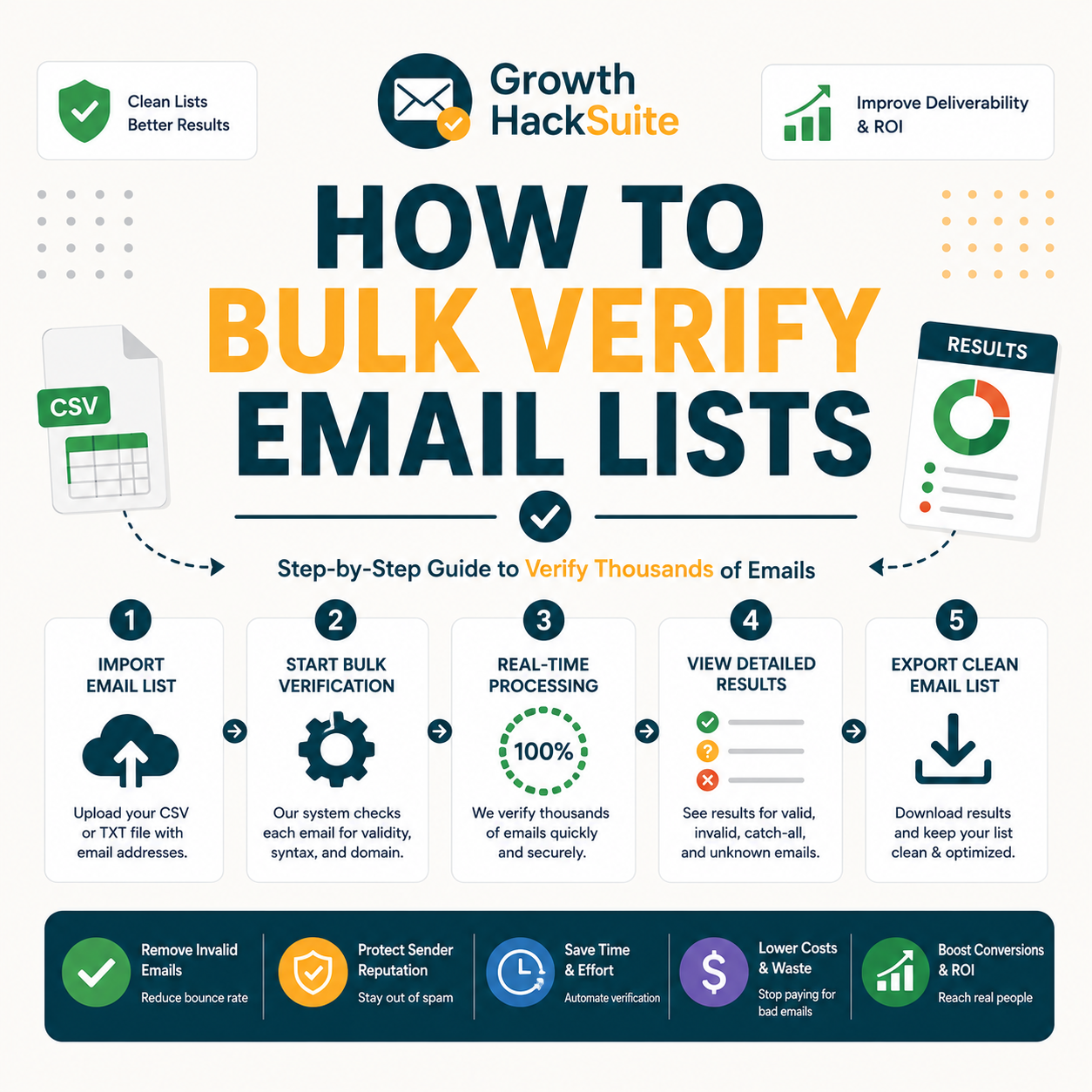
Bulk verify in four steps: upload the CSV to a bulk verifier, start the verification run, wait for background processing, then download the results file with a status per row. From that tagged file, keep the valids, drop the invalids, and segment the catch-alls. The whole run finishes in minutes for most lists, with no address checked by hand.
- Upload CSV: A spreadsheet of addresses uploads to the bulk verifier, where the email column maps to the verification field. The tool reads every row and queues the entire list for processing in one batch.
- Run verification: The verification run starts against live mail servers and risk databases, checking syntax, domain, mailbox existence, and catch-all behavior for each address without sending a real message.
- Download results: The finished file downloads with a status and confidence score appended to every original row, ready to filter, so nothing in the source data is lost in the process.
- Keep, drop, segment: Valid rows stay for sending, invalid rows leave the list, and catch-all or unknown rows move to a separate segment for careful, low-volume testing before any full campaign.
- Import the clean file: The exported deliverable list imports straight into an email platform, so the verified, status-tagged file becomes the live send audience without any further manual cleanup between verification and the first campaign send.
Upload your CSV and bulk verify it free right now.
Bulk Verify Free →Free plan · No credit card · CSV in, clean file out
Upload, run, download, segment: four steps clean an entire list in minutes, replacing hours of one-by-one checking with a single background job.
How Do You Prepare and Upload Your CSV?
Prepare the file with one email per row in a clearly named column, strip obvious junk rows, and save as a plain CSV. Upload it to the verifier and map the email column so every address is read correctly. Clean formatting up front prevents skipped rows and parsing errors, which is the most common cause of a half-verified list.
- One email per row: Each address sits on its own row in a single column with a clear header such as “email”. Multiple addresses crammed into one cell break parsing, so splitting them first keeps every contact readable for verification.
- Save as CSV: The file exports as comma-separated values with UTF-8 encoding, the format every bulk verifier accepts. Spreadsheets save to CSV directly, and removing extra columns the tool does not need keeps the upload small and fast.
- Upload and map the column: The CSV uploads through the verifier interface, then the email column maps to the verification field so the tool knows which data to check. Correct mapping ensures every row enters the run instead of being silently skipped.
- Strip obvious junk: Plainly broken rows such as blanks, duplicates, and addresses missing an @ symbol get removed before upload, which keeps wasted credits low and stops malformed entries from cluttering the final results file.
- Keep a source copy: The original unverified file stays saved before any upload, providing a clean fallback if a mapping error or a wrong filter later requires re-running the list from the untouched starting point.
Clean CSV formatting up front avoids upload errors and missed addresses, so the entire list verifies in a single pass rather than two.
How Do You Read and Export the Results?
After processing, each row carries a status — valid, invalid, accept-all, or unknown — plus a confidence score. Filter to keep the valids, export the cleaned file, and save the risky segments separately. Most tools allow a deliverable-only download, so the export is ready to import straight into an email platform without further editing.
- Review statuses: Each address shows a result label and a numeric confidence score. Reading the spread of statuses reveals list health at a glance, since a high invalid share signals a stale or poorly sourced source file that needs attention.
- Filter valids: The results filter to deliverable addresses, separating confirmed-valid rows from invalid and uncertain ones. This split turns one undifferentiated export into a clear send list plus a hold-back segment for later testing.
- Export the clean file: The filtered valids export as a fresh CSV ready to import, while invalid and catch-all rows save to their own files. Keeping segments in separate exports prevents risky addresses from slipping back into a live campaign.
- Save the catch-all segment: Accept-all addresses move to a dedicated file rather than the main send list, ready for small-batch testing later so reachable contacts are not lost to a blanket delete during the cleanup step.
- Record the invalid rate: The share of invalid results gets noted against the source, since a high invalid rate flags a stale or poorly sourced list that needs re-collection rather than another round of verification.

Filter by status and export, and the cleaned file is ready to import in one download. The full breakdown of each label appears in the result-status table below.
How Long Does Bulk Verification Take?
Most lists finish in minutes, and large lists run in the background so there is no need to wait at the screen. Processing speed depends on list size, server response times, and the share of catch-all domains, but a typical few-thousand-row list verifies in well under five minutes from upload to download.
Bulk verification: under 5 minutes for a typical list
- Small list: A list under a thousand addresses verifies in a few minutes and can run while the browser tab stays open. The job rarely needs background handling at this size, so results appear almost immediately after the upload completes.
- Large list: A list of tens of thousands of addresses takes longer and processes server-side, freeing the sender to close the tab. The verifier notifies on completion, so the run continues even after the browser session ends.
- Background processing: Bulk jobs run asynchronously on the verifier’s servers rather than the local machine, which keeps large runs from timing out and lets several lists queue and process without any manual supervision at all.
- Catch-all share: A list heavy with catch-all and unknown domains takes longer per row, since those addresses need extra checks that standard mailboxes skip, so source quality affects total processing time noticeably.
- Server response: Processing speed also tracks how fast remote mail servers reply, because each address waits on the destination server, making throughput partly dependent on factors outside the verifier itself.
Bulk runs in the background, so a large list starts on upload and returns a finished, tagged file ready to download later.
How Accurate Is Bulk Verification?
Bulk verification is as accurate as single-address checks on standard domains, because it runs the same syntax, domain, and mailbox checks on every row. The shared limit is catch-all domains, which accept all addresses and cannot be confirmed by any tool. Expect high accuracy on normal mailboxes, with honest accept-all labeling for the genuinely uncertain cases.
The verification endpoint checks deliverability and returns a confidence score without sending a message to the address.
— Hunter.io API documentation
Bulk accuracy matches single checks because both use the same engine, applied to many addresses at once rather than one. Detailed measurement methods appear in the Hunter Email Verifier accuracy breakdown.
What Should You Do With Each Status After Bulk Verify?
Act by status: keep and send to valids, delete invalids, segment catch-alls by confidence, and re-test unknowns later. This converts the tagged export into a clear send plan instead of one undifferentiated list. The table below maps the recommended action to each status, so the cleaned file becomes a usable campaign asset rather than raw output.
Source: Hunter Email Verifier result statuses, verified 2026-06-27. Status names vary slightly by tool; the action logic applies to any bulk verifier.
Each status maps to a clear action, and that mapping is what makes a verified file usable. Applying it cleanly fits the wider list-cleaning workflow that follows.
How Do You Bulk Verify a Very Large List?
For a very large list, split it into batches if the tool sets a per-upload limit, run them sequentially, and keep the original file as a backup. Background processing carries the load, and exporting each batch as it finishes allows segmenting to start while the rest of the list is still processing.
- Split into batches: A million-row file divides into smaller uploads that fit any per-task limit, keeping each batch within the tool’s size cap. Batching also makes a failed upload easy to retry without re-running the entire list.
- Run sequentially: Each batch processes one after the next so the verifier handles a steady load rather than one massive job. Sequential runs also spread credit spend, making large cleans easier to monitor as they progress.
- Keep a backup: The original unverified file stays archived before any processing begins, so a mistaken filter or a corrupted export never loses the source data. A backup turns an irreversible delete into a recoverable step.
Batching plus a backup makes even a million-row list manageable, processing it in controlled pieces without ever losing the source data.
What Are the Best Bulk Email Verification Tools?
A good bulk verifier offers fast CSV processing, clear status and confidence scoring, export filtering, and a free tier to test accuracy first. Hunter provides all four plus email finding in one account, while pure-play verifiers compete mainly on bulk price at scale. The table compares the leading options on the features that matter for bulk runs.
Source: vendor pricing and feature pages, verified June 2026. Confirm current free-tier limits on each provider’s site before choosing, as allowances change.
Hunter’s own verifier review found accuracy holds strong on standard domains, with valid-status addresses bouncing under 2% across a 2,000-email benchmark, the same engine behind every bulk upload run through this workflow.
The best bulk tool combines speed, scoring, and a free tier to test, and Hunter is a strong starting point for teams that also need to find addresses.
How Much Does Bulk Email Verification Cost?
Bulk verification draws from a credit pool with a free monthly allowance, and paid plans lower the cost per thousand as volume rises. For a one-off clean, the free tier may cover the whole job; for routine bulk runs, the budget follows monthly volume at the per-thousand rate of the right tier.
Source: hunter.io/pricing, verified 2026-06-27. One verification uses 0.5 credit, so verifications per month = monthly credits × 2 (credits shared with email finding). Cost per 1,000 assumes credits spent on verification at monthly billing.
Bulk verify free within your monthly credits.
Bulk Verify Free →100 free verifications a month · No card · Upgrade only when volume grows
Bulk cost is per-thousand from a credit pool: free for one-off cleans, and budgeted by monthly volume for routine verifying. Larger pools cut the per-thousand rate.
What Are Common Bulk Verification Mistakes?
Three mistakes recur in bulk verification: deleting catch-alls as if they were invalid, verifying once and reusing stale results months later, and skipping the backup of the original file. Each one either loses reachable contacts or wastes credits. Avoiding all three keeps a bulk run both accurate and economical over time.
- Deleting catch-alls: Treating every accept-all address as invalid removes reachable contacts, since many catch-all domains do deliver. Segmenting and testing them in small batches recovers contacts that a blanket delete would throw away.
- Reusing stale results: Email lists decay as people change jobs, so a verification from months ago no longer reflects current deliverability. Re-verifying before each major send keeps the data fresh and the bounce rate low.
- Skipping the backup: Running a filter without archiving the original file makes a wrong delete permanent. Keeping the source file untouched before processing turns any filtering error into a quick, recoverable redo.
Avoiding these three mistakes keeps bulk verification accurate and the contact list intact, protecting both deliverability and the credits spent on the run.
Verdict: The Fastest Way to Bulk Verify a List
Bulk verification is the fastest way to clean a list: upload a CSV, run it, and export a tagged file in minutes. Keep the valids, drop the invalids, segment the catch-alls, and back up the original before filtering. With a free tier to start and clear per-status actions, there is no reason to send a large list unverified.
Verdict: Four steps — upload, run, download, segment — clean a list in minutes. Keep valids, delete invalids, segment catch-alls, and back up the source. The first 100 verifications a month are free, so testing costs nothing.
Email verification confirms an address exists before any message is sent to it.
— Wikipedia, Email address validation
Bulk verification packages that single-address confirmation into one run over an entire list, which is why it is the standard pre-send step. The same logic drives the workflow to reduce email bounce rate with Hunter.
Bulk verify your list free in 5 minutes.
Bulk Verify Free →Free plan · No credit card · Clean file ready to import
Related Tools in the Hunter Stack
Bulk verification pairs with single-address checks and the wider list-hygiene workflow. The Hunter verifier overview explains what the tool checks, and the comparison guide weighs it against a dedicated bulk verifier for teams deciding on price versus bundle.
- Hunter Email Verifier: The product behind every bulk run — read what the Hunter Email Verifier does to understand the checks each row passes through.
- Hunter vs ZeroBounce: Weighing a pure-play verifier on price? Compare them in Hunter vs ZeroBounce for email marketers before committing.
- Hunter Email Finder: The other half of the same credit pool — see the Hunter.io email finder review for the find side of the bundle.
How to Bulk Verify Email List Contacts: Frequently Asked Questions
The 12 most-asked questions about bulk email verification.
How do I bulk verify an email list?
Upload a CSV of addresses to a bulk verifier, start the verification run, then download the results file with a deliverability status on every row. From there, keep the valids, delete the invalids, and segment the catch-alls. The whole run finishes in minutes for most lists, with no address checked by hand.
How do I upload a CSV to verify?
Save the list as a CSV with one email per row in a clearly named column, then upload it through the verifier interface and map the email column to the verification field. Correct mapping ensures every address enters the run instead of being silently skipped during processing.
How do I read the bulk verification results?
Each row returns a status — valid, invalid, accept-all, or unknown — plus a confidence score. Filter to deliverable valids for sending, separate invalids for deletion, and move catch-all and unknown rows to their own segment for careful testing. Most tools export a deliverable-only file ready to import.
How long does bulk verification take?
Most lists finish in minutes. Small lists verify almost immediately, while larger lists run in the background on the verifier’s servers so there is no need to wait at the screen. Exact timing depends on list size, server response, and the share of catch-all domains in the file.
How accurate is bulk verification?
Bulk verification is as accurate as single-address checks on standard domains, since it runs the same syntax, domain, and mailbox checks on every row. The shared limit is catch-all domains, which accept all addresses and cannot be confirmed by any tool, so they are labeled accept-all rather than guessed.
What do I do with each status?
Keep and send to valids, delete invalids, segment accept-all rows by confidence for small-batch testing, and hold unknowns to re-verify later. Mapping each status to a clear action turns the tagged export into a send plan rather than one undifferentiated list of mixed-quality addresses.
How do I bulk verify a very large list?
Split the file into batches that fit any per-upload limit, run them one after another, and keep the original archived as a backup. Background processing handles the load, and exporting each batch as it finishes lets segmenting begin while the remaining batches still process on the server.
What are the best bulk verification tools?
The best bulk verifiers offer fast CSV processing, clear status and confidence scoring, export filtering, and a free tier to test. Hunter provides all four plus email finding in one account; ZeroBounce and NeverBounce focus on pure verification and compete mainly on bulk price at high volume.
How much does bulk verification cost?
Cost runs on credits with a free monthly allowance, and the per-thousand rate falls as volume rises. Hunter’s free plan covers about 100 verifications a month; paid plans start at $49/month for 4,000 verifications, dropping to roughly $7.45 per 1,000 on Growth and around $5.98 at Scale.
What are common bulk verification mistakes?
The three recurring mistakes are deleting catch-alls as if invalid, reusing stale verification results from months ago, and filtering without backing up the original file. Each loses reachable contacts or wastes credits, and all three are avoidable with segmenting, re-verifying before sends, and keeping a source backup.
Can I bulk verify a list for free?
Yes, within a monthly allowance. Hunter includes 50 free credits a month, enough for roughly 100 verifications with full status and confidence scoring and no credit card required. For a small one-off list, the free tier often covers the entire clean; larger lists need a paid plan.
What is the fastest way to clean a list?
Bulk verification is the fastest way to clean a list: upload the CSV, run it, and export a tagged file in minutes rather than checking addresses by hand. Keeping valids, dropping invalids, and segmenting catch-alls in one pass produces a deliverable list ready to import straight away.