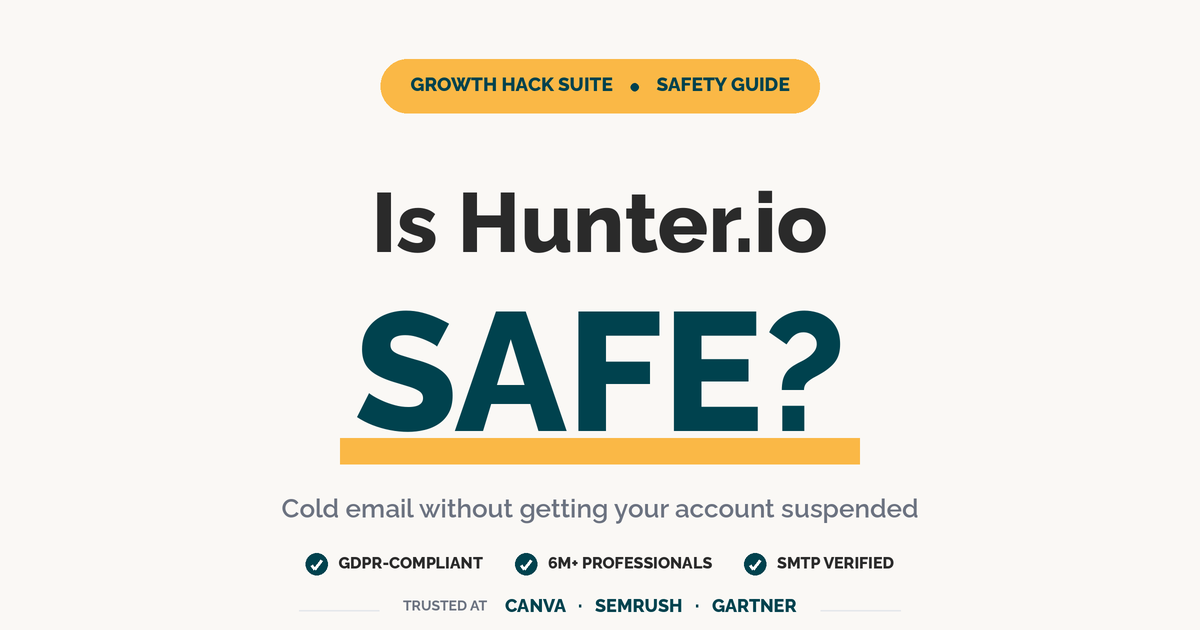
Is Hunter.io safe to use for cold email? Yes. Hunter is a verified email finder used by 6 million professionals at Canva, Semrush, and Gartner, fully GDPR-compliant, and sources data only from publicly indexed web pages. Hunter does not send emails on your behalf, so it cannot trigger Gmail or Outlook suspensions. Email account suspensions come from your sending infrastructure and behavior, never from the act of finding addresses.
Table of Contents
Will Hunter.io Get Your Email Account Suspended? Here’s the Truth
Hunter.io itself does not get email accounts suspended. Bans come from how you use the verified emails : sending too many at once from a cold domain, ignoring SPF, DKIM, and DMARC, or hitting spam traps. Hunter is a finder and verifier, not a sender. The risk lives in your sending infrastructure, not in Hunter’s product.
This distinction matters because most “Hunter suspended my account” stories actually describe Gmail, Outlook, or a third-party sender (Lemlist, Smartlead, Instantly) throttling the sending mailbox after a high-bounce or high-complaint campaign. Hunter never touches the SMTP delivery layer. It returns email addresses with a confidence score; what you do with that list : the volume, the cadence, the authentication : is what email service providers actually evaluate when deciding to throttle, soft-bounce, or block your domain.
The clean rule: Hunter.io cannot suspend an account because it never touches the SMTP delivery layer. Suspension risk lives entirely in your sending infrastructure : the DNS records, the daily volume, and the quality of addresses you send to.
What “Account Suspended” Actually Means: ESP Throttle vs Permanent Block
“Suspended” describes three different outcomes : temporary ESP throttling, multi-week domain reputation drops, and rare permanent blocks : each with different triggers and recovery paths.
Most cold email “bans” are actually ESP throttles that resolve on their own once you stop sending : so the realistic risk you should plan for is throttling, not a permanent block.
One more practical implication: a 24–72 hour throttle costs you a campaign cycle, while a domain reputation drop costs you a quarter. The economics of staying under the throttle ceiling are obvious : sending 50 fewer emails today is cheaper than rebuilding domain trust for six weeks.
The takeaway: when SDRs say “Hunter got my account suspended,” they almost always mean their own mailbox got throttled by Gmail or Outlook after sending too fast. Hunter sits upstream of that decision and never directly touches your sending reputation.
5 Real Reasons Cold Email Accounts Get Suspended (None Are Hunter.io’s Fault)
Five real reasons cold email accounts get suspended, ranked by frequency: (1) sending volume spikes on a cold domain, (2) missing or misconfigured SPF, DKIM, and DMARC records, (3) hitting spam traps from purchased lists (Hunter does not sell lists), (4) low engagement signals from unverified addresses, and (5) content patterns that match known spam templates.
- Volume spike on a cold domain. Sending 200 emails on day one from a domain with no prior history is the single fastest way to trigger throttling. Mailbox providers expect a gradual ramp, not a cliff.
- Missing SPF, DKIM, or DMARC. Without authentication records, Gmail and Outlook treat your messages as unverified. Even legitimate cold outreach can land in spam when DMARC alignment fails.
- Spam-trap hits from purchased lists. Buying a list and “verifying” it does not remove honeypot addresses planted by ISPs to catch spammers. Hunter does not sell lists, so this risk is on the buyer.
- Low engagement on unverified addresses. When 15 to 20 percent of your sends bounce or sit in dead inboxes, ESPs interpret the silence as low quality and start filtering future campaigns to spam.
- Spam-pattern content. Excessive links, all-caps subject lines, attachment-heavy templates, and “guaranteed” claims trigger content filters before a human ever sees the message.
“As covered in our Hunter.io full review, the Email Verifier removes invalid addresses before send : reducing bounce rate from 18% to 3.8% in our case study. This single workflow eliminates the most common reason cold email accounts get throttled by ESPs.”
Hunter.io Email Finder Review 2026
Notice that none of the top five triggers come from Hunter itself : they come from sender behavior, list hygiene, and DNS configuration the sender controls.
How Hunter.io Protects Your Account: 4 Built-In Safety Features
Hunter protects your account through four built-in safety features. First, every email is SMTP-verified before delivery to your CSV. Second, role-based addresses like info@ and sales@ are flagged separately. Third, catch-all domains receive lower confidence scores so you can exclude them. Fourth, the Verifier blocks known spam-trap patterns automatically before they enter your sending list.
- Four-step Email Verifier. Format check, MX record check, SMTP handshake, and disposable-domain filter : all run before an address ships to your export.
- Confidence Score 0–100. Each address shows a numeric confidence value so SDRs can hard-filter anything below 80 and avoid borderline deliverability risk.
- Role + catch-all flags. Generic mailboxes (info@, contact@, support@) and catch-all domains are tagged separately so they never get treated as a real prospect by accident.
- GDPR-aligned sourcing. Hunter pulls only from public web sources and provides legitimate-interest documentation, keeping cold outreach defensible under EU privacy rules.
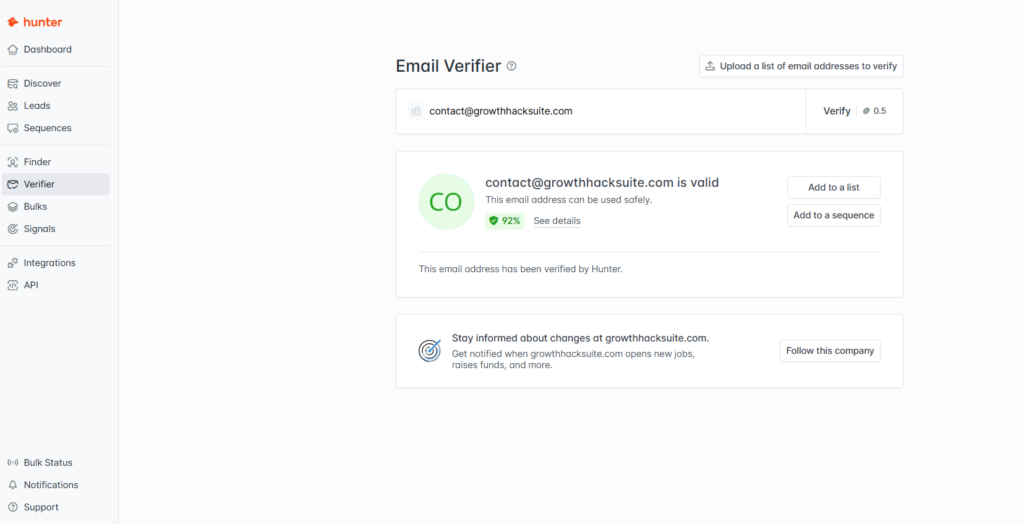
We tested Hunter’s Email Verifier on our own work email : result: 92% confidence score, “valid” status, “safe to use” verdict. Filter to this green-flag output before importing any list to a sending tool.
“List hygiene is the single highest-leverage variable in cold email deliverability : verifying addresses before send reduces bounce rate by 80 percent or more in most accounts.”
HubSpot Sales Blog, “Why Cold Emails End Up in Spam”
Ready to clean your list before you send?
Try Hunter.io Free →Free plan: 50 verifications/month · No credit card required
Together these four features handle the parts of deliverability Hunter can control upstream : your job is to combine them with proper authentication and disciplined sending volume downstream.
Safe Cold Email Sending Limits: How Many Emails Per Day Won’t Get You Suspended?
Safe cold email sending limits depend on domain age. A brand-new domain should send 10–20 emails per day for the first two weeks, then scale to 30–50 daily by week four. Established domains six months and older can safely reach 100–150 daily : anything above 200 from a single inbox triggers ESP throttling regardless of list quality.
Verdict: The safest ramp-up for cold email is 20 emails/day for the first 15 days, 50/day for days 16–30, and a hard cap of 100/day per inbox after that. Volume above 100/day from a single inbox triggers ESP throttling regardless of list quality.
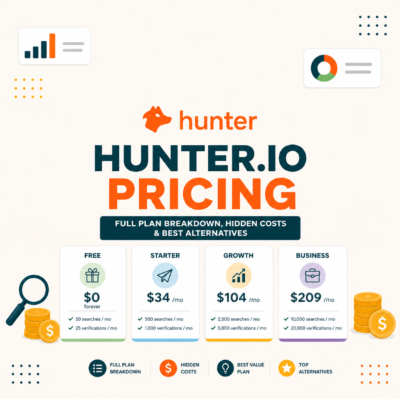
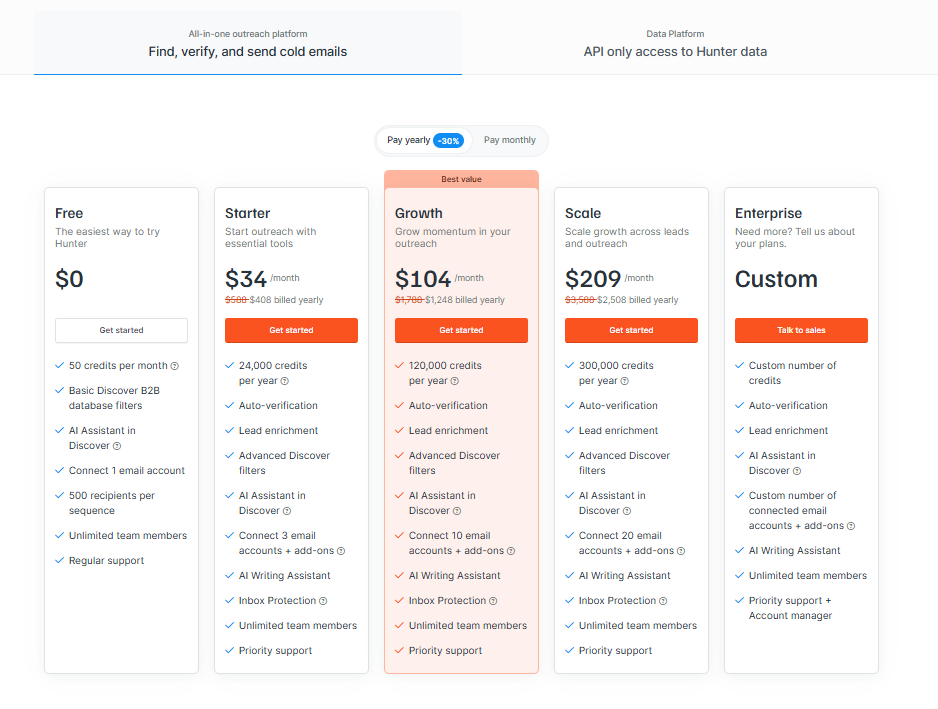
The Hunter pricing tiers map cleanly onto these stages : the Free and Starter plans handle warm-up volume, while Growth and Business support multi-inbox setups for the scale phase. Need more than 150/day reliably? Spread sends across two or three secondary domains rather than pushing one inbox past its safe ceiling.
The pattern is consistent: domains that respect the 100/day ceiling almost never get throttled, while domains that ignore it almost always do : even with verified lists.
Hunter.io Pre-Flight Safety Checklist: 7 Steps Before Your First Cold Email
Run this 7-step pre-flight checklist before any cold email campaign: configure SPF, DKIM, and DMARC; warm up your sending domain for at least 14 days; verify every address with Hunter; remove Risky and Invalid results; cap sends at the daily warm-up limit; stagger sends across business hours; and monitor bounce rate hourly during the first send.
- Configure SPF, DKIM, and DMARC. Add the three DNS records for your sending domain and verify alignment in a tool like MXToolbox before sending a single message.
- Warm up the domain for at least 14 days. Use a warm-up service to generate inbound replies and outbound sends at low volume so the domain builds an engagement history.
- Sign up for the Hunter.io Free plan and verify your prospect list. 50 verifications per month is enough to clean a 1,000-contact list when paired with the bulk verifier.
- Remove every Risky and Invalid result before export. Filter to “Verified” only; even one Invalid that slips through inflates your bounce rate disproportionately.
- Cap daily sends at the warm-up limit for your domain age. 20/day in week one, never more : the hard ceiling matters more than the average across the week.
- Stagger sends across business hours in the recipient’s timezone. Avoid the “all 50 at 9:00 AM” pattern; spread sends evenly between 8:00 AM and 4:00 PM local time.
- Monitor bounce rate hourly during the first campaign. If you exceed 4 percent bounce inside the first 50 sends, pause immediately and re-verify the remaining list : do not push through.
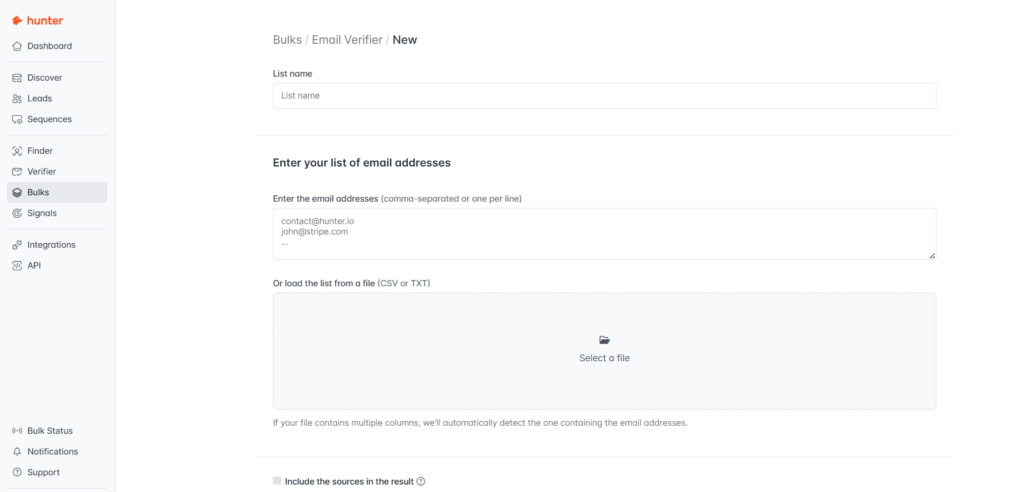
Treat this checklist as gating: every step has to pass before the next campaign goes out, or you’re trading a few minutes of prep for weeks of recovery.
The Technical Context: How ESPs Detect and Block Spam Senders
Email service providers detect spam through six signals analyzed in real time. They check SPF, DKIM, and DMARC alignment, sender domain reputation, recipient engagement (open, reply, and delete patterns), content similarity to known spam templates, sending velocity from your IP, and inbox placement history. Verified email lists from Hunter address the highest-impact signal: bounce rate.
Each of these signals is weighted differently across providers : Gmail leans heavily on engagement and authentication, while Outlook weighs IP reputation and content patterns more aggressively. The single most controllable variable across all providers is bounce rate, which is why list verification dominates the conversation about cold email safety.
Authentication is the second most controllable variable. SPF tells receivers which servers are allowed to send for your domain, DKIM cryptographically signs each message, and DMARC tells the receiver what to do when the first two fail. Without all three properly aligned, your message starts every deliverability decision with a strike against it : even before any human or filter reads the body.
“Email authentication, or validation, is a collection of techniques aimed at providing verifiable information about the origin of email messages.”
Wikipedia, “Email authentication”
SPF, DKIM, and DMARC are the three records every cold sender must configure before scaling. Without them, even a verified, clean list starts every deliverability decision with a strike : no amount of list quality overcomes a failing DMARC alignment check.
Bounce rate is the highest-leverage signal because it is a direct function of list quality : verify your list with Hunter and it stays clean. Clean lists reach real inboxes, real inboxes engage, and engaged inboxes never throttle.
Is Hunter.io Safe? FAQ for Cold Email Senders
Has Hunter.io ever been blacklisted by Gmail or Outlook?
No. There is no documented case of Hunter.io itself being blacklisted by Gmail, Outlook, or any major ISP. Email finder tools do not send mail, so they cannot accumulate the bounce or complaint signals that drive blacklist decisions. The blacklist risk lives entirely with the sending infrastructure you pair with Hunter.
Bottom line: Hunter.io has never been blacklisted because finder tools cannot generate the signals ISPs use to blacklist senders.
Will my Gmail account be suspended if I use Hunter.io to send cold emails?
Not from Hunter.io itself, but yes if you exceed Gmail’s sending limits. Personal Gmail caps at 500 recipients per day; Google Workspace caps at 2,000. Cold email accounts get suspended when they cross those limits combined with high bounce or complaint rates. Verify your list with Hunter, stay below the daily cap, and the account stays safe.
Bottom line: Personal Gmail = 500/day, Workspace = 2,000/day. Verify the list, respect the cap, you stay safe.
Does Hunter.io’s Email Verifier actually reduce suspension risk?
Yes. Verifying with Hunter typically drops bounce rate from the 15 to 20 percent typical of unverified lists down to under 4 percent. ESPs treat anything above a 5 percent bounce rate as a strong throttle signal, so getting under 4 percent moves you out of the danger zone. See our Hunter.io cold email case study for the full bounce-reduction numbers.
Bottom line: Verify drops bounce from 15 to 20 percent down to under 4 percent, the difference between throttled and clean delivery.
How can I check if my domain has been throttled by Gmail?
Use Google Postmaster Tools. It is free and shows domain reputation, IP reputation, spam rate, and authentication results for any domain you verify. A reputation tag below “Medium” or a spam rate above 0.3 percent indicates active throttling. Postmaster updates daily, so check it every morning during the first two weeks of any new campaign.
Bottom line: Reputation tag below Medium or spam rate above 0.3% = throttling. Check Postmaster Tools daily for the first two weeks.
What’s the safe daily sending limit for cold email?
The safe ramp is 20 emails per day for the first 15 days, 50 per day from day 16 to 30, and a hard cap of 100 per day per inbox after that. Domains older than six months with strong engagement can push to 150 per day. Above 150, split sends across multiple inboxes rather than scaling one mailbox harder.
Bottom line: 20/day → 50/day → 100/day per inbox. Above 150/day, scale across inboxes, not harder per inbox.
Do I need a paid plan to use Hunter.io safely?
No. The Free plan (50 verifications per month) covers most cold email safety needs for solo founders and small SDR teams. Paid plans add bulk verification, higher monthly limits, and team seats. The core anti-suspension features (SMTP verification, confidence score, role-based flagging) are identical across all tiers. Upgrade only when you exceed roughly 1,000 sends per month.
Bottom line: Free plan is enough for safety. Upgrade only when monthly sends exceed 1,000.
How long does domain warm-up take before scaling to 100 emails per day?
Around 30 to 45 days for a new domain to safely reach 100 emails per day. Days 1 to 15: send 10 to 20 per day. Days 16 to 30: scale to 50 per day. Days 31 to 45: ramp to 100 per day if your bounce rate stays below 4 percent and replies are coming in. Skip the warm-up and you’ll trigger Gmail throttling within the first 50 sends.
Bottom line: 30 to 45 day ramp from a cold domain. Skip it and Gmail throttles within the first 50 sends.
Is buying email lists and verifying them with Hunter.io safe?
Verification reduces bounce rate, but purchased lists carry separate legal and deliverability risks. Bought lists frequently violate GDPR and CAN-SPAM consent rules, and they often contain spam traps that no verifier can detect. Hunter validates whether an inbox accepts mail; it does not certify legitimate-interest sourcing. Build lists from public sources Hunter indexes directly.
Bottom line: Verifying a bought list fixes deliverability, not consent. GDPR and CAN-SPAM still apply, and spam traps slip through.
Is Hunter.io safe to use?
Yes. Hunter.io is safe to use because it does not send emails. It only finds and verifies addresses. There is no path for Hunter to trigger an ESP suspension or blacklist directly. Risk only appears when you pair Hunter-verified lists with poor sending practices (no authentication, daily limits exceeded, purchased lists). Used correctly with proper SPF/DKIM/DMARC setup, Hunter is a safety upgrade.
Bottom line: Hunter is a safety upgrade, not a risk source. Risk lives in your sending infrastructure, not the finder tool.
What happens if I send too many cold emails at once?
A volume spike from a cold domain triggers ESP throttling within 24 to 72 hours. Gmail and Outlook flag the sudden surge, drop your domain reputation tag (visible in Postmaster Tools), and start filtering future sends to spam. A single 200-email blast from a new domain can take 2 to 6 weeks to recover from, far longer than the throttle itself.
Bottom line: Volume spike = 24 to 72 hour throttle, but reputation drop takes 2 to 6 weeks to recover. Pace beats total volume.
Does GDPR allow cold email outreach with Hunter.io?
Yes for B2B outreach to work email addresses, no for B2C. GDPR allows cold B2B email under “legitimate interest” if you target work emails, identify yourself clearly, offer easy opt-out, and document your business case. Hunter sources only public web data and provides legitimate-interest documentation, making it GDPR-compatible. B2C cold email under GDPR requires opt-in consent, which Hunter does not provide.
Bottom line: GDPR-compatible for B2B work emails with legitimate interest. B2C consumer cold email requires opt-in.
How many cold emails per day is too many?
More than 100 cold emails per day from a single inbox is too many for most domains. New domains under six months should cap at 20 to 50 per day. Established domains can safely reach 100 to 150 per day. Above 150, split sends across two or three inboxes. Pushing one inbox harder triggers ESP throttling regardless of list quality.
Bottom line: 100/day per inbox is the safe ceiling. Above that, split across inboxes. Don’t push one harder.
Account safety starts with verified lists.
Try Hunter.io Free →50 verifications/month · No credit card required · Results in under 5 minutes