
Table of Contents
A reverse proxy is a server that sits in front of web servers and forwards client requests to them, then returns the responses. It improves performance, security and scalability by handling caching, load distribution and SSL, and it hides the backend servers, making it a common component in modern hosting stacks and CDNs. This guide explains how it works and why hosts use one.
Last updated: August 2026. Written by the Growth Hack Suite editorial team, with details cross-checked against provider documentation. This page carries affiliate links to Kinsta.
What Is a Reverse Proxy?
A reverse proxy is a server that sits in front of one or more web servers and forwards incoming client requests to them, then returns the responses. Clients interact with the proxy while the backend servers stay hidden behind it, so the proxy becomes the single public face of the site.
“A reverse proxy is a proxy server that appears to clients as a server.”
— Wikipedia, Reverse proxy
In practice, visitors talk only to the proxy, which then coordinates with the real servers out of sight.
How Does a Reverse Proxy Work?
A reverse proxy works by receiving requests from browsers, deciding which backend server should handle each one, forwarding the request and returning the response. It acts as an intermediary that can add caching, security and load distribution along the way, all before the request reaches your application.
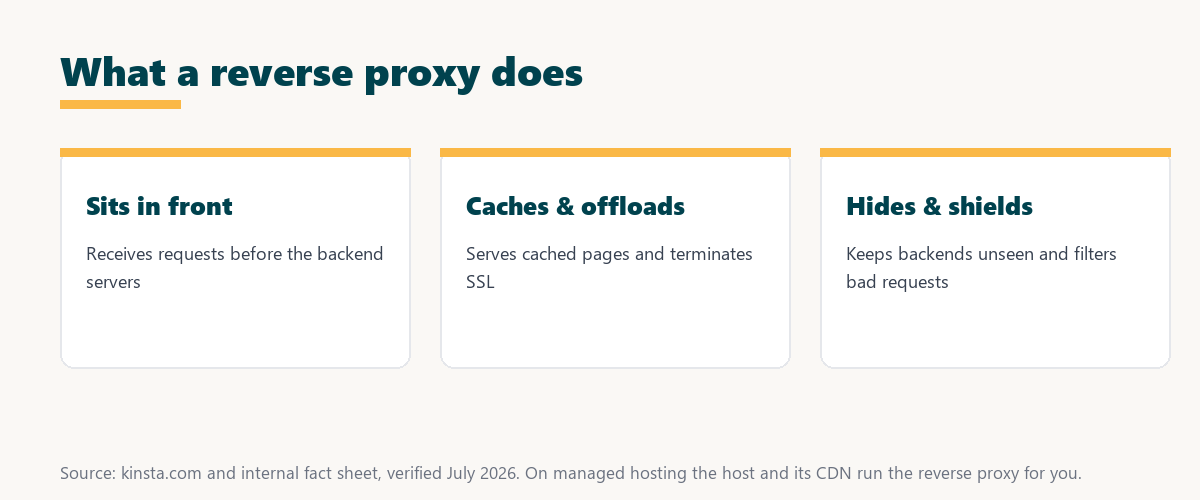
The key idea is that the proxy is a gatekeeper: every request passes through it, which is what lets it add value before reaching the servers.
Forward Proxy vs Reverse Proxy
A forward proxy sits in front of clients and represents them to the internet, while the reverse kind sits in front of servers and represents them to clients. The two face opposite directions and serve different purposes, so they are easy to confuse but do opposite jobs.
Source: provider documentation, verified August 2026. The two proxies face opposite directions.
Comparing what each sits in front of, whom it represents and its purpose shows the two are mirror images: a forward proxy shields clients, the reverse kind shields servers.
See how Kinsta runs its proxy layer
Try Kinsta →Nginx and Cloudflare, with a 30-day money-back guarantee.
What Does a Reverse Proxy Do?
A reverse proxy can cache content, terminate SSL, distribute traffic across servers, compress responses and filter malicious requests. It centralizes several performance and security functions in one layer in front of your application, so the backend does less and clients get faster, safer responses.
- Caching: Stored responses are served directly, so repeat requests skip the backend and return faster.
- SSL termination: The proxy handles encryption, offloading that work from the application servers.
- Load distribution: Requests can be spread across multiple backends to balance the workload.
- Compression: Responses are compressed before delivery, reducing bandwidth and speeding transfer.
- Request filtering: Malicious or malformed requests are blocked before they reach the servers.
The honest takeaway is that the proxy bundles caching, SSL, balancing, compression and filtering into one layer, which is why it is so common in modern stacks.
Reverse Proxy vs Load Balancer
A reverse proxy and a load balancer overlap, since the proxy can distribute traffic. A load balancer specializes in spreading load across servers, while the proxy adds broader functions like caching, SSL and security, so the proxy is the wider role and load balancing is one part of it.
The distinction to keep is scope: a load balancer focuses on distribution, while the proxy does that plus caching, SSL and filtering.
Why Reverse Proxies Improve Performance
Reverse proxies improve performance by caching responses, compressing content and offloading tasks like SSL from the backend. They reduce the work application servers do and speed up how quickly clients receive responses, especially for repeat requests served straight from cache.
“The first five seconds of page-load time have the highest impact on conversion rates.”
— HubSpot, page load time and conversion rates
Because the proxy serves many requests from cache without touching the application, it directly protects those early seconds that shape conversions.
How Reverse Proxies Improve Security
Reverse proxies improve security by hiding backend servers, filtering malicious requests and centralizing SSL and access control. Attackers interact only with the proxy and cannot directly reach or map the servers behind it, so the real infrastructure stays out of sight and better protected.
The honest point is that hiding the backend and filtering at the edge removes a whole class of direct attacks on your servers.
Do You Need to Configure the Proxy Layer Yourself?
You usually do not configure the proxy layer yourself on managed hosting, since the host and its CDN implement it for you. You gain the caching, security and scalability benefits without managing proxy configuration, which is one reason managed platforms are popular for busy WordPress sites.
Source: provider documentation, verified August 2026. Managed hosts run all of this for you.
Listing caching, SSL, load distribution and security filtering against their benefits shows the value the proxy layer adds. Because a host is a long-term commitment, it is worth reading our note on SaaS vendor lock-in before choosing.
How Kinsta Runs Its Proxy Layer
Kinsta uses a proxy architecture with Nginx and its Cloudflare integration on Google Cloud, so caching, SSL and request handling happen in front of your site. Pages are delivered quickly and securely without you configuring anything, since the proxy layer is part of the managed platform.
Run your site behind a managed proxy layer
Start With Kinsta →Free migration and a 30-day money-back guarantee.
Getting Proxy-Layer Benefits for Your Site
You get these benefits by hosting on a platform that builds them into the stack, so caching, SSL termination and security filtering run in front of your WordPress site automatically. The site gains speed and protection without you managing a proxy or its configuration files.
“A tool is only worth its premium when the hours or revenue it protects exceed the invoice.”
— Growth Hack Suite, on tool ROI
Applied to hosting, a managed proxy stack earns its cost when the speed, security and saved configuration time it delivers exceed the plan price.
Reverse Proxies in CDNs and Caching
Reverse proxies are central to CDNs and caching, because a CDN acts as a distributed proxy layer that caches and serves content from edge locations. Understanding reverse proxies explains how CDNs speed up global delivery, since each edge node is a proxy serving cached content close to the visitor.
The practical link is that a CDN is a proxy layer spread across the globe, which is why the two concepts are so closely tied.
Choosing a Host That Handles the Proxy Layer
You choose a host that handles the proxy layer by favoring managed WordPress hosting with a built-in proxy layer, caching and a CDN. That combination delivers the performance and security benefits of this layer without you configuring anything, so the site stays fast and protected as it grows.
The honest summary is that the value of the proxy reaches you through a well-built managed stack, so the host that runs it matters as much as the concept.
Try Kinsta risk-free for a faster, safer site
Try Kinsta Risk-Free →Managed proxy, caching and free migration, with a 30-day money-back guarantee.
Frequently Asked Questions About Reverse Proxies
The 12 most-asked questions about a reverse proxy.
What is a reverse proxy in simple terms?
A reverse proxy is a server that sits in front of your web servers, receiving client requests and forwarding them to the backend, so clients interact with the proxy while the servers stay hidden.
How does a reverse proxy work?
A reverse proxy works by receiving browser requests, choosing which backend server handles each, forwarding the request, and returning the response, acting as an intermediary that adds caching and security.
What is the difference between a forward and reverse proxy?
A forward proxy sits in front of clients and represents them to the internet, while a reverse proxy sits in front of servers and represents them to clients, so they face opposite directions.
What does a reverse proxy do?
A reverse proxy can cache content, terminate SSL, distribute traffic, compress responses, and filter malicious requests, centralizing several performance and security functions in one layer.
Why do hosts use a reverse proxy?
Hosts use a reverse proxy to improve performance through caching and compression, strengthen security by hiding backend servers, and distribute traffic, all from one layer in front of the application.
What is the difference between a reverse proxy and a load balancer?
A load balancer specializes in spreading traffic across servers, while a reverse proxy can also do that but adds broader functions like caching, SSL termination, and request filtering.
Does a reverse proxy improve security?
Yes, a reverse proxy improves security by hiding backend servers, filtering malicious requests, and centralizing SSL and access control, so attackers interact only with the proxy.
Does a reverse proxy improve performance?
Yes, a reverse proxy improves performance by caching responses, compressing content, and offloading tasks like SSL from the backend, reducing server work and speeding up responses.
Do I need to set up a reverse proxy myself?
On managed hosting you usually do not, since the host and its CDN implement the reverse proxy for you, so you gain the benefits without configuring it.
Is a CDN a reverse proxy?
A CDN functions as a distributed reverse proxy, caching and serving content from edge locations close to visitors, so it applies reverse proxy principles across a global network.
Is Nginx a reverse proxy?
Nginx is commonly used as a reverse proxy, since it can efficiently forward requests, cache responses, and terminate SSL, which is why many hosting stacks use it in that role.
How does Kinsta use a reverse proxy?
Kinsta uses a reverse proxy architecture with Nginx and Cloudflare on Google Cloud, so caching, SSL, and request handling happen in front of your site automatically without configuration.
About this guide
Written by the Growth Hack Suite editorial team, drawing on hands-on experience running WordPress sites. Details were cross-checked against provider documentation. This page carries affiliate links to Kinsta, so the position is stated plainly: a reverse proxy sits in front of your servers and adds caching, SSL, load distribution and security, it faces the opposite way from a forward proxy, and on managed hosting the host runs it for you. Kinsta uses a reverse proxy architecture with Nginx and Cloudflare on Google Cloud.