Table of Contents
An email bounce is a message returned by the recipient server because it could not be delivered. The server sends back a non-delivery report explaining the reason, such as the address not existing or the mailbox being full. A high email bounce rate hurts sender reputation, so understanding bounces is the first step to a clean list. This guide explains what an email bounce is, its types, causes, and prevention.
Stop bounces before they happen — verify your list free.
Verify Your List Free →Free plan included · No credit card · Removes invalids before they bounce
What Is an Email Bounce?
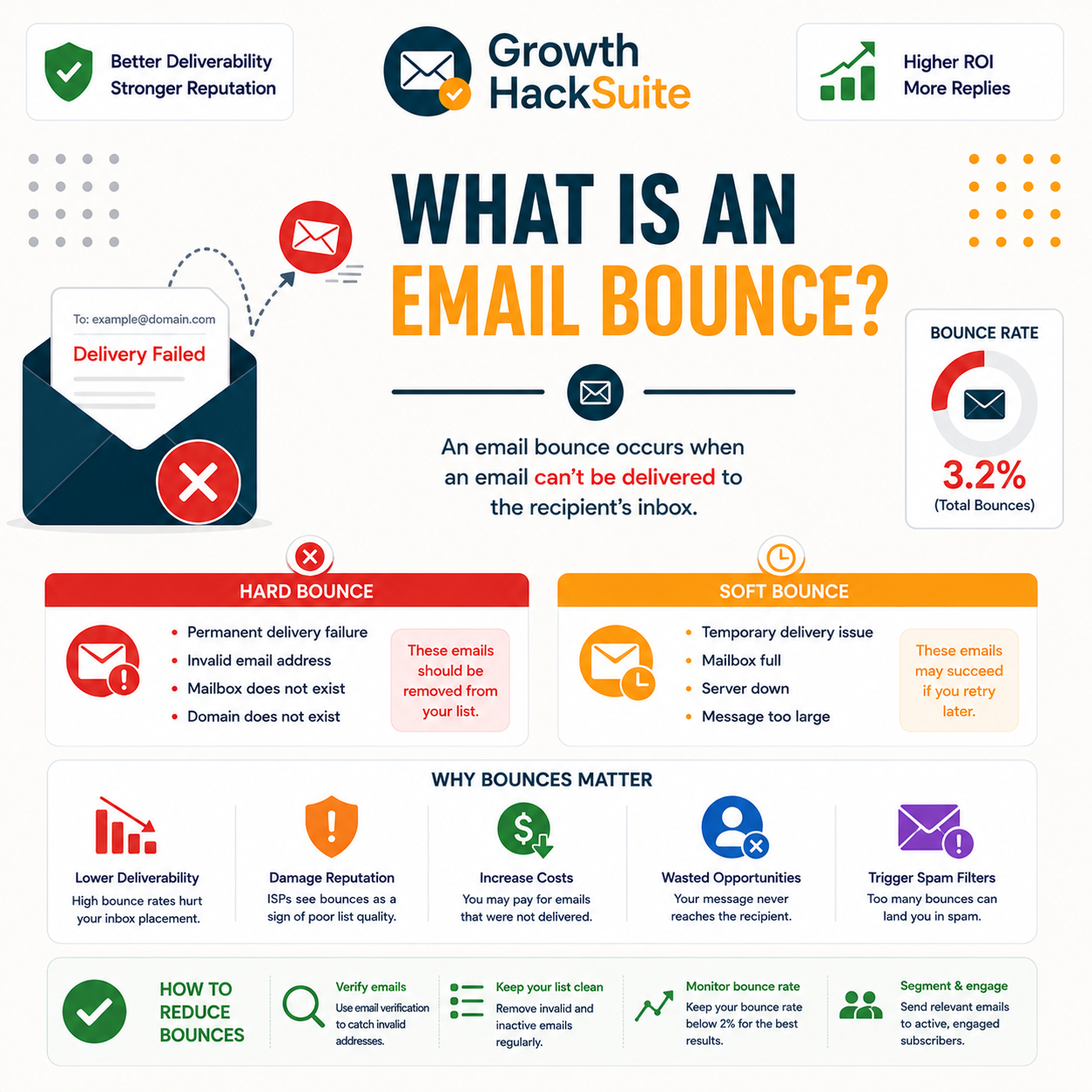
An email bounce is a delivery failure: the recipient mail server rejects the message and returns a notice explaining it could not be delivered. The bounce notice, often called a non-delivery report, states the reason, such as a non-existent address or a full mailbox. A bounce means the message never reached the intended inbox.
- Delivery failure: An email bounce records that the recipient server refused the message rather than placing it in the mailbox. The notice confirms the send failed, so the contact never saw the email and the attempt produced no inbox placement at all.
- Returned notice: The receiving server sends an automated reply, the non-delivery report, back to the original sender. That notice carries an SMTP code and a short reason line, turning a silent failure into a readable explanation of why delivery stopped.
- Stated reason: Every bounce names a cause, whether a dead address, a full mailbox, or a blocked sender. Reading the stated reason decides the next action, since a permanent cause demands removal while a temporary one allows a later retry.
- Reputation signal: Mailbox providers watch bounce volume as a sign of list hygiene, so repeated bounces lower sender standing. A climbing bounce rate pushes even valid mail toward spam folders and can trigger sending limits on the account.
- Removable cause: Most hard bounces trace to invalid addresses that verification catches before a send. Cleaning those addresses out in advance keeps the bounce rate inside the safe zone and protects the sender reputation that delivery depends on.
An email bounce is a delivery failure returned with a reason, and the message never reached the inbox. The stated cause decides whether to delete the address or retry it.
How Does a Bounce Happen?
When a message is sent, the recipient server evaluates the address and either accepts or rejects it. On rejection, the server returns a bounce message carrying an SMTP code and an explanation to the sending server. The whole exchange happens in seconds, before the message would have landed in any mailbox.
- Server evaluates address: The receiving mail server checks whether the target mailbox exists and can accept new mail during the SMTP conversation. That check decides acceptance or rejection within the connection, long before the message body would reach the recipient.
- Rejects with code: When the mailbox fails the check, the server answers with an SMTP status code rather than accepting the message. A 5xx code marks a permanent rejection, while a 4xx code marks a temporary one that may clear on a later attempt.
- Notice returned: The sending server packages that rejection into a non-delivery report and routes it back to the original sender. The report names the failing address and the stated reason, giving the sender a record of exactly why delivery stopped.
- Status logged: Email service providers read the returned code and classify the result as a hard or soft bounce in the campaign report. That classification drives automatic suppression of permanently failing addresses on most sending platforms.
Bounce at a Glance
A 5xx code means permanent failure; a 4xx code means temporary; the NDR carries the stated reason back to the sender.
A bounce is the server’s rejection, returned with a code and a reason within seconds of sending. The sending platform then logs it as a hard or soft bounce.
What Are the Types of Email Bounce?
There are two main types of email bounce. Hard bounces are permanent failures from invalid or non-existent addresses, signaled by 5xx codes. Soft bounces are temporary failures from full mailboxes or server issues, signaled by 4xx codes. Hard bounces damage reputation most and should be removed immediately, while soft bounces may resolve on retry.
Source: SMTP reply codes per IETF RFC 5321; 550 mailbox unavailable, 552 storage exceeded, and 4xx temporary failures per SMTP2GO and DCHost bounce-code references, verified 2026-06-29.
Hard bounces are permanent and dangerous; soft bounces are temporary and may clear. The 5xx versus 4xx split decides the action: delete or retry.
What Causes Emails to Bounce?
Common causes of an email bounce include non-existent addresses, typos, retired mailboxes, full inboxes, blocked senders, and server outages. Most hard bounces trace to bad addresses sitting on the list, which is precisely what verification removes before a send. Soft-bounce causes are usually transient and clear without intervention.
- Invalid address: A mistyped, fake, or never-existent address fails the server check and returns a permanent 550 hard bounce. Invalid addresses make up the largest share of hard bounces and the clearest target for pre-send verification.
- Retired mailbox: Addresses tied to former employees or abandoned accounts get deactivated over time, turning once-valid contacts into hard bounces. List decay produces these failures steadily, so periodic re-verification keeps an aging database deliverable.
- Full mailbox: A recipient inbox that has hit its storage quota refuses new mail with a temporary code, producing a soft bounce. The address remains valid, so the message often delivers on a later attempt once space frees up.
- Blocked sender: A receiving server may refuse mail from a sender with poor reputation or a listed IP, returning a rejection. This cause reflects the sending standing rather than the individual address and signals a deliverability problem to fix.
- Server outage: A temporary failure on the receiving side, such as a server being down or overloaded, defers the message with a 4xx code. The bounce is soft and usually clears once the receiving infrastructure recovers.
Most hard bounces come from invalid addresses that a pre-send check would catch.
— Hunter, Email Verifier API documentation
Most hard bounces come from bad addresses on the list, exactly what a verifier removes before sending. Soft-bounce causes are usually transient and self-clearing.
What Do Bounce Codes Tell You?
Bounce notices carry SMTP codes that classify the failure. A 5xx code means a permanent failure, recorded as a hard bounce, while a 4xx code means a temporary one, recorded as a soft bounce. Reading the code tells you whether to delete the address or retry later. Most providers translate these codes into hard or soft labels automatically.
- 5xx permanent: A 5xx reply, such as 550 for an unavailable mailbox, marks a permanent failure that will repeat on every retry. Codes in this range identify hard bounces, and the matching address belongs off the list at once.
- 4xx temporary: A 4xx reply, such as 421 or 450, marks a temporary failure that may clear on a later attempt. Codes in this range identify soft bounces, so the address stays on the list pending a retry.
- Enhanced status notes: Many servers append a finer code, such as 5.1.1 for an unknown user, that pinpoints the exact reason behind the bounce. Reading the enhanced status separates a dead address from a reputation block within the same 5xx class.
- 550 mailbox unavailable: The most common hard bounce returns 550, signaling that the target mailbox does not exist or refuses delivery. That permanent rejection marks the address for immediate removal, since every retry would meet the same wall.
- 421 service unavailable: A 421 reply tells the sender the receiving service is temporarily unavailable or rate-limiting the connection. The address stays valid, and the message typically delivers once the server recovers or the sending pace eases.
A 5xx code means delete, and a 4xx code means retry. The bounce code tells you which action a given bounce actually demands.
How Do Bounces Affect Your Sending?
A high email bounce rate signals poor list hygiene to mailbox providers, lowering sender reputation and pushing even valid mail toward spam folders. Bounces waste send budget and can trigger account restrictions from an email service provider. Keeping the bounce rate low is essential to maintaining deliverability and inbox placement.
- Reputation damage: Mailbox providers treat repeated bounces as a sign of a poorly maintained list and lower the sender score accordingly. A falling reputation drags inbox placement down for the whole list, not just the bouncing addresses.
- Spam folder risk: As reputation drops from heavy bouncing, providers route more of the sender’s mail into spam folders. Valid, engaged contacts then stop seeing messages, so the cost of bounces spreads well beyond the failed addresses.
- Account restrictions: Sending platforms cap or suspend accounts whose bounce rates cross a threshold to protect their shared sending IPs. Crossing that line can pause campaigns entirely until the list is cleaned and the rate falls back.
- Wasted send budget: Every bounced message still consumes a send credit or sending slot while reaching no inbox. A list heavy with invalids burns budget on addresses that were never reachable, lowering the return on each campaign.
- Skewed engagement metrics: Bounces distort open and click rates because failed deliveries never had a chance to convert. Cleaning bounces out first gives a truer read of how the reachable audience actually responds to a campaign.
Verifying a list before each send keeps bounce rates low and protects sender reputation.
— Growth Hack Suite, reduce email bounce rate with Hunter.io
Bounces are a reputation signal. Let them climb and even valid mail starts landing in spam, while the sending account risks throttling.
How Common Are Bounces on Unverified Lists?
Unverified and aging lists commonly bounce at double-digit rates, far above the safe threshold that providers tolerate. Verified lists routinely sit under the safe line because the invalid addresses have been removed in advance. The gap between the two outcomes is the clearest argument for verifying before every send.
- Unverified lists bounce high: Lists built without verification accumulate typos, dead addresses, and decayed contacts that push bounce rates into double digits. That volume of hard bounces alone can breach an email service provider’s acceptable threshold on a single campaign.
- Aging lists decay steadily: Even a once-clean list loses validity as people change jobs and abandon mailboxes, so old data bounces more with every passing month. Re-verifying before reuse restores the list to a deliverable state.
- Verified lists stay low: Running addresses through a verifier before sending strips out the invalids responsible for most hard bounces, keeping the rate under the safe line. The result is steadier inbox placement and a protected sender reputation.
- Purchased lists bounce worst: Bought or scraped lists carry the highest share of fake, outdated, and trap addresses, so they bounce at the steepest rates. Sending to one unverified can breach a provider threshold on the very first campaign.
- Safe threshold is low: Mailbox providers expect bounce rates well below a few percent, and crossing that mark invites filtering. Verification keeps even large lists under the line that separates a trusted sender from a throttled one.
Unverified lists bounce at double digits, while verified ones stay under the safe line. That stark gap is the case for verifying before every send.
Bounce vs Block: What’s the Difference?
A bounce is a per-message rejection returned to the sender for a specific address; a block is the provider refusing mail more broadly because of sender reputation. Bounces are about individual addresses, while blocks are about overall sending standing. The table below contrasts the two on the points that matter for list hygiene.
Source: bounce versus block behavior per Suped and SMTP2GO email-deliverability references; 554 reputation rejections per RFC 5321, verified 2026-06-29.
A bounce rejects one message to one address; a block refuses the sender’s mail at large. One is an address problem, the other a reputation problem.
How Do You Prevent Email Bounces?
Prevent email bounces by verifying addresses before sending, removing hard-bounced addresses immediately, verifying at signup, and re-verifying aging lists. Verification removes the invalid addresses behind most hard bounces, keeping the bounce rate inside the safe zone. Authentication and gradual warm-up protect against the block side of delivery failures.
- Verify before sending: Running every address through a verifier before a campaign strips out the invalids that produce hard bounces. This single step removes the largest source of permanent failures and keeps the bounce rate beneath provider thresholds.
- Remove hard bounces: Deleting any address that returns a 5xx hard bounce prevents it from failing again on the next send. Repeated sends to a known-dead address compound reputation damage, so prompt suppression protects future deliverability.
- Verify at signup: Checking an address the moment it enters a form blocks typos and fake entries before they ever reach the list. Validation at the point of capture keeps bad data out rather than cleaning it up later.
- Re-verify aging lists: Lists decay as contacts change jobs and abandon mailboxes, so a periodic re-verification pass restores deliverability. Re-checking before reusing an old segment catches the addresses that have gone dead since the last send.
Verify your list free to prevent bounces before they hit.
Verify Your List Free →Free plan · No credit card · Catches invalids at the source
Verification removes the invalids behind most hard bounces, the most direct prevention there is. Suppression and re-verification handle the rest over time.
What Tools Reduce Email Bounces?
A verifier is the core tool for reducing email bounces: it removes invalid addresses before they bounce. Hunter does this with a recurring free tier, while pure-play verifiers compete on bulk price and email service providers add basic suppression. The table compares the common options for cutting bounce rate.
Source: hunter.io/pricing free plan (50 credits/mo, recurring), verified 2026-06-29. Other rows describe common tool categories; confirm each provider’s current limits before buying.
A verifier is the core bounce-reduction tool because it removes the addresses that would have bounced. ESP suppression only acts after the damage is already done.
Verdict: What an Email Bounce Means for You
An email bounce is a delivery failure that, in bulk, damages sender reputation and deliverability. Hard bounces from bad addresses are the dangerous kind, and verification removes them before they hit. Understanding bounces is the first step; verifying lists is the fix that keeps the rate safe and the inbox reachable.
Verdict: An email bounce is a delivery failure returned with a code. 5xx hard bounces are permanent and must be deleted; 4xx soft bounces are temporary and may retry. Unverified lists bounce at double digits, verified lists stay under the safe line, so verify before every send.
A bounce message informs the sender that a message has not been delivered.
— Wikipedia, Bounce message
Verify your list free and stop bounces at the source.
Verify Your List Free →Free plan · No credit card · Invalids removed before they bounce
Related Tools in the Hunter Stack
Bounces tie directly to verification and list building. The Hunter Email Verifier review covers how each address is checked and how invalids are caught before they bounce, while the finder review covers sourcing the lists worth verifying on the same shared credit pool.
- Hunter Email Verifier: The validation layer that removes invalid addresses before a send — start with what the Hunter Email Verifier is.
- Hunter Email Finder: The list-building half of the bundle that shares the same credit pool — read the Hunter.io email finder review for sourcing costs.
Email Bounce: Frequently Asked Questions
The 12 most-asked questions about email bounces.
What is an email bounce?
An email bounce is a message returned by the recipient mail server because it could not be delivered. The server sends back a non-delivery report explaining the reason, such as a non-existent address or a full mailbox. A bounce means the message never reached the inbox, and a high bounce rate harms sender reputation.
How does a bounce happen?
When a message is sent, the recipient server evaluates the address and either accepts or rejects it. On rejection, it returns a bounce message carrying an SMTP code and an explanation to the sending server. The exchange happens in seconds, before the message would have landed, and the platform logs the result as a hard or soft bounce.
What are the types of email bounce?
There are two main types. Hard bounces are permanent failures from invalid or non-existent addresses, signaled by 5xx codes such as 550. Soft bounces are temporary failures from full mailboxes, busy servers, or greylisting, signaled by 4xx codes such as 421 or 450. Hard bounces should be removed at once; soft bounces may clear on retry.
What causes emails to bounce?
Common causes include non-existent addresses, typos, retired mailboxes, full inboxes, blocked senders, and server outages. Most hard bounces trace to bad addresses sitting on the list, which is exactly what verification removes before a send. Soft-bounce causes such as a full mailbox or a busy server are usually transient and clear on their own.
What do bounce codes tell you?
Bounce notices carry SMTP codes that classify the failure. A 5xx code means a permanent failure recorded as a hard bounce, while a 4xx code means a temporary one recorded as a soft bounce. An enhanced status such as 5.1.1 pinpoints the exact reason. Reading the code tells you whether to delete the address or retry it later.
How do bounces affect sending?
A high bounce rate signals poor list hygiene to mailbox providers, lowering sender reputation and pushing even valid mail toward spam folders. Bounces waste send budget and can trigger account restrictions from a sending platform. Keeping the bounce rate low is essential to protecting deliverability and inbox placement across the whole list.
How common are bounces on unverified lists?
Unverified and aging lists commonly bounce at double-digit rates, far above the safe threshold providers tolerate. Verified lists routinely sit under the safe line because the invalid addresses have been removed in advance. The gap between the two outcomes is the clearest argument for verifying a list before every send.
Bounce vs block?
A bounce is a per-message rejection of one address returned to the sender; a block is the provider refusing mail more broadly because of sender reputation. Bounces are about individual addresses, while blocks are about overall sending standing. Fixing a bounce means removing or retrying the address; fixing a block means repairing reputation and authentication.
How do I prevent email bounces?
Prevent email bounces by verifying addresses before sending, removing hard-bounced addresses immediately, verifying at signup, and re-verifying aging lists. Verification removes the invalid addresses behind most hard bounces, keeping the rate in the safe zone. Authentication and gradual warm-up handle the block side of delivery failures.
What tools reduce bounces?
A verifier is the core tool, since it removes invalid addresses before they bounce. Hunter does this on a recurring free tier of about 50 credits a month, while pure-play verifiers compete on bulk price. Email service provider suppression helps but only acts after bounces have already happened, so it is reactive rather than preventive.
Do bounces hurt sender reputation?
Yes. Mailbox providers read a high bounce rate as a sign of a poorly maintained list and lower the sender score accordingly. A falling reputation drags inbox placement down for valid contacts too, not just the bouncing addresses, and can lead a sending platform to throttle or suspend the account.
Can verification stop bounces?
Verification stops most hard bounces by removing the invalid addresses that cause them before a send. It cannot stop every soft bounce, since a full mailbox or a temporary server issue is outside the sender’s control. Still, clearing invalids in advance is the single most effective way to keep an email bounce rate inside the safe zone.