Table of Contents
TTFB, or time to first byte, measures how long a browser waits between requesting a page and receiving the first byte of the response. It reflects server speed, hosting quality and caching, and a low value is essential for fast page loads and strong Core Web Vitals. This guide explains what counts as good and how to reduce it.
Last updated: August 2026. Written by the Growth Hack Suite editorial team, with details cross-checked against provider documentation. This page carries affiliate links to Kinsta.
What Is TTFB (Time to First Byte)?
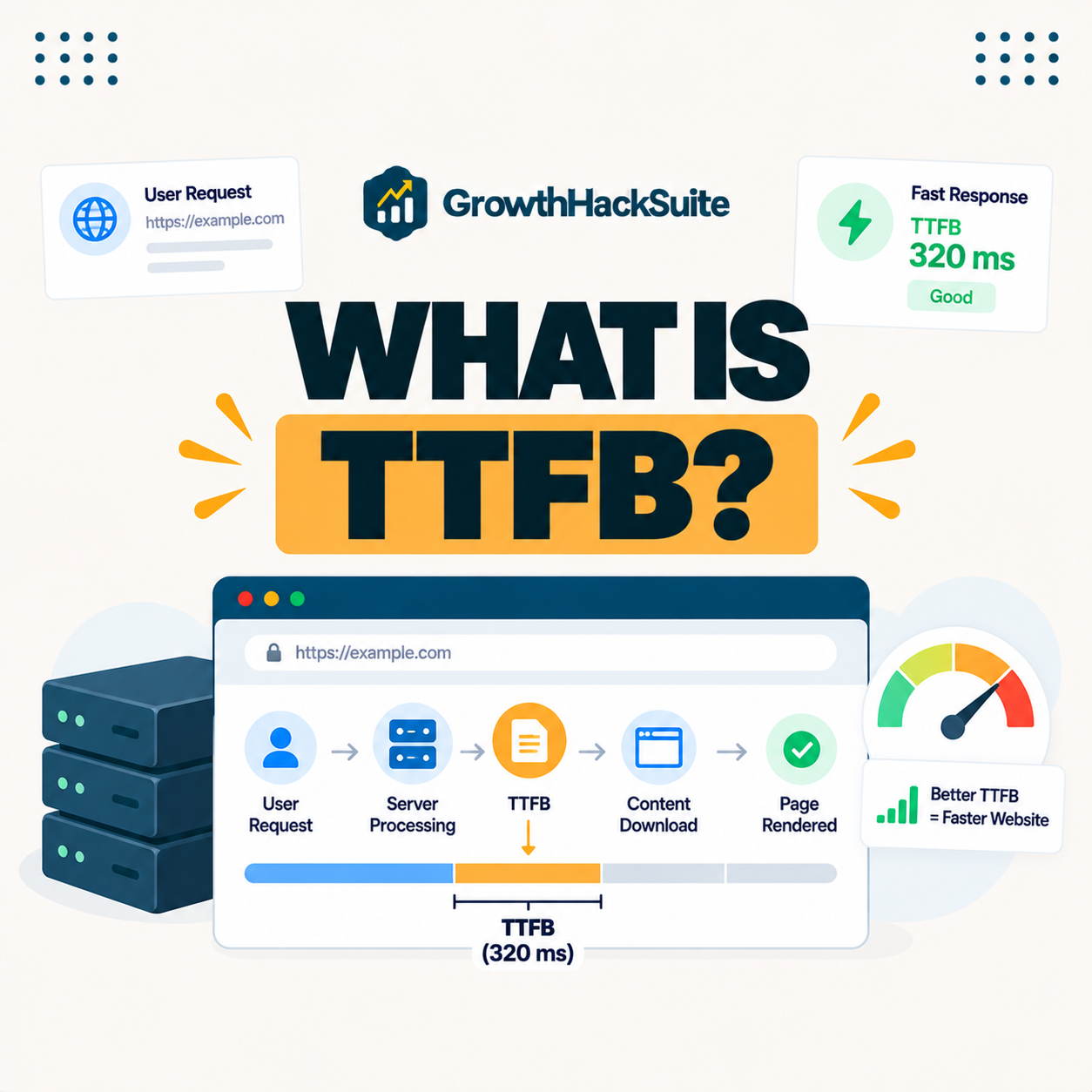
TTFB, or time to first byte, is the time between a browser requesting a page and receiving the first byte of the server’s response. It measures how quickly your server begins delivering content and reflects hosting speed, caching and network latency all at once.
“Time to first byte is a measurement of the responsiveness of a server.”
— Wikipedia, Time to first byte
Because it measures the server’s responsiveness before any rendering happens, it is the first thing to fix when a site feels slow to start loading.
How Is It Measured?
TTFB is measured from the moment a request is sent to the moment the first byte arrives, combining the time for the request to travel, the server to process it, and the response to start returning. Tools like PageSpeed Insights and browser dev tools report it directly.
Verdict: TTFB measures how fast a server starts responding, and it sets the floor for the whole page load. Under 100 milliseconds is excellent, under 200 is good, and over 600 is poor. The honest rule is that hosting quality, caching and server distance move TTFB far more than any theme or plugin tweak, so a fast host with server-level caching and a CDN is the most reliable way to keep it low.
In short, it is a server-side metric, so the biggest gains come from infrastructure, not from front-end changes to the page itself.
What Is a Good TTFB?
A good TTFB is generally under 200 milliseconds, with anything under 100 excellent and over 600 poor. A low value means the server responds quickly and leaves more of the page-load budget for rendering the visible content a visitor actually waits to see.
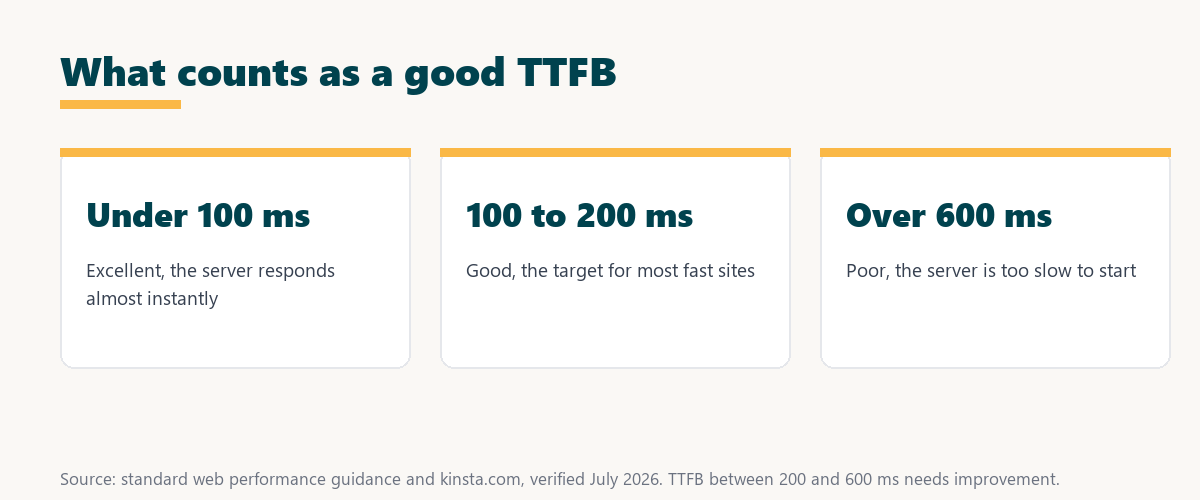
Source: standard web performance guidance, verified August 2026. Bands are approximate and rounded.
Showing excellent, good, needs-improvement and poor ranges in milliseconds lets a site owner grade their own server response at a glance against a clear target.
First Byte vs Page Load Time
First-byte timing differs from total page load time by measuring only the initial server response, whereas page load time covers everything until the page is fully rendered. A low value is necessary but not sufficient for a fast complete load, since front-end assets still have to download and render.
See how Kinsta keeps servers fast on Google Cloud
Try Kinsta →Compute-optimized servers and caching, with a 30-day money-back guarantee.
What Affects Server Response Time?
Server response time is affected by server processing speed, hosting quality, the distance between server and visitor, caching, database performance and heavy plugins. Improving any of these can lower the delay before content starts arriving, but hosting and caching move the needle most.
- Hosting quality: Fast, compute-optimized servers respond in a fraction of the time slow shared hardware takes.
- Caching: A cached page skips PHP and the database, returning almost instantly and slashing the wait.
- Server distance: The farther a visitor is from the server, the longer the request and response travel.
- Database performance: Slow or heavy database queries delay how quickly the server can build a page.
- Heavy plugins: Plugins that run on every request add processing time before the first byte is sent.
The honest takeaway is that it is mostly a server-side story, so infrastructure choices matter far more than any single front-end tweak.
Why It Matters for Speed and SEO
It matters because it sets the floor for how fast a page can load. A high value delays everything that follows, hurts Core Web Vitals like Largest Contentful Paint, and worsens the user experience that search engines increasingly reward with better rankings.
“The first five seconds of page-load time have the highest impact on conversion rates.”
— HubSpot, page load time and conversion rates
Because a slow first byte eats into those decisive early seconds, cutting it protects both conversions and the page-experience signals that influence search performance.
How to Lower It
You lower it by using fast hosting with compute-optimized servers, enabling server-level and edge caching, adding a CDN, choosing a data center near your audience, and trimming slow plugins and database queries. Each of these cuts the time before the server sends its first byte.
- Fast hosting: Compute-optimized servers process requests quickly, the single biggest lever.
- Server-level caching: Full-page caching returns finished pages without running PHP or the database.
- Add a CDN: A content delivery network serves cached content from near each visitor to cut travel time.
- Nearby data center: Hosting close to the audience shortens the network distance the response travels.
- Trim slow code: Removing heavy plugins and optimizing queries speeds up how fast the server responds.
The honest takeaway is that the fastest wins come from hosting and caching, so those are the first places to look before touching the theme.
How Caching Speeds Up the First Byte
Caching speeds up the first byte dramatically because a cached page is returned almost instantly without running PHP or querying the database. Server-level and edge caching are among the most effective ways to cut the time before the first byte arrives, often turning hundreds of milliseconds into tens.
Source: provider documentation, verified August 2026. Hosting and caching influence it most.
Listing hosting, caching, server distance, database and plugins with how each raises or lowers it shows where to focus for the biggest, fastest improvement. Owners weighing platform commitment can also read our note on SaaS vendor lock-in.
How to Choose Hosting for a Fast First Byte
Choose hosting for a fast first byte by favoring providers with compute-optimized servers, built-in caching, a CDN and data centers near your visitors. These infrastructure factors influence it far more than any single plugin or theme change, so they deserve the most weight when comparing hosts.
Get fast responses handled on Kinsta
Start With Kinsta →Free migration and a 30-day money-back guarantee.
How Kinsta Keeps Responses Fast
Kinsta keeps responses fast with Google Cloud compute-optimized machines, server-level and edge caching, and a Cloudflare CDN across 300+ locations, with data centers in Google Cloud regions worldwide. Servers therefore respond quickly to visitors wherever they are, close to the source of the request.
“A tool is only worth its premium when the hours or revenue it protects exceed the invoice.”
— Growth Hack Suite, on tool ROI
Applied to hosting, a compute-optimized platform earns its premium when the faster first byte it delivers protects conversions worth more than the plan.
Can a CDN Lower the First Byte?
Yes, a CDN lowers it for many visitors by serving cached content from a location near them, reducing the network distance the response must travel. It does not speed up dynamic, uncached requests, but for cacheable pages the effect on distant visitors is significant.
The honest qualifier is that a CDN helps most for global audiences and cached content, so its benefit depends on how far visitors are from the origin server.
Improving It on Your WordPress Site
You improve it on WordPress by moving to fast managed hosting, enabling full-page and object caching, using a CDN, and diagnosing slow requests with a tool like Kinsta APM. Together these make the server start responding as quickly as possible for every visitor.
The honest summary is that improving it on WordPress is mostly about hosting and caching, so those two changes deliver the largest, most reliable gains.
Cut your server response time risk-free on Kinsta
Try Kinsta Risk-Free →Compute-optimized hosting, APM and free migration, with a 30-day money-back guarantee.
TTFB: Frequently Asked Questions
The 12 most-asked questions about TTFB.
What is TTFB in simple terms?
TTFB, or time to first byte, is how long a browser waits after requesting a page before it receives the first byte of the server’s response, reflecting how quickly your server starts delivering content.
What is a good TTFB value?
A good TTFB is generally under 200 milliseconds, with under 100 excellent, since a fast first byte leaves more of the load budget for rendering the visible page.
How do I measure my TTFB?
You measure TTFB using tools like Google PageSpeed Insights, WebPageTest, or your browser’s network dev tools, which report the delay between the request and the first byte of the response.
What causes a high TTFB?
A high TTFB is caused by slow hosting, no caching, a distant server, heavy database queries, or slow plugins, all of which delay how quickly the server begins responding.
Does TTFB affect SEO?
Yes, TTFB affects SEO indirectly, because a high TTFB delays page rendering and hurts Core Web Vitals like LCP, and page experience signals influence search rankings.
How can I reduce my TTFB?
You reduce TTFB with fast hosting, server-level and edge caching, a CDN, a nearby data center, and by removing slow plugins and heavy database queries that delay the server.
Does caching improve TTFB?
Yes, caching greatly improves TTFB, because a cached page is served almost instantly without running PHP or querying the database, cutting the time before the first byte arrives.
Is TTFB the same as page load time?
No, TTFB measures only the initial server response, while page load time covers everything until the page fully renders, so low TTFB is necessary but not the whole picture.
Does hosting affect TTFB?
Yes, hosting strongly affects TTFB, since server speed, caching and data center location are the biggest factors in how quickly your server returns the first byte.
What TTFB does Google recommend?
Google guidance associates a server response time under about 200 milliseconds with good performance, since a low TTFB supports faster loading and better Core Web Vitals.
Can a CDN lower TTFB?
Yes, a CDN lowers TTFB for many visitors by serving cached content from a location near them, reducing the network distance the response must travel to reach the browser.
How does Kinsta keep TTFB low?
Kinsta keeps TTFB low with Google Cloud compute-optimized machines, server-level and edge caching, a Cloudflare CDN, and data centers in Google Cloud regions worldwide, so servers respond quickly.
About this guide
Written by the Growth Hack Suite editorial team, drawing on hands-on experience measuring and tuning site performance. Details were cross-checked against provider documentation. This page carries affiliate links to Kinsta, so the position is stated plainly: TTFB measures how fast a server starts responding, under 200 milliseconds is good and under 100 excellent, and hosting quality, caching and server distance move it far more than any theme or plugin change. Kinsta keeps TTFB low with Google Cloud compute-optimized machines, caching and a Cloudflare CDN across 300+ locations.