Table of Contents
Expandi vs GMass is a choice between two outreach channels, not two versions of one tool. Expandi runs LinkedIn campaigns from the cloud at $99 per LinkedIn account per month, with warm-up and a dedicated IP. GMass works inside Gmail and turns a mailbox into a mail merge and follow-up engine sold in Standard, Premium, and Professional plans.
Last checked: October 2026. Expandi figures come from expandi.io pricing, FAQ, Terms, and help center; GMass plan structure and features come from gmass.co/pricing, read on October 2, 2026. GMass showed region-adjusted prices on that date, so no GMass dollar figures appear here.
Prospects answer on LinkedIn more than in the inbox? Test Expandi on one account for seven days.
Start Your 7-Day Expandi Trial →Seven-day trial on the first subscription · dedicated country-based IP for each account · cancel anytime
Expandi vs GMass: Which Channel Fits a Solo Founder?
Expandi vs GMass is a decision about where a founder’s outreach happens. Expandi fits founders whose buyers are active on LinkedIn and who want campaigns with safety controls, while GMass fits founders who already hold email addresses and want mail merge and follow-ups sent straight from Gmail.
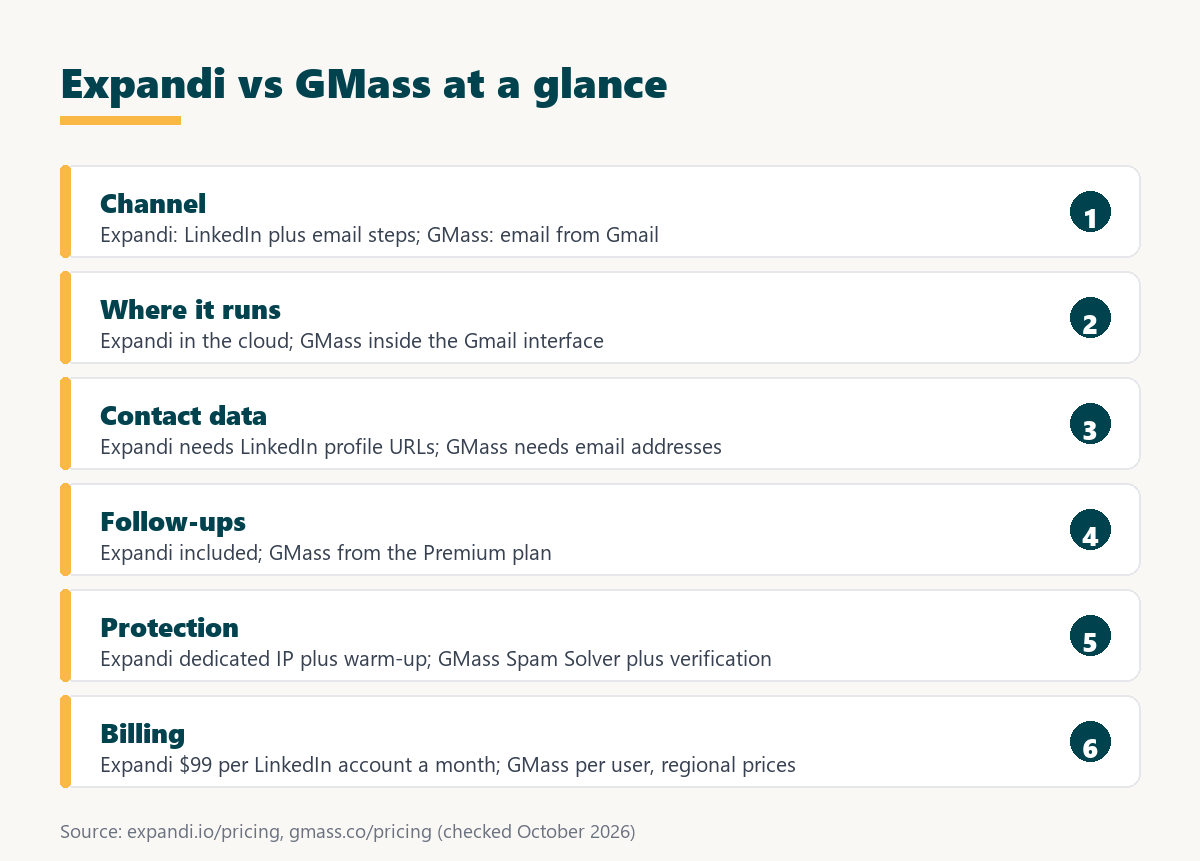
Founders compare these two because both promise to take repetitive outreach off their plate. The overlap ends there. Expandi sends from a LinkedIn profile and needs profile URLs. GMass sends from a Gmail or Google Workspace mailbox and needs email addresses. Each one depends on a different kind of contact data and a different platform’s rules.
So the useful question is not which tool is better in general, but which channel a founder’s buyers actually answer on, and which contact data the founder already owns today.
Founders with LinkedIn-heavy buyers and few addresses lean toward Expandi, and founders with clean email lists and a Gmail habit lean toward GMass.
What Is the Core Difference Between LinkedIn Campaigns and Gmail Mail Merge?
A LinkedIn campaign is an automated sequence of profile visits, connection requests, and messages sent from a LinkedIn account. Gmail mail merge is personalized bulk email sent from a Gmail mailbox. Expandi delivers the first from the cloud, and GMass delivers the second inside the Gmail interface.
Five traits show how far apart the two channels sit:
- Sending identity: Expandi sends as a LinkedIn profile, while GMass sends as a Gmail or Google Workspace mailbox owned by the founder or the team.
- Contact requirement: a LinkedIn campaign needs profile or Sales Navigator URLs, while a mail merge needs valid email addresses for every recipient.
- Platform limits: LinkedIn restricts weekly invitations and Gmail applies its own sending limits, so each tool works inside a different set of caps.
- Message format: LinkedIn messages are short notes inside a social inbox, while mail merge emails carry full subject lines, formatting, and tracked links.
- Where the tool runs: Expandi runs in the cloud without an open browser tab, while GMass runs inside the Gmail interface the founder already uses daily.
Wikipedia’s definition of mail merge shows how old the email side of this comparison really is:
“combining mail and letters and pre-addressed envelopes or mailing labels for mass mailings”
Wikipedia, Mail merge
How channels can be combined rather than chosen is covered in the guide to multichannel outreach across email, calls, and LinkedIn.
LinkedIn campaigns reach people by profile and mail merge reaches them by address, so the contact data a founder holds often decides the channel before any feature comparison does.
What Does Expandi Do on LinkedIn?
Expandi is a cloud-based LinkedIn automation platform that runs connection requests, messages, InMail campaign types, and email steps inside one sequence builder. Each connected account receives a dedicated country-based IP and an automatic warm-up, so campaigns keep running without an open browser tab on the founder’s laptop.
- Campaign types: the help center lists Connector, Mobile Connector, Messenger, Open InMail, Group, Event Invite, Company Follow Invite, and Inbound campaigns ready to configure.
- Sequence builder: an If/Action builder adds conditions between steps, so a follow-up only fires after a connection is accepted or a set delay passes.
- Profile auto warm-up: the gradual option starts at 5 actions per day and adds 3 more every two days until it reaches a ceiling of 21 daily actions.
- Dedicated country-based IP: Expandi states that every user gets a personal dedicated IP address, assigned from the country chosen when the account is connected.
- Campaign limits: the help center caps one campaign at 5,000 leads and allows 15 active campaigns at a time, with up to 500 campaigns per account.
The limit figures come from Expandi’s campaign limitations article and the ramp from its account warm-up guide, both checked in October 2026.
Expandi gives a founder a complete LinkedIn channel in one account, with email steps available inside the same sequence when addresses exist.
What Does GMass Do Inside Gmail?
GMass is a mail merge and email campaign tool that works inside Gmail. Its pricing page lists unlimited contacts and campaigns, mail merge personalization, email address verification, and a Spam Solver on every plan, with sequences, follow-ups, and A/B testing added from the Premium plan upward.
GMass positions itself in one line on its pricing page: “Transform your Gmail account into an email marketing powerhouse.” The features split across plans like this:
- Mail merge personalization: GMass lists this feature on every plan, which lets one Gmail draft reach many recipients with individual fields filled in automatically.
- Sequences and follow-ups: automated follow-up emails start at the Premium plan, so the entry Standard plan covers single sends rather than multi-step sequences.
- A/B testing: split testing of subject lines and copy also starts at Premium, alongside API access with Zapier and triggered emails.
- Inbox Rotation (MultiSend): the Professional plan adds rotation across several mailboxes, which spreads volume instead of pushing everything through a single Gmail account.
- Spam Solver: every plan includes this deliverability check plus free email address verification and custom tracking links with SSL for each campaign.
GMass keeps the founder inside Gmail, which removes a learning curve but ties every campaign to the mailbox and its sending limits.
How Does Expandi Pricing Work?
Expandi pricing is a per-account model where each connected LinkedIn profile costs $99 per month, or $79 per account per month when billed annually. Every account gets the full Business feature set, so a solo founder pays for one account and receives every campaign type without choosing between tiers.
Expandi’s FAQ states the rate plainly:
“Expandi costs 99 USD per account per month.”
Expandi FAQ
Taxes are added by billing country, and the image and video personalization add-ons carry no listed price. The Terms state that subscription fees are nonrefundable unless required by law (Expandi Terms and Conditions).
For a solo founder the Expandi bill is one line item, which makes it easy to test for a month and drop if LinkedIn does not produce conversations.
How Does GMass Pricing Work?
GMass pricing is a per-user plan model with Individual and Team account types billed monthly or annually. Individual buyers choose between Standard, Premium, and Professional, and features unlock by plan. Prices on the official page adjust by region, so this comparison lists the structure without dollar figures.
Source: expandi.io/pricing and expandi.io/faq, checked October 2026; gmass.co/pricing, checked October 2, 2026, when the page displayed region-adjusted prices.
Expandi publishes one flat price per LinkedIn account, while GMass splits features across three individual plans and team bundles, so buyers must pick a GMass plan by the features they need.
The practical point for founders is that follow-ups, the feature most cold outreach depends on, sit on GMass Premium rather than Standard. The structure behind these choices is explained in the guide to SaaS pricing models.
Choosing a GMass plan is a feature decision first, while choosing Expandi is only a decision about how many LinkedIn accounts to connect.
How Do Expandi and GMass Compare Feature by Feature?
Expandi and GMass compare as a LinkedIn outreach engine against a Gmail sending tool. Expandi covers LinkedIn actions, warm-up, IP assignment, and campaign statistics, while GMass covers mail merge, email follow-ups, verification, and inbox rotation, with almost no features that overlap directly between the two.
Source: expandi.io/pricing and Expandi help center, checked October 2026; gmass.co/pricing, checked October 2, 2026.
The feature table shows two tools built for different channels: Expandi owns the LinkedIn rows, GMass owns the email rows, and only follow-up sequences appear on both sides.
Because the rows barely overlap, a founder is really choosing a first channel, and can add the other tool later without replacing anything.
Which Limits Shape Each Channel?
Channel limits are the caps a platform places on how much one account can send. LinkedIn restricts invitations through a weekly cap, while Gmail applies its own sending limits to every mailbox. Both tools work inside those caps instead of removing them, whatever their marketing pages say.
- LinkedIn invitation cap: the Expandi help center recommends staying within 100 actions per week because of the weekly connection request cap it reports for LinkedIn.
- Warm-up ramp: Expandi’s gradual warm-up climbs from 5 to 21 daily actions over 14 days, so a new account reaches full pace only after two weeks.
- Campaign size: one Expandi campaign holds up to 5,000 leads, which is far more than one profile can contact quickly inside the weekly cap.
- Gmail sending limits: GMass advertises unlimited emails with an asterisk on its pricing page, and Gmail’s own sending limits still apply to every mailbox used.
- Inbox rotation: the GMass Professional plan spreads sending across several mailboxes, which raises total volume without pushing one account past its limit.
Both channels reward patience, because a LinkedIn profile ramps over two weeks and a Gmail mailbox can only send what Google allows each day.
How Does Each Tool Protect the Sending Account?
Account protection is the set of controls that keep a sending identity from being restricted or filtered. Expandi documents a dedicated IP per LinkedIn account, a gradual warm-up, and limit ranges. GMass lists a Spam Solver, email address verification, and custom tracking links on every plan to protect the mailbox.
The risks differ by channel. On LinkedIn the concern is a restricted profile; LinkedIn’s help center says it does not permit third-party automation and that members who use it risk restriction (LinkedIn Help, prohibited software). Expandi’s fixed address helps here, as the explainer on what a dedicated IP is describes. On email the concern is the spam folder, which is why verification and spam checks sit on every GMass plan.
Each tool protects the asset its channel puts at risk, a LinkedIn profile for Expandi and a sender mailbox for GMass, and neither protection carries over to the other channel.
How Do Trial Terms Differ?
Trial terms are the conditions for testing a paid tool before the first charge. Expandi offers seven days that apply only to the first subscription, with fees nonrefundable once paid. The GMass pricing page checked for this comparison lists paid plans without describing a trial period at all.
Expandi’s checkout asks for card details, and its FAQ says no charge is made until the seven days are up. For GMass, the safest step is to confirm current terms on its site before buying. The SaaS free trial guide explains what to check in any SaaS offer.
A founder testing LinkedIn should have a list and message ready before the Expandi week starts, because warm-up uses part of that window on its own.
Ready to see how LinkedIn prospects respond? Connect one account and run the seven-day Expandi trial.
Try Expandi for 7 Days →Checkout asks for card details · no charge until the seven days are up
Can Expandi and GMass Work Together?
Expandi and GMass can work together as two channels aimed at one prospect list. Expandi handles LinkedIn connection requests and messages, GMass handles email from Gmail, and a shared spreadsheet or CRM keeps both tools from contacting the same person twice in one day.
HubSpot’s cold email guide recommends exactly this kind of pairing:
“Depending on the prospect, you can request a connection with them on that platform; it enhances the credibility of eventual cold email outreach”
HubSpot, How to Write a Cold Email
- LinkedIn first touch: Expandi opens with a profile visit and connection request, which makes the founder’s name familiar before any email arrives.
- Email follow-up: GMass sends a Gmail follow-up to prospects who did not accept the request, reaching them on a second channel without repeating the note.
- Shared suppression list: the Expandi blacklist and a matching exclusion list in the email tool stop anyone who opted out from being contacted again.
- Event handoff: Expandi webhooks report events such as a reply or an accepted connection, which can pause the email side for that prospect.
- Reply ownership: one place to track replies across both channels stops two tools from answering the same prospect at the same time.
The webhook side is documented in Expandi’s webhooks and integrations section, and the mechanism is explained in the guide to how webhooks pass data between apps.
Running both channels can lift coverage, provided one shared list and one reply inbox keep the founder in control of who hears what and when.
When Is GMass the Better Pick?
GMass is the better pick when the founder already owns verified email addresses and wants to send from Gmail without learning a new platform. Newsletters to existing contacts, simple mail merges, and email-first outreach all sit closer to GMass than to a LinkedIn automation tool.
- Email-first lists: founders holding addresses but no LinkedIn profile URLs can start sending from Gmail the same day without building a new lead list.
- Gmail-native workflow: sending, tracking, and replies stay inside the inbox the founder already checks, so there is no second dashboard to manage.
- Mail merge jobs: event invitations, customer updates, and announcements are classic mail merge tasks rather than LinkedIn campaign work.
- Prospects off LinkedIn: buyers in industries that rarely use LinkedIn are easier to reach by email than by a connection request they may never see.
- A/B testing needs: split testing of subject lines and copy is included from the GMass Premium plan, which suits founders refining an email offer.
Naming where GMass wins keeps the comparison honest, since a founder with a strong email list would gain little from paying for a LinkedIn channel first.
When Is Expandi the Better Pick?
Expandi is the better pick when the founder’s buyers are reachable on LinkedIn and email addresses are missing or unreliable. Founders selling to named decision makers get profile-based targeting, a warm-up, and a dedicated IP inside one flat per-account price.
According to Expandi’s platform data from May 2025 to April 2026, 28.5% of connection requests were accepted and 10.4% of outbound messages received a reply, while 3.0% of connection-request notes got a response. These are figures from one vendor rather than a LinkedIn standard. Expandi holds 4.3 out of 5 from 162 reviews on G2, checked October 2, 2026.
Expandi earns its fee when the founder’s audience lives on LinkedIn and the bottleneck is reaching them, not writing to addresses already on file.
How Should a Founder Test Both Channels Before Paying?
A channel test is a short run that sends the same offer to one small segment on each channel. Running it during the Expandi trial week shows which channel produces replies before Expandi fees become nonrefundable or a GMass plan is chosen for the long term.
- Pick one segment: choosing a single buyer persona keeps the test fair, because both channels then reach the same kind of prospect with the same offer.
- Split the list: half of the segment goes to LinkedIn by profile URL and half goes to email by address, so neither channel contacts the same person.
- Run the Expandi week: the seven-day Expandi trial on one connected account covers warm-up and a short Connector sequence on the LinkedIn half.
- Send the same offer from Gmail: the email half receives the same offer from the founder’s Gmail mailbox during the same week, using a simple merge.
- Compare replies and hours: replies and the hours spent on each channel are recorded before paying for a full Expandi month or choosing a GMass plan.
A one-week split test gives the founder evidence instead of opinions, which matters because Expandi states that subscription fees are nonrefundable once paid.
Verdict: Which Tool Should a Solo Founder Choose?
The verdict is that Expandi wins when prospects live on LinkedIn and GMass wins when the list is email-first and Gmail is already the daily workspace. Founders with both a LinkedIn audience and a verified email list often run the two side by side on one shared list.
Growth Hack Suite’s guide to multichannel outreach explains why many founders end up with both:
“Reaching a prospect on more than one channel is what breaks through the noise of email alone.”
Growth Hack Suite, What Is Multichannel Outreach?
Most founders can decide by checking which contact data they already hold, profile URLs or addresses, and starting with the channel that data supports.
Which Related Tools Complete This Outreach Stack?
Related tools are the products that sit beside a LinkedIn tool and a Gmail sender in a small outreach stack. A full GMass review covers the email side in depth, an email finder supplies addresses for LinkedIn prospects, and a cold email platform handles higher sending volume.
- GMass: plans, deliverability, and Gmail limits in depth, in the complete GMass review.
- Hunter.io: finding verified addresses for prospects first met on LinkedIn, in the Hunter.io email finder review.
- Smartlead: cold email infrastructure for volume beyond a single mailbox, in the Smartlead review.
These related tools extend the stack rather than replace either option, and each one has its own review for founders who need more depth on that piece.
Expandi vs GMass: Frequently Asked Questions
The 12 most-asked questions about Expandi vs GMass.
Is Expandi better than GMass?
Neither is better in general, because they use different channels. Expandi is better for reaching buyers on LinkedIn, and GMass is better for sending email from Gmail to addresses already on file.
What is the difference between Expandi and GMass?
Expandi is a cloud LinkedIn automation platform for connection requests, messages, and email steps. GMass is a mail merge and email campaign tool that works inside Gmail.
Does GMass work on LinkedIn?
No LinkedIn features appear on the GMass pricing page. GMass describes itself as working inside Gmail.
Does Expandi send email?
Yes, as steps inside a campaign. Expandi lists multichannel outreach across connections, messages, and email in its Business plan.
How much does Expandi cost per account?
Expandi costs $99 per connected LinkedIn account per month, or $79 per account per month billed annually. Ten or more accounts move to a custom Agency quote.
Which GMass plan includes follow-ups?
Sequences and follow-ups start at the Premium plan, according to the GMass pricing page checked on October 2, 2026.
Does GMass remove Gmail sending limits?
No. GMass advertises unlimited emails with an asterisk, and Gmail’s own sending limits still apply to each mailbox. Inbox Rotation on Professional spreads volume across mailboxes.
How long is the Expandi trial?
Seven days, limited to the first subscription. Checkout asks for card details, and Expandi says no charge is made until the seven days are up.
Does Expandi include a dedicated IP?
Yes. Expandi states that every user gets a personal dedicated IP address, assigned by the country chosen when the LinkedIn account is connected.
Can Expandi and GMass be used together?
Yes. Expandi can handle the LinkedIn touches and GMass the email follow-ups, as long as one shared list or CRM keeps the two from contacting the same person twice.
Can Expandi fees be refunded?
No. Expandi’s Terms state that subscription fees are nonrefundable unless required by law.
Which channel should a solo founder start with?
The channel the contact data supports. Founders holding LinkedIn profile URLs and LinkedIn-active buyers should start with Expandi; founders holding verified addresses should start with email.
Buyers are on LinkedIn and the message is ready? Start the seven-day Expandi trial on one LinkedIn account.
Start Your 7-Day Expandi Trial →Seven-day trial on the first subscription · cancel anytime · paid fees are nonrefundable
Growth Hack Suite Editorial, Outbound Sales Team
How we compared: every Expandi figure was read from expandi.io pricing, FAQ, and Terms and from the Expandi help center articles on campaign limits, warm-up, and IP addresses. GMass plan names and feature gating were read from gmass.co/pricing on October 2, 2026; that page showed region-adjusted prices, so GMass dollar figures are deliberately left out. No paid GMass plan was tested for this comparison.
Last checked: October 2026. When either vendor changes its prices or product, this page is updated first.
Affiliate disclosure: this page contains an affiliate link to Expandi. If a subscription is purchased through it, Growth Hack Suite may earn a commission at no extra cost to the buyer. No other tool on this page pays Growth Hack Suite, and the assessment does not change either way.