Table of Contents
Expandi vs Dux-Soup is a choice between a cloud tool priced per LinkedIn account and a tool that grew out of a Chrome extension for solo users. Expandi costs $99 per account per month with a dedicated country-based IP. Dux-Soup now sells STACKED Local, a desktop app at $55 per seat, and STACKED Cloud at $99 per seat, so scale decides the fit.
Last checked: October 2026. Prices and features taken from the official Expandi pages (pricing, FAQ, Terms, help center) and the official Dux-Soup pages (pricing, home, individual and agency solutions) on the dates shown under each table.
Want LinkedIn campaigns that keep running with the laptop closed? Test Expandi on one account for seven days.
Start Your 7-Day Expandi Trial →Dedicated country-based IP per account · automatic warm-up · cancel anytime
Expandi vs Dux-Soup: Which Fits a Solo Founder or a Growing Team?
Expandi vs Dux-Soup is a choice between cloud automation priced per LinkedIn account and a tool that also offers a cheaper desktop option. Dux-Soup STACKED Local suits a solo founder who keeps one computer running, at $55 per seat, while Expandi suits teams that want every account in the cloud on its own dedicated IP.
At the hosted level the two land on the same monthly list price: STACKED Cloud and Expandi Business are both $99 per seat or account. The real fork is therefore whether a buyer is willing to run desktop software to save money, and how many LinkedIn profiles the setup has to support over the next year.
The short answer depends on where the automation should run and how many LinkedIn accounts are involved, so a buyer should settle those two points before comparing feature lists.
What Is the Core Difference Between Expandi and Dux-Soup?
The core difference is where the automation runs and who each product was designed for. Expandi is cloud-based software that runs every account on its own servers, while Dux-Soup is known as a browser extension and now sells a desktop app called STACKED Local plus a hosted option called STACKED Cloud.
- Runtime location: Expandi runs campaigns on cloud servers, while Dux-Soup STACKED Local runs on the buyer’s own Mac or Windows machine and STACKED Cloud on Dux-Soup infrastructure.
- Billing unit: Expandi charges per connected LinkedIn account, while Dux-Soup charges per seat with a choice between fixed prepaid seats and flexible seats billed afterward.
- IP handling: Expandi assigns a dedicated country-based IP to every account, while a per-account IP or proxy is not documented on the Dux-Soup pages reviewed.
- Team scope: Expandi offers workspaces with roles and an Agency tier from ten accounts, while Dux-Soup offers a team dashboard, per-day billing, and unlimited free agents.
- Entry price: the lowest monthly list price is $99 per account at Expandi and $55 per seat for Dux-Soup STACKED Local, with STACKED Cloud matching Expandi at $99.
The product’s roots explain its solo-first design. Wikipedia defines the category Dux-Soup started in plainly:
“A browser extension is a software module for customizing a web browser.”
Wikipedia, Browser extension
How extensions work inside a sales workflow is covered in the guide to sales prospecting Chrome extensions.
Both tools automate LinkedIn outreach, yet they start from opposite ends: one from a managed cloud built for many accounts, the other from a tool an individual installs and runs.
How Much Does Expandi Cost per LinkedIn Account?
Expandi costs $99 per LinkedIn account per month, or $79 per account per month when billed annually, which is a 20% saving. Every account receives the same Business feature set, and teams running ten or more accounts can request custom Agency pricing with a dedicated Customer Success Manager instead of paying the list rate.
Expandi’s FAQ puts it in one sentence: “Expandi costs 99 USD per account per month” (Expandi FAQ). Taxes are added by billing country, two personalization add-ons carry no listed price, and the Terms state that paid fees are nonrefundable unless required by law.
Expandi keeps one price per profile with no feature tiers below Agency, so a solo founder pays the same rate per account as a ten-person team.
How Does Dux-Soup Price STACKED Local and STACKED Cloud?
Dux-Soup pricing is a per-seat model with two products. STACKED Local costs $55 per seat per month and runs on the buyer’s own machine, while STACKED Cloud costs $99 per seat per month and runs on Dux-Soup infrastructure. Yearly billing saves 25%, and a volume discount begins at ten seats.
- STACKED Local: a desktop app for Mac and Windows priced at $55 per seat monthly, or $41.25 per seat each month when billed annually.
- STACKED Cloud: a hosted product priced at $99 per seat monthly, or $74.17 per seat each month when billed annually, running on Dux-Soup infrastructure.
- Yearly billing: the pricing page toggles between monthly and yearly, with yearly billing labeled as a 25% saving on both STACKED products.
- Volume discount: Dux-Soup advertises 10% off for every ten seats, capped at 50%, without a public table showing exactly how the steps apply.
- Flexible seats: beside fixed prepaid seats, flexible seats are billed afterward on a metered basis, and on Cloud the metering applies above five seats.
“Volume discount: 10% off per 10 seats, up to 50%”
Dux-Soup pricing
Dux-Soup gives buyers a lower entry price in exchange for running the software locally, and it matches the Expandi monthly rate only on its hosted cloud product.
What Does Each Tool Cost at 1, 5, and 10 Accounts?
Expandi costs $99 multiplied by the number of accounts at list price, so five accounts cost $495 a month. Dux-Soup STACKED Cloud lists the same $99 per seat, while STACKED Local lists $55 per seat, so five local seats cost $275 a month before any volume discount is applied.
Source: expandi.io/pricing and dux-soup.com/pricing, checked October 2026. Calculated from list price multiplied by account count; Dux-Soup volume discounts and Expandi Agency pricing are not applied because neither vendor publishes the exact result.
At list price the two cloud products cost exactly the same per account, and only the Dux-Soup desktop app comes in lower, at a little over half the monthly Expandi rate.
From ten seats both vendors move off list price in different ways, which is why the guide to how SaaS volume discounts work is worth reading before negotiating either one.
The table shows that price separates these tools only when a buyer accepts local software, because the hosted versions sit at the same monthly figure for every account count.
How Does Cloud Automation Differ From a Desktop App?
Cloud automation is software that runs campaigns on the vendor’s servers, and desktop automation is software that runs on the buyer’s own computer. Expandi and STACKED Cloud keep campaigns running with the laptop closed, while STACKED Local needs the Dux-Soup desktop app and its host machine switched on.
Dux-Soup’s pricing page describes the two products in its own words: STACKED Local “Runs on your own machine, desktop app (Mac/Win),” while STACKED Cloud “Runs continuously, no need to keep a machine on” (Dux-Soup pricing). Expandi has no local option; every account runs in its cloud from the moment it is connected.
Runtime location decides daily convenience more than any feature does, since a campaign tied to one computer pauses whenever that computer sleeps, travels, or restarts.
Is Dux-Soup Still a Chrome Extension?
Dux-Soup is a LinkedIn automation brand widely known as a Chrome extension that now sells its paid plans under the STACKED name. The pricing page describes STACKED Local as a desktop app for Mac and Windows, and a Chrome Web Store listing for Dux-Soup was still live when this comparison was checked.
The headline of this page uses the familiar framing of Dux-Soup as a solo plugin, but the product on sale today is broader. The pricing page does not mention a Chrome extension for either STACKED plan, and its home page groups the offer into a client app with a desktop installer plus dashboard access through a browser (Dux-Soup).
Buyers who remember Dux-Soup as a simple plugin should recheck the current pricing page, because the product sold today is a desktop app with a hosted alternative.
How Do Expandi and Dux-Soup Compare Feature by Feature?
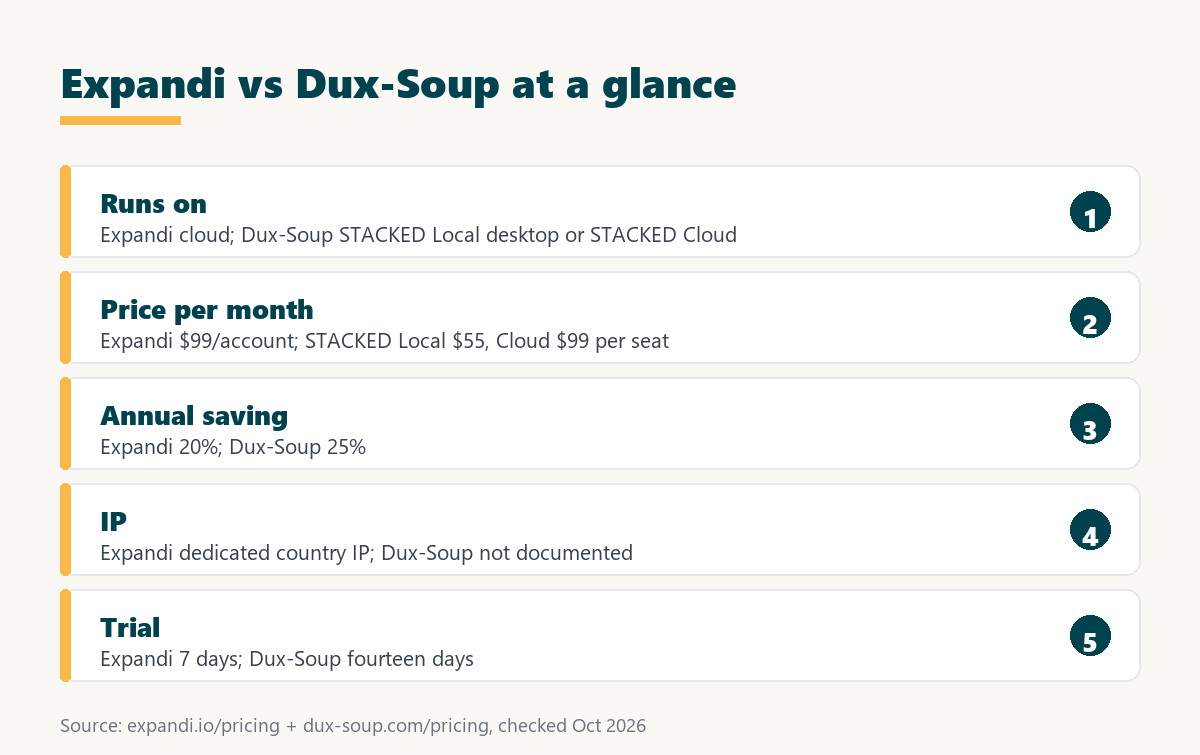
Expandi and Dux-Soup differ in runtime, billing unit, IP handling, and trial length. Expandi runs in the cloud with a dedicated country-based IP on every account, while Dux-Soup offers both local and cloud seats, lists five built-in safety controls, and advertises a longer fourteen-day trial.
Source: expandi.io/pricing, expandi.io/faq, dux-soup.com/pricing, dux-soup.com and the Dux-Soup agency page, checked October 2026.
Expandi documents its IP model and warm-up in detail, while Dux-Soup lists more named integrations, a longer trial, a larger annual discount, and a cheaper local product.
Neither tool wins every row, so the useful reading is to pick the three rows that matter most to the buyer and ignore the rest.
How Does Each Tool Protect a LinkedIn Account?
Account protection is the set of controls that keep automated activity inside limits LinkedIn tolerates. Expandi documents a dedicated country-based IP per account and an auto warm-up that starts at five actions a day, while Dux-Soup lists five built-in safety controls and states that the specifics stay confidential by design.
Expandi’s help center describes the gradual warm-up: it starts at 5 actions per day, adds 3 every two days, and caps at 21, beginning once the account has an active campaign (Expandi help center, account warm-up). Dux-Soup’s home page says: “We invest heavily in measures that help keep your account safe. The specifics stay confidential, by design.”
Neither approach makes automation acceptable to LinkedIn, whose User Agreement prohibits third-party automation tools, so no vendor can promise an account will never be restricted. The role of a fixed sending address is explained in the guide to what a dedicated IP does.
Both vendors invest in safety, yet only Expandi publishes its warm-up schedule and IP setup, which matters to buyers who want to verify safeguards before connecting a profile.
Want to see the dedicated IP and warm-up on a real profile? Connect one LinkedIn account and run the seven-day trial.
Try Expandi for 7 Days →Card details at checkout · no charge until the 7 days are up
How Do the Free Trials Compare?
A free trial is a time-limited test of a paid plan before the first charge. Expandi offers seven days that apply only to the first subscription, with card details requested at checkout, while Dux-Soup advertises a fourteen-day free trial, which gives a solo founder twice as long to judge reply quality.
Expandi’s FAQ says “You will not be charged until the 7 days are up,” and its pricing page says the trial gives access to all features. Dux-Soup’s individual page carries a button for the fourteen-day trial (Dux-Soup for individuals); whether a card is needed is not stated on the pages reviewed. The broader mechanics are covered in the guide to how SaaS free trials work.
The longer Dux-Soup trial favors careful testers, while the Expandi week rewards buyers who arrive with a lead list and a message sequence already written.
How Does Each Tool Handle Teams and Agencies?
Team handling is how a tool lets one operator manage several LinkedIn accounts. Expandi offers workspaces with roles and an Agency tier with a dedicated Customer Success Manager from ten accounts, while Dux-Soup advertises per-day billing for added accounts, unlimited free agents, and a shared team dashboard.
- Workspaces and roles: Expandi lets an owner assign workspace, company, or LinkedIn account roles so teammates manage only the profiles they are meant to see.
- Agency tier: Expandi opens custom pricing at ten accounts, with white label, client reports, and a dedicated Customer Success Manager added to the Business features.
- Per-day billing: Dux-Soup’s agency page says accounts can be added and removed with per-day billing, which suits client rosters that change during a month.
- Unlimited free agents: Dux-Soup does not charge for the agents who operate accounts, so the seat count follows LinkedIn profiles rather than staff numbers.
- Shared dashboard: STACKED Cloud supports a single dashboard for unlimited accounts with consolidated billing, while STACKED Local supports shared campaigns and a team dashboard.
Both products now reach beyond solo users, so the agency question comes down to whether a dedicated IP per client profile or flexible seat billing matters more.
When Is Dux-Soup the Better Pick?
Dux-Soup is the better pick when a solo founder wants the lowest entry price and does not mind running a desktop app. STACKED Local costs $55 per seat against $99 at Expandi, and the fourteen-day trial plus named CRM integrations suit buyers who work from one computer every day.
- Budget-first founders: a single STACKED Local seat costs a little over half the Expandi monthly rate for one LinkedIn account, before any yearly saving.
- Single-computer workflows: a founder who works at one desk with the machine on during business hours loses little by running automation locally.
- Named CRM integrations: Dux-Soup lists native connections to Salesforce, Pipedrive, HubSpot, and Slack, which saves building a webhook flow for common stacks.
- Longer trial needs: fourteen days leaves room for connection requests to be accepted and replies to arrive before the buyer has to decide.
- Recruiter users: Dux-Soup states compatibility with LinkedIn, Sales Navigator, and Recruiter, which suits talent teams sourcing from Recruiter seats.
Saying plainly where Dux-Soup wins keeps the comparison useful, because a founder with one profile and one laptop may never need a per-account cloud setup.
What Hidden Costs Should a Buyer Check?
Hidden costs are charges or trade-offs that sit outside the headline price. With Expandi they are per-account growth, paid personalization add-ons, and nonrefundable fees, while with Dux-Soup they are the machine uptime a local seat needs and metered billing on flexible seats.
- Machine uptime: a STACKED Local seat depends on a computer that stays on during sending hours, which adds a practical cost the price page does not show.
- Per-account growth: every extra LinkedIn profile adds $99 a month at Expandi list price, so the bill grows in step with the number of sending accounts.
- Paid add-ons: Expandi’s image and GIF personalization and video personalization through Sendspark are paid add-ons without a published price.
- Metered seats: Dux-Soup flexible seats are billed afterward based on use, which keeps flexibility high but makes the monthly figure harder to forecast.
- Refund terms: Expandi’s Terms make fees nonrefundable unless required by law, and a refund policy for Dux-Soup was not found on the pages reviewed.
Neither price page tells the whole story, so buyers should add uptime, add-ons, and refund terms to the comparison before choosing on the monthly figure alone.
How Should a Founder Test Both Tools Before Paying?
A side-by-side test is a short trial run where the same audience and message go through both tools. Running it inside the two trial windows shows real setup time, runtime reliability, and inbox handling before any subscription starts, which matters because Expandi fees are not refunded once charged.
- Decide the runtime: choosing between cloud and desktop first removes half the options and sets the realistic price range for the whole test.
- Count accounts for twelve months: estimating how many LinkedIn profiles will send over the next year shows whether agency pricing or volume discounts will matter soon.
- Open both trials together: starting the seven-day Expandi trial and the fourteen-day Dux-Soup trial on the same day keeps the comparison window aligned.
- Run the same sequence: sending one connection note and two follow-ups to the same ideal customer profile isolates the tool from the copy.
- Compare setup, stability, and cost: recording setup time, missed sending days, and the twelve-month bill gives an evidence-based answer before the first charge.
A structured test replaces guesswork with evidence, and it usually shows within days whether a founder is comfortable leaving a computer running for outreach.
Verdict: Agency Scale or Solo Plugin?
The verdict is that Expandi suits teams and agencies that want cloud automation with a dedicated IP on every account, and Dux-Soup suits solo founders who want the cheapest working setup on one computer. At cloud level the two list the same monthly price, so documentation and team features decide the rest.
Growth Hack Suite’s guide to multichannel outreach makes a point that applies to scaling any of these tools:
“The deciding factor is that coordination, not just more touches, is what makes it work.”
Growth Hack Suite, What Is Multichannel Outreach?
HubSpot’s definition of the category is a useful reminder that either tool is only as good as the process around it:
“Sales automation is the use of technology to automate manual sales tasks, manage data flows, and trigger actions automatically based on buyer behavior.”
HubSpot, Sales Automation
Most buyers can decide by answering two questions, how many accounts and where the software should run, then confirming the choice inside the free trial.
Expandi vs Dux-Soup: Frequently Asked Questions
The 12 most-asked questions about Expandi vs Dux-Soup.
Is Expandi better than Dux-Soup?
Expandi is better for teams and agencies that want cloud automation with a dedicated IP per account. Dux-Soup is better for solo founders who want the lowest entry price and can run a desktop app.
How much does Expandi cost per account?
$99 per LinkedIn account per month, or $79 per account per month billed annually. Ten or more accounts can request Agency pricing.
How much does Dux-Soup cost?
STACKED Local is $55 per seat per month ($41.25 billed yearly) and STACKED Cloud is $99 per seat per month ($74.17 billed yearly).
Is Dux-Soup a Chrome extension?
Dux-Soup started as and is widely known as a Chrome extension, and a Chrome Web Store listing still exists. Its paid STACKED plans are sold as a desktop app and a cloud product.
What is STACKED by Dux-Soup?
STACKED is the name of Dux-Soup’s current paid products: STACKED Local, a desktop app for Mac and Windows, and STACKED Cloud, which runs on Dux-Soup infrastructure.
Does Dux-Soup run in the cloud?
Yes, on STACKED Cloud, which Dux-Soup says runs continuously with no need to keep a machine on. STACKED Local runs on the buyer’s computer.
Does Expandi include a dedicated IP?
Yes. Expandi assigns a dedicated country-based IP to each connected LinkedIn account on its Business plan.
Does Dux-Soup include a dedicated IP?
A dedicated IP or proxy per account is not documented on the Dux-Soup pages reviewed. It lists five built-in safety controls instead.
How long are the free trials?
Expandi offers seven days on the first subscription, with card details at checkout. Dux-Soup advertises fourteen days.
Does Dux-Soup have a volume discount?
Yes. Its pricing page advertises 10% off per ten seats, up to 50%.
Can Expandi fees be refunded?
No. Expandi’s Terms state that subscription fees are nonrefundable unless required by law.
Can a founder switch from Dux-Soup to Expandi?
Yes. Export lead lists and copy, stop the old campaigns, connect the profile in Expandi, let warm-up run, then rebuild the best sequence.
Planning more than one LinkedIn account, or tired of keeping a laptop on? Start the seven-day Expandi trial on one profile.
Start Your 7-Day Expandi Trial →Seven-day trial on the first subscription · cancel anytime · paid fees are nonrefundable
Growth Hack Suite Editorial, Outbound Sales Team
How we compared these tools: Expandi figures come from expandi.io pricing, FAQ, and Terms and from the Expandi help center; Dux-Soup figures come from dux-soup.com pricing, home, individual, and agency pages. Multi-account costs are list price multiplied by account count, before tax and before any volume discount. No hands-on benchmark was run for this page.
Last checked: October 2026. When the vendors change their pages, this line is updated first.
Affiliate disclosure: this page contains an affiliate link for Expandi only. If a subscription is purchased through it, Growth Hack Suite may earn a commission at no extra cost to the buyer. It does not change the assessment.