Table of Contents
Knowing how to remove invalid emails keeps your bounce rate low without erasing reachable contacts. The process is simple: verify the list, filter for the invalid status, remove only those addresses, and keep catch-all and unknown results for separate handling. This guide covers the removal mechanics specifically — how to do it in bulk, how to avoid deleting good contacts, and how to keep invalids out for good.
Find and remove every invalid email free — verify your list with Hunter at no cost.
Remove Invalids Free →Free plan included · No credit card · Clear invalid status on every row
What Is an Invalid Email Address?
An invalid email address is one that cannot receive mail: the mailbox does not exist, the domain has no mail server, or the syntax is broken. Sending to an invalid address guarantees a hard bounce, which is why removing invalids is the first and most important cleaning step. The label is assigned by a verifier, not by appearance, since a perfectly normal-looking address can still be dead.
Invalid means a guaranteed bounce — these are the addresses to remove first and without hesitation. The first step toward removal is understanding exactly what an invalid email is.
How Do You Remove Invalid Emails From Your List?
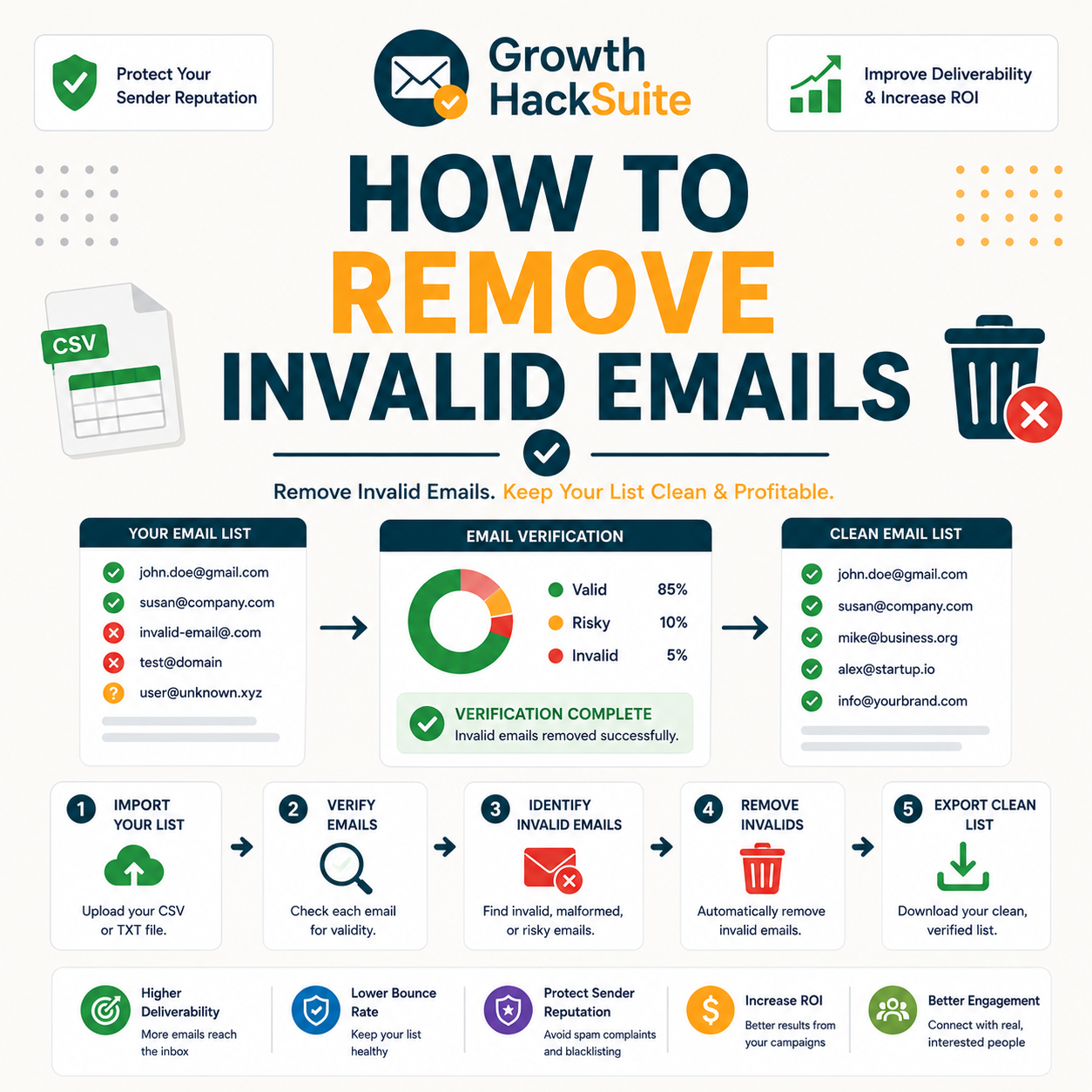
Remove invalid emails in four steps: verify the whole list, filter for the invalid status, delete only those rows, and export the cleaned file. Keep catch-all and unknown addresses separate — they are not invalid and should not be removed in this pass. The entire sequence takes minutes for most lists and needs no manual row-by-row review at any size.
- Verify the list: Run every address through a verifier so each row receives a deliverability status. This is the only reliable way to learn which addresses are genuinely invalid before any deletion happens.
- Filter the invalid status: Sort or filter the results so only rows labelled invalid are selected. Filtering on the status field keeps the selection precise and leaves catch-all and unknown untouched.
- Remove only invalids: Delete the filtered invalid rows from the working file. Touching only this status protects deliverable, catch-all and unknown addresses from accidental loss during cleanup.
- Export the clean file: Save or export the remaining rows as the cleaned list, ready to import back into the sending platform. Most verifiers export only deliverable addresses in one click.
- Re-import and resume: Load the cleaned file back into the email platform, replacing the old list so the next campaign sends only to addresses confirmed deliverable. The removal cycle is then complete for this pass.
Verify your list free and filter out the invalids in minutes.
Remove Invalids Free →Bulk upload · One-click status filter · Export the clean list
Verify, filter, remove, export — and crucially, touch only the invalid status in this pass. That precision is what separates clean removal from damaging a list.
How Do You Identify Which Emails Are Invalid?
Invalid addresses cannot be spotted by looking — only verification confirms them. A verifier tests each address and labels it invalid when the mailbox or domain fails, distinguishing true invalids from catch-all and unknown results. Guessing by pattern, such as removing every free-mail or odd-looking address, both misses real invalids and flags perfectly good contacts.
- Verify to confirm: A verifier checks syntax, domain mail records and mailbox response, then returns a definitive invalid label only when the address genuinely cannot receive mail. This evidence-based result replaces guesswork entirely.
- Read the invalid label: The status field, not the address itself, identifies what to remove. An invalid label means a confirmed dead mailbox, while accept-all and unknown labels mean something different and require their own handling.
- Avoid pattern guessing: Deleting addresses by domain, freemail provider or apparent typo throws away reachable contacts and leaves hidden invalids behind. Pattern rules cannot see whether a mailbox actually exists on the server.
- Separate the other statuses: A good verifier distinguishes invalid from accept-all and unknown, so the three never get merged into one bucket. Only the confirmed invalid label marks an address for removal in this pass.
- Use the confidence score: Many verifiers attach a numeric confidence figure alongside the status, adding a second signal for borderline cases. A low score on a non-invalid row flags an address worth re-testing before any decision.
Only a verifier reliably identifies invalids — eyeballing patterns both misses dead addresses and over-flags good ones. The label, never the look of the address, is the signal to trust. The same logic underpins how to verify an email in the first place.
How Do You Bulk-Remove Invalid Emails?
For a whole list, upload the CSV to a bulk verifier, let it tag every row, then filter and delete the invalids in one operation. Most tools export only the deliverable addresses, so the cleaned list is ready to import back within minutes. Bulk removal scales the same four-step process to any list size without manual review.
- Bulk verify the CSV: Upload the entire list as a single file and let the verifier process every address in parallel. A bulk run tags each row with its status in one job rather than one address at a time.
- Filter the invalid rows: Apply a filter on the returned status column so only invalid rows remain selected. This isolates exactly the addresses for deletion across the whole file at once.
- Export deliverable only: Use the export option that outputs valid addresses alone, leaving invalids behind automatically. The downloaded file becomes the clean list, ready to re-import into the email platform.
- Set catch-all and unknown aside: Export accept-all and unknown rows to a separate file rather than mixing them into the clean list or the deleted invalids. This keeps reachable and recoverable addresses available for segmentation and re-testing.
- Keep the original as backup: Retain the pre-clean upload so the full removal can be reversed if a filter was applied incorrectly. A preserved source file makes every bulk deletion a recoverable operation.
Bulk removal is a single filter-and-export — no row-by-row work is needed at any list size. The mechanics stay identical whether the file holds five hundred rows or five hundred thousand.
Why Does Removing Invalid Emails Matter?
Invalids cause hard bounces, and a high bounce rate tells mailbox providers the sender is careless, lowering inbox placement for the entire list. Removing invalids before sending keeps the bounce rate under the safe threshold and protects sender reputation directly. One unremoved batch of dead addresses can drag down deliverability for every healthy contact that remains.
A bounce message reports non-delivery of an earlier email to its sender.
— Wikipedia, Bounce message
Removing invalids is the most direct way to keep bounce rate safe and protect whole-list deliverability. For the wider strategy, see how to cut your bounce rate before the next send.
Invalid vs Catch-All vs Unknown: Which Should You Remove?
Only remove the invalid status. Catch-all addresses may be reachable and should be segmented, while unknown results need re-testing, not deletion. Removing catch-all and unknown as if they were invalid throws away good contacts and is the single most common cleaning mistake. This removal pass should leave both of those statuses completely untouched.
- Invalid — remove: These are confirmed dead mailboxes that will hard bounce on every send. Deleting them is safe and necessary, because there is no scenario in which an invalid address becomes deliverable later.
- Catch-all — segment: Accept-all domains return a maybe, not a no, so many of these mailboxes are real. Moving them to a separate, lower-priority segment preserves reach without risking the main list’s bounce rate.
- Unknown — re-test: An unknown result means the verifier could not reach a verdict, often due to a temporary server issue. Re-verifying later usually resolves it to a clear status, so deletion would discard recoverable contacts.
Remove invalids only — treating catch-all or unknown as invalid is how good contacts get lost. The honest rule is to act solely on a confirmed dead status. Understanding this distinction is also central to learning how to clean your email list properly.
How Do You Remove Invalids Without Deleting Good Contacts?
Filter strictly on the invalid status, never on broad guesses like domain or activity. Keep a backup of the original file, and re-verify anything ambiguous before removing it. This precision is what lets a sender cut bounces without shrinking reach, since every deletion maps to a confirmed dead mailbox rather than a hunch.
- Filter on status only: Selection for deletion comes from the verifier’s invalid label alone, not from sender intuition about which addresses look risky. Status-based filtering keeps every valid, catch-all and unknown row safely in place.
- Keep a backup: Saving the original file before deleting anything means any mistaken removal can be reversed instantly. A pre-clean copy turns an irreversible delete into a recoverable change.
- Re-verify ambiguous rows: Addresses that returned unknown or borderline scores deserve a second verification pass before any action. Re-testing resolves uncertainty so that only genuinely dead mailboxes ever reach the delete step.
- Preserve catch-all and unknown: Both statuses stay on the list or move to a holding segment instead of the delete pile, because each can contain reachable contacts. Leaving them intact protects reach that a blunt removal would destroy.
- Document each removal: Logging which addresses were deleted and on what status creates an audit trail for later review. A record makes accidental over-removal visible and easy to correct from the backup file.
Hunter’s own verifier review found accuracy holds strong on standard domains, with valid-status addresses bouncing under 2% across a 2,000-email benchmark, the precision needed to remove invalids without touching a single good contact.
Precision on the invalid status, plus a backup, removes bounces without costing a single good contact. Status discipline is the whole safeguard.
What Are the Best Tools to Remove Invalid Emails?
Removing invalids needs a verifier with bulk processing, a clear invalid label, and export filtering. Hunter offers all three plus a recurring free tier; dedicated verifiers compete mainly on bulk price per thousand. The table below compares the leading tools for finding and removing invalids so the right pick is clear before any signup.
Source: Vendor pricing pages, verified June 2026. Free-tier volumes and labels are vendor-stated; confirm current terms on each provider’s site before buying.
Any reliable verifier removes invalids; the differences are bulk speed, label clarity and free volume. Hunter stands out by pairing a clear invalid label with a recurring free tier.
How Do You Keep Invalids Out Going Forward?
Prevent re-accumulation by verifying at the point of capture: add real-time API verification to signup forms so invalids never enter, and re-verify the list periodically to catch natural decay. Prevention plus periodic cleaning keeps invalid rates near zero, so a one-time cleanup does not have to be repeated from scratch every quarter.
- Verify in real time at signup: A verification API wired into signup and lead-capture forms checks each address as it is entered, rejecting invalids at the door. This stops dead addresses from ever reaching the list and removes the main source of future bounces.
- Re-verify on a cadence: Addresses decay over time as people change jobs and abandon mailboxes, so periodic re-verification of the active list catches newly dead contacts. A quarterly or biannual pass keeps the invalid rate from creeping back upward.
Verify at capture and re-verify on a cadence — that combination keeps invalids from ever piling up again. Prevention turns removal into a small maintenance task instead of a recurring crisis.
How Many Invalid Emails Should You Expect?
It depends on the source. Opt-in lists often show low single-digit invalid rates, while purchased or aging lists can reach double digits. Expecting a higher rate on cold or bought data helps set realistic cleaning expectations and flags when a list source is fundamentally poor. The table below shows typical ranges by where a list came from.
Source: Internal benchmark — Hunter verification of sample lists by source type. Ranges are directional; the actual rate varies by list age and collection method.
Invalid rate tracks list source — high on bought or aging data, low on engaged opt-in lists. A surprisingly high rate is usually a signal about where the addresses came from.
Manual vs Automated Invalid Removal: Which Is Better?
Manual removal cannot reliably detect invalids and does not scale. Automated verification tags and filters them accurately at any size. For everything but a handful of addresses, automated removal is faster and far more accurate than manual review, because a human cannot test whether a mailbox exists by reading the address alone.
Removal at a Glance
- Manual removal: Reviewing addresses by eye cannot confirm whether a mailbox exists, so it both deletes good contacts and leaves real invalids behind. It also becomes impossibly slow past a few hundred rows and offers no audit trail of what was removed or why.
- Automated removal: A verifier tests every address against the mail server, assigns an accurate status, and filters invalids in one pass at any volume. The result is faster, repeatable, and based on confirmed evidence rather than guesswork about each address.
Automated removal wins on accuracy and scale; manual review cannot reliably spot an invalid at all. The verifier sees what the eye cannot — whether the mailbox truly exists.
Verdict: The Right Way to Remove Invalid Emails
Verify first, remove only the invalid status, keep catch-all and unknown for separate handling, and verify at capture to keep invalids out. Done this way, removal cuts bounces and protects sender reputation without losing a single reachable contact. The discipline is simple: act on one confirmed status, and never delete by guesswork.
Verdict: Verify the full list, delete only the 1 invalid status, and keep the 2 others — catch-all segmented, unknown re-tested. Expect low single-digit invalid rates on opt-in data and double digits on purchased lists. Verify at signup to keep the rate near zero. Result: lower bounces, zero good contacts lost.
Hunter’s verifier checks an address against the mail server before any message is sent.
— Hunter.io API documentation
Remove every invalid email free — verify your list with Hunter now.
Remove Invalids Free →Free plan · No credit card · Clean list exported in minutes
Related Tools in the Hunter Stack
Removing invalids is one step of list hygiene; full cleaning and re-verifying are the next. The Hunter Email Verifier review covers the validation product in depth, and the finder review covers the list-building side of the same connected stack on one credit pool.
- Hunter Email Verifier: The validation layer that assigns the invalid label this guide relies on — start with what the Hunter Email Verifier is.
- Hunter Email Finder: The other half of the bundle that shares the same credit pool — read the Hunter.io email finder review for list-building costs.
How to Remove Invalid Emails: Frequently Asked Questions
The 12 most-asked questions about removing invalid emails.
How do I remove invalid emails from my list?
Remove invalid emails in four steps: verify the whole list, filter for the invalid status, delete only those rows, and export the cleaned file. Keep catch-all and unknown addresses separate, since they are not invalid. The full sequence takes minutes for most lists and needs no manual row-by-row work.
How do I identify invalid emails?
Only a verifier reliably identifies invalids. It tests each address against the mail server and labels it invalid when the mailbox or domain fails. Guessing by pattern or appearance misses real invalids and flags good addresses, so the status field, not the address itself, is the signal to trust.
How do I bulk-remove invalid emails?
Upload the CSV to a bulk verifier, let it tag every row with a status, then filter for invalid and export only the deliverable addresses. The cleaned list is ready to re-import within minutes. The same filter-and-export process works whether the file holds hundreds or hundreds of thousands of rows.
Why does removing invalids matter?
Invalids cause hard bounces, and a high bounce rate tells mailbox providers a sender is careless, lowering inbox placement for the whole list. Removing invalids before sending keeps the bounce rate under the safe threshold and protects sender reputation directly, which benefits every healthy contact that remains on the list.
Should I remove catch-all addresses too?
No. Catch-all addresses return a maybe, not a confirmed dead status, so many of those mailboxes are reachable. Removing them as invalid throws away good contacts. The better approach is to move catch-all addresses into a separate, lower-priority segment rather than deleting them during an invalid-removal pass.
How do I remove invalids without losing good contacts?
Filter strictly on the invalid status, never on broad guesses like domain or activity. Keep a backup of the original file, and re-verify anything ambiguous before removing it. Because every deletion maps to a confirmed dead mailbox, this precision cuts bounces without shrinking reach or risking a single reachable address.
What are the best tools to remove invalid emails?
The best tools combine bulk processing, a clear invalid label, and export filtering. Hunter offers all three plus a recurring free tier, while dedicated verifiers such as NeverBounce, ZeroBounce and Bouncer compete mainly on bulk price per thousand. Any reliable verifier removes invalids; the differences are speed, label clarity and free volume.
How do I keep invalids out going forward?
Verify at the point of capture by adding real-time API verification to signup forms so invalids never enter the list. Then re-verify the active list periodically to catch natural decay as people change jobs and abandon mailboxes. Prevention plus a regular cleaning cadence keeps the invalid rate near zero over time.
How many invalid emails should I expect?
It depends on the source. Engaged opt-in lists often show low single-digit invalid rates, aging lists climb into mid single or low double digits, and purchased or scraped lists frequently reach double digits. A surprisingly high invalid rate is usually a signal about where the addresses came from rather than a verifier problem.
Is manual or automated removal better?
Automated removal is better for everything but a handful of addresses. Manual review cannot confirm whether a mailbox exists, so it both misses real invalids and deletes good contacts, and it does not scale past a few hundred rows. A verifier tests each address against the server and filters invalids accurately at any volume.
What’s the difference between invalid and catch-all?
Invalid means a confirmed dead mailbox that will always hard bounce, so it is safe to remove. Catch-all means the domain accepts mail for any address without confirming the specific mailbox exists, so it returns a maybe rather than a no. Invalids should be deleted; catch-all addresses should be segmented and tested cautiously.
What’s the right way to remove invalid emails?
Verify first, remove only the invalid status, keep catch-all and unknown for separate handling, and verify at capture to keep invalids out. Done this way, removal cuts bounces and protects sender reputation without losing a single reachable contact. The core discipline is acting on one confirmed status and never deleting by guesswork.