Table of Contents
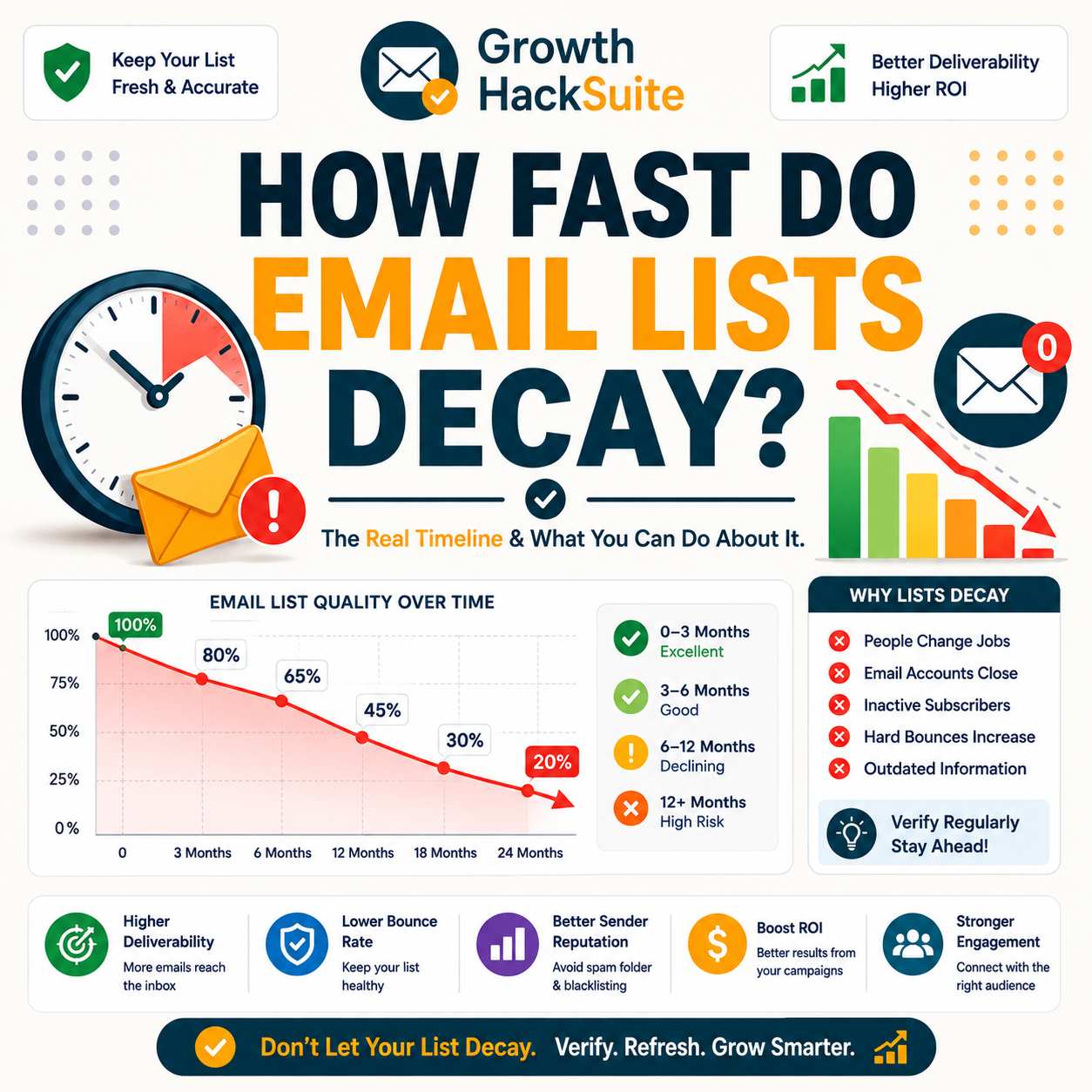
How fast do email lists decay? Industry data puts B2B email list decay at roughly a quarter to a third of addresses per year, as people change jobs, companies fold and domains retire. At about 2.1% per month, a list left untouched for two years can be close to half invalid. This guide breaks down decay rates by list age and role, and shows how verification keeps a list current.
Beat list decay — verify your data free and see what is still valid.
Verify Your Data Free →Free plan included · No credit card · Full status and scoring
What Is Email Data Decay?
Email data decay is the steady process by which valid addresses in a list become undeliverable over time. People change jobs, companies fold, and mailboxes are deactivated, so a list silently loses accuracy every month. Decay is why a clean list does not stay clean on its own: without re-verification, the invalid share only grows, regardless of how good the data was at capture.
Decay is continuous and invisible. A list erodes every month whether or not anyone sends to it, which is why current accuracy — not original accuracy — decides deliverability. For the core definition, see what email data decay is.
How Fast Do Email Lists Decay Each Year?
Industry data places B2B email list decay at roughly 22.5% per year, an annualized rate from about 2.1% per month, with some sources citing up to 30%. At that pace, a list loses close to half its validity within two to three years untouched. The table shows cumulative invalid share by list age, the core number behind every list-hygiene decision.
Source: B2B data decays ~22.5%/yr (MarketingSherpa, cited by HubSpot database-decay research); ~2.1% per month compounding, with some sources reporting up to ~30%/yr (Cleanlist, Cognism). Cumulative shares are compounded from the monthly rate; confirm against your own re-verification before acting.
At a quarter to a third per year, an untouched list reaches roughly half invalid within a few years — the central decay fact that drives every cleaning schedule.
Source: MarketingSherpa/HubSpot ~22.5%/yr (~2.1%/mo); cumulative figure compounded from the monthly rate.
Why Do Email Lists Decay?
Email lists decay for predictable reasons: job changes retire work addresses, companies shut down or rebrand domains, mailboxes are deactivated, and people abandon personal accounts. Each event silently turns a once-valid address invalid. Job movement alone explains much of it, since average tenure sits under three years and a large share of professionals switch roles annually, taking their old work email with them.
- Job changes: Professionals leave roles roughly every few years, and average tenure under three years means a meaningful share of contacts switch employers annually. The old work address stops receiving mail, making job movement the single largest driver of business list decay.
- Domain changes: Companies close, merge, rebrand or consolidate domains, retiring entire address blocks at once. A single acquisition can invalidate every contact on a former domain overnight, turning a previously deliverable segment into hard bounces without warning.
- Abandoned mailboxes: Personal and secondary accounts fall dormant as people consolidate inboxes or stop checking older addresses. Providers eventually deactivate unused mailboxes, so addresses that once delivered quietly become invalid even when the person remains reachable elsewhere.
- Company closures: Businesses fail or get acquired and shut down, taking their entire email infrastructure with them. Every address on a closed company domain becomes undeliverable simultaneously, producing a sudden cluster of bounces rather than a gradual trickle of invalids.
- Spelling and capture errors: Typos at signup, mistyped domains and fake submissions enter lists as invalid from the start. These errors do not decay over time but compound with true decay, inflating the invalid share unless verification catches them at the point of capture.
Decay is driven by ordinary life events — predictable in aggregate, which is exactly why a steady re-verification cadence offsets it reliably.
How Does Decay Vary by Role and Industry?
Decay is not uniform. High-churn roles like sales, startups and junior positions lose addresses faster than stable senior or operational functions, and some industries turn over far quicker than others. The table contrasts decay speed by segment, showing why high-churn data needs more frequent verification than a stable, long-tenured contact base.
Source: Decay varies 22–70%/yr by seniority, field type and industry; job switching runs ~15–20% of professionals annually with average tenure under three years (Landbase, Cleanlist B2B data-decay statistics). Relative speed shown qualitatively; measure your own segments to confirm.
High-churn roles decay fastest, so a segment-aware verification frequency beats a single one-size cadence applied across the whole database.
What Does Decay Do to Your Deliverability?
As decay accumulates, sending to the list hits more invalid addresses, pushing bounce rate past the safe threshold and lowering sender reputation. A healthy bounce rate sits under 2%; above 5%, mailbox providers begin filtering aggressively. Left unchecked, decay turns a once-healthy list into a deliverability liability, dragging even valid mail toward the spam folder.
Bounce rate is one of the top signals providers use to decide inbox versus spam.
— Hunter API documentation
Unmanaged decay quietly raises bounce rate until reputation drops — the slow path to the spam folder. For the mechanics, see how to reduce email bounce rate with verification.
How Do You Measure Your List’s Decay Rate?
Measure decay by re-verifying the same list at intervals and comparing the new invalid share to the last. The difference is the decay over that period. Tracking it across several cycles reveals a specific rate, which is usually higher for older or high-churn segments than the generic industry average suggests for any individual database.
- Re-verify periodically: Run the same list through a verifier at a fixed interval, such as quarterly, recording the invalid count each time. Consistent intervals make the readings comparable and turn raw verification results into a measurable trend over the year.
- Compare invalid shares: Subtract the previous invalid share from the new one to get the decay added in that window. A jump signals a high-churn segment or an aging list, while a small change confirms the data stays relatively fresh.
- Segment before measuring: Split the database by role, seniority and industry before re-verifying, since decay differs sharply between groups. Segment-level rates expose which contacts erode fastest, rather than hiding volatile data behind a single blended average for the whole list.
- Annualize the figure: Convert the per-cycle decay into a yearly rate by scaling the interval to twelve months. Annualizing makes the number comparable to industry benchmarks and easy to act on when setting a verification budget and cadence.
- Track over time: Plot the per-cycle decay across several rounds to find the true annualized rate for that database. The measured figure, not a published average, should set the verification cadence for each segment going forward.
Re-verifying and comparing reveals a real decay rate; generic averages only set the starting expectation before measurement refines it.
Decay vs Bounce: How Are They Related?
Decay is the cause; bounces are the symptom. As decayed addresses accumulate, they surface as hard bounces on the next send, where mailbox providers count them against sender reputation. Verification breaks the link by removing decayed addresses before they bounce, which is why decay management and bounce control are effectively the same task done at different moments.
Hunter’s own verifier review found accuracy holds strong on standard domains, with valid-status addresses bouncing under 2% across a 2,000-email benchmark, the standard re-verification restores on a list that has decayed since its last clean.
Decay causes bounces, so managing decay and controlling bounce rate are two names for one underlying job.
How Do You Fight Email Data Decay?
Fighting decay means ongoing verification: verify new contacts at the moment of capture, re-verify the list on a regular cadence, and refresh high-churn segments more often than stable ones. For acquired data, source from providers that verify before sale. Continuous verification is the only thing that offsets continuous decay, because a single clean starts aging the day it finishes.
- Verify at capture: Validate every address as it enters through a form, import or API so invalid data never reaches the list. Catching errors at the source prevents bad records from compounding into bounces during later campaigns.
- Re-verify on cadence: Schedule periodic bulk re-checks aligned to the measured decay rate, typically quarterly for active lists. Regular passes remove addresses that decayed since the last clean, keeping the invalid share low and the sending domain protected.
- Refresh high-churn segments: Verify sales, startup and junior-role data more frequently, since those segments decay fastest. Targeted refresh concentrates effort where the loss is greatest, rather than treating a stable contact base the same as a volatile one.
- Source pre-verified data: Acquire contacts from providers that verify addresses before sale, so purchased records arrive cleaner. Pre-verified sourcing reduces the immediate invalid share on new data, though it still decays afterward and needs the same ongoing re-verification as any other segment.
- Remove repeat bouncers: Suppress addresses that hard-bounce on any send permanently, never retrying them. Repeat removal stops decayed records from re-entering future campaigns, protecting reputation and keeping the bounce rate from creeping back above the safe threshold over time.
Verify your data free and stay ahead of decay before the next send.
Verify Your Data Free →Free plan included · No credit card · Full status and scoring
Only continuous verification offsets continuous decay — one-off cleans always fall behind the steady monthly loss.
How Often Should You Re-Verify for Decay?
Given typical decay rates, re-verify active lists quarterly and high-churn segments more often, and always re-verify before sending to a dormant list. The right cadence matches a measured decay rate rather than a generic schedule: faster decay demands more frequent verification, while a stable, recently cleaned base can stretch the interval safely.
- Active lists: Databases in regular use suit a quarterly re-verification baseline, which keeps cumulative decay well under the bounce threshold between cleans. Quarterly cadence balances effort against the roughly 2% monthly loss most B2B lists experience.
- High-churn segments: Sales, startup and junior-role data decays fastest and benefits from monthly or pre-campaign verification. Tightening the interval on these segments prevents the fast loss from dragging overall bounce rate above safe limits.
- Dormant lists: Any list untouched for many months should be fully re-verified before a single send, since cumulative decay may already exceed safe bounce levels. Treating dormant data as suspect until proven valid protects the sending domain.
- Newly acquired data: Purchased or imported lists warrant verification on arrival regardless of vendor claims, since freshness varies and decay starts immediately. Checking new data before its first send catches both pre-existing invalids and any addresses that decayed between collection and delivery.
- Pre-campaign checks: Run a quick re-verification immediately before any major send, even on a recently cleaned list. A final pass catches the small share that decayed since the last cycle, protecting reputation on the highest-volume and highest-stakes campaigns.
Matching verification cadence to measured decay works best: quarterly as a baseline, faster for high-churn data, always before reactivating dormant lists.
What Tools Track and Fix Email Decay?
Fixing decay needs a bulk verifier for periodic re-checks, real-time verification at capture, and ideally pre-verified data sources for acquisition. Hunter covers verification and finding on one credit pool with a recurring free tier; standalone verifiers focus on bulk cleaning; data providers vary widely in freshness. The table compares the main options for managing decay over time.
Source: Capability rows reflect product categories; Hunter free tier gives 50 credits/month (~100 verifications at 0.5 credit each), paid plans from Starter $49/4,000 to Growth $149/20,000 and Scale $299/50,000, ~30% off annual (hunter.io/pricing, verified 2026-06-27). Confirm current features and rates on each provider’s site.
Beating decay needs both re-verification and fresh data at capture; Hunter’s free tier covers the verify side and pairs it with finding on one account. For the full field, see the Hunter Email Verifier accuracy benchmark.
Can You Stop Email Decay Entirely?
No, and no tool can. Decay is driven by real-world change — job moves, closures, deactivated mailboxes — that no software prevents. The realistic goal is to offset decay, not eliminate it. Continuous verification keeps the invalid share low and stable; expecting zero decay or a permanently clean list is the one unrealistic claim worth avoiding when evaluating any vendor.
- What verification can do: Ongoing checks identify and remove addresses that have already decayed, holding the invalid share low and keeping bounce rate under the safe threshold. Consistent re-verification turns an inevitable loss into a managed, predictable maintenance routine.
- What verification cannot do: No tool stops people changing jobs, companies folding or mailboxes closing, so the underlying decay never reaches zero. Any product promising a permanently clean list or no future decay overstates what verification physically achieves.
You cannot stop decay, only offset it — continuous verification keeps the invalid share low and steady rather than zero.
Verdict: How Fast Email Lists Decay and What to Do
Email lists decay at roughly a quarter to a third per year, so an untouched list is close to half invalid within a few years. You cannot stop decay, but continuous verification offsets it: verify at capture, re-verify on cadence, and refresh high-churn data more often. That routine keeps a list deliverable for good, rather than letting silent monthly loss erode reputation.
Verdict: B2B lists decay ~22.5% per year (about 2.1% monthly), so an untouched list is roughly half invalid within two to three years. Decay cannot be stopped, only offset. Verify at capture, re-verify quarterly, and refresh high-churn segments more often to stay below the 2% bounce threshold.
Data degradation is the gradual corruption of data due to accumulating non-critical failures.
— Wikipedia, Data degradation
Stay ahead of decay — verify your data free and keep the list deliverable.
Verify Your Data Free →Free plan included · No credit card · Full status and scoring
Related Tools in the Hunter Stack
Understanding decay leads naturally to re-verification and fresh data sourcing. The Hunter verifier covers keeping lists current, and the finder covers building new lists worth verifying — both on one connected account and credit pool, so sourcing and cleaning stay in the same workflow.
- Hunter Email Verifier: The validation layer that offsets decay by re-checking lists on cadence — start with what the Hunter Email Verifier is.
- Hunter Email Finder: The sourcing half that replaces decayed contacts with fresh ones — read the Hunter.io email finder review for list-building costs.
How Fast Do Email Lists Decay: Frequently Asked Questions
The 12 most-asked questions about how fast email lists decay.
How fast do email lists decay?
B2B email lists decay at roughly 22.5% per year, an annualized figure from about 2.1% per month, with some sources reporting up to 30%. At that rate, an untouched list loses close to half its validity within two to three years as contacts change jobs and domains retire.
What is email data decay?
Email data decay is the steady process by which valid addresses become undeliverable over time. Job changes, company closures and deactivated mailboxes silently turn good addresses invalid, so a clean list loses accuracy every month without anyone sending to it or making any error at capture.
Why do email lists decay?
Lists decay because people change jobs, companies fold or rebrand domains, and mailboxes are deactivated. Job movement is the largest driver, since average tenure is under three years. Each event invalidates an address that was once deliverable, and together they produce the steady annual decay rate.
Does decay vary by role or industry?
Yes. High-churn roles such as sales, startups and junior positions lose addresses faster than stable senior or operational functions, and some industries turn over much quicker. Decay can range from about 22% to 70% per year depending on seniority, field type and industry, so segments need different verification frequencies.
What does decay do to deliverability?
Accumulated decay raises the share of invalid addresses, so the next send produces more hard bounces. A healthy bounce rate sits under 2%; above 5%, mailbox providers filter aggressively and sender reputation drops. Unchecked decay pushes a once-healthy list toward the spam folder even for its valid recipients.
How do I measure my list’s decay rate?
Re-verify the same list at fixed intervals and compare each new invalid share to the last. The difference is the decay over that window. Plotting it across several cycles reveals the database’s true annualized rate, which is usually higher for older or high-churn segments than the published average.
How are decay and bounces related?
Decay is the cause and bounces are the symptom. As decayed addresses build up, they appear as hard bounces on the next send and count against sender reputation. Verification removes decayed addresses before they bounce, which is why managing decay and controlling bounce rate are the same task.
How do I fight email data decay?
Verify new contacts at capture, re-verify the list on a regular cadence, and refresh high-churn segments more often. For acquired data, choose providers that verify before sale. Because decay is continuous, only ongoing verification offsets it; a one-time clean starts aging immediately and falls behind within months.
How often should I re-verify for decay?
Re-verify active lists quarterly as a baseline, high-churn segments monthly or before each campaign, and any dormant list fully before its next send. The ideal cadence matches the measured decay rate rather than a generic schedule, so faster-decaying data is checked more frequently to stay below the bounce threshold.
What tools track and fix decay?
Managing decay needs a bulk verifier for periodic re-checks, real-time verification at capture, and pre-verified data sources for acquisition. Hunter combines verification and finding on one credit pool with a recurring free tier; standalone verifiers focus on bulk cleaning; data providers vary widely in how fresh their records are.
Can I stop email decay entirely?
No tool can stop decay, because it is driven by real-world change no software prevents. The realistic goal is to offset it with continuous verification, keeping the invalid share low and stable. Any vendor promising a permanently clean list or zero future decay is overstating what verification can physically do.
Is a two-year-old list still usable?
A two-year-old untouched list is likely close to half invalid, so sending to it without re-verification risks a bounce rate well above the safe 2% threshold. It can be made usable again by running a full bulk re-verification first, which removes decayed addresses before any campaign goes out.