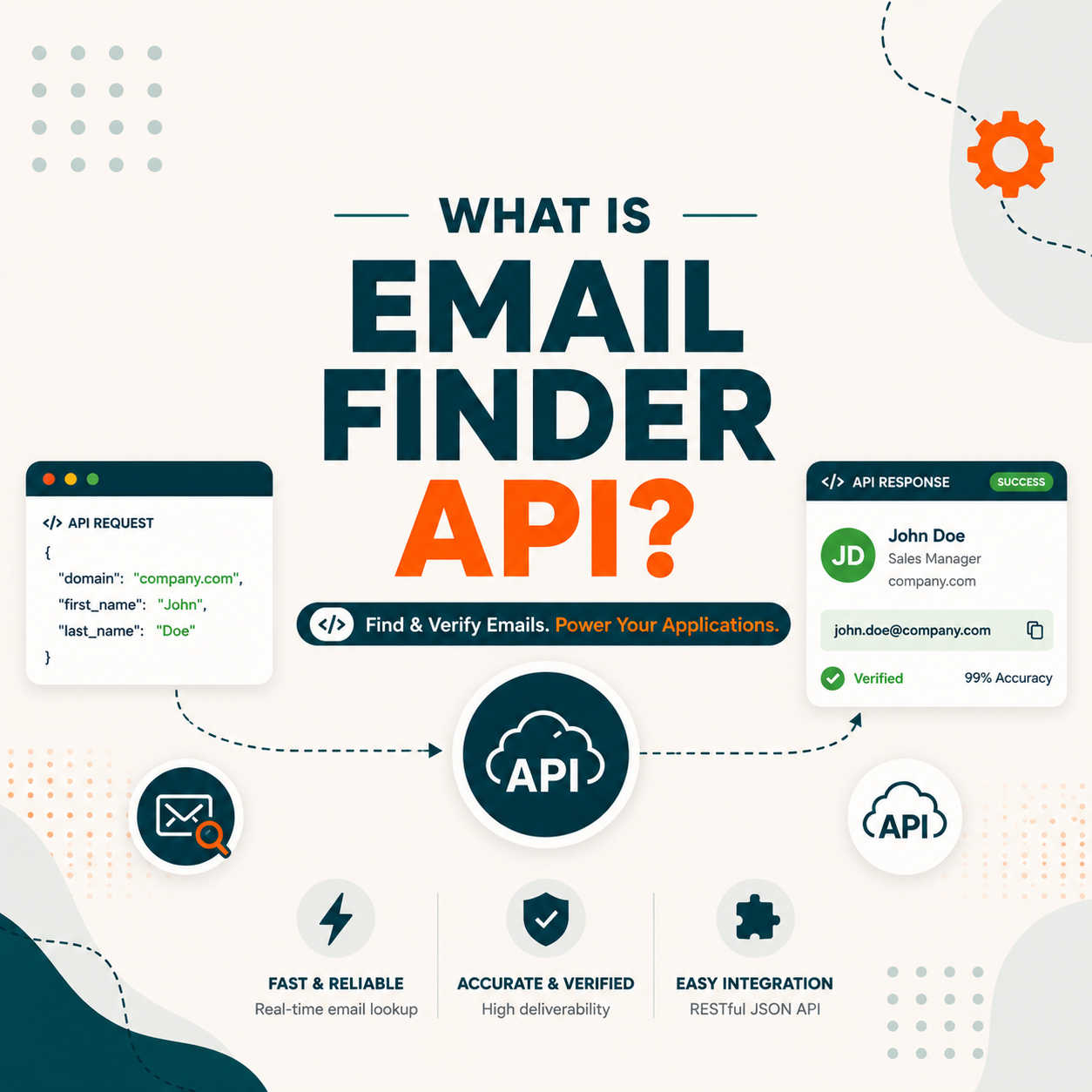
An email finder API is a REST endpoint that lets your CRM, automation, or custom app find and verify business emails programmatically. Sales Ops and Marketing Ops use it to enrich form submissions in real time, sync CRM records on a cadence, or build internal prospecting tools. Major APIs (Hunter, Apollo, Clearout) charge per credit consumed, typically 0.01 to 0.05 dollars per lookup at production volume.
Table of Contents
What Is an Email Finder API and How Does It Differ from Dashboard Lookup?
An email finder API is a REST-based web service that accepts a domain or name-domain pair and returns a found email address with a confidence score, accessible from any application with HTTP capability. If you are new to the category, start with what is an email finder for the fundamentals the API automates. Unlike logging into a web dashboard and typing a domain manually, the API lets your code call the finder in real time, at scale, inside any automated workflow.
“An application programming interface (API) is a way for two or more computer programs or components to communicate with each other. It is a type of software interface, offering a service to other pieces of software.”
: Wikipedia: Application programming interface
The REST API is the only access mode that scales beyond human speed. Dashboard and extension lookups are rate-limited by the person clicking; the API runs on your server, triggered by logic, and can process thousands of records per hour without manual input.
How Does an Email Finder API Work? REST, Authentication, and Rate Limits Explained
An email finder API works by accepting an HTTP GET request with your API key in the header, querying a database of pattern-matched and SMTP-verified addresses, and returning a JSON object with the found email and a confidence score between 0 and 100. The entire round trip typically takes 200 to 800 milliseconds.
- REST endpoints. The core endpoints are GET /v2/email-finder (find by domain + name), GET /v2/email-verifier (verify an email address), and GET /v2/domain-search (list all emails on a domain). All use HTTPS with JSON responses.
- API key authentication. Pass your key as the query parameter api_key=YOUR_KEY or in the X-API-Key request header. Keys are scoped to your account credit balance; a missing or expired key returns HTTP 401 immediately.
- Rate limits and credit consumption. Limits vary by plan, from 1 request per second on free tiers to 15 requests per second on Starter. Each successful find or verify deducts one credit; a 404 result (email not found) typically costs no credit on Hunter but may cost on other providers.
- JSON response structure. Every response includes a data object with email, score (0-100), sources array, domain, and status (valid/risky/invalid/unknown). Your code should gate on score and status before writing to CRM to prevent bad data from entering the pipeline.
Rate limits are the most common scaling bottleneck. At 15 requests per second, Hunter Starter can process 54,000 lookups per hour theoretically; in practice, network latency and retry logic reduce throughput to 30,000 to 40,000 per hour on a single thread. Use parallel workers for high-volume jobs.
What Are the 5 Common Use Cases for Email Finder APIs in B2B Tech Stacks?
Email finder APIs integrate into five distinct workflow layers in a modern B2B tech stack. Each use case requires different throughput, latency, and error-handling logic, which is why understanding the pattern before writing code prevents costly rework at scale.
- CRM record enrichment on a cadence. A nightly cron job pulls all CRM contacts missing a verified email, sends each domain-name pair to the API in batches, and writes results back to the contact record. This pattern keeps CRM data fresh without requiring SDR manual effort and pairs naturally with cold email outreach campaigns.
- Real-time form submission verification. A webhook fires when a prospect submits a demo request form. The API verifies the submitted email synchronously (under 500 ms) before the thank-you page renders. Invalid emails trigger a re-entry prompt; valid emails route to the sales queue automatically.
- Marketing automation pipeline gating. Before adding a lead to a nurture sequence, the automation platform calls the API to confirm the email is deliverable. Risky or invalid addresses go to a quarantine segment instead of the active list, protecting sender reputation upstream.
- Internal prospecting dashboard builds. Engineering teams embed the API inside custom sales tools that let reps search by job title, company, or technographic filter and see enriched email results directly in the proprietary interface, without needing a Hunter.io login for every seat.
- Lead scoring and routing logic. The API’s confidence score (0-100) becomes a field in the lead record. Leads with score above 90 route to high-velocity sequences; scores below 70 trigger a manual review flag. This numeric signal replaces binary valid/invalid judgments with a gradient that maps to pipeline risk.
“The Hunter API gives you access to all our data and lets you automate the email finding and verification process. You can use the API to build your own applications, integrate Hunter into your CRM, or automate your prospecting workflows.”
: Hunter.io API Documentation
The five patterns above cover roughly 90 percent of production API use cases. CRM enrichment cadences and form verification are the two highest-ROI entry points for teams new to API integration, because they replace workflows that existing staff already perform manually.
The right API starts with the right tool.
Compare the best email finder tools on accuracy, free tier, and price, with API capability notes for each, before you wire one into your stack.
Compare the best email finder tools →What Are the 5 Technical Considerations Before Integrating an Email Finder API?
Five technical parameters determine whether an email finder API integration succeeds at production scale. Getting these right in the design phase prevents performance bottlenecks, unexpected cost overruns, and data quality issues that become exponentially harder to fix after go-live.
- Rate limit ceiling vs. your peak throughput demand. Measure the maximum records per hour your pipeline needs at peak before choosing a plan. A mismatch between plan rate limit and workload triggers HTTP 429 errors at the worst moments, typically end-of-month when CRM imports are largest.
- Cost per credit at projected monthly volume. Calculate (monthly lookup volume) multiplied by (cost per credit) and add a 20 percent buffer for failed retries. For a team running 50,000 lookups per month, Hunter Starter at $0.025 per credit totals roughly $1,250 per month. See the full Hunter.io pricing breakdown to compare plan tiers before committing.
- API response latency for synchronous vs. asynchronous use. Synchronous use cases (form validation) require sub-500 ms responses; asynchronous batch jobs tolerate 2 to 5 seconds per call. Test your integration’s latency under load before wiring into any user-facing flow where slow responses affect conversion.
- Error handling and retry strategy. Design for three failure modes: HTTP 429 (rate exceeded, wait and retry with exponential backoff), HTTP 404 (email not found, log and skip), and HTTP 5xx (server error, retry once after 30 seconds, then alert). Production integrations without explicit retry logic fail silently and corrupt data.
- Catch-all domain handling. Catch-all domains (where the mail server accepts all addresses regardless of validity) return status “accept-all” or “catch-all” from most APIs. Flag these records separately in your CRM rather than writing them as verified, because deliverability on catch-all domains is unpredictable and can spike bounce rates.
“Hunter.io combines email finding with real-time SMTP verification in a single API call, returning both the address and a confidence score. For teams building prospecting automation, that dual output eliminates a second verification step and reduces integration complexity significantly.”
: Hunter.io Email Finder: Full Feature Review, Growth Hack Suite
The catch-all handling issue is the most frequently overlooked technical consideration. Some domains, particularly large enterprises, have catch-all policies that make SMTP verification inconclusive. Building a separate processing path for catch-all results protects your sender reputation while still capturing potentially reachable contacts.
Top 5 Email Finder APIs Compared: Hunter, Apollo, Clearout, Email Hippo, Abstract
The five leading email finder APIs each occupy different positions on the cost-accuracy-volume spectrum. The right choice depends on whether your primary use case is domain-level prospecting, contact-level enrichment, or high-volume real-time verification at the lowest cost per call.
Hunter stands out for combining email finding and verification in a single API call, which eliminates the need to chain two separate services. For most B2B Sales Ops use cases, that single-call architecture justifies the higher per-credit cost compared to verify-only alternatives. For a broader comparison of lookup tools and cost structures, see the complete email leads finder tools guide.
How Do You Integrate Hunter.io API with Your CRM in 5 Steps?
Integrating the Hunter.io API with your CRM requires five sequential steps: generating credentials, testing the endpoint manually, wiring the webhook or cron trigger, adding retry logic, and setting up credit monitoring. Most engineering teams complete a working prototype in one afternoon and production-ready code in two to three days. If you would rather skip custom code, the Hunter.io integrations guide covers the native CRM and Zapier connectors.
- Step 1, generate your API key: Log in to Hunter.io, navigate to API section under account settings, and copy your personal API key. Store it as an environment variable (HUNTER_API_KEY), never hardcoded in source files. Free accounts start with 50 requests per month to test logic before committing to a paid plan.
- Step 2, run a manual curl test: Execute
curl "https://api.hunter.io/v2/email-finder?domain=stripe.com&first_name=Patrick&last_name=Collison&api_key=YOUR_KEY"from your terminal. Confirm you receive a JSON response with an email field and score field before writing any application code. This single test prevents 80 percent of authentication-related debugging later. - Step 3, wire the CRM webhook or cron job: For real-time enrichment, attach a webhook to your CRM’s contact-created event and call the API with the new contact’s domain and name. For batch enrichment, write a cron job that queries CRM contacts where email is null, batches them in groups of 100, and sends each to the API with a 100 ms delay between calls to stay under rate limits.
- Step 4, add retry logic for 429 and 5xx errors: Wrap every API call in a retry block: on HTTP 429, wait for the Retry-After header value (or default 60 seconds) and retry once. On HTTP 5xx, retry with exponential backoff starting at 5 seconds. Log all failures with the input domain-name pair so a manual review queue can catch misses.
- Step 5, monitor credit consumption with alerts: Set a credit balance alert at 20 percent of your monthly allocation via the Hunter dashboard or by calling GET /v2/account to poll remaining credits in your monitoring system. An unexpected spike in 404 responses (not found) may indicate a data quality problem in your CRM source records, not an API issue.
Ready to connect Hunter API to your CRM?
Get Hunter API Key Free →50 free requests/month on free plan, no credit card required
Email Finder API: Frequently Asked Questions
Common questions from Sales Ops and Marketing Ops teams integrating email finder APIs into B2B tech stacks.
What exactly does an email finder API return in its response?
A standard email finder API response includes: the found email address, a confidence score from 0 to 100, an array of source URLs where the email was publicly found, the domain, and a status field (valid, risky, invalid, or unknown). Some providers also return the full name, job title, and LinkedIn profile URL when available.
Is an email finder API the same as an email verification API?
No. An email finder API discovers an email address from a name and domain. An email verification API confirms whether a given email address is deliverable by checking DNS, MX records, and SMTP response. Hunter.io combines both in a single call; most other providers separate them into distinct endpoints requiring two API calls and two credit charges.
How accurate are email finder APIs in practice?
Accuracy varies by provider and domain type. Hunter reports a confidence score; emails with scores above 90 have a real-world bounce rate below 3 percent in most independent benchmarks. Scores between 70 and 90 carry moderate risk. Below 70, treat the result as unverified and route to a manual review queue rather than adding directly to active email sequences.
Do email finder APIs work for all domains and company sizes?
Email finder APIs perform best on mid-size B2B companies with publicly discoverable email patterns. Coverage drops on very small companies (no published emails), Fortune 500 enterprises (catch-all servers), and government or educational domains. Hunter.io provides a pattern field in the domain-search response indicating the email format used by that company, which helps estimate likely coverage before committing credits.
How much does it cost to run 10,000 lookups per month via API?
At Hunter.io Starter pricing (about $0.025 per credit), 10,000 lookups cost approximately $250 per month. At Clearout rates (~$0.008 per credit), the same volume costs around $80. The right choice depends on whether you need only verification (Clearout is sufficient) or combined finding plus verification in one call (Hunter is more cost-effective than chaining two APIs).
What happens when you hit the API rate limit?
When you exceed the rate limit, the API returns HTTP 429 Too Many Requests with a Retry-After header indicating how many seconds to wait. Production integrations must implement exponential backoff: on first 429, wait the Retry-After value; on subsequent 429s, double the wait time. Without this logic, parallel workers can create a 429 storm that halts all lookups for minutes at a time.
Are there free email finder APIs available for development and testing?
Hunter.io offers 50 free API requests per month on the free plan, which is sufficient for development and integration testing. Abstract API offers 100 free monthly verification requests. These free tiers are ideal for building and testing your integration logic before upgrading to a paid plan for production volume. No credit card is required to start on the Hunter free plan.
Can the same API handle both real-time form validation and nightly batch enrichment?
Yes, but with different configuration. Real-time calls require sub-500 ms latency and should be made from server-side code close to your users. Batch enrichment jobs can run asynchronously with a small delay between calls. Using the same API key for both is fine; just ensure your total credit consumption across both workflows stays within your monthly allocation to avoid mid-month credit exhaustion.
What programming languages have official Hunter.io API libraries?
Hunter.io provides official client libraries for Python, Ruby, Node.js, and PHP, available on their GitHub. For other languages, the REST API is language-agnostic: any HTTP client that can send GET requests with query parameters and read JSON responses works. Java, Go, and .NET integrations are commonly built directly against the REST endpoints without an official library.
How should catch-all domain results be handled in a CRM integration?
Create a separate CRM field or segment tag for catch-all results (API returns status “accept-all” or “catch-all”). Do not add these addresses to active sending sequences alongside verified emails. Route them to a lower-frequency or permission-confirmation flow first. Mixing unverified catch-all addresses into a verified list is the leading cause of sudden bounce rate spikes after CRM enrichment runs.
What is the difference between the domain-search and email-finder endpoints?
The domain-search endpoint returns all publicly known emails on a given domain in a single response, useful for account-based prospecting where you want every contact at a company. The email-finder endpoint returns a single predicted email for a specific person given their first name, last name, and domain, useful for CRM enrichment when you already have a contact name. Use domain-search for discovery and email-finder for individual record enrichment.
How do you monitor API credit consumption to avoid mid-month exhaustion?
Call GET /v2/account on a daily schedule to retrieve remaining credits and log the value to your monitoring system. Set an alert threshold at 20 percent of your monthly allocation. When the alert fires, pause non-urgent batch jobs and switch to high-priority real-time calls only until the next billing cycle resets your balance. Hunter.io also emails an alert when credits drop below a threshold set in account preferences.
For a complete comparison of which tools offer the best-documented and most cost-efficient API access among the top 9 options, see the 9 best email finder tools ranked by accuracy and price including API capability notes for each tool.
Start integrating email finding into your tech stack today
Get Hunter API Key Free →50 API requests free per month, no credit card required, full REST documentation included