Table of Contents
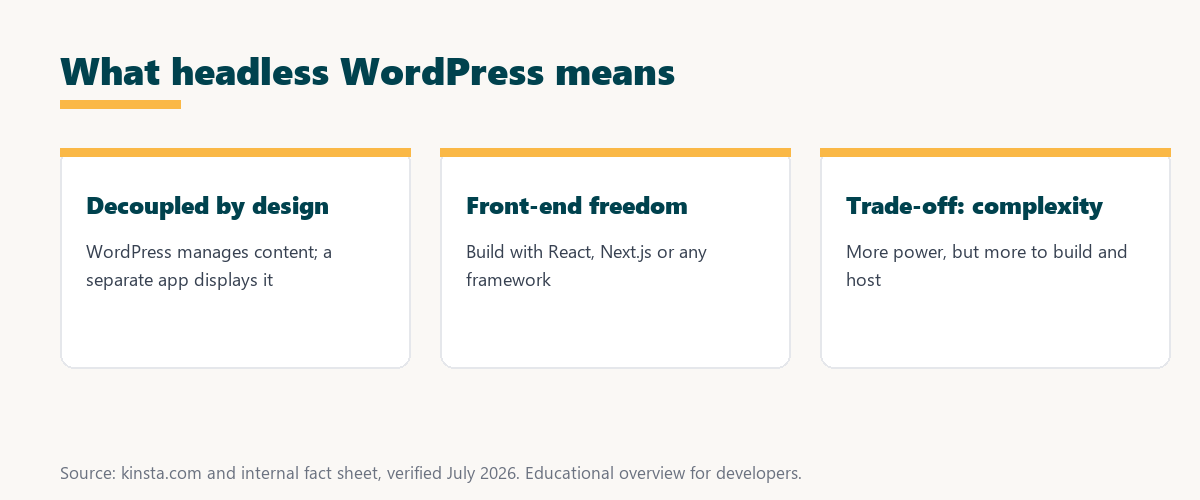
Headless WordPress separates the content backend from the front end, using WordPress to manage content while a separate application, often built with a framework like React, displays it via the REST API. This decoupling offers flexibility and performance for developers, but it adds complexity, so it suits custom projects more than typical sites. This guide explains how it works and whether you should use it.
Last updated: August 2026. Written by the Growth Hack Suite editorial team, with details cross-checked against provider documentation. This page carries affiliate links to Kinsta.
See how Kinsta hosts headless WordPress on Google Cloud
Try Kinsta →WordPress and application hosting together, with a 30-day money-back guarantee.
What Is Headless WordPress?
Headless WordPress is an approach that separates the content backend from the front end, so WordPress manages your content while a separate application displays it, connecting to WordPress through the REST API or GraphQL rather than using WordPress themes. The theme layer is replaced by a custom front end.
“A headless content management system provides content through an API without a front end.”
— Wikipedia, Headless content management system
This approach applies that idea to WordPress: it keeps the familiar content tools while handing the display off to a separate application.
How Does Headless WordPress Work?
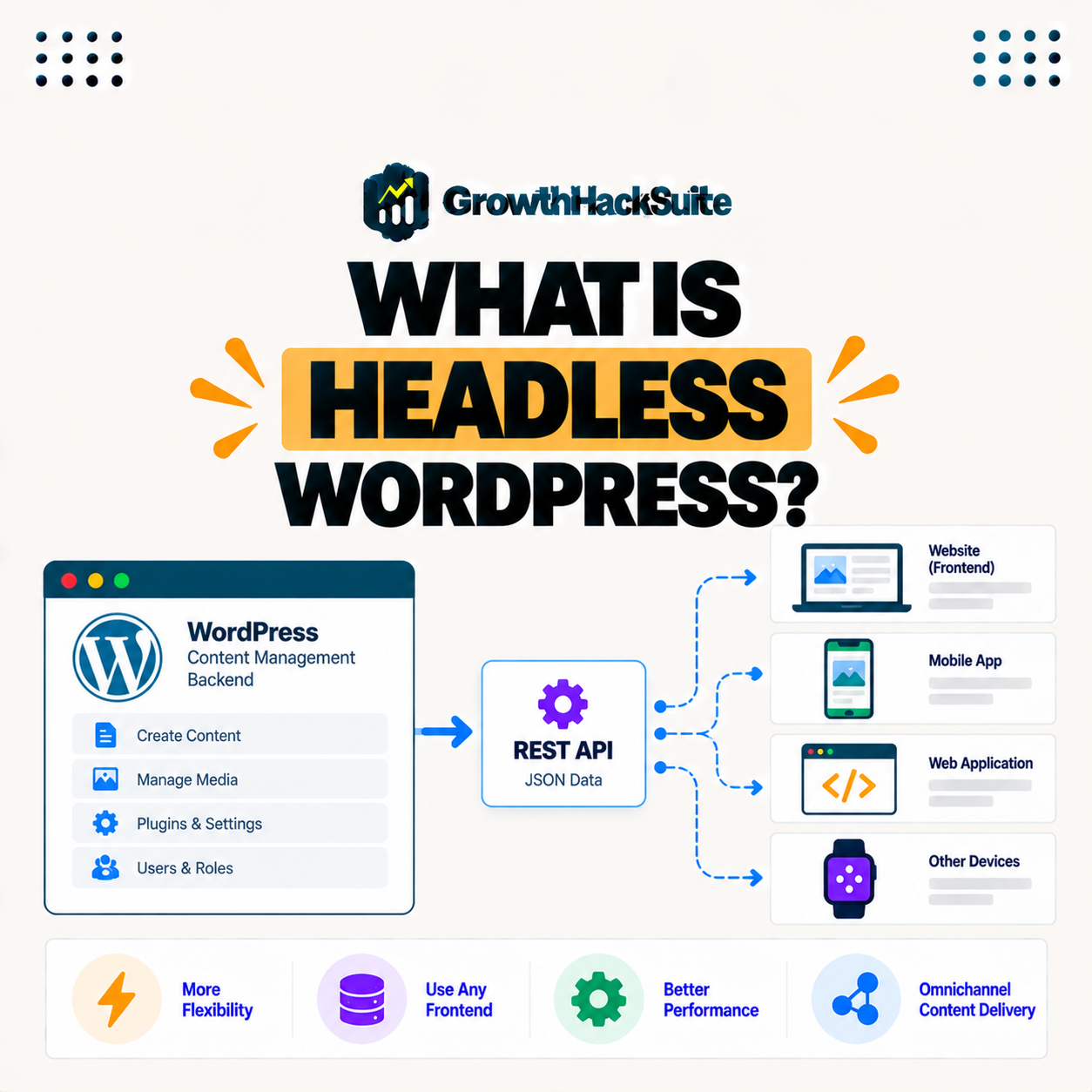
Headless WordPress works by using WordPress as a content management system whose data is fetched by a decoupled front end, often built with a framework like React or Next.js, so the front end pulls content over the API and renders it independently. WordPress stores; the front end shows.
The key mechanism is the API: WordPress hands content to the front end as data, and the front end decides entirely how to present it.
What Is a Decoupled Architecture?
A decoupled architecture separates the parts that manage content from the parts that display it, so in headless WordPress the backend and front end operate independently and communicate through an API, giving developers freedom in how the site is built. Each layer can change without breaking the other.
The takeaway is that decoupling is about independence: content management and presentation become two separate systems joined only by an API.
Headless vs Traditional WordPress
Traditional WordPress uses themes to render content and front end together, while headless WordPress separates them, so headless offers front-end flexibility and potential performance gains at the cost of added complexity and losing some theme and plugin conveniences. The trade is control for simplicity.
Source: general overview cross-checked with public WordPress developer documentation, verified August 2026.
Reading down the table, headless trades the simplicity of themes for front-end freedom and performance, which is why it fits custom projects more than everyday sites.
What Are the Benefits of Going Headless?
Headless WordPress benefits include front-end flexibility, the ability to use modern frameworks, potentially faster and more scalable front ends, and reusing content across channels, so it suits teams wanting custom, high-performance experiences. The gains are real when a project needs them.
Five benefits explain why teams choose a headless setup:
- Front-end flexibility: The display layer is fully custom, so the interface can be designed and coded without the limits a WordPress theme imposes.
- Modern frameworks: Tools like React and Next.js power the front end, so teams build with the technologies they already use elsewhere.
- Performance potential: A lean, API-driven front end can be highly optimized, so pages can load fast when the build is done well.
- Multi-channel content: The same WordPress content feeds websites, apps and other channels, so one backend serves many front ends.
- Independent scaling: The front end and backend scale separately, so each part grows to meet its own demand without dragging the other.
Together these show the appeal: headless setups give teams control, modern tooling and content that travels beyond a single site.
What Are the Drawbacks of Going Headless?
Drawbacks of headless WordPress include added complexity, losing many themes and page-builder features, more development effort, and the need to host both the backend and front end, so it is not ideal for simple sites or non-developers. The flexibility comes with real cost.
“The first five seconds of page-load time have the highest impact on conversion rates.”
— HubSpot, page load time and conversion rates
Performance is often the reason teams go headless, but it is not automatic: a decoupled front end can be fast, yet it only protects those early seconds when it is engineered and hosted well.
Should You Use Headless WordPress?
You should use headless WordPress when you need a custom front end, high performance, or to serve content to multiple channels and have the development resources, while a traditional setup is better for most standard sites. The right choice depends on the project, not the trend.
The honest point is that headless is powerful but not universal: choose it for custom, resourced projects, and stay traditional for ordinary sites.
What Do You Need to Run Headless WordPress?
To run headless WordPress you need WordPress as the backend, a front-end application, and hosting for both, so a platform that offers WordPress hosting plus application hosting supports the full decoupled setup in one place. Keeping both parts together simplifies the architecture.
Source: general overview cross-checked with public WordPress developer documentation, verified August 2026.
Reading the table together, the pros and cons mirror each other: the flexibility and performance headless offers are paid for in complexity and effort.
How Kinsta Supports Headless WordPress
Kinsta supports headless WordPress by hosting the WordPress backend and offering application hosting for the front end on Google Cloud, so you can run both parts of a decoupled site on one reliable platform. Having both on one provider reduces the moving parts of a headless build.
Run headless WordPress on Kinsta’s Google Cloud platform
Start Free Migration →Backend and front-end hosting together, with free migration.
Building a Decoupled Site on One Platform
You build a decoupled site on one platform by hosting the WordPress backend and the front-end app together, so with Kinsta’s WordPress and application hosting, both parts of a headless project run on the same Google Cloud infrastructure. One platform keeps deployment and management simpler.
The takeaway is that hosting both halves in one place removes a common headache of headless builds: juggling two providers for one site. For anyone weighing a long hosting commitment, our note on SaaS vendor lock-in is worth a read.
Headless WordPress and the REST API
Headless WordPress relies on the REST API or GraphQL to deliver content to the front end, so understanding the API is key, since it is the bridge that lets your decoupled application read and display WordPress content. Without the API, the two halves cannot connect.
“A tool is only worth its premium when the hours or revenue it protects exceed the invoice.”
— Growth Hack Suite, on tool ROI
Applied to this approach, the lesson is to weigh the cost: the flexibility earns its place only when the custom experience it enables is worth the extra build and hosting effort.
Common Headless WordPress Use Cases
Common headless WordPress use cases include custom web apps, high-traffic marketing sites, content served to mobile apps, and multi-brand or multi-channel publishing, so it fits projects where a standard theme would limit the experience. The pattern suits ambitious, custom builds.
The honest summary is that headless earns its complexity in specific cases: custom apps, demanding performance needs, and content that must reach more than one channel.
Try Kinsta risk-free for backend and front-end hosting
Try Kinsta Risk-Free →WordPress and application hosting with free migration, and a 30-day money-back guarantee.
Headless WordPress: Frequently Asked Questions
The 12 most-asked questions about headless WordPress.
What is headless WordPress in simple terms?
Headless WordPress separates the content backend from the front end, so WordPress manages content while a separate app displays it through the REST API instead of WordPress themes.
How does headless WordPress work?
It works by using WordPress as a content system whose data a decoupled front end, often built with React or Next.js, fetches over the API and renders independently.
What is a decoupled architecture?
A decoupled architecture separates content management from display, so in headless WordPress the backend and front end operate independently and communicate through an API.
How is headless different from traditional WordPress?
Traditional WordPress renders content and front end together with themes, while headless separates them, offering flexibility and performance at the cost of added complexity.
What are the benefits of headless WordPress?
Benefits include front-end flexibility, using modern frameworks, faster and more scalable front ends, and reusing content across channels, suiting custom, high-performance projects.
What are the drawbacks of headless WordPress?
Drawbacks include added complexity, losing many themes and page-builder features, more development effort, and hosting both backend and front end, so it is not ideal for simple sites.
Should I use headless WordPress?
You should use it when you need a custom front end, high performance, or multi-channel content and have development resources, while a traditional setup fits most standard sites.
Do I need a developer for headless WordPress?
Yes, headless WordPress requires development skills to build and connect the front end, so it is aimed at developers and teams rather than typical site owners.
What do I need to run headless WordPress?
You need WordPress as the backend, a front-end application, and hosting for both, so a platform offering WordPress plus application hosting supports the full setup.
Is headless WordPress faster?
Headless WordPress can be faster because a modern front end and API-driven delivery can be highly optimized, though performance depends on how the front end and hosting are built.
Does headless WordPress use the REST API?
Yes, headless WordPress uses the REST API or GraphQL to deliver content to the front end, which is the bridge that lets the decoupled app read and display WordPress content.
Does Kinsta support headless WordPress?
Yes, Kinsta hosts the WordPress backend and offers application hosting for the front end on Google Cloud, so you can run both parts of a decoupled site on one platform.
About this guide
Written by the Growth Hack Suite editorial team, drawing on hands-on experience running WordPress sites. Details were cross-checked against public WordPress developer documentation. This page carries affiliate links to Kinsta. The position is stated plainly: headless WordPress decouples the content backend from a custom front end that pulls content via the REST API or GraphQL, trading complexity for flexibility and performance. Kinsta supports it by hosting both the backend and the front end on Google Cloud.