Table of Contents
Expandi vs hiring an SDR compares software cost with payroll cost for the same goal, booked meetings. Expandi costs $99 per LinkedIn account per month and automates LinkedIn touches. No federal source tracks SDR pay, and the closest published figure, a $72,080 median annual wage for wholesale and manufacturing sales representatives, covers wages only, before any employer overhead.
Last checked: October 2026. Expandi figures come from expandi.io pricing, FAQ, Terms, and help center. The wage figure comes from the U.S. Bureau of Labor Statistics Occupational Outlook Handbook, re-checked on October 8, 2026, and is used only as a proxy.
Want more outbound capacity before adding payroll? Test Expandi on one LinkedIn account for seven days.
Start Your 7-Day Expandi Trial →Seven-day trial on the first subscription · dedicated country-based IP for each account · cancel anytime
Expandi vs Hiring an SDR: Which Costs Less per Booked Meeting?
Expandi vs hiring an SDR is a decision between renting software and adding a salaried person to produce booked meetings. Expandi carries the lower fixed cost at $99 per account each month, while an SDR carries wages and overhead but adds judgment, phone calls, and qualification that software does not perform.
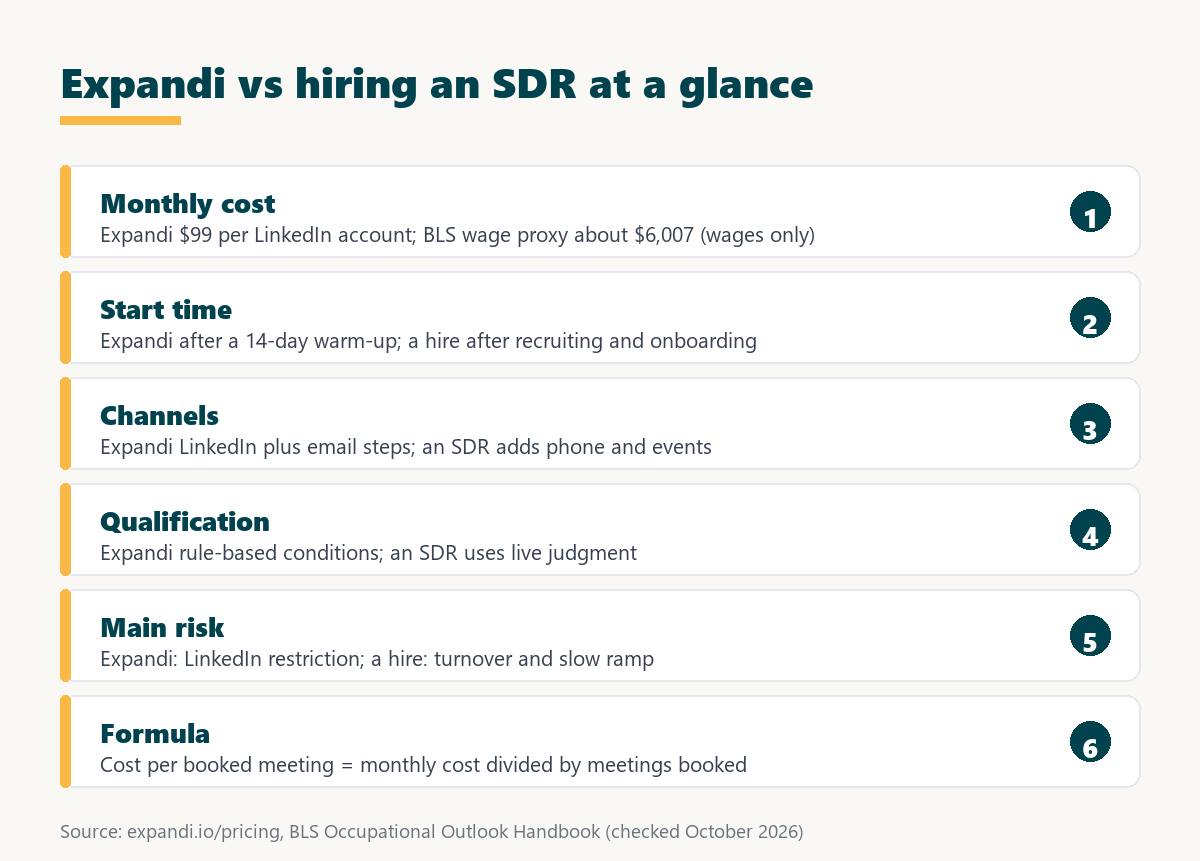
The sticker comparison is lopsided. One Expandi account costs less in a year than one month of wages for a B2B sales representative. That gap is real, but it is also misleading, because the two options do not produce the same work. Software repeats defined LinkedIn steps; a person researches, calls, qualifies, and books.
The fair yardstick is cost per booked meeting, which divides every cost on each side by the meetings that side actually produces. This guide gives the formula and the inputs that are published, and it leaves the meeting counts to each agency’s own data, because no reliable public benchmark exists for them.
Expandi wins the monthly-fee comparison easily, while the cost-per-meeting comparison depends on how many meetings each option books in a specific agency.
What Is the Core Difference Between a Tool and a Hire?
A tool is software that repeats defined outreach steps at a fixed subscription price. A hire is a person who performs outreach, adapts to each prospect, and costs wages plus overhead. Expandi belongs to the first group, and a sales development representative belongs to the second group.
Five traits separate the two options in an agency budget:
- Cost structure: Expandi bills a flat monthly fee per LinkedIn account, while a hire adds wages, employer costs, software seats, and management time.
- Judgment: a person weighs each prospect’s context before responding, while a sequence follows the rules and conditions set when the campaign was built.
- Channel range: an SDR can call, email, and message on LinkedIn, while Expandi covers LinkedIn actions plus email steps inside a campaign.
- Start-up time: Expandi needs an account connection and a 14-day gradual warm-up, while a hire needs recruiting, onboarding, and training first.
- Exit terms: an Expandi subscription can be cancelled at any time, while ending a hire follows employment terms and local labor rules.
Wikipedia describes the job that both options are trying to fill:
“tasked with setting up qualified meetings between a salesperson and a potential buyer”
Wikipedia, Sales development
The full role is explained in the Growth Hack Suite guide to what an SDR does.
A tool buys repeatable steps and a hire buys adaptable effort, so the comparison only makes sense once the agency knows which of the two is actually missing.
What Does Expandi Automate?
Expandi is a cloud-based LinkedIn automation platform that automates profile visits, connection requests, follow-up messages, and email steps inside one sequence builder. Each connected account receives a dedicated country-based IP and an automatic warm-up, while replies still land in an inbox that a person must answer.
- Connection requests: Expandi sends invitations from a lead list on a schedule, within the limit ranges set for the connected account.
- Follow-up messages: an If/Action sequence sends the next message only after a connection is accepted or a defined delay has passed.
- Email steps: email can be added as a second channel inside the same campaign for prospects who do not respond on LinkedIn.
- Profile auto warm-up: the gradual option starts at 5 actions per day and adds 3 more every two days until it reaches 21.
- Campaign statistics: step-by-step statistics show where prospects accept, reply, or drop off, which guides edits to the message copy.
Expandi’s campaign limitations article allows 15 active campaigns at a time and up to 5,000 leads per campaign, checked in October 2026.
Expandi automates the repetitive top of the funnel but stops at the reply, which is exactly where a person’s time becomes valuable.
What Does an SDR Do That Software Does Not?
A sales development representative is a salesperson who researches accounts, contacts prospects, qualifies interest, and books meetings for closers. The role includes live phone calls, objection handling, and judgment about fit, which are tasks that a LinkedIn automation tool does not carry out on its own.
HubSpot’s glossary summarizes where the role sits in the pipeline:
“This role concentrates on outbound prospecting activities like cold outreach, lead research, and initial qualification conversations rather than closing deals.”
HubSpot, Sales Development Representative
- Live qualification: an SDR asks follow-up questions in real time and decides whether a prospect deserves a meeting slot with a closer.
- Phone outreach: calling prospects who accepted a connection or opened an email is work a LinkedIn automation tool does not perform.
- Objection handling: answering pushback in context keeps a conversation alive where a scripted follow-up would simply repeat the offer.
- Account research: a person finds a specific angle for each target account, such as a recent hire or product launch, before reaching out.
- Handoff notes: the SDR briefs the closer on pain points and stakeholders, so the booked meeting starts with context instead of a blank page.
Those human steps convert interest into meetings, which is why a tool alone rarely matches an experienced SDR on meeting quality.
What Does Expandi Cost per Month?
Expandi cost is a flat subscription of $99 per LinkedIn account per month, or $79 per account per month when billed annually. A monthly plan kept for twelve months comes to $1,188 per account, and fees already paid are nonrefundable under the published terms.
Expandi’s FAQ states the rate as “Expandi costs 99 USD per account per month” (Expandi FAQ), and the Terms say that, unless required by law, subscription fees are nonrefundable (Expandi Terms and Conditions). Taxes are added by billing country, and image and video personalization are paid add-ons without a listed price.
Expandi’s cost is predictable to the dollar, which makes it easy to divide by meetings once an agency knows how many one account produces.
What Does Hiring an SDR Cost?
SDR cost is the full expense of employing a sales development representative, which includes wages, employer taxes, benefits, tools, and management time. No federal dataset isolates the role, and the nearest published proxy is a $72,080 median annual wage for wholesale and manufacturing sales representatives.
Source: expandi.io/pricing, expandi.io/faq and expandi.io/terms-conditions, checked October 2026; BLS Occupational Outlook Handbook, re-checked October 8, 2026. The BLS figure is a wage proxy, not an SDR-specific figure.
The cost table shows a fixed $99 monthly fee on the Expandi side and a wage proxy of about $6,007 a month on the hiring side, before taxes, benefits, and tools.
The Bureau of Labor Statistics states the proxy figure this way:
“The median annual wage for sales representatives, wholesale and manufacturing, except technical and scientific products was $72,080 in May 2025.”
U.S. Bureau of Labor Statistics, Occupational Outlook Handbook
The proxy is a floor, not a full cost, because employer taxes, benefits, commission, tools, and management time all sit on top of wages.
How Is Cost per Booked Meeting Calculated?
Cost per booked meeting is the total monthly cost of an outreach option divided by the meetings it books in that month. The formula works the same for software and for staff, so an agency can place Expandi and an SDR on one scale once real meeting counts exist.
The formula is short: cost per booked meeting = total monthly cost divided by meetings booked that month.
For Expandi, total monthly cost is the account fee plus lead data plus the hours someone spends on lists and replies. For a hire, it is wages plus employer costs, commission, tools, and management time. The meeting count on each side has to come from the agency’s own calendar, not from a vendor or a blog.
As an illustration of the arithmetic only, an Expandi account costing $99 plus operator time that books three meetings in a month carries $33 of software cost per meeting before labor. The same division applies to the hiring side once its full monthly cost and real meeting count are known.
The method is covered in more depth in the guide to cost per booked meeting, with related context in the guide to customer acquisition cost.
The formula turns an emotional build-or-buy debate into one comparable figure, but it is only as honest as the cost lines and meeting counts fed into it.
How Do Expandi and an SDR Compare Side by Side?
Expandi and an SDR compare as fixed-price automation against flexible human effort. Expandi wins on monthly cost, speed to start, and ease of exit, while an SDR wins on channel range, live qualification, and the ability to handle conversations that fall outside any scripted sequence.
Source: expandi.io/pricing, Expandi warm-up guide and expandi.io/terms-conditions, checked October 2026. Qualitative comparison; no figures are estimated for the hiring side.
The side-by-side table shows Expandi ahead on cost, start time, and exit, and the SDR ahead on channels, qualification, and reply handling, with capacity limited on both sides.
Neither column is strictly better, which is why the decision usually comes down to whether the agency’s bottleneck is touches or conversations.
How Much Outreach Can Each Option Handle?
Outreach capacity is the number of meaningful touches one option can deliver in a week. Expandi ramps a new account from 5 to 21 actions a day and recommends staying within 100 actions per week. An SDR working by hand faces the same LinkedIn limits but adds calls and emails.
Expandi’s warm-up guide explains the weekly ceiling directly: it recommends staying within 100 actions per week because LinkedIn enforces a weekly cap of 100 connection requests (Expandi account warm-up guide). That limit belongs to the LinkedIn profile, not to the tool, so a person sending by hand from the same profile meets the same wall.
The difference is where extra capacity comes from. More Expandi capacity means more connected accounts at $99 each. More human capacity means more hours, calls, and emails from the SDR, or another hire.
On LinkedIn alone the two options share one ceiling per profile, so an SDR’s advantage in capacity comes from channels beyond LinkedIn rather than from sending more invitations.
Which Hidden Costs Appear on Each Side?
Hidden costs are the expenses that sit outside the headline price of an option. Expandi needs lead data, operator time, and sometimes a paid LinkedIn subscription for certain list types. A hire brings employer taxes, benefits, software seats, recruiting effort, and the manager hours spent coaching.
- Operator time: every Expandi campaign still needs someone to build lists, write messages, and answer replies each day the campaign is running.
- Lead data: lists come from a data tool or a Sales Navigator search, and Expandi notes that Sales Navigator searches require that LinkedIn subscription.
- Add-ons and taxes: image and GIF personalization is a paid add-on without a listed price, and sales tax or VAT is added by billing country.
- Employer overhead: payroll taxes and benefits sit on top of any wage figure, and they vary widely by employer, location, and plan design.
- Management load: recruiting, onboarding, coaching, and reviewing calls take manager hours that never appear on the hire’s own payslip.
Both options cost more than their headline figure, so a fair comparison adds every hidden line before dividing by meetings.
What Risks Come With Each Option?
Risk is the chance that an outreach investment stops producing before it pays back. Expandi carries platform risk, because LinkedIn can restrict accounts that automate activity. Hiring carries people risk, because a new SDR may ramp slowly or leave before the recruiting cost is recovered.
LinkedIn’s help center is explicit about the platform side:
“Automated inauthentic activity violates the LinkedIn User Agreement and can result in temporary or permanent restriction of your account.”
LinkedIn Help, account restrictions
Expandi reduces exposure with a dedicated IP, a gradual warm-up, and limit ranges, and the explainer on what a dedicated IP is covers why that matters. None of those settings make automation permitted under LinkedIn’s terms. On the hiring side, the risk is time and money spent recruiting someone who leaves before producing meetings.
Platform risk can be capped by spreading activity and keeping volume modest, while people risk is managed through hiring quality and coaching, so each option needs a different safeguard.
Want to measure LinkedIn output before opening a job post? Run the seven-day Expandi trial on one account.
Try Expandi for 7 Days →Checkout asks for card details · no charge until the seven days are up
Can an SDR and Expandi Work Together?
An SDR and Expandi can work together as a person supported by automation. Expandi handles the repetitive LinkedIn first touches and follow-ups, and the SDR spends the freed hours on replies, calls, and qualification, which are the steps that turn interest into booked meetings.
- Automated first touch: Expandi sends the connection request and opening message, so the SDR starts with prospects who have already responded.
- Human reply handling: the SDR answers replies in the inbox, adapting to each prospect instead of letting a scripted follow-up continue.
- Phone follow-up: prospects who accepted a connection can be called by the SDR, adding a channel the automation does not cover.
- Shared lead list: one list assigned to one campaign keeps the SDR and the automation from contacting the same person twice.
- Campaign statistics review: the SDR reads step-by-step statistics to see where prospects drop off and rewrites the weakest message.
This split is the core idea behind multichannel outreach: automation covers volume while a person covers judgment.
Pairing the two often produces more meetings per payroll dollar than either alone, because the SDR’s hours go to conversations instead of invitations.
When Is Hiring an SDR the Better Choice?
Hiring an SDR is the better choice when the sales motion depends on phone calls, complex qualification, or relationships that span several stakeholders. Agencies with steady client revenue, a manager able to coach, and deals that justify payroll gain more from a person than from software alone.
- Call-driven motions: markets where buyers respond to phone outreach need a person, since LinkedIn automation does not place calls.
- Complex qualification: offers with several fit criteria need live questions that a rule-based sequence cannot ask or interpret.
- Multi-stakeholder deals: buying groups with several decision makers need someone to map roles and run parallel conversations.
- Stable budget: steady client revenue is needed to carry wages through recruiting, onboarding, and the slower early months of a new hire.
- Coaching capacity: a manager with time to train and review calls turns a new SDR into a productive one far faster than one without it.
A hire pays off when the work that remains after automation, the conversations, is what limits the agency’s pipeline.
When Is Expandi the Better Choice?
Expandi is the better choice when the agency needs more LinkedIn touches without adding payroll. Small teams with a clear offer, a ready lead list, and someone available to answer replies get extra capacity at a fixed monthly fee that can be cancelled.
According to Expandi’s platform data from May 2025 to April 2026, 28.5% of connection requests were accepted and 10.4% of outbound messages received a reply, figures from one vendor rather than a LinkedIn standard. Expandi holds 4.3 out of 5 from 162 reviews on G2, checked October 2, 2026.
Expandi earns its place as the first step when the channel is unproven, because it adds capacity for the price of a subscription and can be stopped in any month.
How Should an Agency Run the Numbers Before Deciding?
A build-or-buy calculation is a short worksheet that lists the monthly cost and expected meetings for each option. Filling it with the agency’s own figures, then testing the software side during the Expandi trial, gives a decision grounded in data instead of assumptions.
- List every cost line: writing down subscription, data, wages, employer costs, and management hours prevents a headline price from skewing the result.
- Use real meeting counts: past campaign results or a sales manager’s records supply meeting numbers, rather than benchmarks borrowed from vendors or blogs.
- Calculate cost per meeting: dividing each side’s full monthly cost by its meetings gives two comparable figures on the same scale.
- Run the Expandi week: the seven-day trial on one connected account produces first-hand numbers for the software side of the worksheet.
- Decide the sequence: the result points to tool first, hire first, or both, depending on whether touches or conversations limit growth.
The broader method for judging any sales tool against its cost is in the guide to ROI on sales tools.
A worksheet with real inputs beats any generic answer, which matters because Expandi states that subscription fees are nonrefundable once paid.
Verdict: Should an Agency Buy Expandi or Hire an SDR?
The verdict is that Expandi is the cheaper first step for adding LinkedIn capacity, and an SDR is the stronger investment once conversations, calls, and qualification limit growth. Many agencies start with the tool, prove the channel, and then hire a person to work the replies.
Growth Hack Suite’s SDR guide describes the part of the role software cannot take over:
“An SDR owns the top of the revenue funnel: prospecting, qualifying, and booking meetings so Account Executives can focus entirely on closing.”
Growth Hack Suite, What Is an SDR?
Most agencies can decide by asking whether they lack touches or conversations today, then funding that gap first.
Expandi vs Hiring an SDR: Frequently Asked Questions
The 12 most-asked questions about Expandi vs Hiring an SDR.
Is Expandi cheaper than hiring an SDR?
On monthly fees, yes: one Expandi account costs $99 a month, while the nearest BLS wage proxy works out to about $6,007 a month before overhead. Per booked meeting, the answer depends on how many meetings each option books.
Can Expandi do the work of an SDR?
Not fully. Expandi automates LinkedIn first touches and follow-ups, but replies, calls, qualification, and handoffs still need a person.
How much does Expandi cost per account?
Expandi costs $99 per connected LinkedIn account per month, or $79 per account per month billed annually. Twelve months on the monthly plan comes to $1,188.
How much does an SDR cost?
No federal source publishes an SDR-specific figure. The nearest BLS proxy is a $72,080 median annual wage for wholesale and manufacturing sales representatives in May 2025, which covers wages only.
How is cost per booked meeting calculated?
Divide the total monthly cost of an option by the meetings it booked that month. Include every cost line, such as data, labor, and overhead, on both sides.
Does Expandi book meetings automatically?
No. Expandi sends connection requests, messages, and email steps, but a person still has to answer replies and agree a meeting time.
How long does Expandi warm-up take?
The gradual warm-up runs over 14 days, starting at 5 actions a day and adding 3 every two days up to 21.
What risks come with LinkedIn automation?
LinkedIn says automated inauthentic activity violates its User Agreement and can lead to temporary or permanent restriction. Expandi’s IP, warm-up, and limits reduce exposure but do not remove it.
Can an SDR use Expandi?
Yes. Many teams let Expandi send first touches while the SDR handles replies, calls, and qualification.
How long is the Expandi trial?
Seven days, limited to the first subscription. Checkout asks for card details, and Expandi says no charge is made until the seven days are up.
Can Expandi fees be refunded?
No. Expandi’s Terms state that subscription fees are nonrefundable unless required by law.
When should an agency hire its first SDR?
When replies, calls, and qualification, rather than outreach volume, limit booked meetings, and when revenue can carry wages and coaching time.
Ready to test LinkedIn capacity before adding payroll? Start the seven-day Expandi trial on one LinkedIn account.
Start Your 7-Day Expandi Trial →Seven-day trial on the first subscription · cancel anytime · paid fees are nonrefundable
Growth Hack Suite Editorial, Outbound Sales Team
How we compared: every Expandi figure was read from expandi.io pricing, FAQ, and Terms and from the Expandi help center articles on campaign limits and warm-up. The wage figure was read from the BLS Occupational Outlook Handbook and is used only as a proxy, since no federal source tracks SDR pay. No meeting benchmarks are given, because no reliable public source exists for them.
Last checked: October 2026. When Expandi or BLS figures change, this page is updated first.
Affiliate disclosure: this page contains an affiliate link to Expandi. If a subscription is purchased through it, Growth Hack Suite may earn a commission at no extra cost to the buyer. The assessment does not change either way.