Table of Contents
Here is how to reverify old email list data before a re-engagement campaign: export the aged list, run it through a verifier, remove addresses that have gone invalid since last use, and send only to those still deliverable. Old lists decay fast, so re-verifying first prevents a bounce spike that would sink the campaign and damage the sending domain on the very first reactivation send.
Re-verify your old list free before you re-engage.
Re-Verify Your List Free →Free plan included · No credit card · Full status and confidence scoring
What Does It Mean to Re-Verify an Old Email List?
Re-verifying means running a previously-verified or long-dormant list through a verifier again to catch addresses that have gone invalid since last use. Because contacts change jobs and domains retire over time, a list cleaned a year ago is partly invalid now. Re-verification finds exactly what decayed, so a reactivation send reaches real inboxes rather than dead mailboxes.
Re-verification catches the decay that has accumulated since the last clean — invisible until the list is checked again. Understanding how fast email lists decay explains why a fresh check matters before any old-list send.
How to Reverify Old Email List Data: The Core Steps
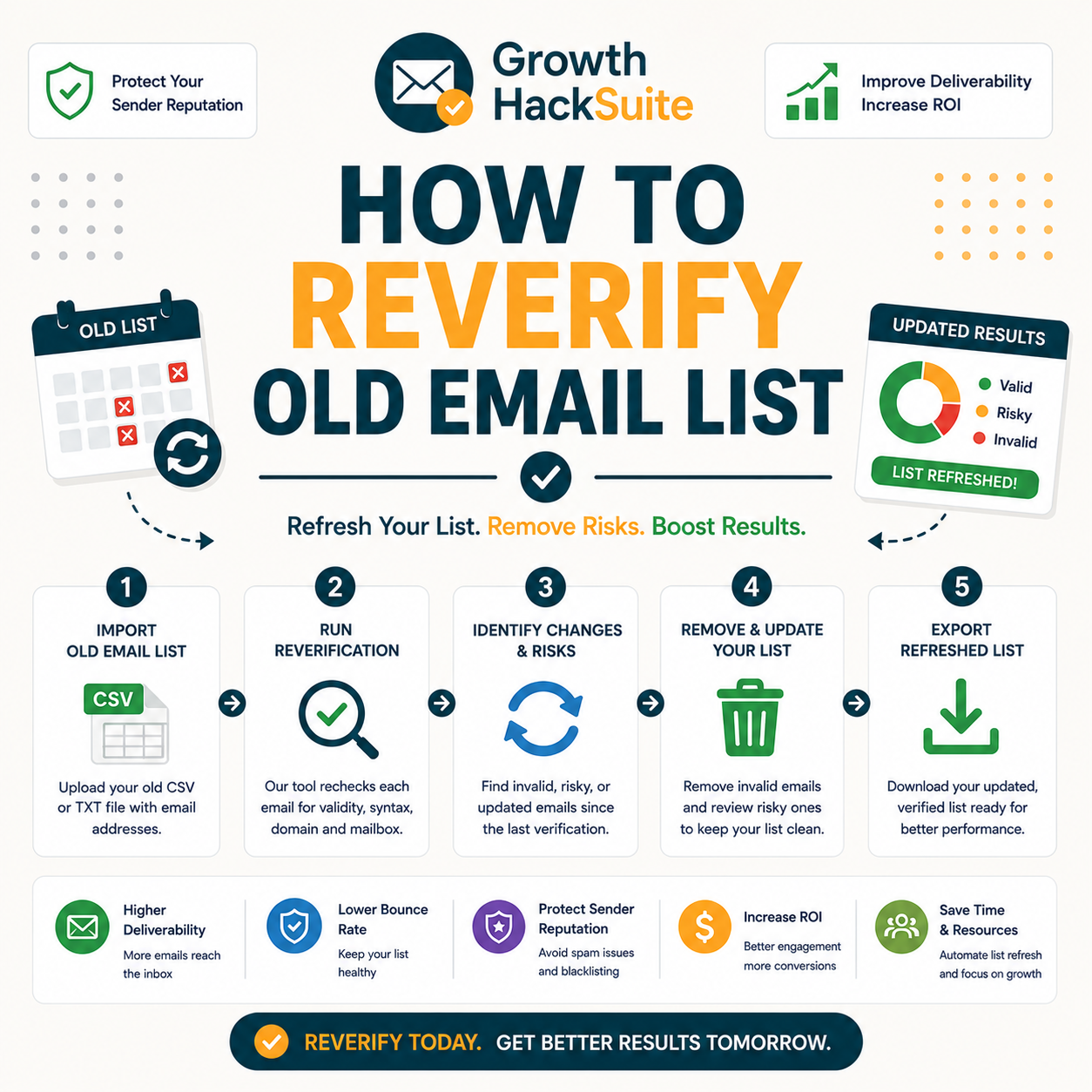
Re-verify in four steps: export the aged list, run it through a bulk verifier, remove addresses now flagged invalid, and send only to those still deliverable starting with a warm-up. Treat an old list like a cold one, because its deliverability has changed since the last send and the previous statuses no longer reflect reality.
- Export the aged list: Pull the dormant or long-unused segment from the CRM or ESP into a clean CSV. A separate export keeps the original record intact and provides a baseline for measuring how much decay re-verification surfaces.
- Bulk re-verify: Upload the CSV to a bulk verifier and run a fresh check that ignores the stored statuses. The new results reflect current deliverability, flagging every address that turned invalid since the previous clean.
- Remove newly-invalid: Drop addresses now returning a hard-invalid status, since these will bounce. Segment catch-all or risky results separately rather than sending to them blind, protecting reputation on the reactivation campaign.
- Send clean, warm up: Begin sending to the cleaned, still-valid segment with a gradual warm-up. Ramping volume slowly signals legitimate activity to mailbox providers and avoids the spam-folder placement a sudden blast invites.
- Monitor the first waves: Track bounce and engagement metrics on the opening sends, confirming the cleaned segment holds up before widening volume. Early signals reveal whether any decayed addresses slipped through the fresh verification.
Re-verify your aged list free before reactivation.
Re-Verify Your List Free →Free plan · No credit card · Bulk CSV upload
Treat an old list like a cold one: re-verify, then warm up, because its deliverability has shifted since the last campaign and old statuses cannot be trusted.
Why Do Old Email Lists Need Re-Verification?
Old lists decay: people leave companies, domains shut down, and mailboxes are deactivated. Even an opt-in list loses a meaningful share of valid addresses each year. Re-verifying surfaces this decay before a reactivation send turns it into a damaging bounce spike that mailbox providers read as a spam signal.
- Job changes: Contacts move roles and companies constantly, abandoning the work addresses that filled the original list. A former employee mailbox is usually deactivated within weeks, turning a once-valid address into a guaranteed bounce on the next campaign.
- Domain shutdowns: Companies merge, rebrand or close, retiring entire email domains in the process. Every address on a dead domain fails verification, and an aged list often holds a cluster of these from businesses that no longer exist.
- Deactivated mailboxes: Providers close inactive or abandoned accounts, and individuals abandon personal addresses over time. These mailboxes return invalid on a fresh check even though the syntax and domain still look correct at first glance.
- Full inboxes and blocks: Some addresses reject mail because the inbox is full or a previous send was marked spam. A fresh verification flags these soft-failing mailboxes that an old status incorrectly recorded as deliverable.
- Spam-trap conversion: Abandoned addresses are sometimes recycled into spam traps by providers, turning a once-valid contact into a reputation hazard. Re-verification helps surface suspicious addresses before a reactivation send hits a trap.
Decay is silent until you send: re-verification makes it visible before the bounce spike hits and the reputation damage becomes permanent.
How Do You Export and Re-Verify an Aged List?
Export the dormant segment to CSV, upload it to a verifier, and run a fresh verification that ignores the old statuses. The new results reflect current deliverability. Keep the original file so the two can be compared, showing exactly how much the list decayed since its last clean and how much remains usable.
- Export dormant segment: Isolate the addresses untouched for months and export them alone, separating dormant contacts from active subscribers so the re-verification focuses on the records most likely to have decayed since the previous send.
- Fresh verify: Run the file through the verifier as if it were brand new, discarding every stored status. Only a current check reflects today’s deliverability, because an address valid last year may have died months ago.
- Compare to old: Match the new results against the original export to measure the decay rate. The gap reveals how aggressively the list aged and informs how often future re-verification should run.
Ignore the old statuses and verify fresh, because only current results reflect today’s deliverability and the previous clean expired the moment contacts started churning.
How Do You Handle Newly-Invalid Addresses?
Remove addresses that have turned invalid since last verification, because they will bounce. For ones now flagged catch-all or risky, segment them for cautious sending. Suppress, do not delete, long-dormant valids chosen for exclusion, keeping the record intact for future reference while protecting the active campaign from preventable bounces.
- Remove newly-invalid: Drop every address returning a hard-invalid status on the fresh check, since these mailboxes no longer accept mail. Including them guarantees bounces that inflate the bounce rate and signal poor list hygiene to mailbox providers.
- Segment now-risky: Move catch-all, accept-all and risky results into a separate group for cautious, low-volume sending. Isolating uncertain addresses keeps them out of the main reactivation send while preserving the chance to test them carefully later.
- Suppress unengaged: Suppress rather than delete long-dormant valids excluded from re-engagement, retaining the historical record. Suppression prevents accidental sends while keeping the data available should the contact re-engage or the segment strategy change.
- Flag role and disposable: Separate role accounts and disposable domains surfaced by the fresh check, since these rarely engage and can hurt deliverability. Filtering them out keeps the reactivation send focused on real, mailbox-owning contacts.
- Log the decay rate: Record how many addresses turned invalid since the last clean, building a decay baseline for the list. That number guides how aggressively future re-verification cadences need to run.
Remove the newly-invalid and segment the now-risky: that split is what makes a re-engagement send safe and keeps the bounce rate inside provider thresholds. The same logic underpins how to clean your list on any cadence.
How Much Does an Old List Decay Over Time?
B2B lists commonly lose a significant share of valid addresses per year, so a two-year-old list can be substantially invalid. The exact rate depends on industry and role churn. The table shows typical decay by list age, which sets realistic expectations for how much a re-verification will remove before the work begins.
Source: Internal benchmark plus published B2B data-decay ranges (~22-30%/yr).
Contact data degrades steadily each year as people change roles and companies.
— Hunter.io API documentation
The older the list, the larger the invalid share: age alone predicts how much re-verification will remove, with two-year-old lists often shedding close to half before a send. Tracking email data decay turns that estimate into a planning number.
How Do You Re-Engage After Re-Verifying?
After re-verifying, ramp the re-engagement send: start with the most recently active, high-confidence valids, monitor bounces and replies, then expand. A win-back message works best on a clean, warmed segment. Sending cold to the whole old list at once would spike bounces and undo the gains the re-verification just delivered.
- Start with recent actives: Send the first wave to the most recently engaged, high-confidence valids. These contacts are likeliest to open and reply, building positive engagement signals that ease the rest of the list back into the inbox.
- Monitor metrics: Watch bounce, open and reply rates closely on the opening waves. Strong numbers confirm the cleaned segment is healthy, while a rising bounce rate signals the need to re-check before expanding the send.
- Expand if clean: Widen the send to the remaining valids only once early waves show low bounces and steady engagement. Gradual expansion protects domain reputation that a single full-list blast would otherwise burn.
- Lead with a win-back offer: Open the re-engagement message with a clear reason to return, such as an update or incentive. A relevant offer lifts replies on a dormant audience and reinforces the positive signals the ramp depends on.
- Drop the persistently silent: Suppress contacts that ignore several re-engagement waves, since continued sending to dead-weight addresses dilutes engagement metrics. Pruning the silent segment keeps the recovered list lean and deliverable.
Re-engage in waves on the cleaned segment, because a gradual ramp protects the domain a full blast would burn and gives mailbox providers time to register renewed legitimate activity. A disciplined prevent a bounce spike workflow makes that ramp safe.
How Often Should You Re-Verify a List?
Re-verify before any send to a list untouched for months, and on a regular cadence for active lists, roughly quarterly. Because decay is continuous, the right time to re-verify is right before sending, not on a fixed date disconnected from campaigns. A clean run weeks before a send drifts stale by launch day.
- Before dormant sends: Any list untouched for several months needs a fresh verification immediately before reactivation, since months of silent decay will have invalidated a meaningful share of addresses that were deliverable at the last campaign.
- Quarterly for active: Lists that send regularly still benefit from a roughly quarterly re-verification, because ongoing role churn invalidates addresses even between active campaigns and a periodic clean keeps the bounce rate inside provider thresholds.
Re-verify to the send, not the calendar, because decay makes any fixed-date clean partly stale by send time and the campaign carries the cost of that drift.
Re-Verify vs Start Over: Which Is Better?
Re-verifying salvages the still-valid majority of an old list, which is almost always cheaper than rebuilding from scratch. Only abandon a list if re-verification shows the vast majority invalid. For most aged lists, re-verifying recovers real value that starting over would throw away along with the dead addresses.
Hunter’s own verifier review found accuracy holds strong on standard domains, with valid-status addresses bouncing under 2% across a 2,000-email benchmark, the confidence needed to trust a reverified old list before re-engaging it.
Re-verify before abandoning, because most old lists retain a valuable valid core worth recovering, and rebuilding sacrifices that equity for no real gain. The underlying email data decay rate decides where that line actually falls.
What Tools Are Best for Re-Verifying a List?
Re-verification needs the same bulk verifier features as a first clean: CSV processing, fresh status and confidence scoring, and export filtering. Hunter offers these with a recurring free tier; pure-play verifiers compete on bulk price. The table compares the top options on the capabilities that matter most for an aged list.
Source: Vendor pricing pages, verified June 2026.
Any bulk verifier re-verifies fine, but Hunter’s recurring free tier makes a fresh check on a small old list cost nothing while bundling email finding on the same account.
What Re-Verifying an Old List Recovers
Is Re-Verifying an Old List Worth It?
Almost always. Re-verifying recovers the valid contacts in an old list and prevents the bounce spike that would damage reputation on reactivation. The cost is minutes and a few credits against the value of a re-engaged audience, a clearly positive trade for any list with a meaningful valid core left.
- Worth it when: An aged list still holds a meaningful valid core and a reactivation campaign is planned. Re-verification then costs minutes and a few credits to protect domain reputation and recover contacts that rebuilding would otherwise discard entirely.
- Skip if: A fresh check shows the vast majority invalid and the remaining valids are too few to justify a send. At that point starting over with a properly sourced list beats salvaging a near-dead one.
Re-verifying an old list is a positive trade: minutes and credits to recover a re-engageable audience safely while keeping the sending domain out of harm.
Verdict: Always Re-Verify Before You Re-Engage
Never reactivate an old list without re-verifying it first. Export, re-verify, remove the newly-invalid, segment the risky, and re-engage in warmed waves. Old lists decay continuously, so re-verification is the single step that turns a dormant liability back into a deliverable asset worth sending to again.
Verdict: A one-year-old list loses roughly 22–30% of valid addresses, and a two-year list often 40%+. Re-verify before reactivation, remove the newly-invalid, salvage the valid core, then re-engage in warmed waves. The cost is minutes and a few credits against a protected domain and a recovered audience.
Email verification confirms an address exists and can receive messages.
— Wikipedia, Email verification
Re-verify your old list free before re-engaging.
Re-Verify Your List Free →Free plan · No credit card · Protect your domain on reactivation
Related Tools in the Hunter Stack
Re-verifying an old list pairs with understanding data decay and the verifier that does the work. The Hunter Email Verifier review covers the product, and the email finder review covers building the lists worth re-verifying in the first place, all on one connected account.
- Hunter Email Verifier: The validation layer that re-verifies an aged list, including how it works and what it flags — start with what the Hunter Email Verifier is.
- Hunter Email Finder: The other half of the bundle on the same credit pool for sourcing fresh contacts — read the Hunter.io email finder review for list-building costs.
Re-Verifying an Old Email List: Frequently Asked Questions
The 12 most-asked questions about re-verifying an old email list.
How do I re-verify an old email list?
Export the aged or dormant list to CSV, upload it to a bulk verifier, and run a fresh check that ignores the stored statuses. Remove every address now flagged invalid, segment the catch-all and risky results, then send only to the still-valid contacts starting with a gradual warm-up.
Why do old lists need re-verification?
Old lists decay as contacts change jobs, domains shut down, and mailboxes are deactivated. Even an opt-in list loses a meaningful share of valid addresses each year. Re-verification surfaces that hidden decay before a reactivation send turns it into a bounce spike that damages domain reputation.
How much does an old list decay?
B2B lists commonly lose roughly 22–30% of valid addresses per year, with a two-year-old list often shedding 40% or more. The exact rate depends on industry and role churn, but age alone reliably predicts how much a re-verification will remove before a send.
How do I handle newly-invalid addresses?
Remove addresses returning a hard-invalid status, since these will bounce. Move catch-all and risky results into a separate group for cautious, low-volume sending. Suppress rather than delete long-dormant valids excluded from re-engagement, keeping the record intact while protecting the active campaign from preventable bounces.
How do I re-engage after re-verifying?
Start the re-engagement send with the most recently active, high-confidence valids, monitor bounces and replies, then widen the send only once early waves look healthy. A win-back message works best on a clean, warmed segment, while a sudden full-list blast would spike bounces and burn reputation.
How often should I re-verify a list?
Re-verify immediately before any send to a list untouched for months, and on a roughly quarterly cadence for active lists. Because decay is continuous, the right moment is right before sending rather than a fixed date, since a clean run weeks ahead drifts stale by launch day.
Re-verify or start over — which is better?
Re-verifying salvages the still-valid majority of an old list and is almost always cheaper than rebuilding from scratch. Only abandon a list when a fresh check shows the vast majority invalid. For most aged lists, re-verification recovers real value that starting over would discard with the dead addresses.
What tools are best for re-verifying?
Re-verification needs CSV processing, fresh status and confidence scoring, and export filtering. Hunter provides these with a recurring free tier and bundled email finding; pure-play verifiers such as NeverBounce and ZeroBounce compete on bulk price. Any reputable bulk verifier handles an aged list well.
Is re-verifying an old list worth it?
Almost always. Re-verifying recovers the valid contacts in an old list and prevents the bounce spike that would damage reputation on reactivation. The cost is minutes and a few credits against a re-engaged audience, a positive trade unless a fresh check shows too few valids to justify a send.
Should I treat an old list like a cold one?
Yes. An old list has decayed and its deliverability has shifted since the last send, so the previous statuses no longer hold. Re-verify it as if it were brand new, then warm up the send gradually rather than blasting the whole list, exactly as a cold list would require.
Will re-verifying prevent a bounce spike?
Re-verifying removes the addresses that would otherwise bounce, which is the main cause of a spike on an old list. Paired with a gradual warm-up rather than a full blast, it keeps the bounce rate inside provider thresholds and protects the sending domain on reactivation.
Should I always re-verify before reactivation?
Yes. An old list never reactivates safely without a fresh verification first, because months of silent decay will have invalidated a meaningful share of addresses. Re-verifying before reactivation is the single step that turns a dormant liability back into a deliverable asset worth sending to.