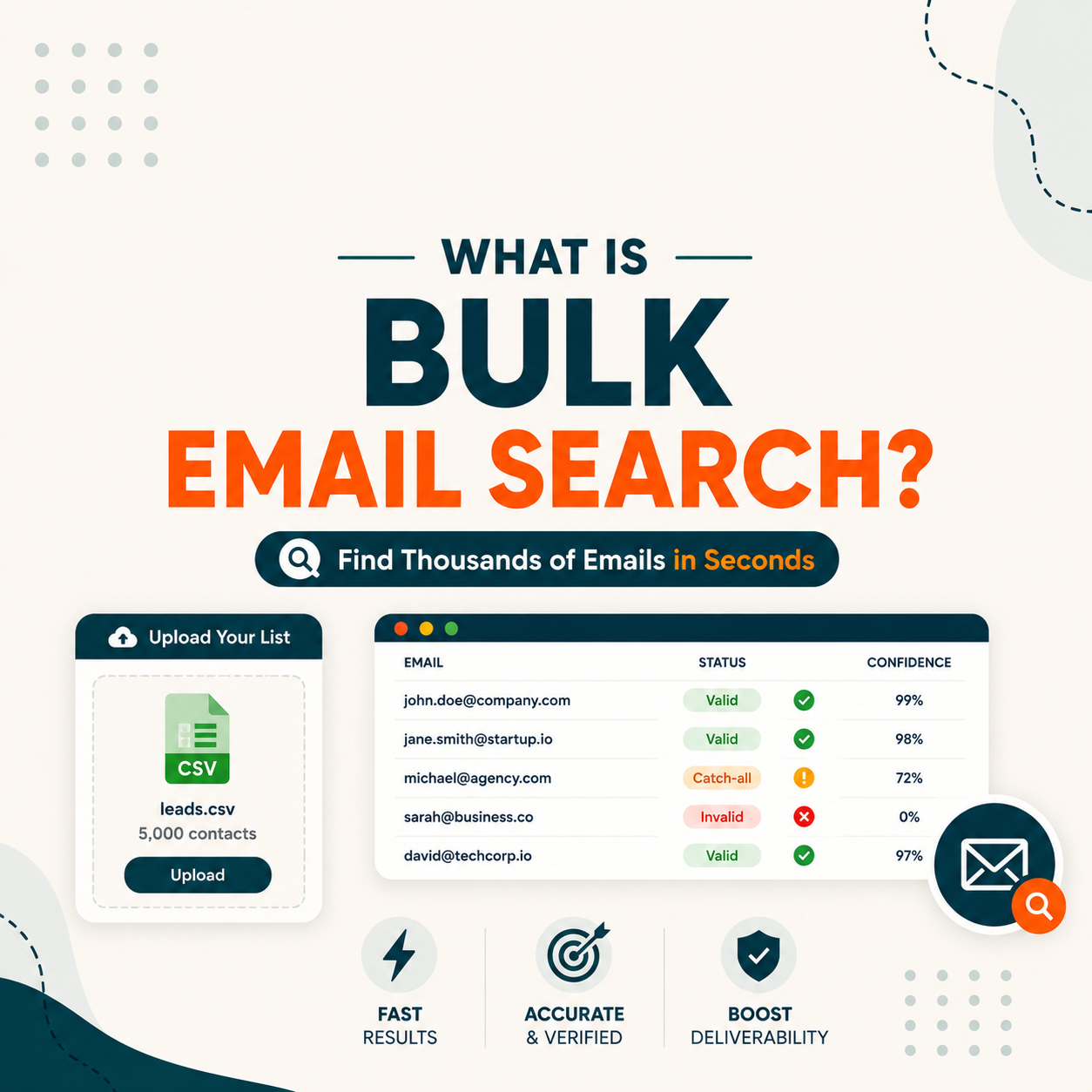
Bulk email search is the process of uploading a list of company domains or contact names to a tool that finds, verifies, and exports business emails at scale. Sales Ops teams use it to enrich 1000 to 50000 contacts per batch. Hunter.io Bulk Task processes 10000 emails in under an hour on the Starter plan, with verification built into the same workflow.
Table of Contents
What Is Bulk Email Search and How Does It Scale Beyond Single Lookups?
Bulk email search is a batch workflow that takes a CSV input of company domains or contact names and returns verified business email addresses for each row. Sales Ops teams upload 100 to 50000 rows at a time. The tool processes async (minutes to hours), runs verification on each result, and exports a clean CSV with confidence scores. Hunter Bulk Task on Starter plan processes 10000 rows in under one hour. For a foundational overview of how email finders work at the basic level, the single-lookup model is where bulk tools build their data layer.
“Web scraping is data scraping used for extracting data from websites.”
Wikipedia, Web scraping. Bulk email finders apply this structured extraction pattern specifically to business contact data at scale.
Bulk search is what turns a target account list into an actionable contact database. The bottleneck is not the find step, it is the verification step that protects your sender domain after the batch is delivered.
How Does Bulk Email Search Process a CSV to Verified Emails Asynchronously?
Four stages run async when you upload a CSV. First, the tool parses your CSV columns (domain, first name, last name, company) and validates row count against your plan quota. Second, it queues each row as a separate job and processes in parallel. Third, each result runs through SMTP verification. Fourth, results aggregate into a downloadable CSV with email, confidence score, and verification status. Full 10000 row job finishes in 30 to 90 minutes.
- Stage 1, CSV parsing: tool reads your file headers, maps columns to required fields (domain or first/last/company), validates row count against your monthly quota, rejects malformed rows before queueing.
- Stage 2, async queue: each row becomes a separate job in the vendor backend queue. Parallel workers pull jobs and execute find requests. Failed rows retry with backoff. Queue progress visible in dashboard.
- Stage 3, SMTP verification: each found email goes through syntax, DNS, MX, SMTP handshake. Results tagged valid, risky (catch-all), or invalid. Verification adds 1-3 seconds per row but happens in parallel with find.
- Stage 4, result aggregation: completed rows merge into final CSV with original input columns plus email plus confidence score (0-100) plus status. Download link emailed when 100 percent of rows are processed.
Bulk is async by design because synchronous SMTP verification would take days. The async pattern lets you upload, walk away, and come back to a clean list. The tradeoff is you cannot see real-time progress on individual rows.
What Are the Top 5 Use Cases for Bulk Email Search in B2B Sales and Marketing?
Five workflows justify bulk email search over single-lookup tools. CRM enrichment refreshes 10000 stale contacts in one batch. ABM list build turns 500 target accounts into a verified contact database. Event lead processing converts a conference attendee CSV into outreach-ready leads in 30 minutes. Market research enriches 5000 ICP company contacts with decision-maker emails. Reactivation campaigns re-verify a 50000 subscriber list before send. For teams scaling outbound, see the Hunter pricing plan breakdown for bulk volume to match plan tier to batch size.
Five use cases below show where bulk email search becomes the only viable workflow for B2B sales and marketing teams.
- CRM enrichment refresh: upload 10000 stale CRM contacts, get verified current emails back, re-import to Salesforce or HubSpot in one batch.
- ABM target list build: turn 500 target accounts plus 3 to 5 personas each into a 2000-row verified contact database ready for outbound.
- Event lead processing: convert a 1000-row conference attendee CSV with LinkedIn URLs into outreach-ready verified emails within 30 minutes of event end.
- Market research enrichment: add decision-maker emails to 5000 ICP company records pulled from Crunchbase, ZoomInfo, or G2 firmographic data.
- Reactivation campaign prep: re-verify a 50000 subscriber list before a winback send to protect domain reputation and avoid Spamhaus blacklist.
“Upload a list of domains or names and get back verified email addresses in one batch task.”
Hunter.io Bulk Task documentation. Hunter Bulk Task processes each row with find plus SMTP verification in the same async job.
Bulk search is the difference between an SDR running 50 prospects per day and Sales Ops onboarding 5000 contacts per week. Same vendor, very different workflow.
Bulk speed is only half the decision.
Compare the best email finder tools on real accuracy, free tier, and pricing before you commit to one for your Sales Ops batch workflow.
Compare the best email finder tools →What Are the 5 Limitations of Bulk Email Search Every Sales Ops Should Know?
Five limitations cap what bulk search can deliver. Plan quota limits restrict batch size to your monthly credit cap. Catch-all domains return ambiguous status that requires manual sampling. Stale source data inflates failure rate on contacts older than 18 months. Async timing makes real-time CRM enrichment impossible. Cost per row scales linearly, a 50000 row batch on Hunter Starter costs roughly 340 dollars in credits before annual discount. Teams needing higher-volume options should review Hunter alternatives for high-volume bulk processing.
Five limitations below shape how Sales Ops teams plan bulk batches and budget allocation each quarter.
- Plan quota ceiling: bulk batch cannot exceed your monthly credit pool, on Hunter Starter 2,000 credits means 500 row maximum per batch unless you upgrade.
- Catch-all ambiguity: domains where the server accepts every address return risky status, requiring manual sampling of 50 rows to estimate real deliverability for the segment.
- Stale source data: input lists older than 18 months show 30 to 40 percent failure rate because contacts have changed jobs, inflating cost per usable email significantly.
- Async processing timing: bulk cannot power real-time CRM enrichment on form submit because results take 30 to 90 minutes, use the API streaming mode instead for that use case.
- Linear cost scaling: a 50000 row batch on Hunter Starter costs roughly 340 dollars in credits before annual discount, plan quarterly bulk volume against monthly cap.
“Bulk Task processes async with full verification built in, returning a clean CSV with confidence scores so Sales Ops can segment risky rows before send.”
Growth Hack Suite, Hunter.io Email Finder review
Bulk is powerful but not magic. Source data quality and plan quota set the ceiling, not the verification engine. Sales Ops teams plan for 10 to 15 percent of bulk results requiring manual review.
Top 5 Bulk Email Lookup Tools Compared: Hunter, Snov, Findymail, Clearout, Apollo
Five tools dominate bulk B2B email lookup. Hunter Bulk Task leads on simplicity plus verification at 10000 rows per hour. Apollo wins on volume with 275M database access. Snov.io fits budget teams with cheaper per-row cost. Findymail specializes in LinkedIn URL bulk input. Clearout offers the cheapest verification-only pricing. Each tool trades off accuracy, speed, and per-row cost differently. For a broader comparison, see the 9 best email finder tools comparison.
Five bulk email lookup tools below cover the main Sales Ops batch processing use cases, tested on 5000-row B2B samples.
Hunter wins for Sales Ops needing find plus verify in one workflow. Apollo wins on database breadth. Choose based on whether your bottleneck is contact discovery or contact verification.
How Do You Run Your First Bulk Email Search with Hunter.io in 4 Steps?
Four steps take you from raw domain list to clean verified email CSV in under an hour with Hunter Bulk Task. Prepare your input CSV with domain or first/last/company columns. Upload to Hunter Bulks dashboard and map columns. Wait for async processing (30 to 90 minutes for 1000 to 10000 rows). Download results CSV with email plus confidence plus status, then segment risky rows for manual review before send. For plan sizing, see the Hunter pricing plan breakdown for bulk volume.
Four steps below run your first Hunter Bulk Task from CSV upload to verified email export in under one hour. For how the feature itself works, see what Hunter.io Bulk Task is.
- Step 1, prepare input CSV: structure your file with required columns (domain) or (first name, last name, company), keep under 50000 rows per batch, save as UTF-8 to avoid encoding errors.
- Step 2, upload to Bulks dashboard: go to Hunter Bulks tab, click New Bulk Task, drag CSV into upload zone, map your columns to Hunter required fields, confirm credit cost preview.
- Step 3, wait for async processing: 1000 rows finish in 5 to 15 minutes, 10000 rows in 30 to 90 minutes, dashboard shows live progress percentage and any rate limit retry events.
- Step 4, download and segment results: get email plus confidence (0-100) plus verification status, filter to valid plus risky over 70 score for safe send, hold catch-all rows for manual sampling.
Test Hunter Bulk Task free before any plan commitment
Try Hunter Bulk Task free →- 50 credits free per month
- No credit card required
- 10000 rows per hour on Starter plan
Four steps, one hour, 1000 rows ready for outreach. Hunter Bulk Task is the fastest path from CRM stale data to clean campaign-ready list, free tier covers 25 rows for testing the workflow.
Bulk Email Search: Frequently Asked Questions
Twelve questions below cover what Sales Ops and SDR teams search when evaluating bulk email tools: which is best, how to choose plan size, what counts as a credit, processing time expectations, and CRM integration. Three groups of four, INTENT, BENEFIT, and AI extraction.
Which bulk email lookup tool is best for B2B Sales Ops?
Hunter Bulk Task wins for Sales Ops needing find plus verify in one workflow at 91 percent real accuracy. Apollo wins on database breadth (275M contacts) but drops to 84 percent accuracy. Snov fits budget teams. Findymail specializes in LinkedIn URL bulk input. Choose based on whether your bottleneck is contact discovery or verification quality for your specific source data.
How long does a bulk email search take for 10000 rows?
30 to 90 minutes on Hunter Bulk Task Starter plan with verification included. Apollo bulk runs faster at 30 minutes without built-in verification. Snov and Findymail hit 45 to 60 minutes. Clearout verifies 10000 rows in 25 minutes but requires you bring the email list (no discovery). Times vary with vendor rate limits and target domain SMTP response speed.
Is bulk email search legal under GDPR?
Yes for B2B contacts under legitimate interest legal basis (GDPR Article 6.1.f). Business email addresses are typically considered business contact data, not personal data, when used for B2B outreach. Maintain opt-out compliance, document your legitimate interest assessment, and never email personal addresses. Always confirm your vendor offers a Data Processing Agreement before processing EU contact lists.
What is the difference between bulk email search and email finder API?
Bulk search runs async on a static CSV input, returns results in 30 to 90 minutes via download. API runs sync on each call, returns single-row results in 1 to 3 seconds, integrates programmatically with your CRM. Use bulk for one-time enrichment batches. Use API for real-time CRM form enrichment or programmatic pipeline integration.
How much does bulk email search cost per verified email?
Hunter Starter plan costs 49 dollars per month (34 dollars billed annually) for 2,000 credits, roughly 0.025 dollars per credit if you use the full quota. Apollo Basic costs 49 dollars per month for 600 credits, roughly 0.082 dollars per credit. Snov costs 0.033 dollars per credit on annual plans. Plan cost-per-email drops significantly on Growth and Scale tiers. See the Hunter free vs Starter upgrade guide for the right plan tier.
Will bulk email search work for my 50000 contact list?
Yes if you have credits to cover it. On Hunter Growth plan (159 dollars per month, 10,000 credits), one 50000 row batch fits across 10 monthly cycles or one bulk credit top-up. Snov Pro at 99 dollars per month handles 30000 credits monthly. Plan budget against batch frequency, not total volume.
Can I run bulk email search on a free plan?
Yes for testing the workflow. Hunter free tier covers 25 find requests per month, enough to upload a 25-row CSV and validate Bulk Task end-to-end. Apollo free 60 credits work the same. Snov free 50 finds work the same. Free tier is too small for production batches but proves the workflow before plan commitment.
Does bulk email search include verification?
Hunter Bulk Task includes find plus verify in one workflow at one combined credit per row. Snov bulk runs find and verify as separate quotas. Apollo bulk is enrichment-only by default with verification as an add-on. Findymail bundles verification. Clearout is verification-only (you bring the list). Always check whether your tool counts find plus verify as one credit or two.
What is bulk email search?
Bulk email search is a batch workflow that takes a CSV input of domains or contact names and returns verified business emails for each row asynchronously. Tools process 100 to 50000 rows in 5 minutes to 2 hours, run SMTP verification on each result, and export a clean CSV with email plus confidence plus status.
How fast can bulk email search process 1000 rows?
5 to 20 minutes depending on vendor. Hunter Bulk Task processes 1000 rows in 5 to 15 minutes including verification. Apollo bulk runs faster at 3 to 8 minutes without verification. Snov hits 10 to 20 minutes. Clearout verifies 1000 in 2 to 5 minutes but no discovery step.
Can bulk email search integrate with my CRM?
Yes for major tools. Hunter integrates with Salesforce, HubSpot, Pipedrive natively, plus 5000 plus apps through Zapier. Apollo offers tighter native CRM sync at the paid tier. Snov has CRM connectors at the Pro plan. You can also import the exported CSV manually to any CRM that accepts bulk upload.
What CSV format do bulk email search tools require?
Most tools accept a CSV with either a (domain) column or (first name, last name, company) columns, plus optional fields like LinkedIn URL or job title. Hunter accepts up to 50000 rows per batch with UTF-8 encoding. Apollo handles 100000 rows. Always strip duplicate rows before upload to avoid wasted credits.
Bulk email search compresses weeks of manual research into one async job. The free tier of Hunter is enough to validate the workflow on 25 rows before committing to a plan that fits your batch volume. For a full ranking of which email finder tools offer the strongest bulk processing capabilities alongside accuracy and pricing, see the 9 best email finder tools comparison.
Try Hunter.io free, see your first bulk task completed
Hunter.io Bulk Task is available from the free tier with 25 monthly find requests. Upload a domain list, get verified emails back in minutes, and decide if the workflow fits before paying.
Try Hunter Bulk Task free →7M+ professionals use Hunter. No card. Cancel anytime.